❌

Reading view

Apple Hosts Unusual Colorado Event to Showcase Latest Hardware

Apple has invited a group of social media influencers to Colorado this week for an unusual event involving group hiking, trail running, and other outdoor activities designed to showcase the company's recently launched iPhone 17 Pro Max, AirPods Pro 3, and Apple Watch Ultra 3.
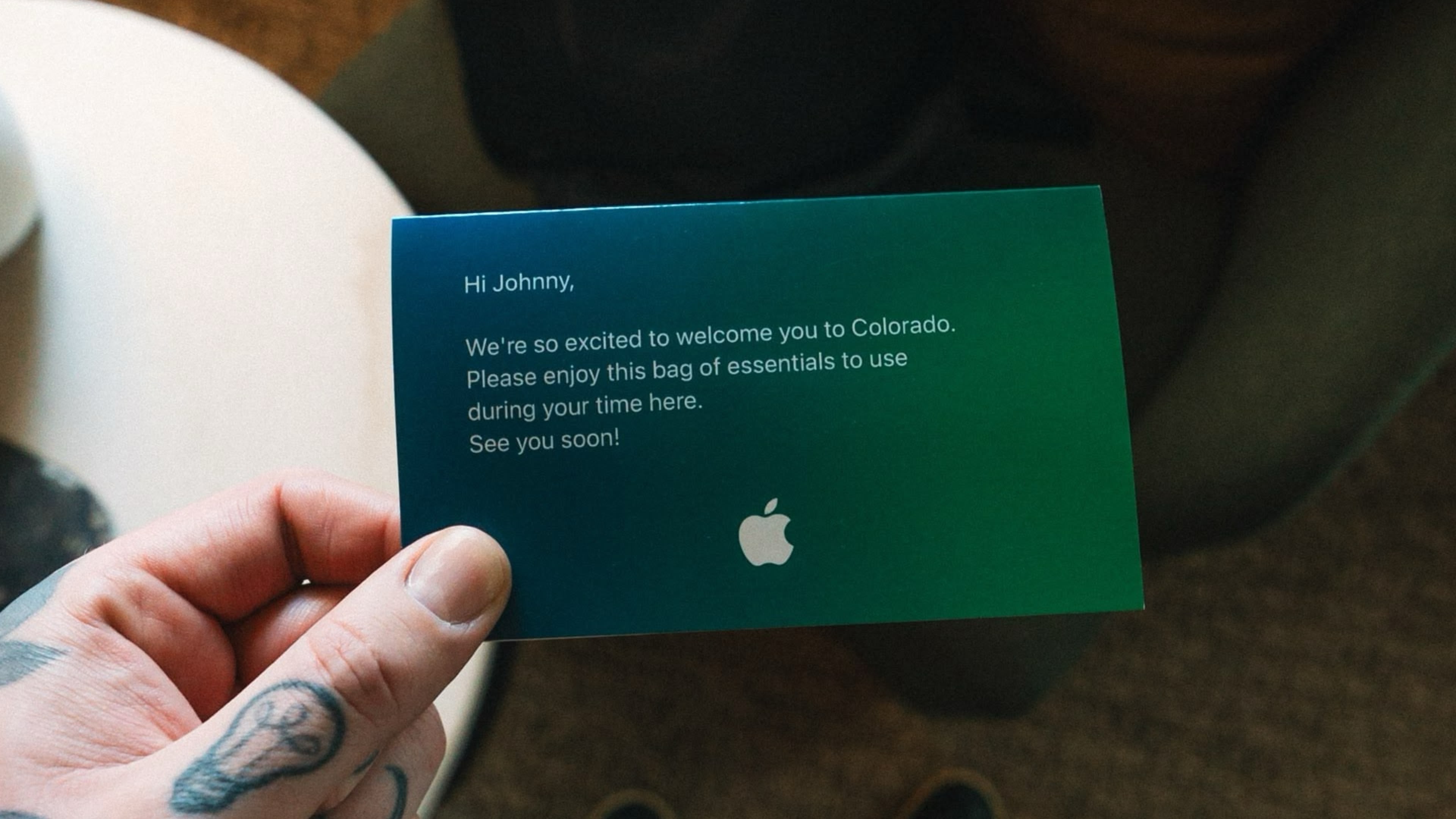

An invitation was shared on X (Twitter) by photographer Johnny Hawk, featuring a simple message: "Hi Johnny. We're so excited to welcome you to Colorado. Please enjoy this bag of essentials to use during your time here. See you soon!" The card is accompanied by a black backpack emblazoned with Apple's logo and a white flask.

When news of the mysterious Colorado gathering first surfaced, there was some speculation online that it might relate to Apple's anticipated October product refresh, which is expected to include new iPad Pro models with M5 chips and an updated Vision Pro, with potentially other updates also coming. Apparently, that's not the case at all.

The Rocky Mountain gathering appears to be just another aspect of Apple's marketing campaign for its been-and-gone iPhone 17 fall event. In follow-up posts on X and Instagram, Hawk revealed that he had been brought to Colorado's rugged terrain by Apple to test how the new iPhones, AirPods, and Apple Watch perform in demanding outdoor conditions.


Apple has occasionally held regional events for influencers to preview products in unique settings, but these have usually occurred in major metropolitan centers like New York City. So far we've not heard rumors of anything in that vein taking place this month.
This article, "Apple Hosts Unusual Colorado Event to Showcase Latest Hardware" first appeared on MacRumors.com

Discuss this article in our forums
  •  

Adding BlackBerry-Style Keys to Your iPhone Just Got More Affordable

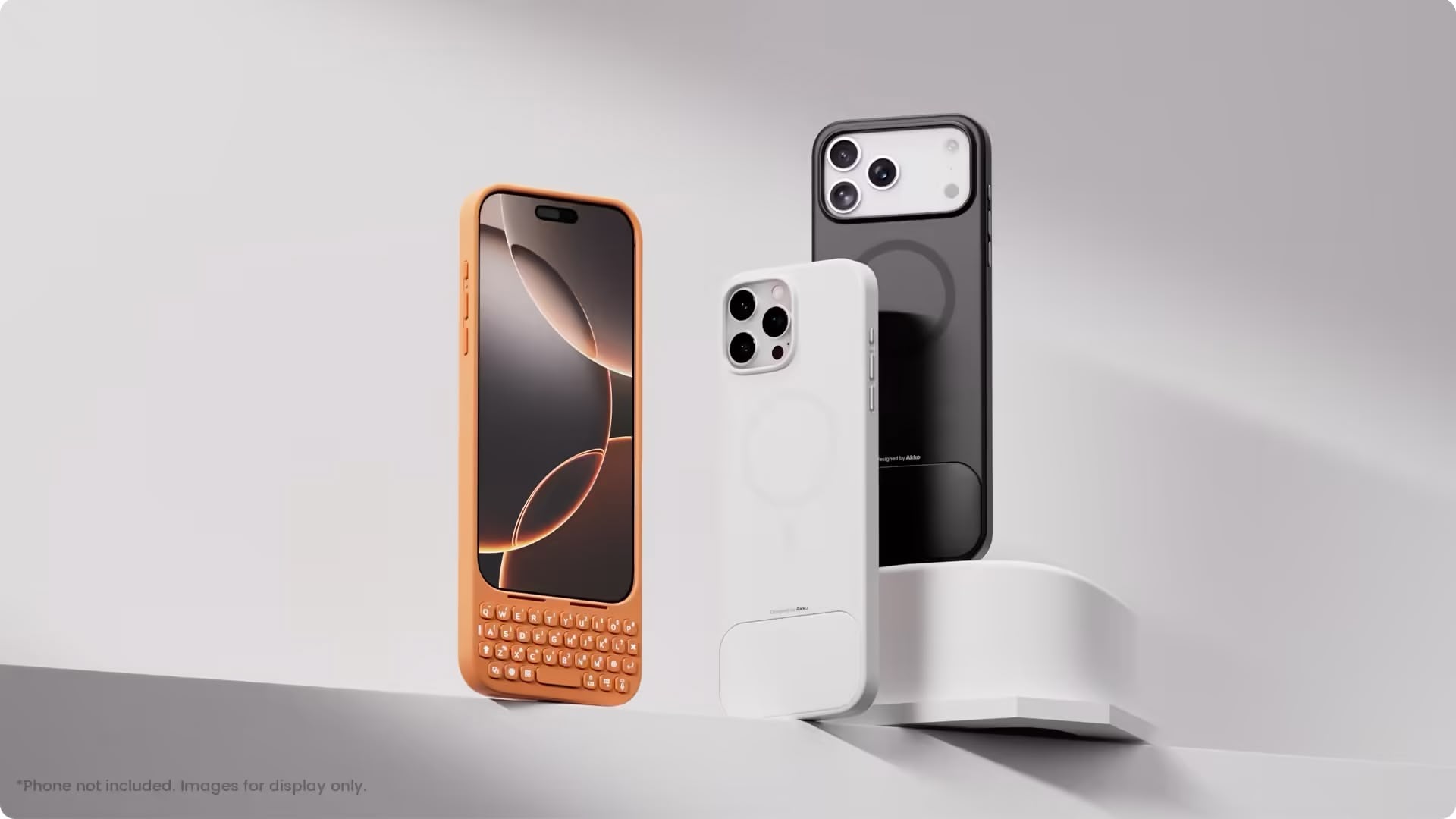
Keyboard manufacturer Akko has just launched an iPhone keyboard case called MetaKey, proving that BlackBerry nostalgia is alive, well, and willing to add inches to your smartphone's length.


Like Clicks' cases, the MetaKey case connects via USB-C and adds a QWERTY keyboard to the bottom of the iPhone. However, priced at $59.99, it's half the cost of the Clicks keyboard case, which launched in January 2024 at $139.

The case features backlit keys and includes shortcuts for common tasks like accessing Siri, triggering voice-to-text, and entering numbers. There's also a unique scrolling mode that converts the top two rows of keys into large scroll buttons for browsing social media.

One of the practical challenges of these sort of keyboard cases is that they can be top-heavy. To address this, the MetaKey includes a removable 9-gram weight that attaches to the back of the keyboard to improve balance while typing.

MagSafe-compatible and with a USB-C passthrough port for charging, the MetaKey is currently available for the iPhone 16 Pro Max in black, white, and pink. An iPhone 17 Pro Max version is also available in black, orange, pink, blue, lavender, sage, and white, though some of these are currently out of stock.

For what it's worth, Clicks recently launched similar cases for iPhone 17 and iPhone 17 Pro starting at $139, with a 17 Pro Max version at $159.

The physical keyboard case category is undoubtedly niche, but the MetaKey's lower price might appeal if you want to try out the concept without committing to Clicks' premium pricing.
This article, "Adding BlackBerry-Style Keys to Your iPhone Just Got More Affordable" first appeared on MacRumors.com

Discuss this article in our forums

  •  

AI Browser Dia Launches Publicly on Mac

The Browser Company's Dia app is now open to anyone on Mac. It's the first time the AI-powered browser has been widely available since its beta launch in June.


Following on from Opera's Neon, which arrived last month, Dia is another AI-first browsing experience that's centered around tab-based chat functionality. The browser includes Skills, which are a mix of user-created and built-in shortcuts for everyday tasks like planning, learning, writing, and coding. Current Skills include summarization, fact-checking, browsing history analysis, outlining, and productivity planning.

Users can mention tabs in any chat query, add attachments to conversations, and personalize Dia with Memory, which helps the browser understand preferences over time. Meanwhile, students get dedicated tools that turn notes, lectures, and readings into flashcards, quizzes, and custom study guides.

Dia requires macOS 14 or later running on Apple silicon. The Browser Company offers both free and Pro ($20/month) tiers. Free users get access to all core features including chat, custom Skills creation, tab mentions, attachments, and Memory personalization, while Pro subscribers receive unlimited chat usage within the terms of service, plus a 14-day trial period.


Acquired by Atlassian for $610 million last month, the Browser Company says it is resuming weekly updates, and plans to bring Arc browser features to Dia. October's releases include more powerful memory of user tabs, redesigned Dia Skills, and Arc's Focus Mode (CMD-S). Dia is available to download directly from the company's website.
This article, "AI Browser Dia Launches Publicly on Mac" first appeared on MacRumors.com

Discuss this article in our forums

  •  

iOS 26: Keep AirPods Connected When You Get in Your Car

If you wear AirPods during your commute but don't want your podcast or music suddenly blasting through the car speakers when you start the engine, there's a new setting in iOS 26 that can ensure it doesn't happen.


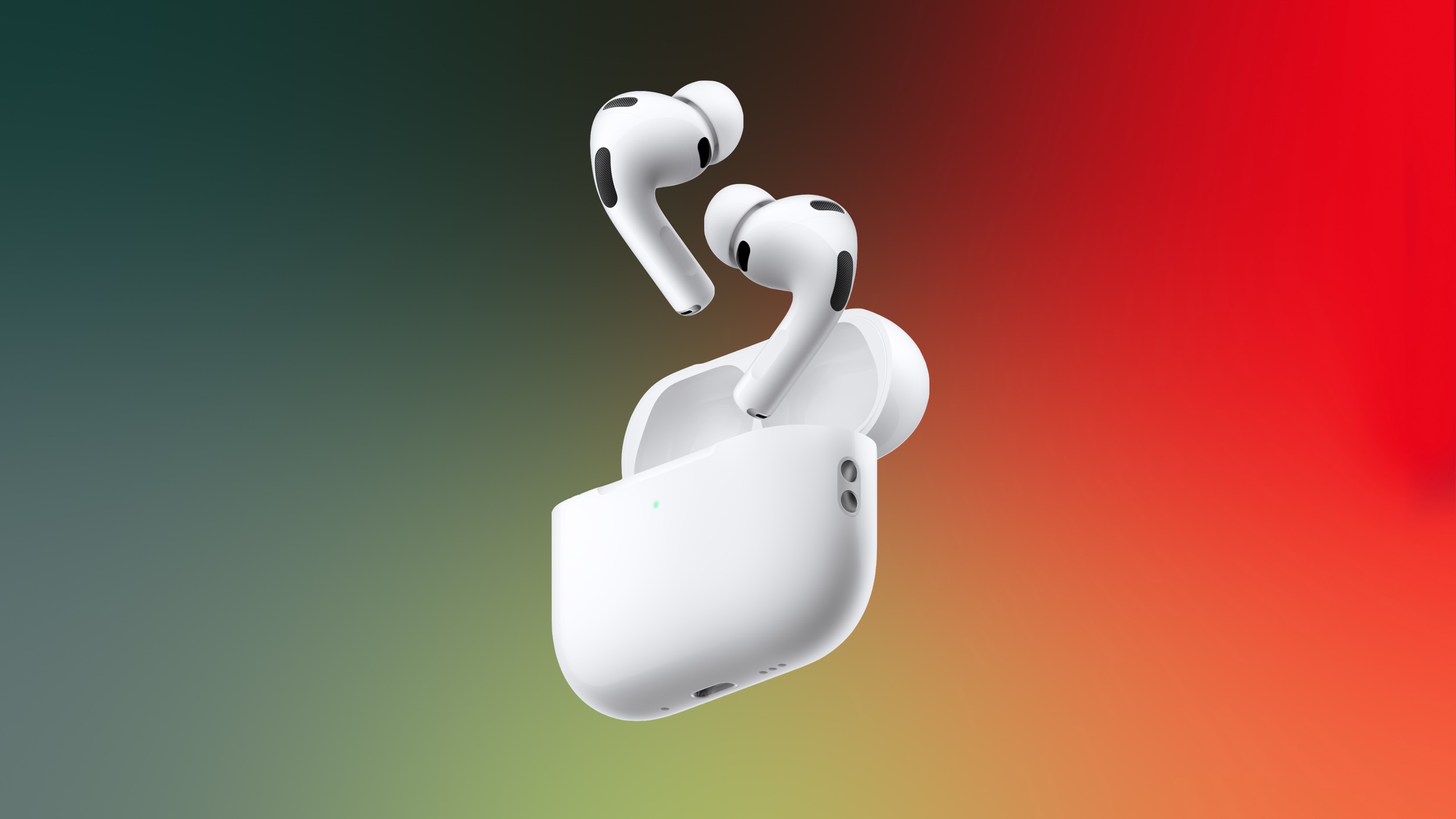
Apple has thoughtfully added a new "Keep Audio with Headphones" setting that prevents your iPhone from automatically switching audio to CarPlay or other Bluetooth speakers when you're already listening through AirPods. Here's how to toggle it on.

How to Keep Audio in Your AirPods


  1. Open the Settings app on your iPhone.

  2. Tap General.

  3. Select AirPlay & Continuity.

  4. Toggle on Keep Audio with Headphones.
settings

With the setting enabled, your music, podcasts, or calls will continue playing in your AirPods even after your iPhone connects to your car's Bluetooth system. Note that you can always manually switch to car speakers through Control Center or CarPlay if needed.

The feature also works with other wireless headphones, plus it's useful beyond in-car scenarios, since it stops audio from jumping to nearby Bluetooth speakers in your home, too.
This article, "iOS 26: Keep AirPods Connected When You Get in Your Car" first appeared on MacRumors.com

Discuss this article in our forums
  •  

Apple Modifies In-Store MagSafe Stands to Prevent iPhone 17 Marks

Apple has quietly added a protective silicone ring to its in-store MagSafe charging stands following reports of marks appearing on some iPhone 17 series display models, according to Consomac.


The apparent move comes after Apple last month confirmed that worn MagSafe chargers in retail stores were causing what appeared to be scratches on the iPhone 17 Pro and iPhone 17 Pro Max. There have also been reports of the marks appearing on iPhone Air models.

Apple said the marks were actually material transfer from the stand to the phone, and could be removed with cleaning. The company also noted that other models like the iPhone 16 were affected by the problem.

It's currently unclear whether the in-store display change is localized to France, where the Consomac report originates, or if it's just a snapshot of a more widespread rollout to Apple retail stores in other countries.


Separately, Apple has addressed concerns about scratching on the camera plateau area of the iPhone 17 Pro models, saying the edges have similar characteristics to aluminum cases on other Apple devices, like MacBooks, and may show normal wear and tear over time.

(Thanks, Sylvain!)
Related Roundup: iPhone 17 Pro
Related Forum: iPhone

This article, "Apple Modifies In-Store MagSafe Stands to Prevent iPhone 17 Marks" first appeared on MacRumors.com

Discuss this article in our forums
  •  

iOS 26: See Your Full Call History With Any iPhone Contact

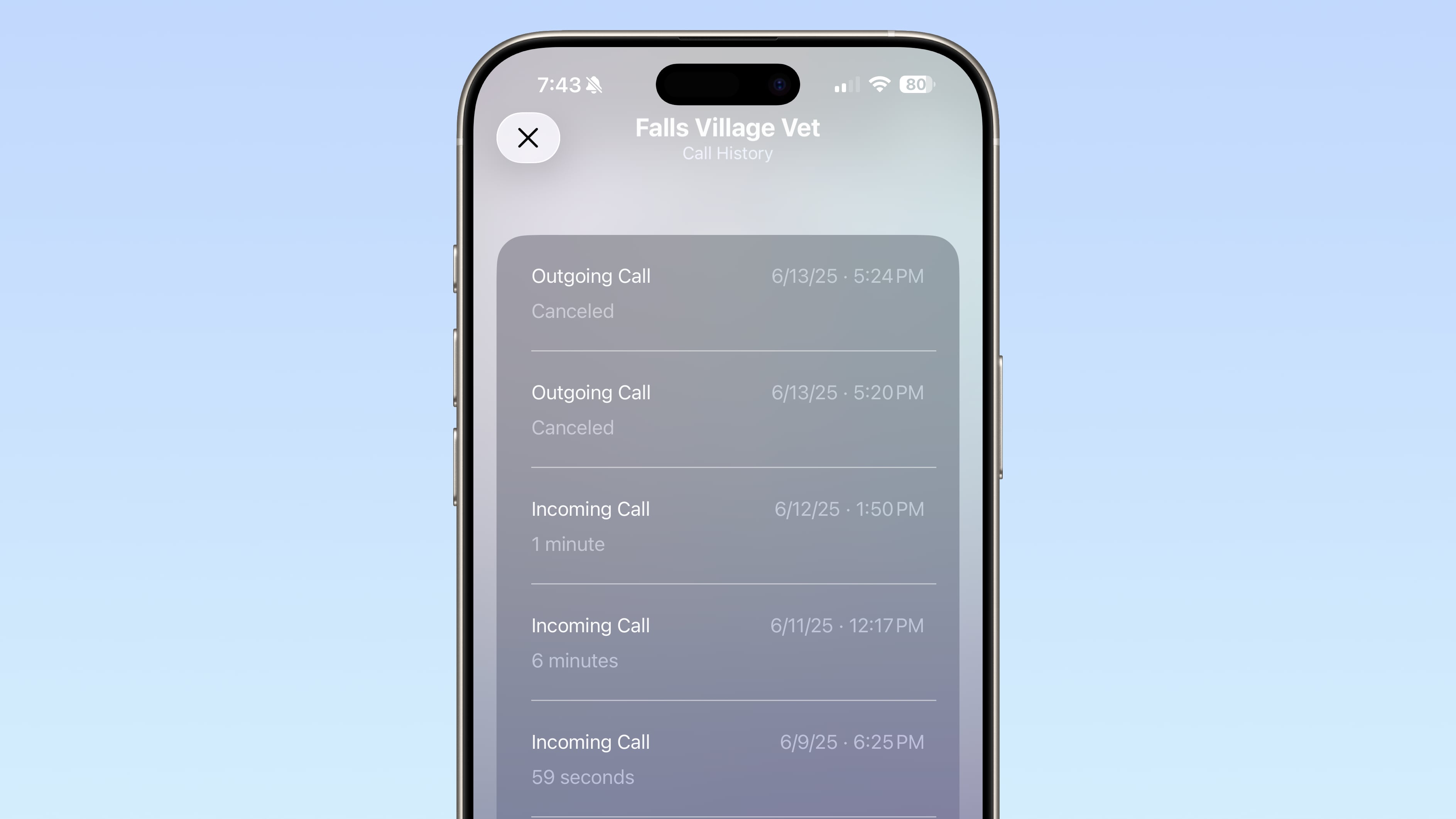
Buried within iOS 26 is a hidden history that lets you see every call you've ever exchanged with a specific contact, potentially going back years. You might not know it, but you can access this detailed call history on your iPhone in seconds.


Viewing the new extended history screen can come in handy when you need to recall when you last spoke with someone. It's also pretty useful when you want to verify a call duration for whatever reason. Here's how to get there.

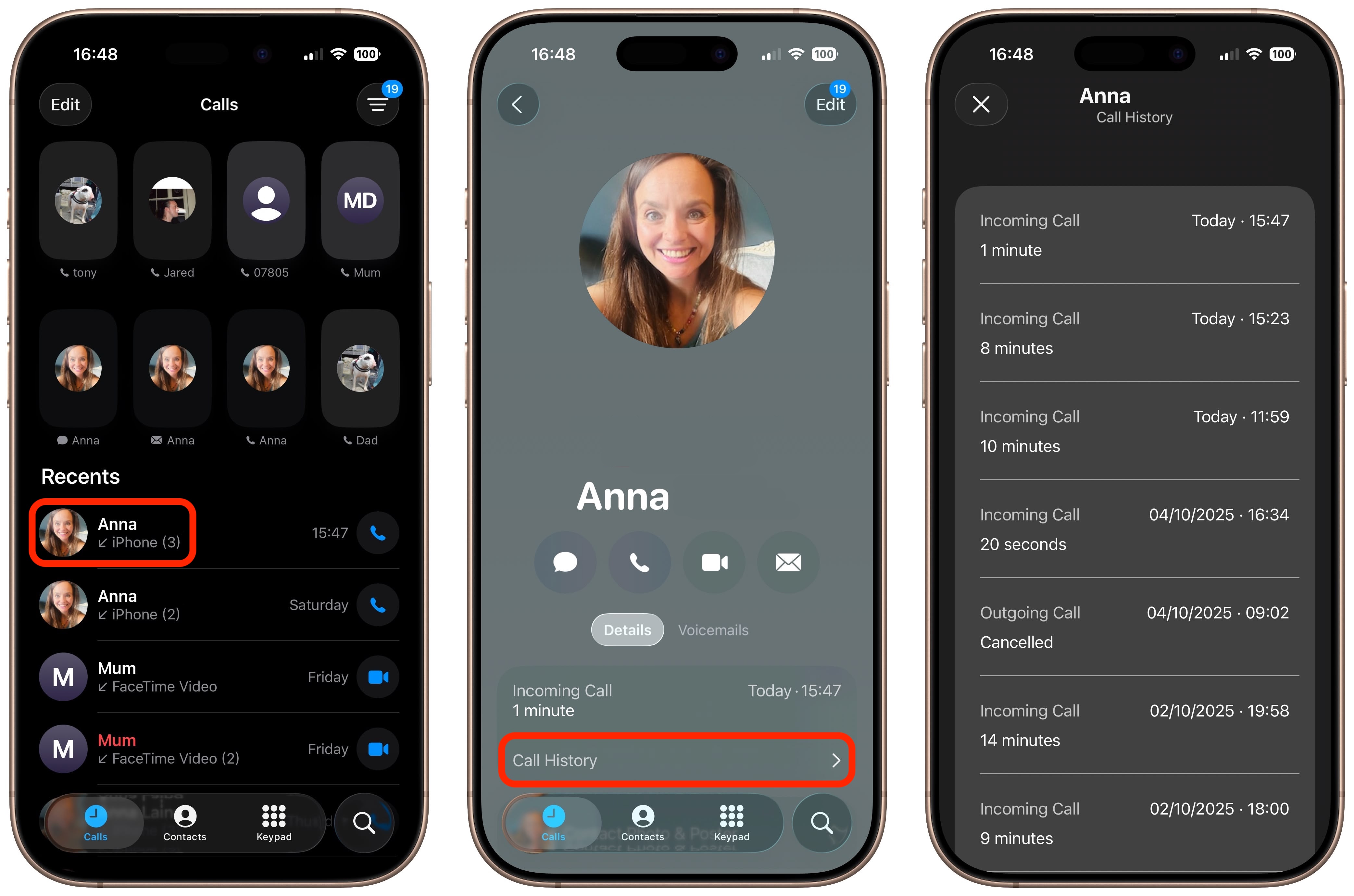
Access Extended Call History


  1. Open the Phone app on your iPhone.

  2. In the Unified view, find the contact in the "Recents" section whose call history you want to view.

  3. Tap the contact's name (if you're using the Classic interface, tap the circled "i" icon next to their name.

  4. Scroll down and tap Call History.


You'll now see a complete chronological record of every incoming, outgoing, and missed call with that contact, including the date, time, and duration of each conversation. This view can stretch back in time for months or years, depending on how long you've been in touch and how much call history data is stored on your phone.
This article, "iOS 26: See Your Full Call History With Any iPhone Contact" first appeared on MacRumors.com

Discuss this article in our forums

  •  
❌