Reading view

OpenProject: The open source alternative to Jira

Jira is a well-known agile project management tool. For many, Jira is a household name for issue tracking software. However, Jira is not open source. OpenProject is - and offers quite similar features. On top of that, OpenProject provides both a cloud or on-premises edition. Jira has chosen to focus on the cloud side of things and has terminated the self-hosted option. Let’s compare Jira and OpenProject.

Hosting

Jira shifted its focus to the cloud edition and has discontinued the on-premises offer. This move marks a shift in focus towards the cloud edition. Jira users who self-host their software had been requested to make plans to move to the cloud or data center, as support for self-hosted Jira is no longer available since spring 2024. Since then, many Jira customers already migrated to an alternative or are still looking for an easy way to do so.

OpenProject continues offering both the cloud and on-premises editions. OpenProject Enterprise on-premises edition enables companies to install OpenProject on their own servers and offers additional Enterprise add-ons and security features, as well as support. It provides the flexibility of self-hosting while ensuring a high level of security and extensibility with additional features.

Tip

In February 2025, an open source developer wrote a migration script for Jira to OpenProject – the OpenProject Jira importer. Read more about it on our blog article A Community-driven solution for your Jira exit: The OpenProject Jira importer, or navigate directly to the migration tool on GitHub.

Open source

OpenProject is an open source software and as such provides independence and complete autonomy. Its source code is publicly available on GitHub. It allows users to modify code and create new plug-ins for maximum flexibility. Being open source means that users can customize and tailor it to their needs, making it an attractive option for businesses looking for a flexible and adaptable project management solution. With OpenProject, users can take full control of their project management process and make it fit their unique workflows.

Jira is a proprietary software, which means that the software code cannot be reviewed, so the users are dependent on the vendor for reliability, code adjustments and upgrades. This also means that certain features require third-party plugins and can significantly increase maintenance costs.

Data security

Data security is an important aspect when choosing a project management tool. Both OpenProject and Jira treat the subject with the seriousness it requires.

Large companies often have strong data privacy and data security guidelines which might prohibit the use of web-based solutions, making use of Jira cloud solutions potentially problematic. Furthermore, the location of data storage must be considered. Jira uses AWS storage services. While storing customer data in the European AWS region is possible, it must be actively requested.

For OpenProject data security is a top priority, our processes meet all requirements of the EU General Data Protection Regulation. Whether you decide to use the cloud or a self-hosted edition, you can be sure that your data is safe. All our customer data for the cloud edition is hosted and kept in the EU. For the self-hosted edition, you have absolute control over your data.

Features

OpenProject and Jira both offer comprehensive and customizable project management tools that offer a range of features to support agile, classic, and hybrid project management. They both provide similar capabilities for issue tracking, backlog maintenance, reporting, user management and more. It should be noted that with Jira, some of the functionalities or more advanced versions of such functionalities come through integrating one or more plugins. This can mean additional maintenance efforts, not to mention additional costs.

Let’s take a look at how some of the features compare.

Issue & task tracking

Both Jira and OpenProject offer sophisticated issue tracking with custom fields and workflow customization.

Jira

In Jira users can create new issues either directly in the list view of the existing issues or in a popup window. The displayed fields can be configured, and the view can be customized to users’ needs. It is possible to specify workflows for different issue types.
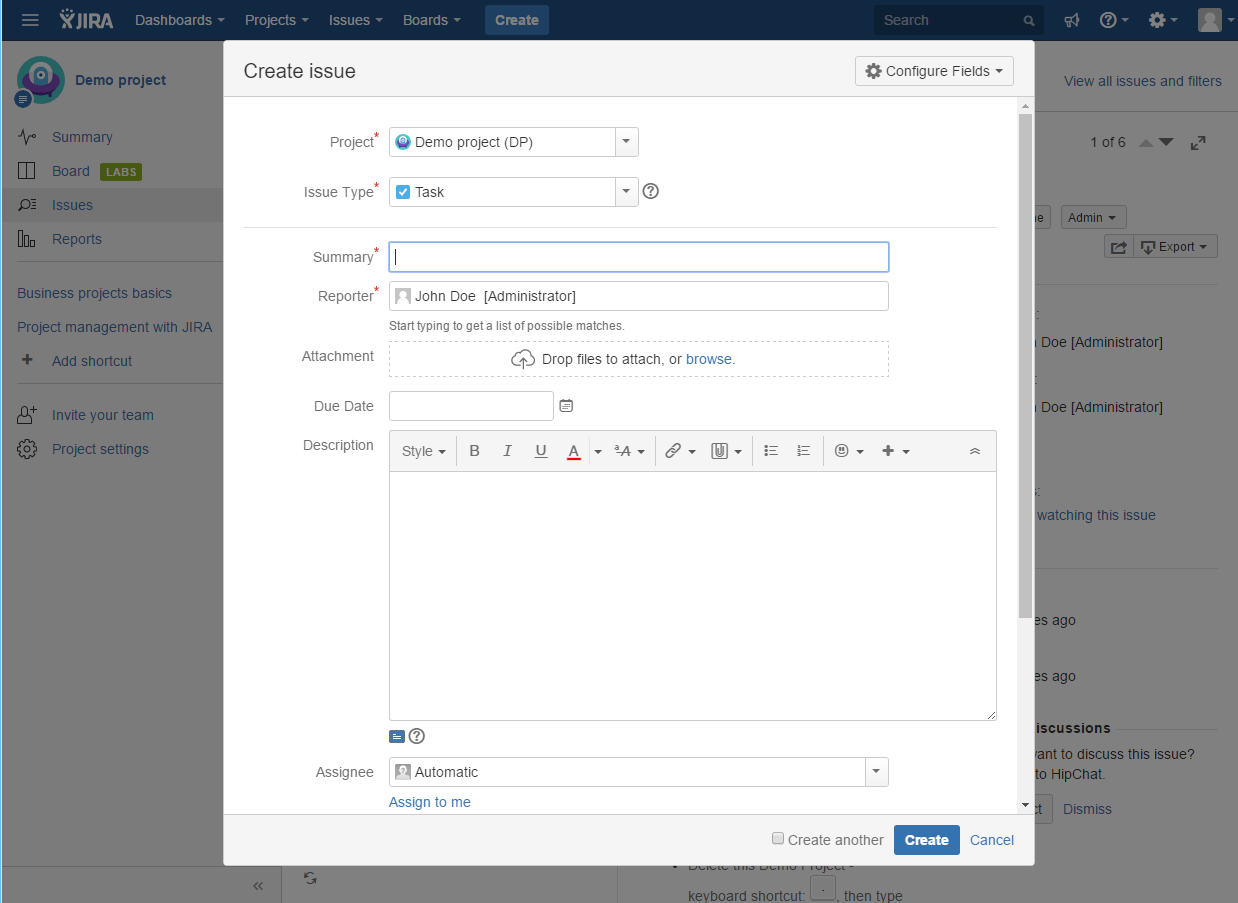
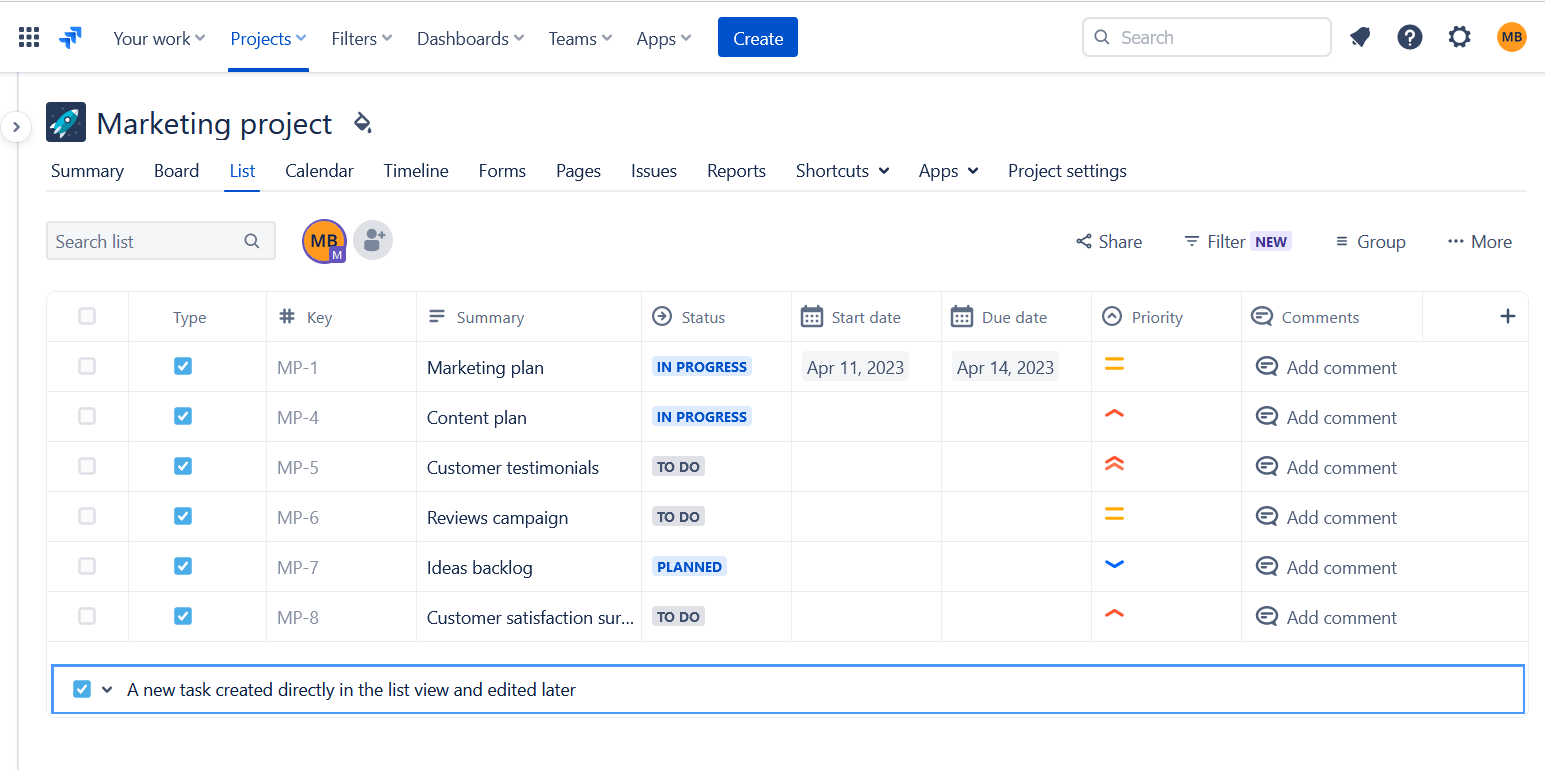
IssueTracking-Jira1Image: Issue tracking in Jira Jira issues list viewImage: A list view of issues in Jira.

OpenProject

In OpenProject you can create new issues from the work package table. Similar to Jira, the displayed attributes can be configured for each issue type. On top of this, you can display help texts to assist users in setting the correct attribute values. You can adjust the workflow for each issue type, as well as for the author and assignee of a work package.
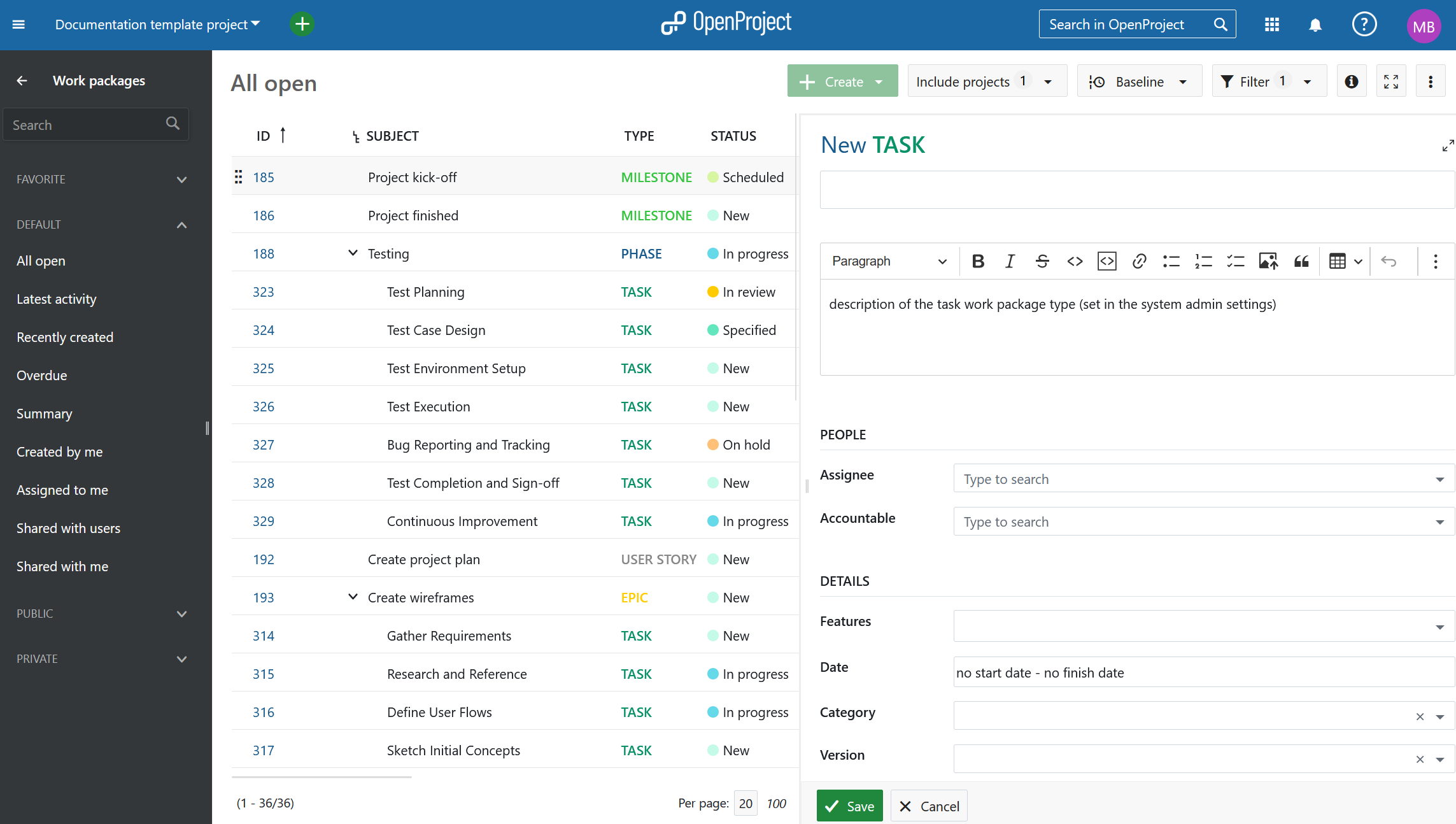
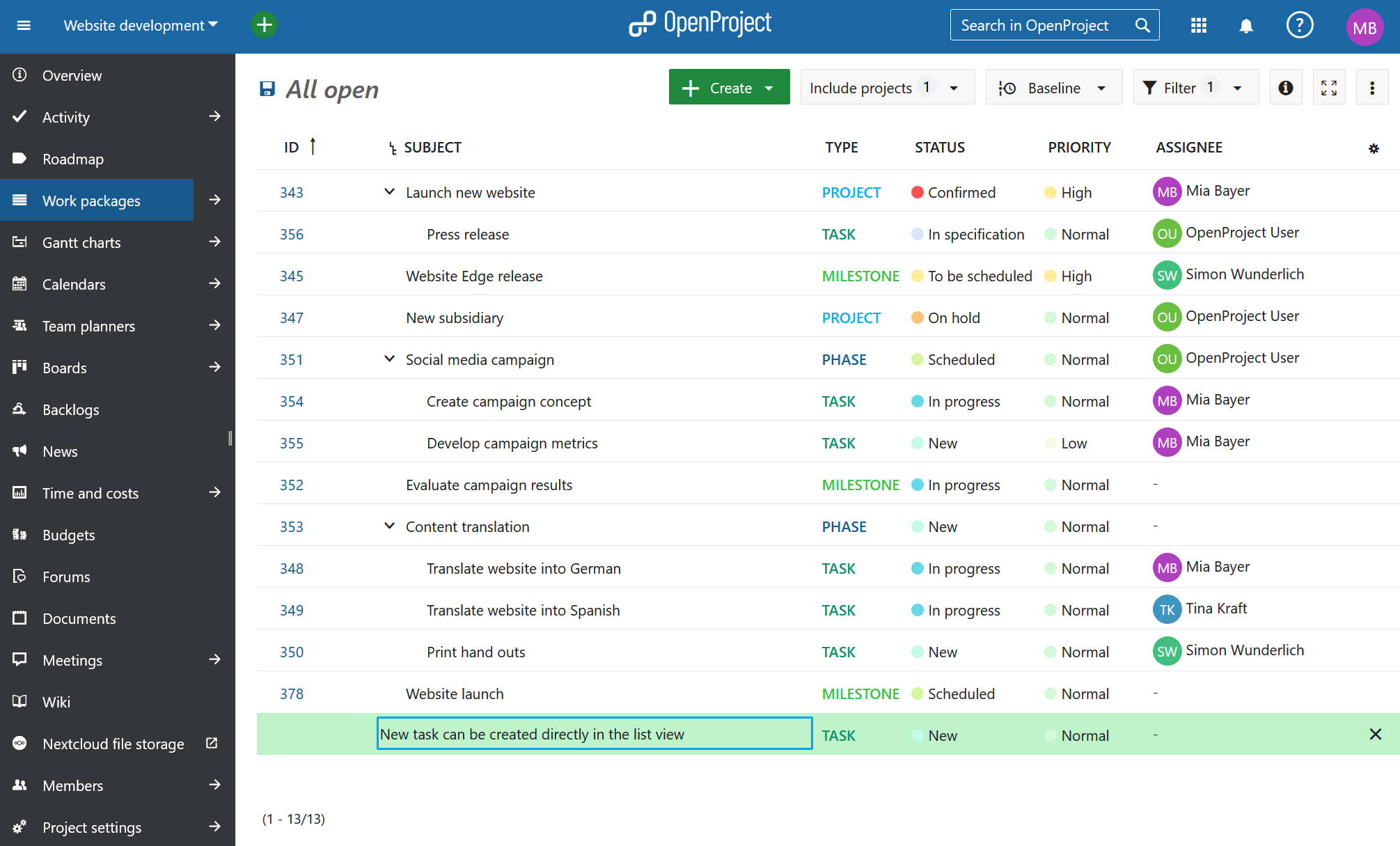
Work Package CreateImage: Create a work package in OpenProject. OpenProject issues list viewImage: A list view of work packages in OpenProject.

Project planning with Gantt charts

Managing a project plan is a critical component for successful project management.

Jira

The core version of Jira previously did not include a Gantt chart. This has now been compensated be the timeline function that displays the project time plan. Sophisticated Gantt chart options are available via installing additional plugins.
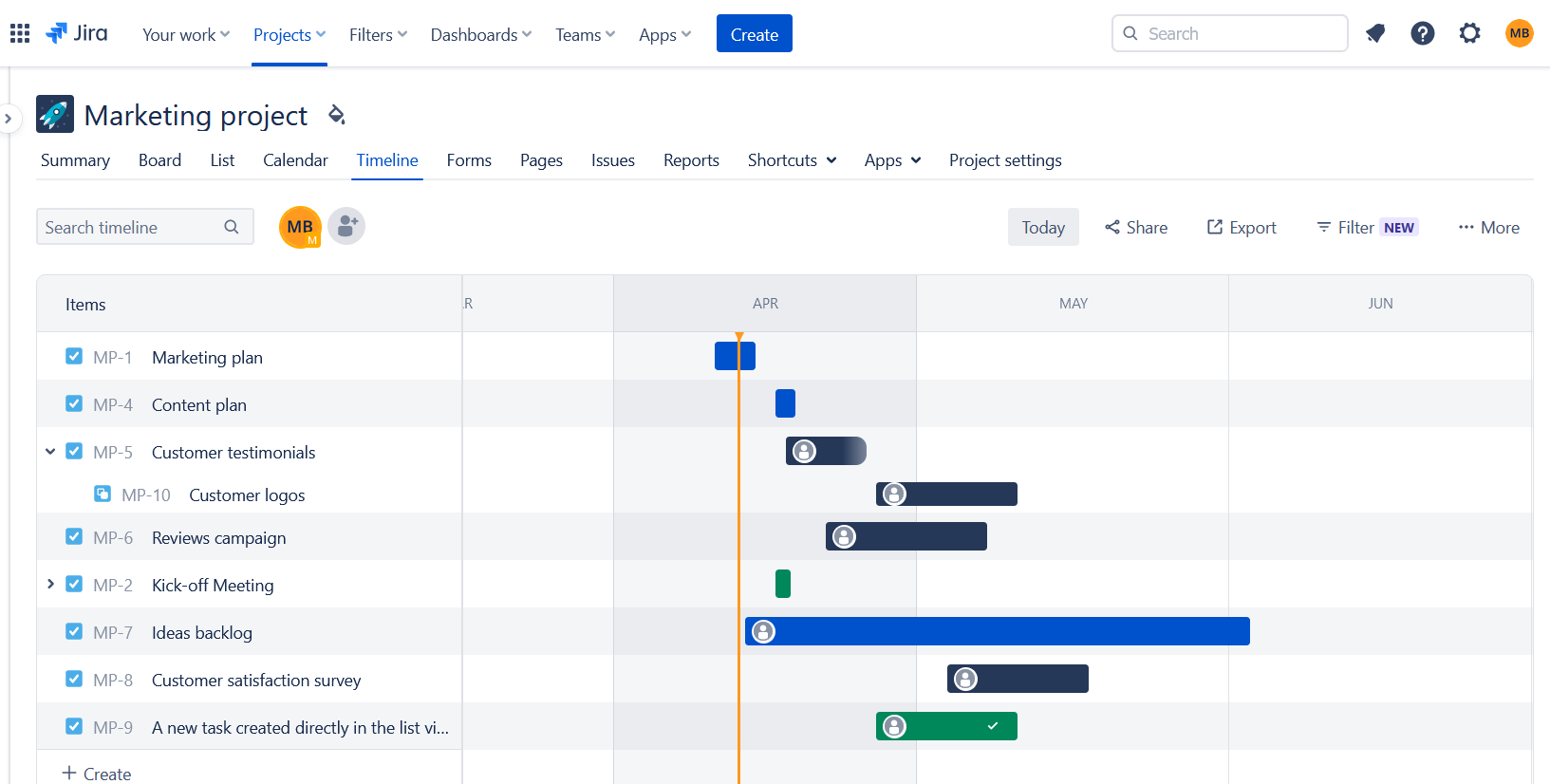
Jira timeplanImage: A time plan in Jira.

OpenProject

OpenProject enables creating and managing project plans using Gantt charts, both for single projects, as well as multi-hierarchy projects. The dynamic and interactive Gantt chart in OpenProject can be displayed on the work package table. This allows a seamless transition from the list view to the Gantt chart view. Start and due dates can be easily updated by either setting the dates in the list view or using drag & drop in the Gantt chart. Thereby, you can choose between top-down and bottom-up planning. You can also create and visualize dependencies in the Gantt chart. Project managers can create and visualize the progress, even for complex Gantt charts which span multiple projects. It is also possible to add a baseline comparison to also display planning changes.
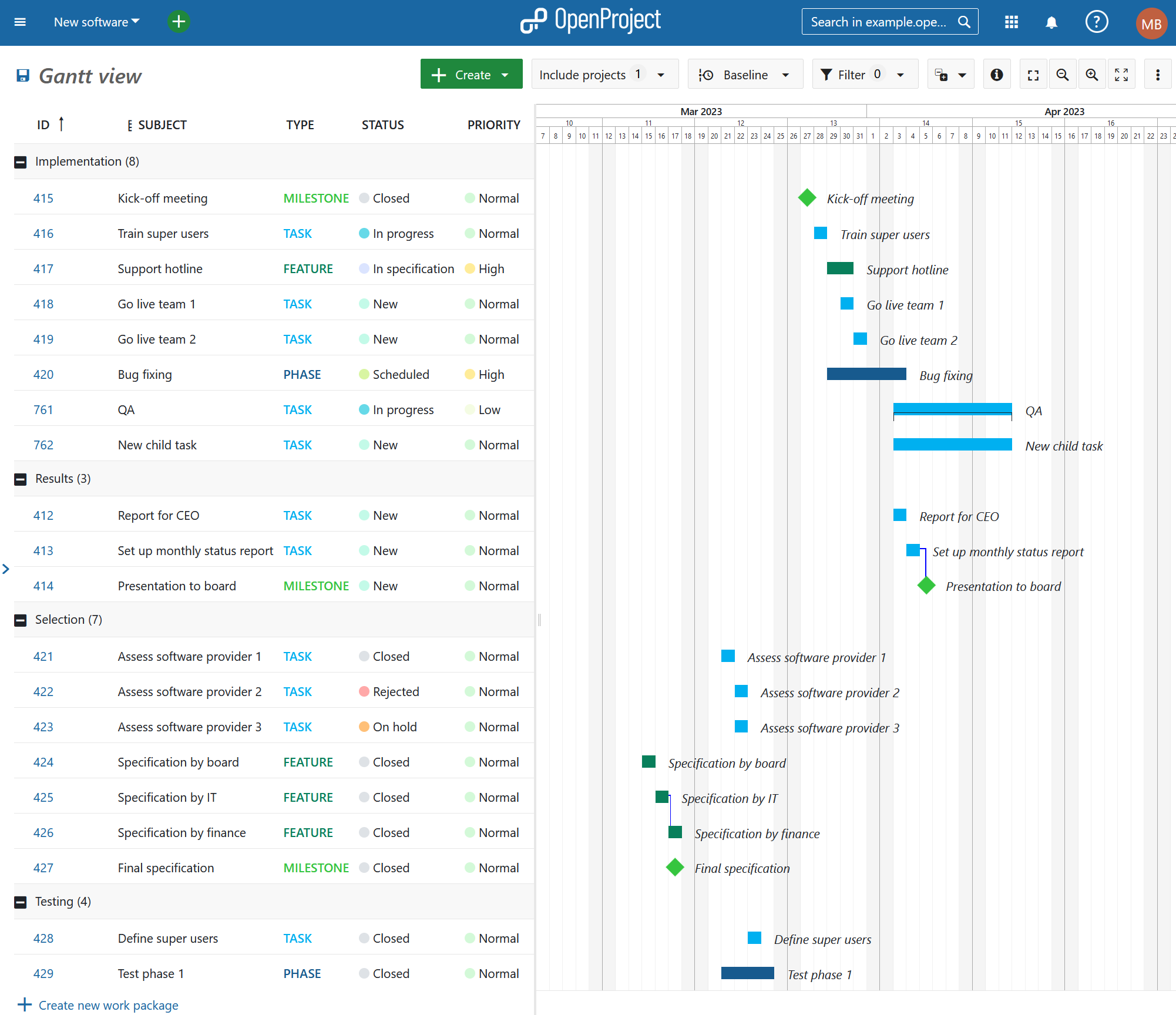
OpenProject Gantt chart designImage: A Gantt chart time plan in OpenProject.

Time and cost tracking

An essential feature for any larger project is the ability to track the time, as well as the costs spent on a project.

Jira

Jira supports time tracking, including the detailed specification of working times and hours. In the basic version, the time spent on an issue can be logged in the detailed view of a task but is not displayed in the list of all the tasks. More advanced time tracking options are available through various add-ins. Jira does not support cost tracking in the basic version. However, it is possible to download add-ins in the Atlassian marketplace for cost tracking.

OpenProject

You can enable time and cost tracking for each project separately within OpenProject. Additionally, OpenProject allows users to track costs - both personnel costs as well as unit costs. Furthermore, you can create budgets within projects to compare planned and realized costs. You can create and save detailed time and costs reports filtered and grouped based on your needs. A sophisticated permission model allows users to restrict the data that users can see. This includes for example whether a user can only see and edit own tracked time.
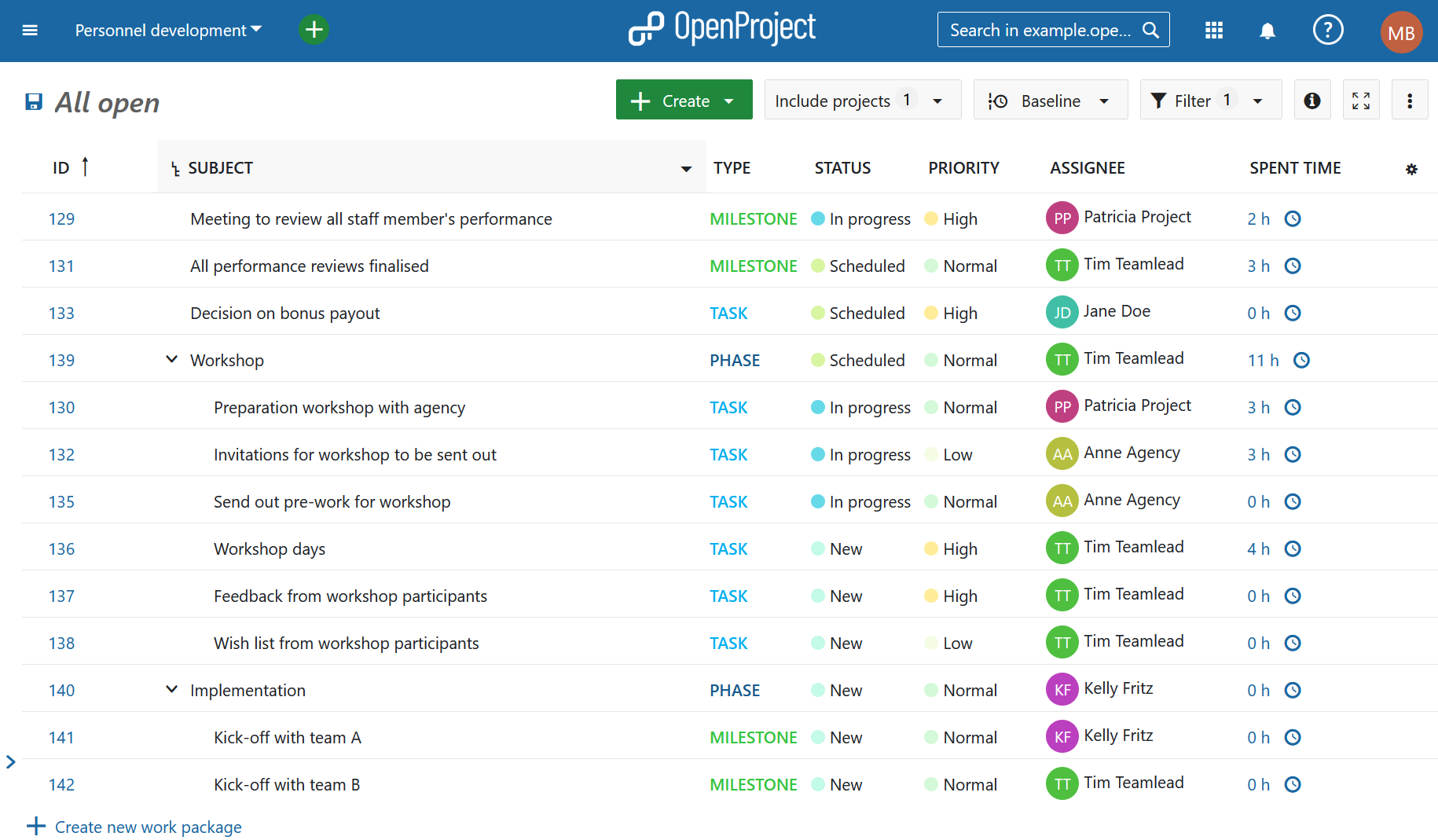
Log time list viewImage: A time tracking overview in OpenProject.

Conclusion: OpenProject vs Jira

In conclusion: Jira is a very powerful application with more than 2,000 add-ons and a large following. It is highly customizable. However, this flexibility comes at a price: Many add-ons come with a significant price tag which adds up. Also, going forward, Jira is putting its cloud version first, deprioritizing server products.

OpenProject is open source, it offers very similar features all from the same source without additional expense. The decision between the cloud or on-premises editions is entirely up to you. OpenProject is the best open source Jira alternative.

Do you need a demo or want to switch?

If you want to take a glance at OpenProject or test all features thoroughly you can create a free OpenProject trial.

Take a look at other customers who have decided to switch to OpenProject from Jira and read about their experience.

If you consider moving from Jira to OpenProject, there is a way to import tickets from Jira to OpenProject. First, you can export your tasks from Jira into an Excel file and then import these tasks via an Excel plugin into OpenProject. Additionally, there is the user-built OpenProject Jira importer, as mentioned in the beginning of the article. If you would like to discuss your specific case, you can always get in touch with us.

  •  

Agile administration made easy: Digitalize internal tasks with OpenProject

Agile methods make administrations more effective - but without the right software, good ideas often remain good ideas. Modern task management makes it possible to control processes efficiently and react flexibly to changes. OpenProject offers exactly this possibility: a customizable open source solution that ensures full control over data with a high level of functionality. Cost-effectively.

In this article, you can learn…


Making digital administration work: Cutting complexity, boosting efficiency

Endless Excel lists, lost emails, and overflowing inboxes—does that sound familiar? Many administrative teams struggle with outdated tools and rigid workflows that slow down rather than support their daily work. Digitalization is supposed to help, but too often it brings complicated, expensive, and impractical solutions.

We understand—many people don’t want to hear about digitization anymore. Too many initiatives have promised improvement but ended up adding more complexity instead. The real question is: How can digital tools actually simplify work in administration — without creating new obstacles?

OpenProject offers a pragmatic approach here. The open source project and task management software helps to clearly structure tasks and make processes more efficient. Without burdening employees with unnecessary complexity. Freedom of design for administrators, simple and perfectly tailored application for employees.

Introducing agile processes with efficient task management

Digital task management is a key building block on the path to greater agility in administration. Every day, numerous tasks, approvals and processes are created in public administrations that need to be coordinated. Without a clear structure, this leads to lags, extra work and a lack of transparency. Professional task management ensures that:

  • responsibilities are clearly defined,
  • all tasks can be tracked at all times,
  • work processes run efficiently and transparently.

Agile working does not mean chaos, but flexibility with a basic structure at the same time. Administrative staff can react more quickly to changes and adapt their work to current requirements. Instead of constantly adapting rigid processes, agile structures can create more efficient workflows that grow dynamically. This enables a sustainable, future-proof way of working in administration.

What features does task management software need in administration?

For task management in administration to function simply and efficiently, the software must have the following features:

  • Easy to use: Only administrators have to deal with technical details - for everyone else, operation is uncomplicated and intuitive.
  • Flexible methods: Personalized composition of agile and classic methods - in a modular system, suitable for the working methods of the respective administration.
  • Tasks in work packages: All information collected in one place, with clear responsibilities and traceable progress.
  • Data protection and compliance: Security and GDPR compliance must of course be guaranteed.
  • No vendor lock-in: Public administrations must retain full control over their data at all times.

Five stars for OpenProject - perfect for task management in administration

The demands on modern administrations are increasing at every turn: More tasks, more regulations - and more digitalization. OpenProject is a solution that was developed precisely for these challenges. No more Excel spreadsheets like “xxx_new-2”, just centralized task management supported by agile processes.

Let’s put OpenProject to the test and take a closer look at the five requirements mentioned above:

Feature Description
⭐ Easy to use for all employees - Administrators can set up the instance with the help of extensive configuration options, so that it is easy to use for users.
⭐ Structured workflows with clear responsibilities - Tasks are assigned transparently, so everyone knows who is responsible for what.
- Status updates and automatic notifications ensure that the entire workflow remains traceable.
⭐ Flexibility with agile and traditional methods - Whether Kanban, Scrum, or Gantt charts – OpenProject supports various ways of working.
- Government teams can use hybrid methods and gradually introduce agile processes.
⭐ Data protection and digital sovereignty - OpenProject is open source, giving public administrations full control over their data.
- GDPR compliance and secure hosting options ensure maximum security.
⭐ Future-proof and sustainable solution - No dependency on proprietary vendors, as OpenProject is open, extensible, and customizable.
- Regular updates and an active community drive continuous development.

Tip

openDesk - your secure office and collaboration suite: Do you already know openDesk? The office and collaboration suite bundles proven open source tools explicitly for digital administrative work - including OpenProject for efficient task management and agile processes. Learn more about openDesk.

Features for agile administration with OpenProject - an overview

Successful digital administrative work requires more than just task management. OpenProject offers a wide range of features that are specially tailored to the needs of public administrations, such as:

  • Agile Boards - Manage tasks and processes visually, prioritize them flexibly and maintain an overview.
  • Meetings - Plan meetings in a structured way, link them to work packages and thus easily integrate agile methods such as dailies.
  • Date alerts and notifications - Never miss important dates again and be informed in good time.
  • Individual actions and workflows - Define automated processes for recurring tasks and make workflows more efficient.
  • Time and cost tracking - Track working hours and budgets accurately to manage projects and resources optimally.

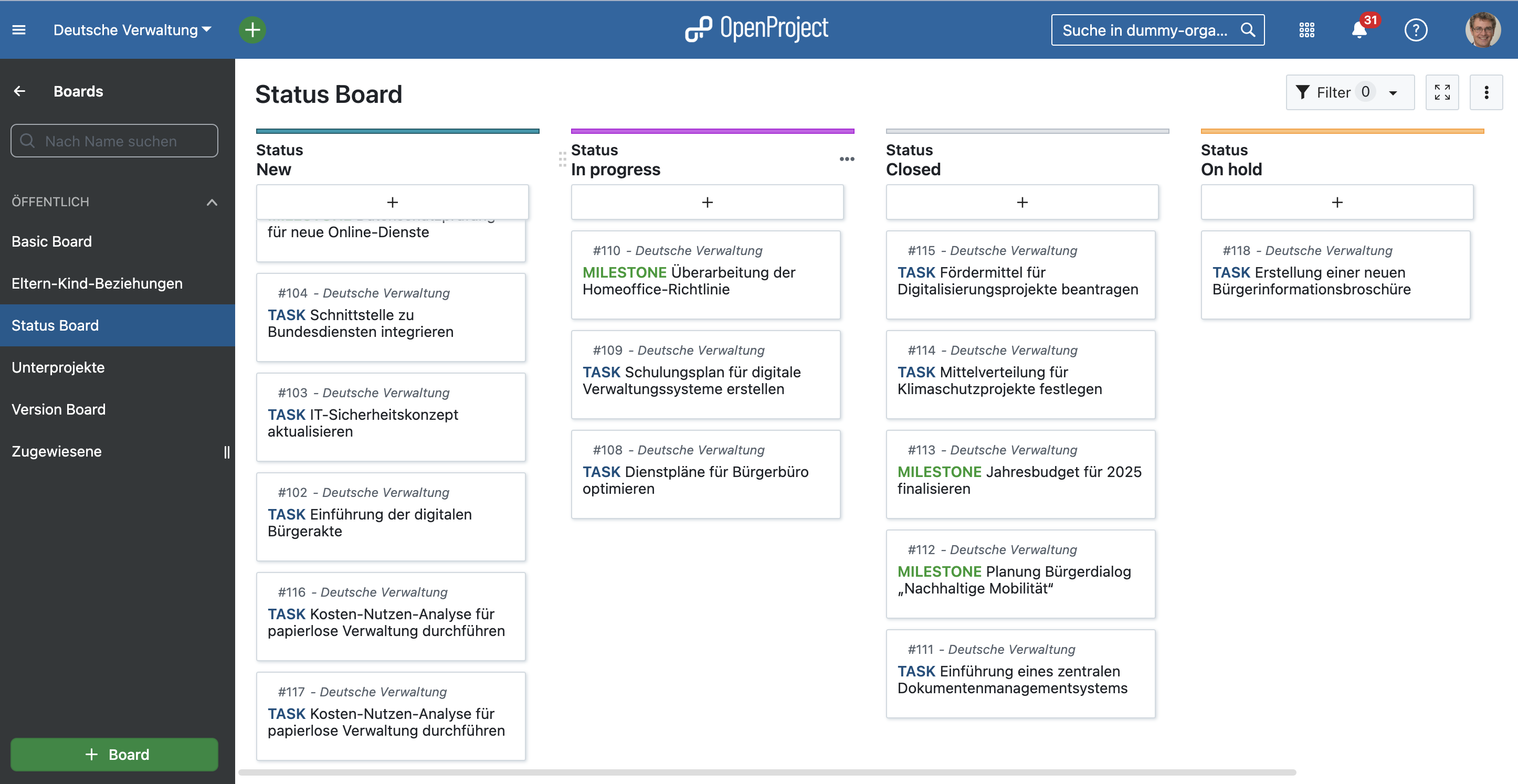
Here’s an example status board created in OpenProject:

OpenProject screenshot showing a status board with work packages from a public administration

Tip

Did you know? OpenProject is your best choice, if you do not exclusively use either agile or classic project management features. It offers a high range of customization and flexible administration. Read about your best mix with hybrid project management here.

European public administrations successfully work with OpenProject

OpenProject has been a popular choice for project and task management in the public sector long before the launch of openDesk. We’ve already outlined several reasons for this. Now, take a look at concrete real-world examples. We’ve spoken with customers and created case studies to provide transparency on the typical challenges faced by public administrations and how exactly OpenProject – and its key features – offers a solution.

How do public institutions in Germany use OpenProject?

You can find the following and more case studies on this page about project management for the public sector.

FITKO (Federal IT Cooperation)

“With OpenProject as part of openDesk, we have a centralized, flexible platform that greatly facilitates our work as the office of the Federal IT Standardization Board – from meeting planning, execution, and documentation to the centralized management of federal IT standards. The software supports us in collaboration and the coordination of our initiatives.”
Tobias Schuh, IT Standards Coordinator at FITKO (Federal IT Cooperation)

FITKO faces the significant challenge of coordinating and streamlining numerous tasks and stakeholders. With the introduction of openDesk, FITKO members now have access to a centralized and secure office and collaboration suite that enables just that. Read more in FITKO’s case study with OpenProject.

FITKO Logo and laptop

City of Ravensburg

“OpenProject enables us to plan long-term and reliably without overburdening our staff. As a municipality, OpenProject has finally given us the opportunity to properly manage our resource planning. The platform provides high reliability and transparency regarding workload distribution.”
Eric Fischer, former Process and Project Manager in Digitalization at the City of Ravensburg

The City of Ravensburg is just one of many municipalities relying on OpenProject. Since 2023, Ravensburg has been using OpenProject primarily for traditional project management, utilizing features like Gantt charts and the time and cost module. One major challenge before introducing OpenProject was making employees’ workloads visible at all. Now, it is possible to track workloads precisely and, most importantly, in time to redistribute tasks when necessary. Read more in the case study on City of Ravensburg and OpenProject.

City of Ravensburg with logo

Conclusion: Start agile now - at your own pace

The best way to get to know OpenProject? Just give it a try! You can test OpenProject free of charge for 14 days - no strings attached. Discover for yourself how intuitive and powerful digital task management can be for your administration.

Would you like an individual introduction or in-depth training? No problem! We offer customized training and consulting to provide you and your team with the best possible support.

  •  
❌