Reading view

My time tracking: Structure your workday with a calendar view

Note

This module is planned to be released with version 16.0 on May 21, 2025. It will be available in all editions, Enterprise and Community.

Self-organization has become a key skill in today’s remote and flexible work environments. It’s not unusual for new employees to be asked during job interviews: “How well do you organize yourself?” Teams are expected to work independently. Managers are expected to trust them. But trust needs transparency — and the right tools to support it.

One of the most essential aspects of self-organization is managing your own time. And it’s not just about logging hours. It’s about giving people structure, helping them reflect on their work, and enabling teams to stay aligned without micromanagement.

Starting this May with OpenProject 16.0, we are introducing the My time tracking module. It comes with a calendar view and makes it easier than ever to view, log, and manage personal time entries with start and end times.

Read this article to learn more about this exciting update, including two practical use cases.

Track personal start and end times in a calendar view – How it works

Modern time tracking isn’t just about numbers — it’s about visibility. That’s why OpenProject 16.0 will introduce a new My time tracking module, enabling users to log their time with start and end times and visualize it in a calendar view.

This global module is designed for personal use: it helps users reflect on their daily and weekly workload, see time blocks at a glance, and create new entries directly from the calendar. Of course, every time entry in OpenProject is still connected to a work package — so your time tracking remains structured and linked to tasks.
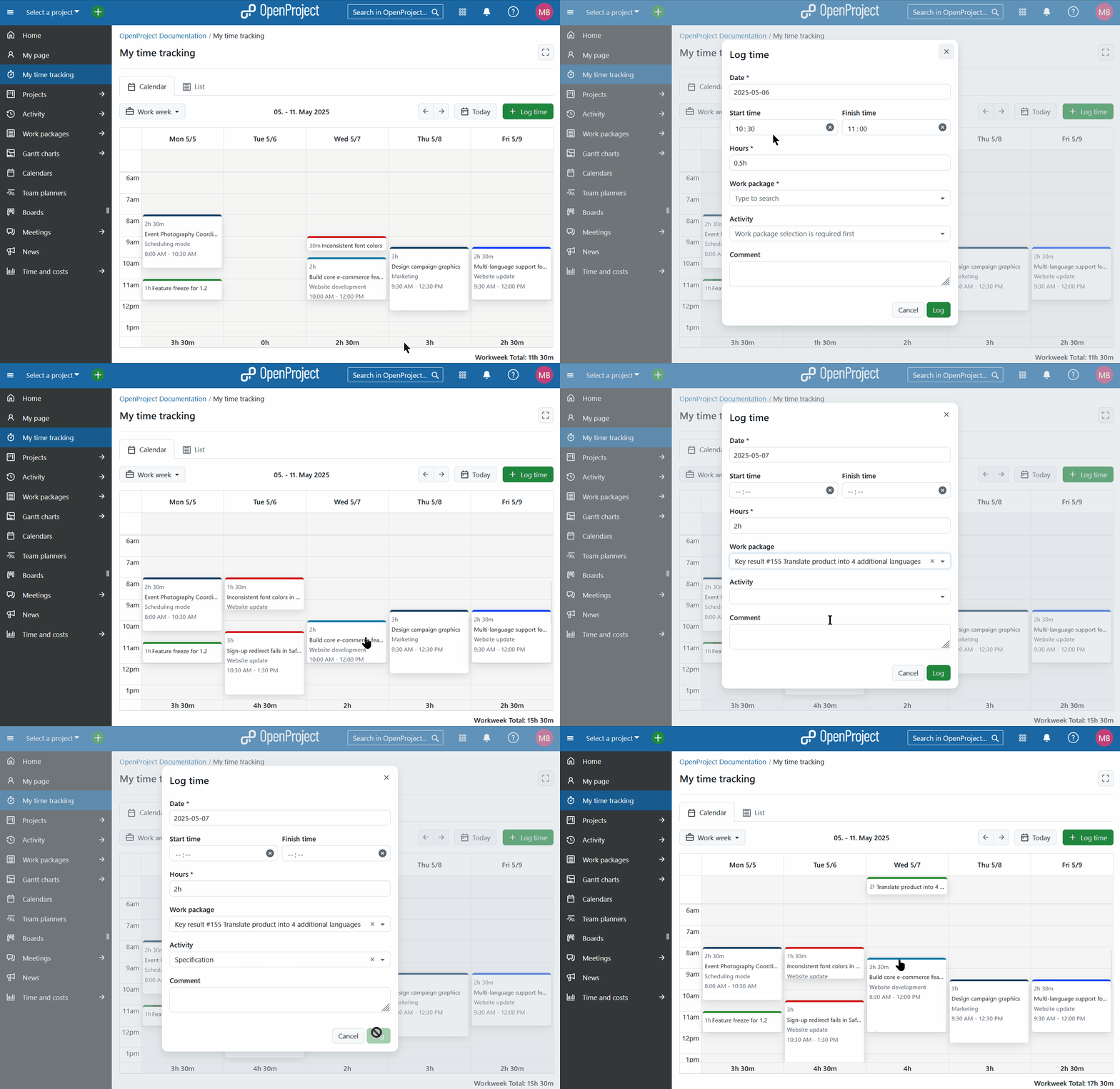
Gif shows how a user clicks in the calendar, creates a new time entry and then changes it by dragging the corner to make it longer and by dragging and dropping another entry from Friday to Thursday

Depending on your configuration, you’ll see either a calendar or list view:

  • If exact time tracking is enabled, the calendar view is shown by default.
  • If not, the list view is shown — a simpler overview for users who only track hours, not the start and end times.

Display your calendar either in a Day, Week, Work week or Month view. In the calendar, users can:

  • Click and drag to create new entries.
  • Move entries to different times or days.
  • Resize entries to adjust their duration.
  • Move an entry to the “No specific time” row on top of each day, to remove start and end time.

Each time entry is color-coded based on the type of its work package — just like in the Team planner, so you can easily identify different items of work.

You can also visually distinguish between working (lighter grey) and non-working days (darker grey). Choose the Work week view to only see the working days that are enabled under Administration → Calendars and dates → Working days and hours.
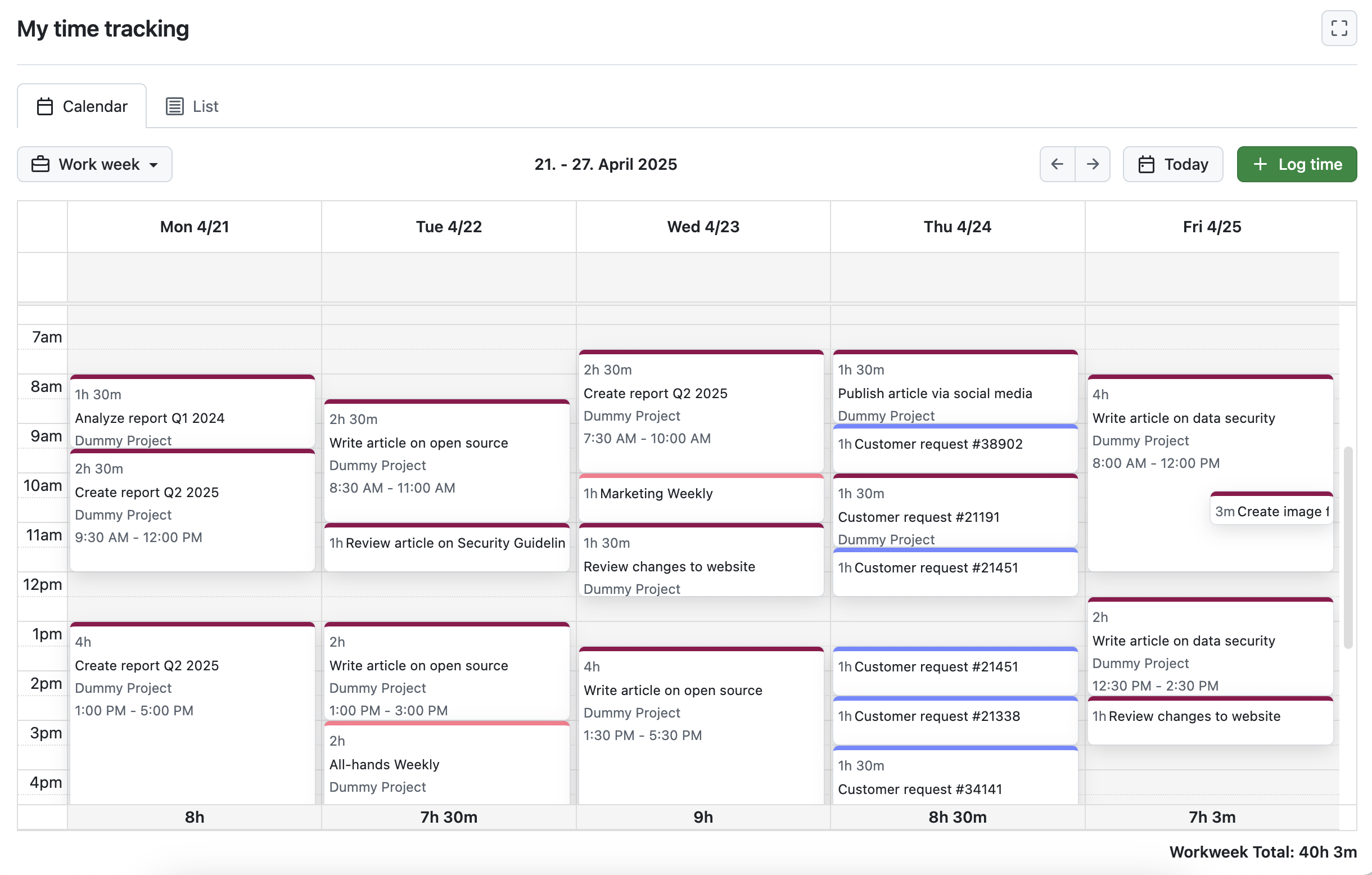
OpenProject’s My time tracking module in calendar view

Tip

Admins can enable exact time tracking in the global administration — and enforce it with the setting Require exact times (Enterprise add-on). This helps organizations improve accountability and prepare for future resource planning features. See the two examples below for different use cases.

When is the list view the better choice?

If the exact time tracking is not enabled, a calendar view does not make much sense. The calendar in the My time tracking module then adds all time entries at the top of each day, which clutters the view. Here, the list view comes in handy and is also set as a default if the exact time tracking is disabled.

Of course, you might also choose the list view if exact time tracking with start and finish date is enabled. It displays your logged times in a collapsible list that also shows sums and other logged information.
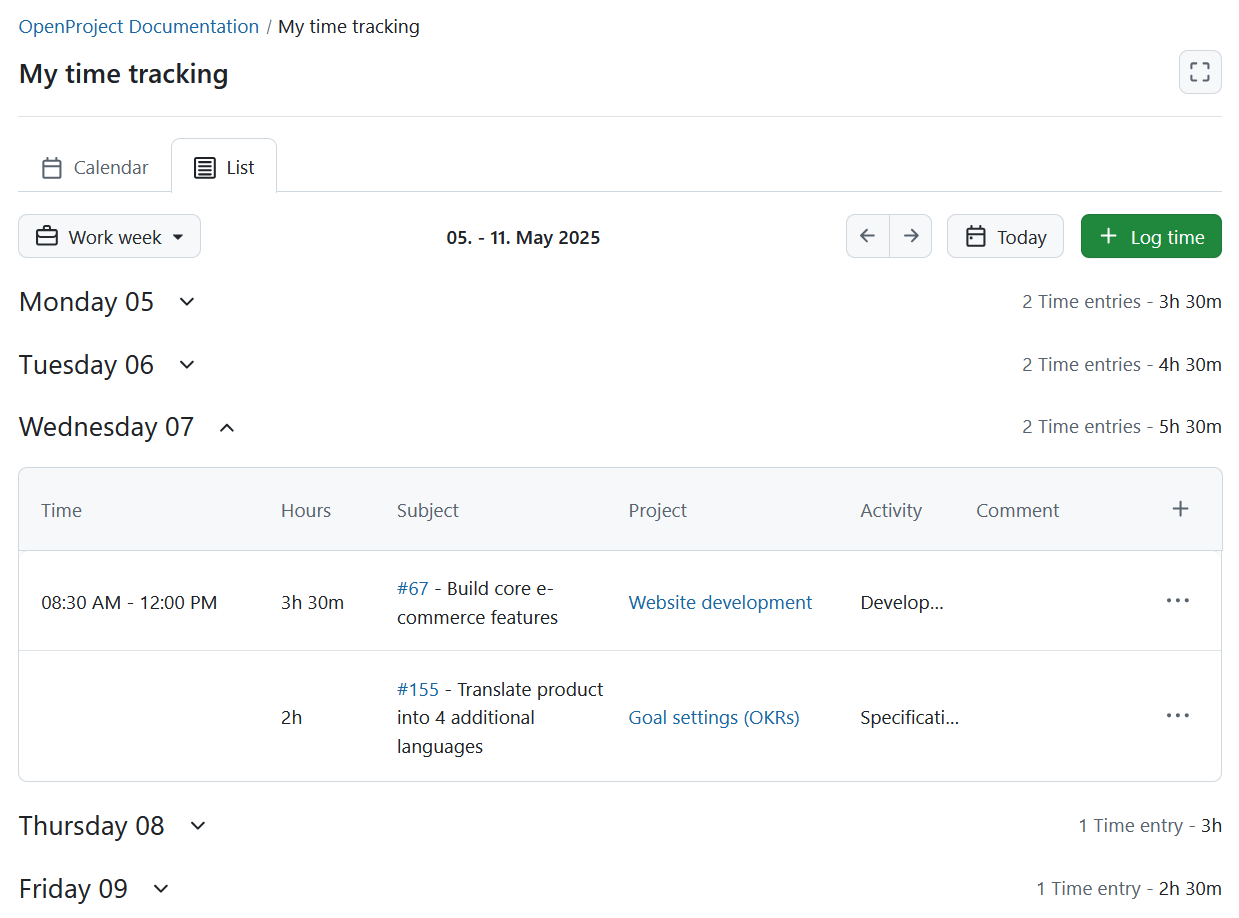
OpenProject’s My time tracking module in list view

Practical benefits: Time tracking for freelancers and growing teams

The new My time tracking module supports different ways of working — from independent teams to organizations with structured planning needs. Let’s look at two example scenarios to show how flexible time tracking with start and end times can be.

Example 1: Small team with freelancers — balancing autonomy and structure

Imagine a small digital agency in Berlin. The team consists of five full-time employees who manage their own schedules and two freelancers who invoice by the hour. Everyone tracks their time — not because they’re told to, but because they want to stay on top of their workload.

With the new calendar view in OpenProject, all team members can:

  • Quickly enter time directly by clicking and dragging in the calendar.
  • Get a visual overview of how much time they’ve spent on different tasks.
  • Spot gaps or overloads in their week at a glance.

For freelancers, start and end times provide the exact data that is sometimes needed in cost reports. For the whole team, it’s a simple way to reflect, stay aligned, and avoid time slipping through the cracks — all without micromanagement.

Example 2: Growing teams who need efficient resource management

Now consider a mid-sized city administration in Germany. The digitalization team has grown to 20 employees, and it’s become harder for department heads to keep an overview of team capacity. At the same time, the organization wants to foster trust and avoid excessive reporting requirements.

By using the My time tracking module with start and end time enforcement (available in the Enterprise edition), admins can:

  • Ensure that team members always track their time precisely
  • View consistent data across the organization for reporting and planning
  • Identify over- or under-allocation of resources early on

Time entries remain private in the personal module, but the structured data feeds into cost reports and will lay the foundation for upcoming resource management features.
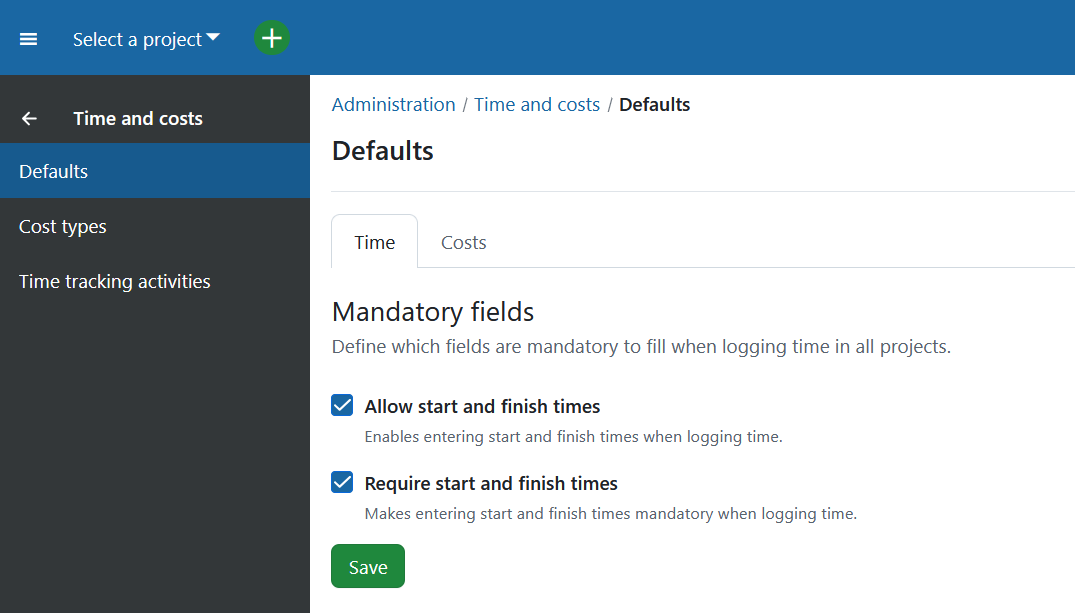
OpenProject administration - Time and cost settings: Checkboxes for ‘Allow users to track start and end time on time records’ and ‘Force users to set start and end time on time records’

Important

The ability to require exact time tracking is available in the Enterprise Professional plan. You can activate it in the Administration → Time and costs → Defaults.

Summary: Calendar-based time tracking with start and end times

The new My time tracking module in OpenProject 16.0 helps you log, review, and manage your personal time entries more intuitively. With a calendar-based interface and support for start and end times, it makes time tracking more visual, structured, and user-friendly.

Whether you’re working independently or as part of a growing team, this module provides the tools you need to stay organized, maintain transparency, and prepare for future planning features.

  • Two views available: Calendar (default if start/end time tracking is enabled) or list view (default if disabled).
  • Calendar interactions: Click and drag to create entries, move or resize them, or remove times by dragging to the “No specific time” row.
  • Color-coded entries: Time entries inherit the color of the work package type to provide visual context.
  • Workdays vs. non-workdays: Configurable workdays appear with a lighter background, while non-working days are dimmed. A “Work week” toggle hides weekends.
  • Admin settings:
    • Enable start and end time tracking (all editions).
    • Enforce exact time tracking (Enterprise only).
  • Benefits for teams of all sizes:
    • For small teams: intuitive tracking and visual workload overview.
    • For larger organizations: consistent data for reporting and long-term resource planning.
  •  

News from the Product Desk: Internal comments

Important

Update May 2025: Internal comments have been released with version 16.0, and are included in our Enterprise professional plan.

With OpenProject 16.0, scheduled for May 21, 2025, we will introduce a new way to communicate with your team: internal comments in the work package Activity tab. This blog post will talk about why we developed this feature, how you can use it and how it might evolve in the future.

Why do we need internal comments?

OpenProject is as much a tool for team communication as it is for project management. In public offices, hospitals, universities and small and large companies, teams use OpenProject to manage the exchange of information.

Most of this information is contained within individual projects and our users sometimes work across multiple projects, each with a limited set of users with different roles. Each of these roles comes with a different set of permissions. For example, project admins generally have full, unrestricted access to the project, project members might have the ability to create only certain types of work packages or execute certain status changes, while external (non-project) collaborators might only be able to read and write comments. This approach allows for fine-grained access control.

In version 13.1 of OpenProject, we introduced work package sharing. This made it possible to invite users who are not project members to individual work packages in a limited capacity, with rights to only view, view and comment, or even modify the shared work package.

Sharing is especially useful when you need to involve people in very specific, small scopes. They might be external collaborators, clients, suppliers or observers. However, until now, anyone who could view a work package could also view all the comments in the Activity tab. This might not always be ideal. There might be times when a core team might want to discuss things related to a work package confidentially amongst themselves and keep that conversation separate from what is visible to all other stakeholders.

That’s where internal comments come in.

Internal communication

Internal comments lets core project members limit the visibility of certain comments to a select group that is a smaller subset of project members.

To use this feature, a project admin will be able to enable internal comments for their project. By default, these internal comments are only visible to the project admin role. To expand who can view these comments, instance administrators can grant a new set of permissions (to view, write and edit internal comments) to any number of roles.

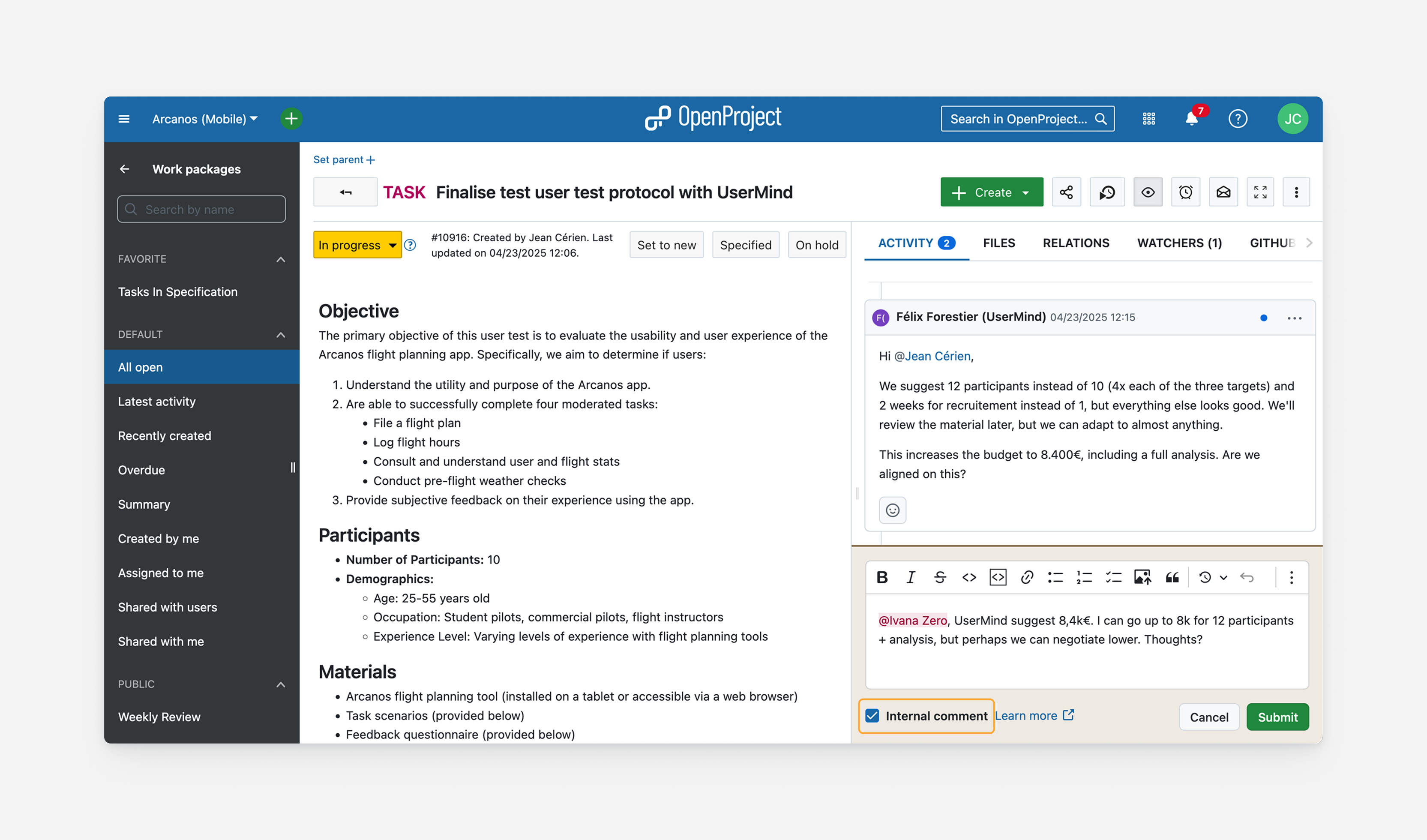
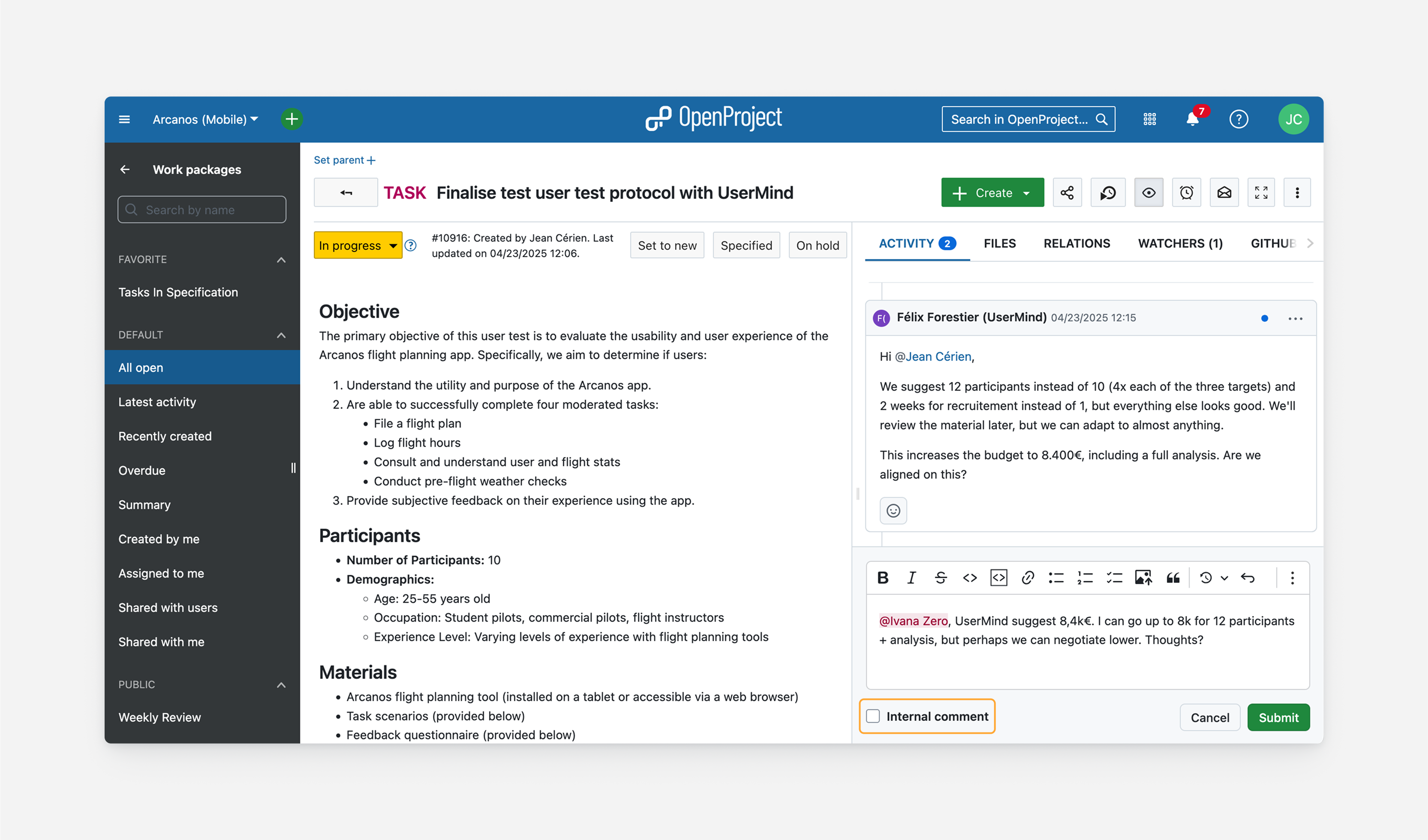
Users who have these roles within their project will then see a checkbox under the comment box labeled “Internal comment”:

The ‘Internal comment’ checkbox below the comment box

Checking this will turn that comment into an internal comment. The background color of the comment box will change to indicate this.

Checking ‘Internal comment’ will limit its visibility

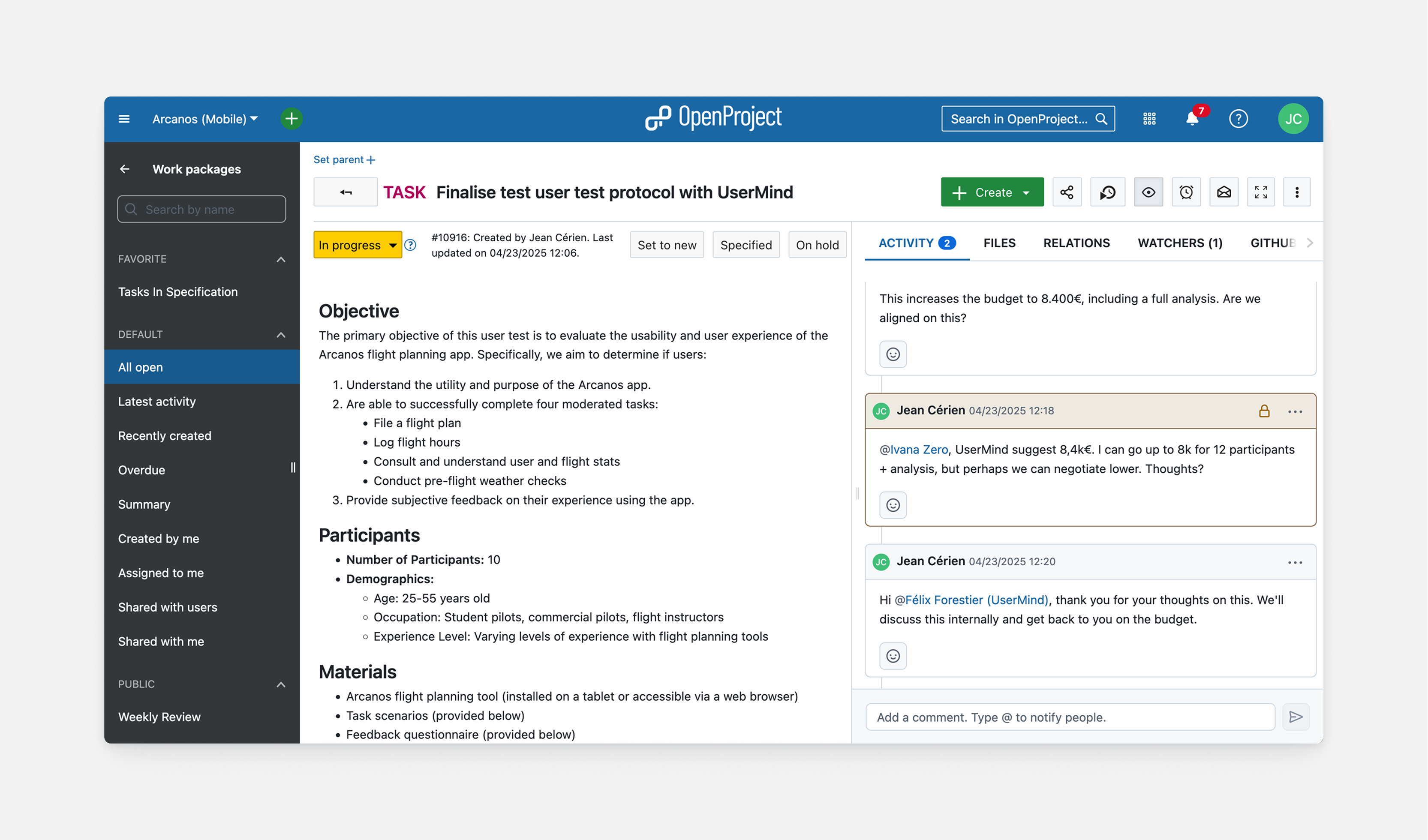
Once posted, the comment will also be marked in the same color, along with a lock icon, to distinguish it from regular comments.

Internal comments appear differently on the activity feed

Users without the necessary permissions will not be able to see these comments, nor that new comments were posted. They will not be visible in neither the Activity tab nor the other places where user activity is reported, like the user activity and project activity pages.

Use cases

Internal comments can enable more efficient communication within a project. They can allow teams to ensure all relevant information stays in one place, facilitate multi-layered communication when external clients or suppliers are involved and also be useful in helpdesk scenarios.

Maintain a single source of truth

A project can include a number of different stakeholders and not all stakeholders should be privy to all information. Ideally, all discussion around a single topic or work package should happen in the same place but because there are currently no visibility controls, confidential conversations need to currently happen elsewhere. This is often a separate work package (in a different project), a Matrix chat room or email. All of these introduce inefficiencies by introducing information duplication and blind spots.

With internal comments, all information and stakeholders can be gathered in one work package that is considered the single source of truth and core project members are nevertheless able to communicate amongst only themselves.

Collaborate with an external client or supplier

Projects often involve external clients or suppliers. They can be invited to a project or an individual work package with specific, limited roles. This reduces the need to organize outside the project context using different incompatible tools.

However, the core project team might want to keep some of their conversation private and limited to a smaller group, for example when discussing rates, negotiations, sensitive financial information or contextual information. With restricted visibility comments, the core team can have a meta-level conversation within work packages that external clients or suppliers cannot access.

Use OpenProject as a helpdesk tool

Implementing internal comments is also a step towards making OpenProject a capable helpdesk tool. Customer support teams can write internal notes only they can view, along with public comments and responses the customer can read and react to.

This will be supplemented in the future with other important helpdesk features such as the ability to set up OpenProject to automatically create work packages based on incoming emails to certain addresses and allow responding to comments via email.

Your feedback

We are excited to release internal comments this May with version 16.0.

As an open source software company, we value the ideas and feedback of our user Community. If you have opinions about these changes or have feature requests, feel free to join our Community instance and share your thoughts.

We would like to thank ZenDiS for sponsoring this feature. We hope you are looking forward to this update as much as we are looking forward to releasing it.

  •  

Top 5 open source project management software 2025

How to choose the best project management software?

Finding the best project management software suited for your organization is a challenging task. We have put together the important criteria to help you make that choice. As an open source software, we of course advocate for choosing an open source project management software.

We prepared a latest overview of the top 5 open source project management software in 2025 for you to compare and see which one could enable you to tackle your challenges best. Take a look at the feature sets, hosting options, prices, security of the open source project management solutions to make an informed decision for your organization.

Please also make sure to check your potential project management software provider’s privacy policy and data security strategy in detail. In a project management software, confidential data is being processed so you have to make sure your data is in the right hands and being protected.

Here are our 5 best open source project management tools in 2025 with different advantages:

  1. OpenProject
  2. GitLab
  3. Tuleap
  4. Taiga
  5. Orangescrum

OpenProject

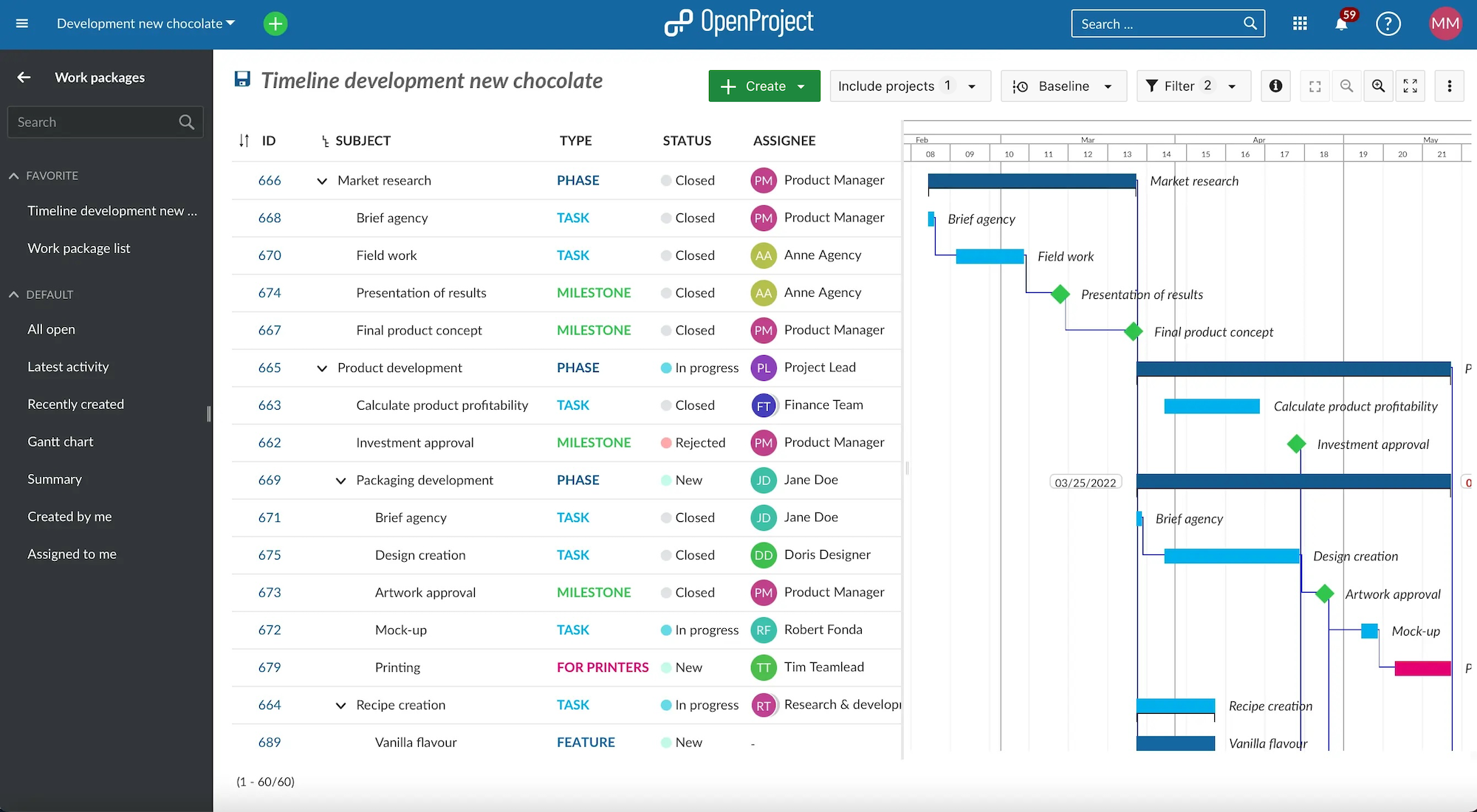
OpenProject is the leading open source project management software, licensed under GNU GPL v3.

screenshot OpenProject work package table with Gantt chart

Free and open source software

The software code is freely available on GitHub and the changes to the source code are transparently traceable any time. With OpenProject there is no vendor lock-in.

OpenProject meets the highest data protection and security requirements. The company, based in Berlin, Germany, focuses on developing a secure and privacy-compliant European alternative for project management and team collaboration.

Data sovereignty

With OpenProject, users retain full control over their data. With the self-installed version hosted on its own servers, OpenProject offers the highest level of data sovereignty. Alternatively, hosting is provided on demand on secure servers within Germany. Subcontractors are based in the EU, and there is no user tracking on websites or within the application.

Secure hosting

As self-hosted versions, the Community and Enterprise on-premises editions provide users with data sovereignty. You will benefit from a set-up with ultimate control over your data and with your preferred technical set up.

If you don’t have the capacity or knowledge to host OpenProject in your environment, we offer the Enterprise cloud edition with secure hosting in the EU or on request in Germany. With the OpenProject Enterprise cloud, you will benefit from a data center and network architecture built to meet the requirements of the most security-sensitive organizations. You can rely on hosting in a high security data center and redundant infrastructure, built for high availability and performance. Continuous encrypted data backups in separate locations, regular data privacy assessment and certification by external auditor are part of the security strategy.

Extensive project management features

OpenProject maps the entire project lifecycle, from project planning, execution and project controlling, to project closure. The software supports classic, agile and hybrid project management. The software includes extensive project management functions, such as project and milestone planning (Gantt charts), task recording, agile boards, project wiki, pre- and post-processing of deadlines, forums, time and cost recording, budgets.

Also, UX and UI play an important role at OpenProject. We invest heavily into our interface design team so that the use of OpenProject is as intuitive as possible and users don’t need much training or a documentation quest before jumping right in.

Configuration

The software is flexibly configurable, can be adapted to individual requirements and is suitable for the respective company processes. With a powerful API, additional systems can be connected if required.

Part of openDesk

OpenProject is one of the software solutions that are used for openDesk – the Sovereign Workplace. The vision of the Sovereign Workplace is to offer a true open source alternative to Microsoft and Google throughout Europe. And OpenProject is ‘openDesk’ ready, which means the current version (and upwards, of course) can be used as part of openDesk.

Active maintenance and development

OpenProject is continuously developed and maintained by an active developer community. New functions, improvements and updates are released regularly. This also allows a quick reaction to possible security gaps.

Professional support and training

OpenProject offers professional support and training. This ensures that users receive both technical and functional support in order to work with the software in the best possible way.

Pricing

The OpenProject Community edition covers a wide range of features and plugins and is free of charge. This is an on-premises version that requires you to host it in your own environment.

The Enterprise cloud and on-premises editions offer you professional support as well as additional premium and security features. Consequently, these are paid plans. Pricing starts from €5.95 per month per user, long-term subscriptions though are cheaper.

OpenProject offers a 14 days free trial which you can extend on request.

GitLab

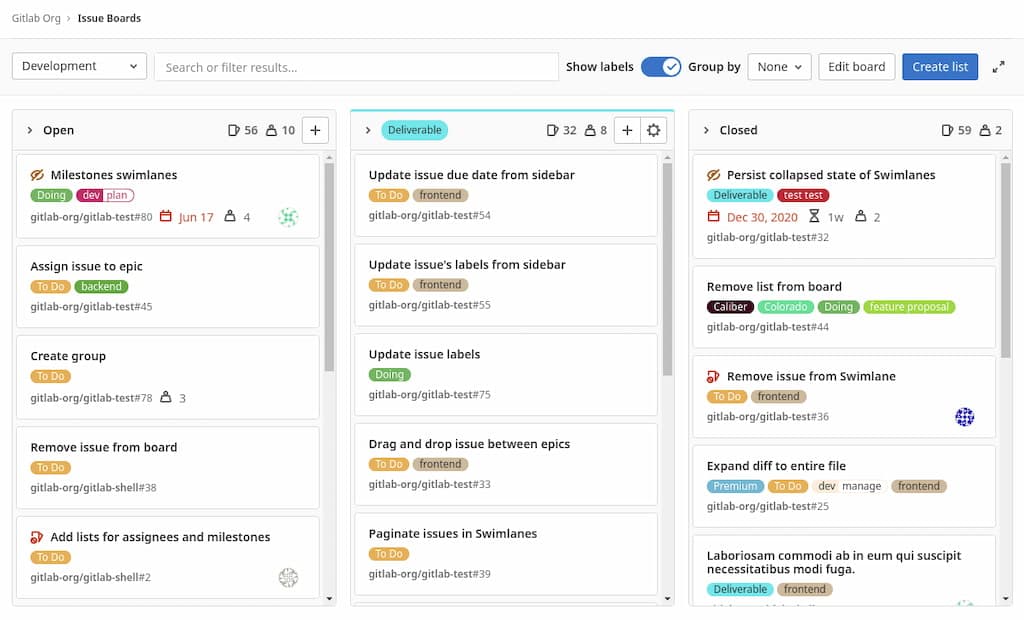
GitLab is a source code management and DevOps platform that can also be used for project management, licensed under MIT open source license. It has a clear focus on software development. The users benefit from fast deployments, standardization, automation and increased security of the software development process.

Screenshot GitLab issue boardhttps://about.gitlab.com

GitLab Feature set

GitLab has a vast feature set to allow the mapping of the entire software delivery lifecycle. It offers many specific features targeted at software developers, such as DevOps Reports. Both agile and traditional project management methodologies are supported by GitLab as it also includes timelines, task management and workflows. However, time tracking or budget and costs are features missing in GitLab’s offer.

Overall, one can say that GitLab has a more technical user interface due to the fact that the main target group is software engineers. It might not be as intuitive as other open source project management software in 2025.

Exciting: If you are not entirely convinced by the GitLab offering in terms of project management, but like its feature set, you can use OpenProject with its GitLab integration.

See a comparison between GitLab and OpenProject to compare both open source project management tools.

GitLab Hosting

GitLab is available in the cloud and on-premises. The self-installed version provides full data control. GitLab’s cloud version, the GitLab.com core infrastructure, is primarily hosted in Google Cloud Platform’s (GCP) US-East1 region.

The location where your data is stored is important as it determines which regulations and data privacy measures apply (in the EU e.g. the providers have to adhere to GDPR). Feel free to read up more about cloud security.

GitLab Pricing

While there is a free version available (with limited storage, users and features), the paid versions start from $19 per user per month. To test the paid version, GitLab offers a 30 days free trial.

Tuleap

Tuleap is an open source project management software for agile project management, licensed under GNU GPL.

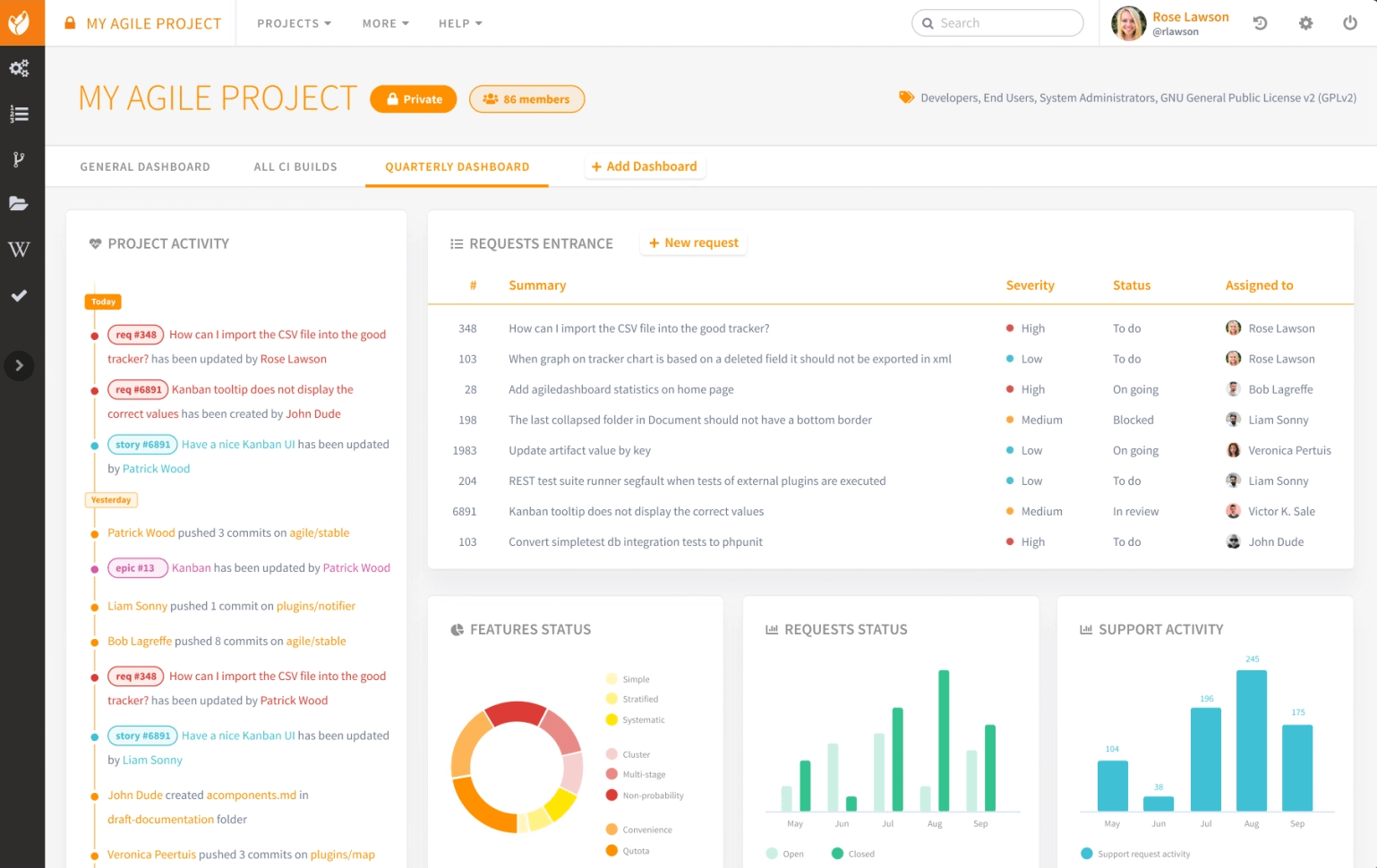
Screenshot Tuleap dashboardhttps://www.tuleap.org/

Tuleap Feature set

Tuleap comprises all agile project management features like task board, backlog, Kanban boards, burnup and burndown charts, dashboard. It allows you to execute software development, test management, project tracking and agile planning in specific.

If you are an agile or software development team, Tuleap’s clear focus on the agile methodology might work very well for you. For a broader project management approach, you might miss traditional project management features like a Gantt chart or a Wiki, and options to track time, budget and costs. Working in Tuleap, its interface seems very intuitive.

See a comparison between Tuleap and OpenProject to compare both open source project management tools.

Tuleap Hosting

Tuleap is available in the cloud and on-premises. The premium cloud version gives you a hosting choice among providers in France, Switzerland, USA, UK, Korea. There is no information on the basic cloud hosting.

Tuleap Pricing

There is no free version of Tuleap available. The cheapest option is the basic cloud version that starts from 6€ per user per month. However, Tuleap offers a free trial if you contact them.

Taiga

Taiga is an open source project management software whose beginnings date back to a Kaleidos hackathon in 2013. It is licensed under MPL 2.0.

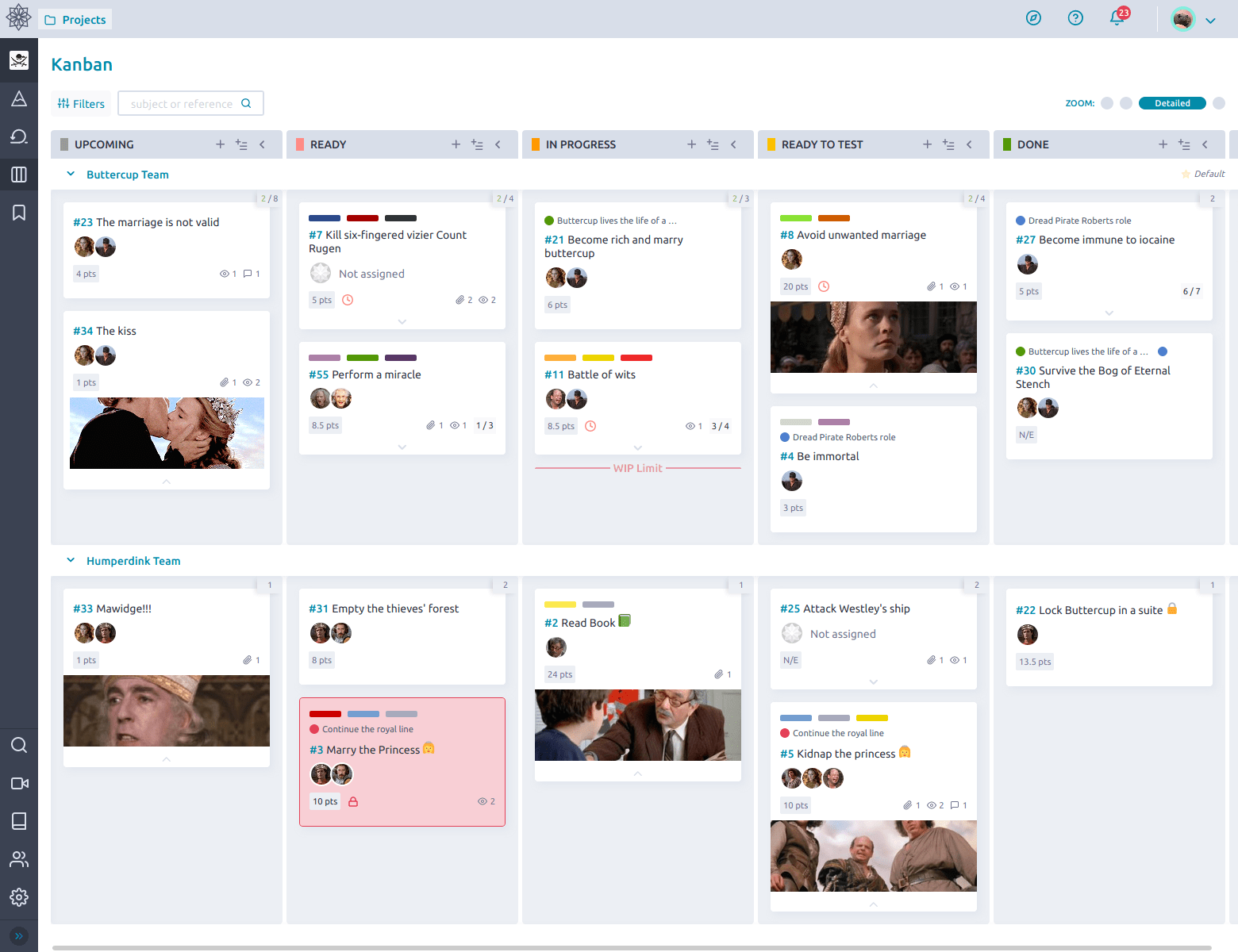
Screenshot Taiga Kanban boardhttps://www.taiga.io

Taiga Feature set

Taiga’s vision was to create an intuitive and visually appealing agile project management tool for developers and designers. Accordingly, Taiga offers a comprehensive feature set for agile project management. It includes Kanban boards, backlog, estimation tool, issue tracking, dashboard and more.

Consequently, classic project management features are not part of Taiga, limiting its use cases to agile methodologies only. Taiga has a very intuitive interface, which makes it easy for users to start working with the software.

See a comparison between Taiga and OpenProject to compare both open source project management tools.

Taiga Hosting

Taiga is available in the cloud and on-premises. The cloud version is hosted in the EU by AWS, which means it complies with GDPR in this regard.

Taiga Pricing

There is a free cloud and free on-premises version available. The paid Taiga cloud edition comes with premium support and is at $70 per month (unlimited users).

Orangescrum

Part of the top 5 open source project management software 2025 is also Orangescrum. It offers a cloud, on-premises version and open source enterprise edition. The open source edition is licensed under GNU GPL v3.

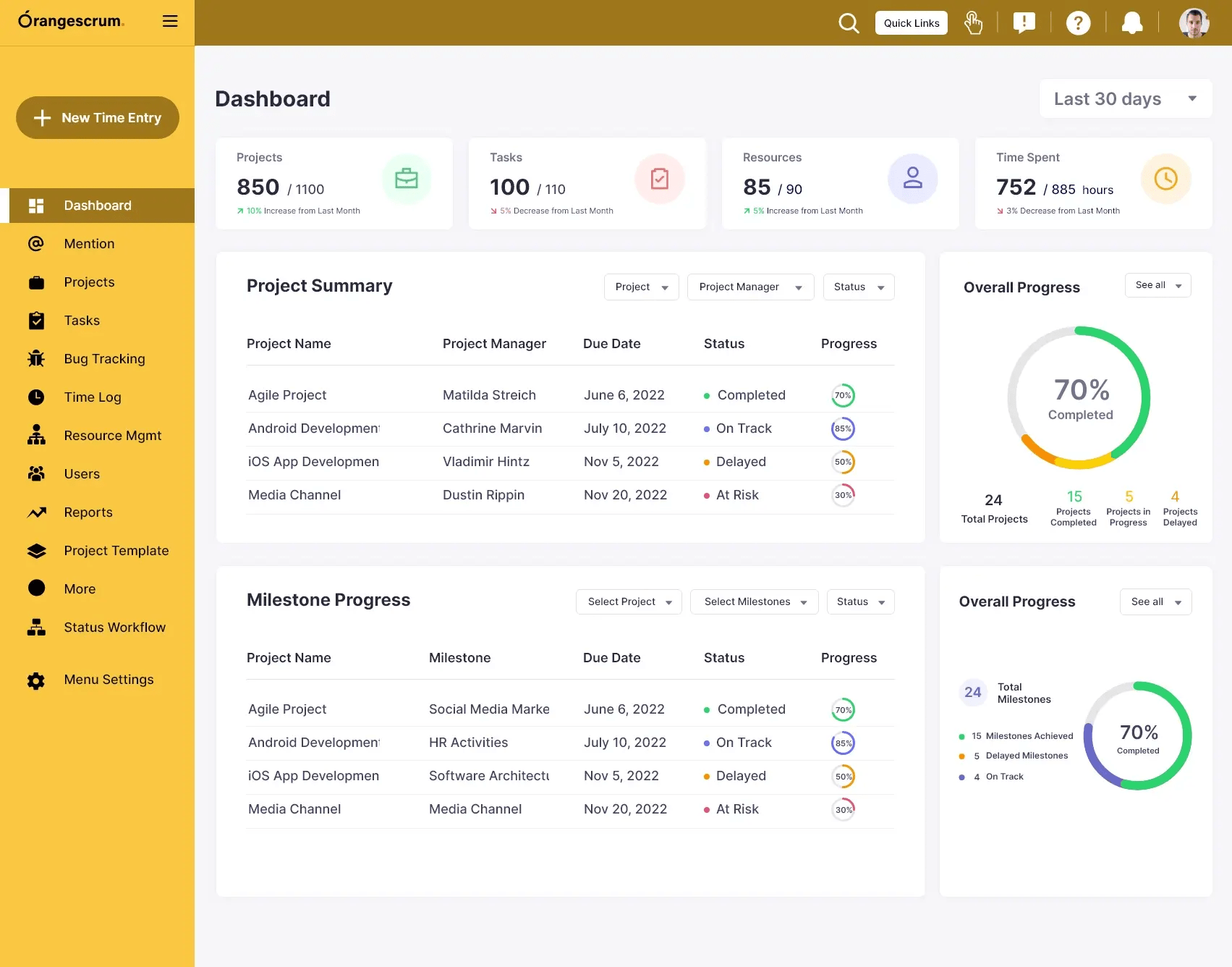
Screenshot Orangescrum dashboardhttps://www.orangescrum.com/

Orangescrum Feature set

Orangescrum offers classic as well as agile project management features. Resource management, schedule management (Gantt charts), budget and cost management, issue tracking, time tracking, workflow management as well as backlogs are available.

The on-premises and cloud version include even more features (burndown chart, project overview, task labels, custom task types, recurring tasks, invoicing etc.). Those are premium features and are part of paid plans.

Orangescrum’s interface looks very intuitive. See a comparison between Orangescrum and OpenProject to compare both open source project management tools.

Orangescrum Hosting

Orangescrum is available in the cloud and self-hosted. The cloud version is hosted with AWS (location not mentioned).

Orangescrum’s privacy policy states that they are taking many steps across the entire company to ensure they will be ready for the GDPR.

Orangescrum Pricing

The Orangescrum open source edition can be downloaded for free. You can add paid support plans to it, from $299 per month. You can try Orangescrum for 15 days for free.

There is a free Orangescrum cloud edition for 3 users and limited storage, paid plans are starting from $8 per user per month. The on-premises version with premium features and support is charged as a once-off (from $4,425), with potential support subscriptions for following years.

Compare the top 5 open source project management software

Choosing the best project management software that fits your organization depends on a variety of criteria, including the features and use cases you want, the size of your team, and hosting preferences. All listed top 5 open source project management software have their advantages.

If you are looking for an open source project management software in 2025, we recommend to have a look at OpenProject, GitLab, Tuleap, Taiga, and Orangescrum.

To give you a quick summary:

  • OpenProject offers traditional, classic and hybrid project management features with a very intuitive interface. It is available in the cloud and on-premises and focuses on data security and privacy, protecting your confidential data. Therefore, the cloud version is securely hosted in the EU or on request in Germany. The OpenProject Community edition (on-premises) includes a comprehensive feature set and is free of charge.
  • GitLab has an elaborate feature set that is mainly targeted at software development teams and has a more techy interface. It is available in the cloud and on-premises. The cloud is hosted in the US. They offer a free on-premises version for a maximum of 5 users with limited storage and essential features only.
  • Tuleap is only for agile project management teams. It offers an intuitive interface. It comes both as on-premises and cloud version. Only for the premium cloud version you can choose the location of the host provider. Tuleap does not offer a free version.
  • Taiga also only offers agile project management features, though with a very appealing interface. It is available as cloud and on-premises version and the cloud version is hosted in the EU. Taiga offers a free cloud and free on-premises version.
  • Orangescrum has a big feature set for traditional as well as agile project management with an intuitive interface. There are on-premises and cloud versions, the latter is hosted by AWS but it seems Orangescrum might not comply fully with GDPR. The open source version with reduced feature set is free of charge and there is a free cloud version for a maximum of 3 users.

Regarding the pricing of all top 5 open source project management software, we recommend you visit the individual websites to input your team size and other requirements to find out the detailed pricing as there are many variables that may change the pricing.

You can also take a look at a more detailed comparisons of OpenProject to other alternatives.

  •  

Project management terminology

Ever wondered what all these project management terms actually mean? Understanding key project management terminology is essential for effective collaboration and successful project execution. In this article, we’ll walk you through fundamental concepts and terms.

If you’re looking for OpenProject-specific definitions, see our Glossary, where we define the most commonly used terms in OpenProject.

Waterfall

Waterfall is sometimes referred to as classic or traditional project management. It is characterized by a sequential flow of tasks. One task is completed before the next can begin. This linear structure gave the method its name — Waterfall.

Because of this sequential nature, careful planning and precise timing are essential. Delays can lead to significant setbacks. A Gantt chart is a typical way to visualize a waterfall project.

Agile

Agile project management recognizes the complexity and uncertainty of many projects. It uses an adaptive approach: a large project is broken into smaller pieces that are handled by cross-functional teams.

Work is done in short cycles, known as iterations or sprints, and customer feedback is integrated regularly. Agile allows for greater flexibility and continuous improvement during the development process.

Scrum

Scrum is a framework used within agile project management. Originally developed in software, it can be applied in many industries. Scrum divides work into small, manageable tasks and emphasizes collaboration, progress tracking, and regular adjustment.

Scrum teams deliver value incrementally. A task board helps visualize the current status.

Scrum task board in OpenProject

Sprint

A sprint is a fixed-length iteration in agile development — often lasting one or two weeks. During each sprint, the team works on selected tasks from the backlog. After each sprint, results are reviewed, and the backlog is adjusted based on feedback and progress.

Board

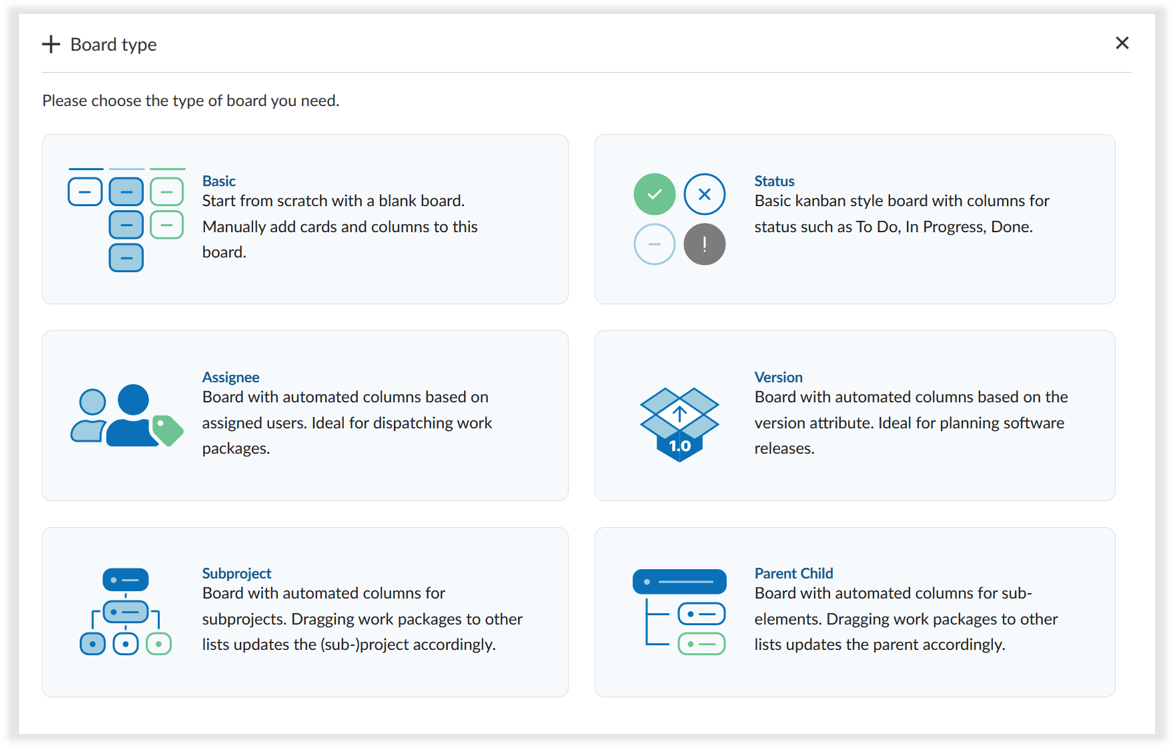
A board is a visual tool used to manage and track tasks in a project. In OpenProject, boards help teams stay organized and collaborate effectively by showing tasks (work packages) in columns such as To Do, In Progress, or Done. This makes boards ideal for agile workflows like Scrum or Kanban, but they are just as useful for managing general task lists, team priorities, or feedback rounds.

In OpenProject, there are basic boards for all users and action boards (with automatic sorting e.g. by status or version) available as Enterprise add-on:

Screenshot of the board creation modal in OpenProject with board type options

Tip

To learn more about how boards work in OpenProject and which board types are available, read our blog article on Agile Boards.

Kanban

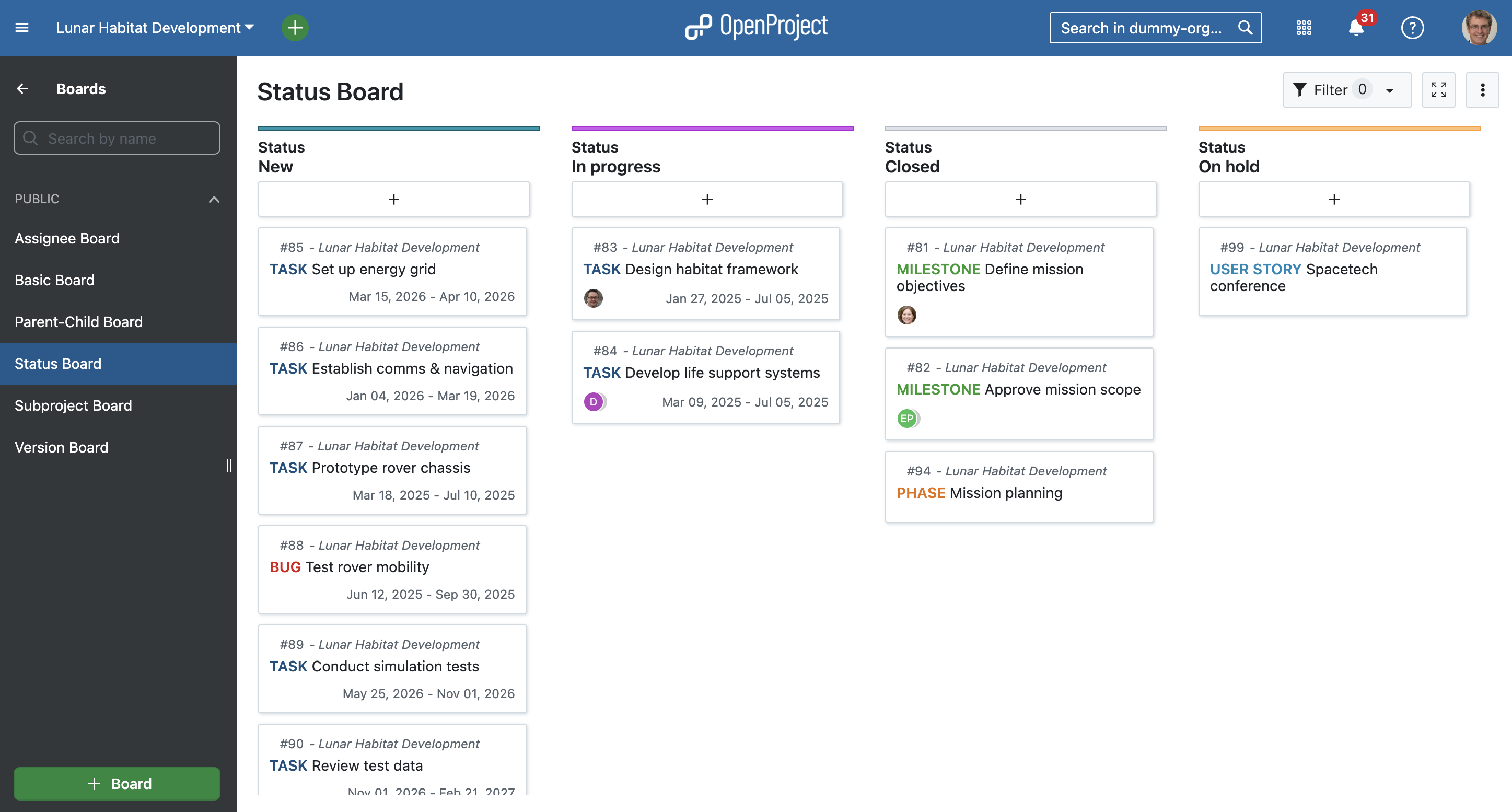
Kanban is a visual approach to agile project management. It focuses on transparency and continuous delivery. A Kanban board shows tasks in columns (e.g., To do, In progress, Done) and helps teams limit work in progress.

Example of an action board in OpenProject: Aerospace work packages sorted by status

Backlog

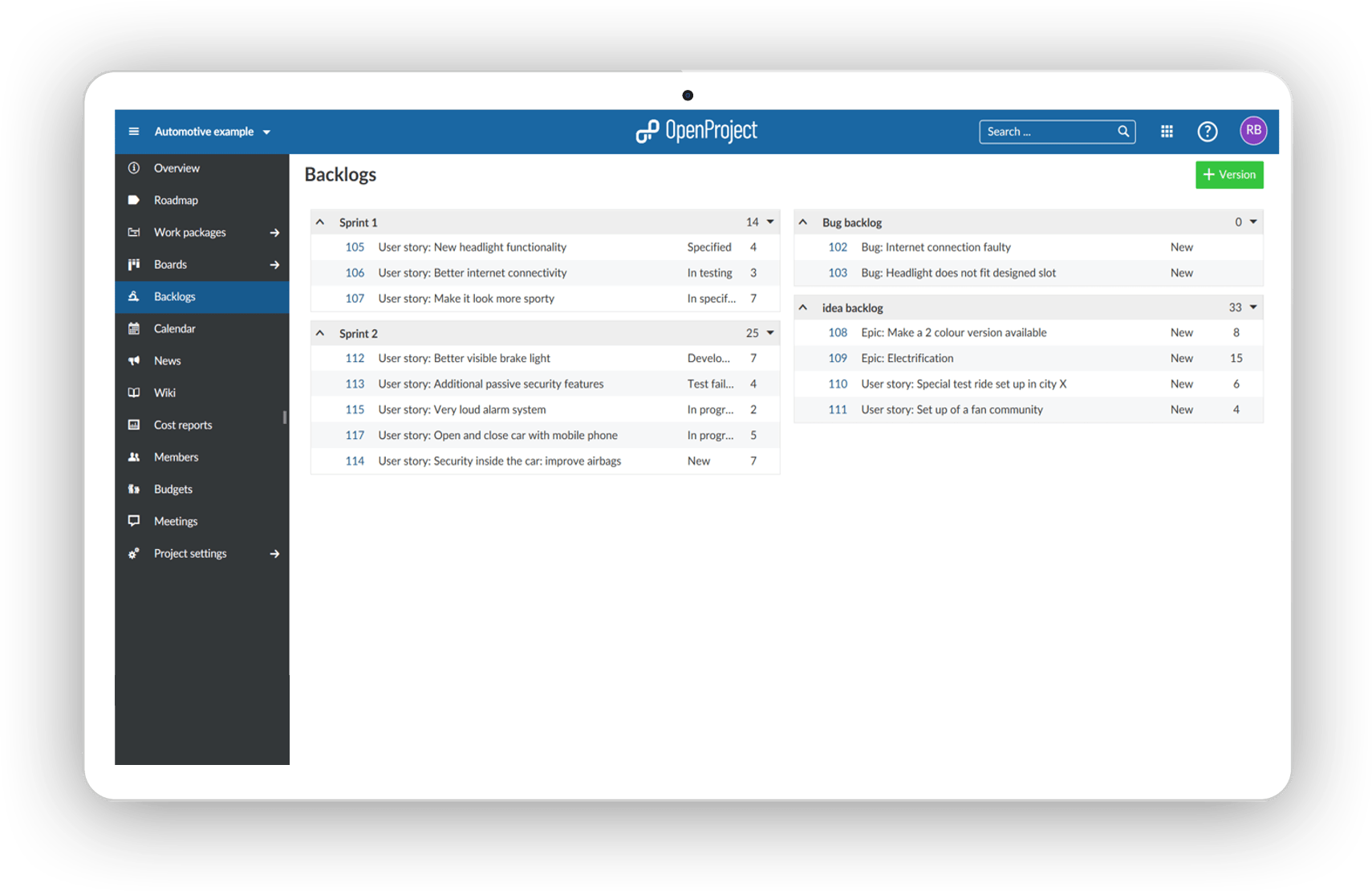
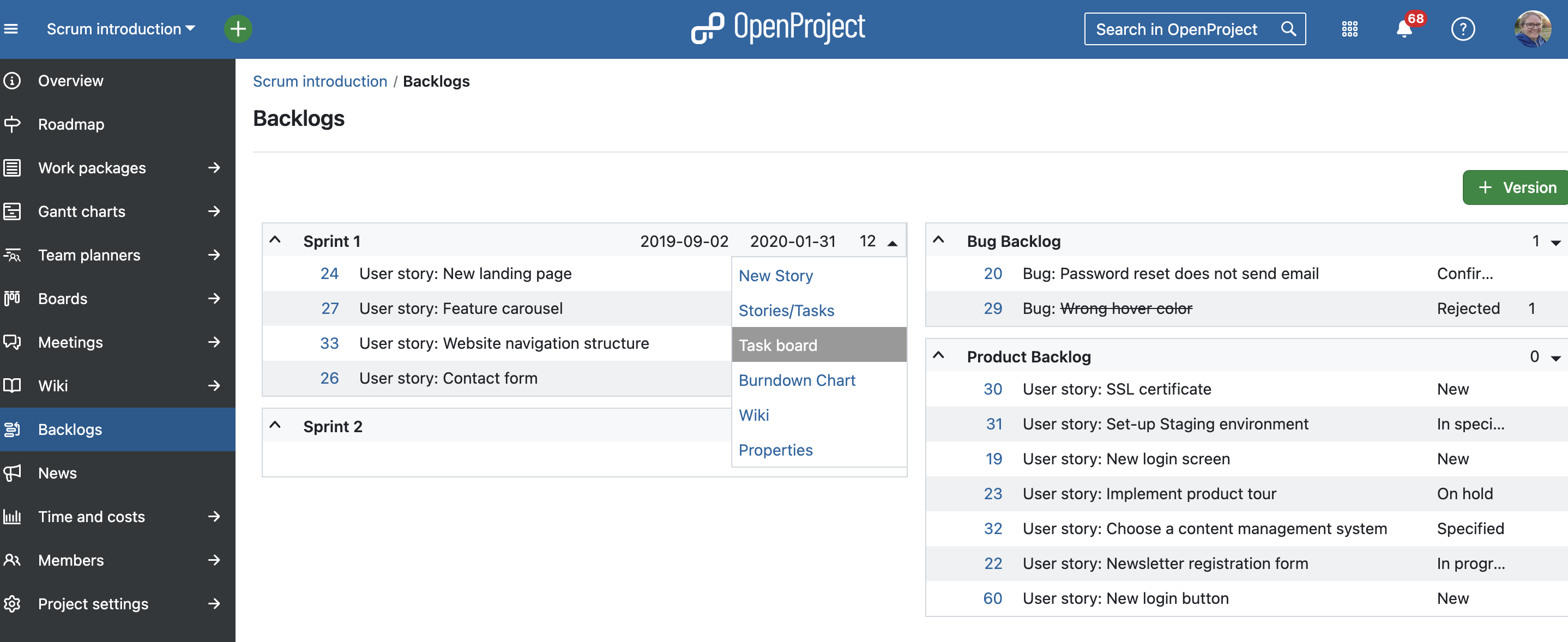
The backlog is a list of all items that need to be completed to achieve a project goal. Tasks are typically prioritized, and the most important ones are selected for the next sprint. A backlog serves as the central source of truth for the team.

Backlog in OpenProject

User story

A user story represents a piece of functionality from the user’s perspective — something they want to achieve. Stories should be small enough to complete within a sprint and usually follow a standard format like: “As a [user], I want to [goal] so that [benefit].”

Epic

An epic is a large body of work that represents a big objective or need. It’s typically too large to complete in a single sprint, so it is broken down into smaller user stories that can be tackled incrementally.

Milestone

A milestone marks a significant point in a project — such as deadlines, delivery dates, or decision gates. It helps monitor progress and often represents a non-working task with a specific target date but no duration.

Bug

A bug is an unintended error or issue in the software that affects functionality or performance. Bug tracking is an essential part of product development.

Feature

A feature is a specific piece of functionality that delivers value to the user. In agile teams, features are often driven by user stories and linked to requirements in the backlog.

Story points

Story points are used to estimate the effort required to complete a task, feature, or user story. They are typically assigned using a predefined scale and help teams plan and track sprint velocity.

Burndown chart

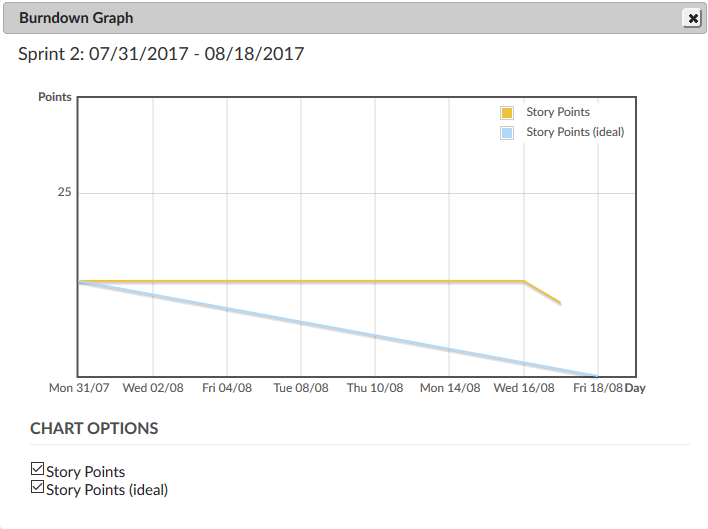
A burndown chart is a tool mostly used in Scrum. It is a two-dimensional graph that shows the amount of work remaining (usually measured in story points) versus the time left in a sprint or project. This visual representation helps teams track their progress and stay focused on their goals.

Burndown chart example

Work package

A work package is a group of related tasks that can be managed and delivered together. In OpenProject, a work package can represent a task, feature, user story, bug, phase, or milestone.

A work package in split screen view in OpenProject

Wiki

A wiki is a collection of collaborative, editable pages where teams can document knowledge, processes, or project information. In OpenProject, each project can have its own wiki, helping centralize documentation.

Dependencies

Dependencies, also known as relations, define how tasks are connected. For example, one task may need to finish before another starts. Managing dependencies helps create realistic timelines and avoid bottlenecks.

Project

A project is a temporary endeavor with a defined goal, timeline, and scope. It can range from small internal improvements to complex product releases. Even though the term is widely used, it’s not always clearly defined. Taking time to align on what constitutes a “project” in your context helps ensure consistent planning and execution.


If you want to learn more about project management, please read our project management guide.

  •  

OpenProject 15.5: Filter for descendants of work packages

We are happy to announce the release of OpenProject 15.5. Among other changes, users now can filter for descendants of work packages, which includes children, grandchildren, and deeper levels in the hierarchy. This makes it easier to focus on specific parts of a project hierarchy.

In this blog article, we will take a closer look at these feature updates:

And there are more great updates in this version again. For more details on other changes, features and bug fixes in 15.5, please check out our release notes.

Tip

The next version is already on the horizon: In May 2025, we plan to release OpenProject 16.0 with major feature changes. One change will be the ‘sunsetting’ of classic meetings, meaning users will only be able to create one-time and recurring meetings then. With the release of 15.5, you already see a hint in the application that classic meetings are unsupported. We recommend switching to the newer meeting types now to benefit from recent improvements and to ensure a smooth transition. Read this article to learn more: Classic meetings will be replaced: What changes with OpenProject 16.0

Filter for descendants of work packages

OpenProject 15.5 introduces a helpful new filter to better navigate complex project structures. The Descendants of filter allows you to display all related work packages beneath a selected parent — including its children, grandchildren, and deeper levels.

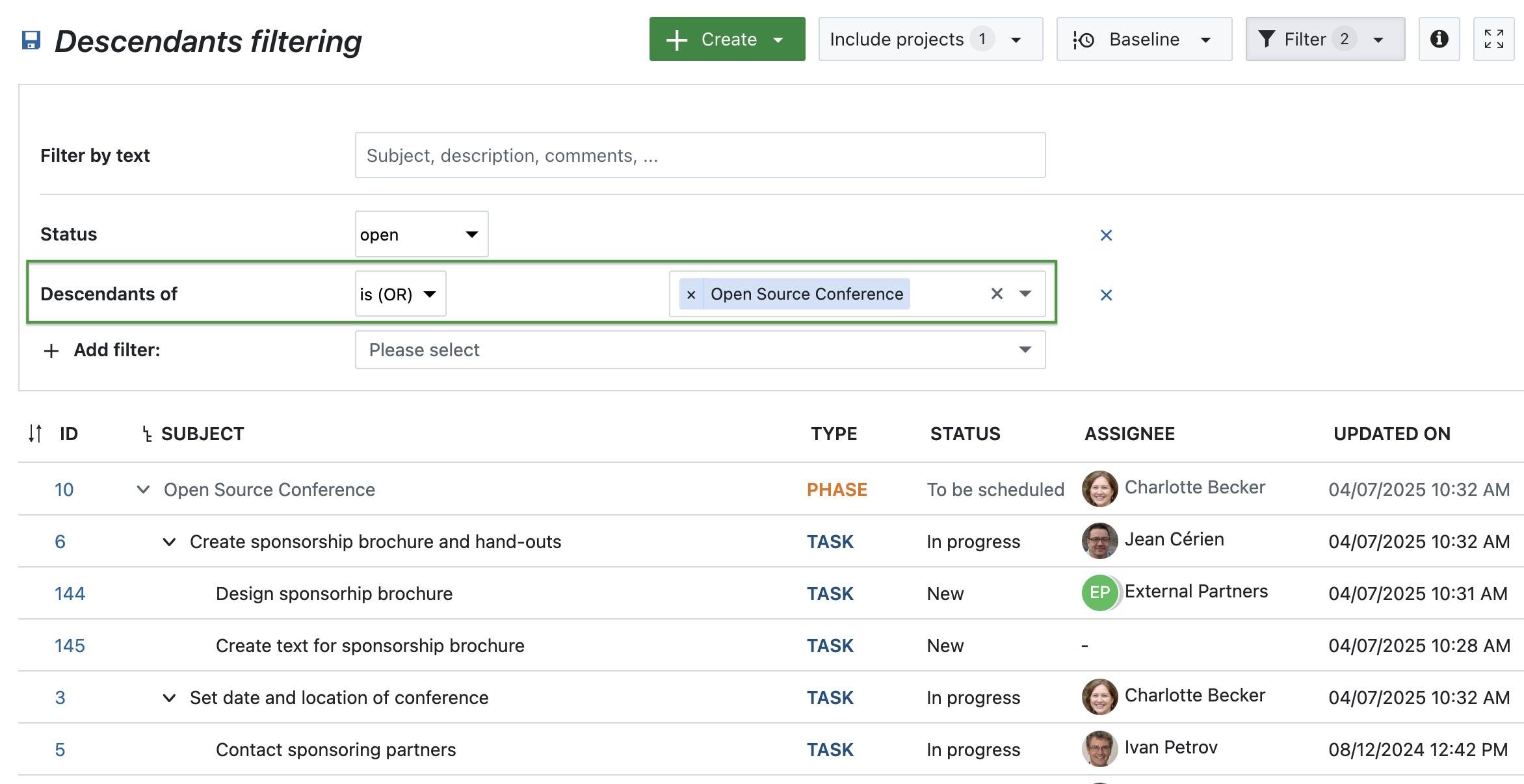
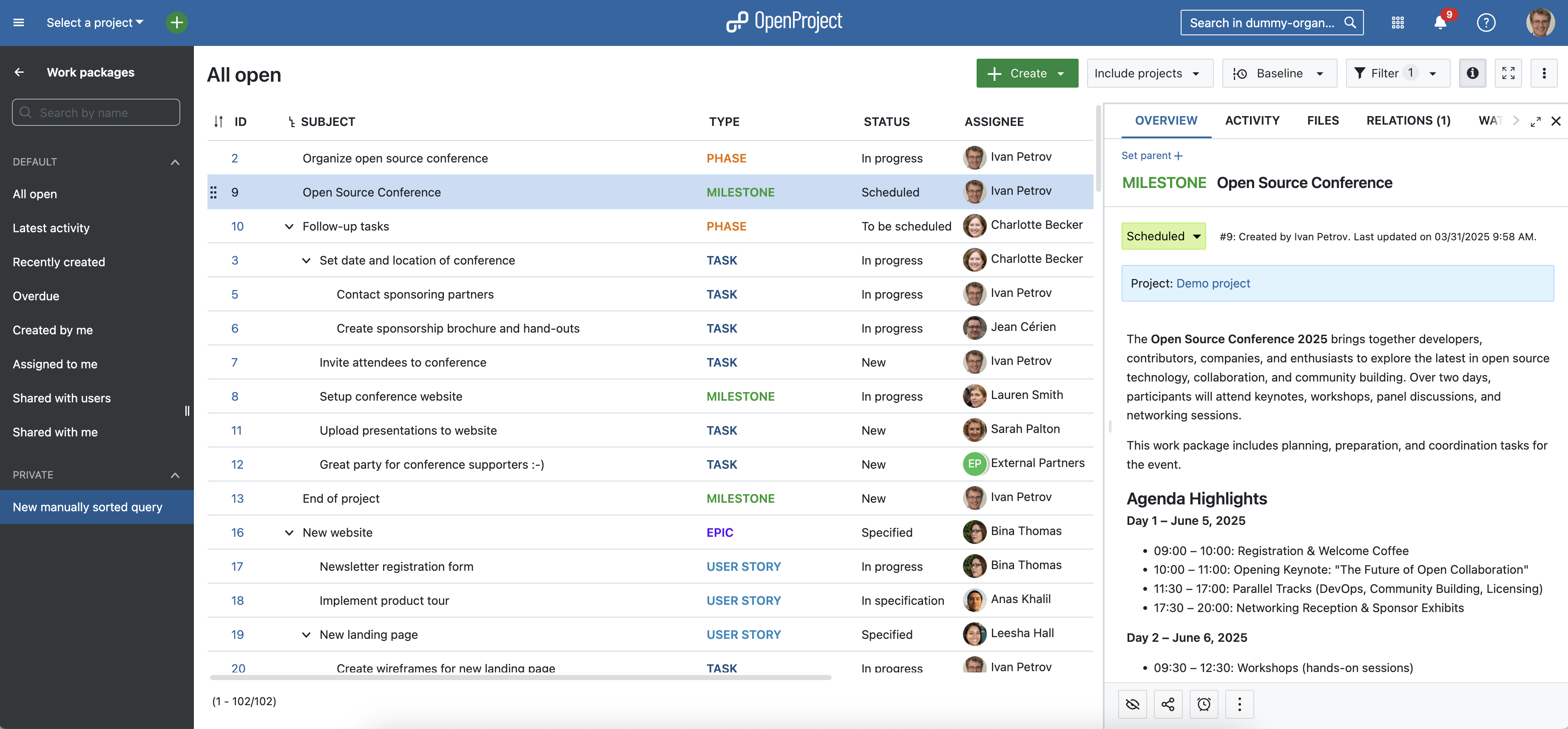
For example, if you apply the filter “Descendants of” is (OR) “Open Source Conference”, the view will include:

  • Two direct children: Create sponsorship brochure and hand-outs and Set date and location of conference
  • Two children of the brochure task — in other words, grandchildren of the main phase: Design brochure and Write brochure text
  • One grandchild under the location task: Contact sponsoring partners

This filter is available wherever filters are supported, such as work package tables or agile boards. Until now, it was only possible to filter for parent work packages — this new option lets you see the full hierarchy below a selected item, making it easier to focus on a specific part of your project and understand its structure at a glance.

Work package table filtered for descendants of a phase

Column for children in work package tables (Enterprise add-on)

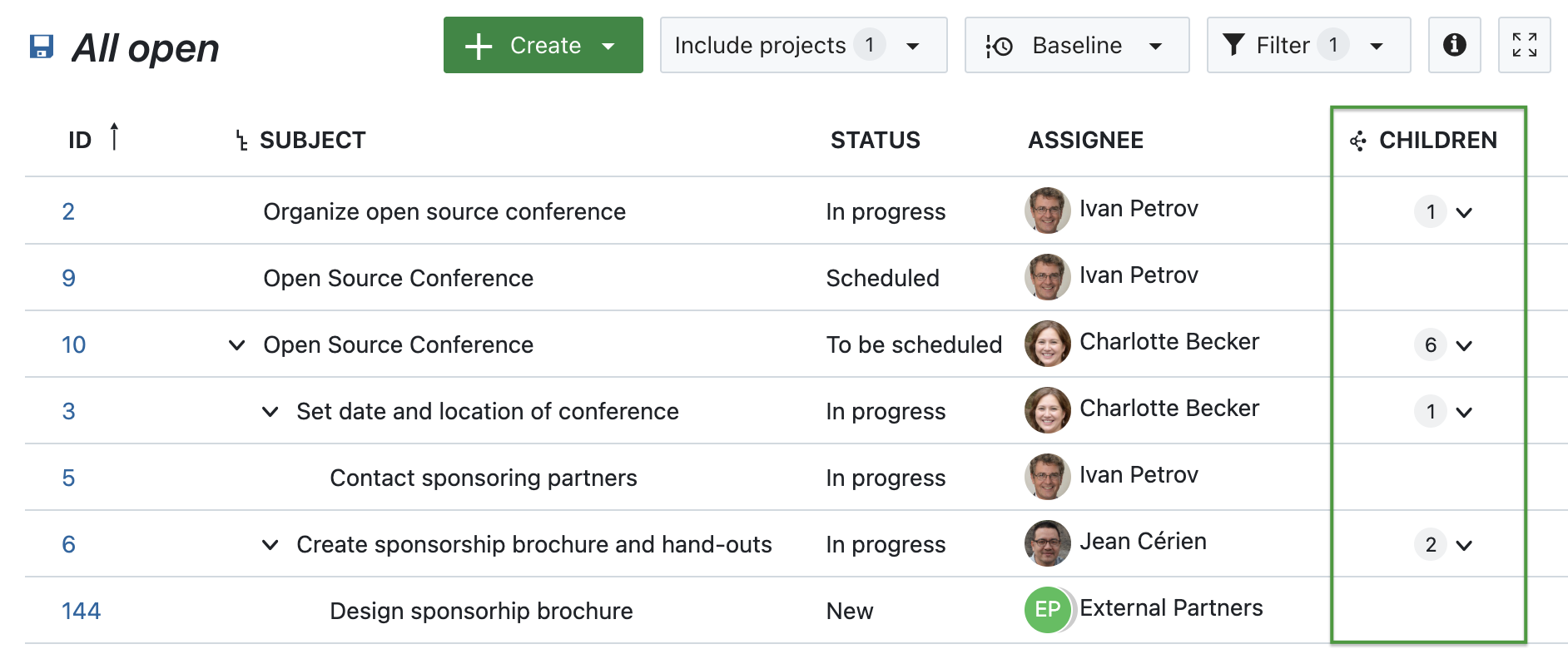
OpenProject 15.5 adds a new Children column to work package tables — giving you a faster and more structured way to view hierarchical relationships without needing to apply filters or switch views.

This column shows a clickable dropdown icon alongside the number of child work packages linked to each parent. With one click, you can expand the parent directly in the table to get an immediate overview of its structure. Each child is clearly marked with a Child label, helping you stay oriented even in complex project hierarchies.

This feature is especially useful when working with large datasets or focused views, where quickly understanding relationships between work packages is key.

For example, in a project phase like Open Source Conference, the Children column shows how many related work packages are connected to that phase — helping teams assess scope and progress without leaving the table view.

Work package table with a highlighted ‘Children’ column - the number of children being displayed next to each parent, along with a dropdown-symbol

Note

All relationship columns, including the new Children column, are part of the Enterprise add-ons.

% Complete included in work package table sums

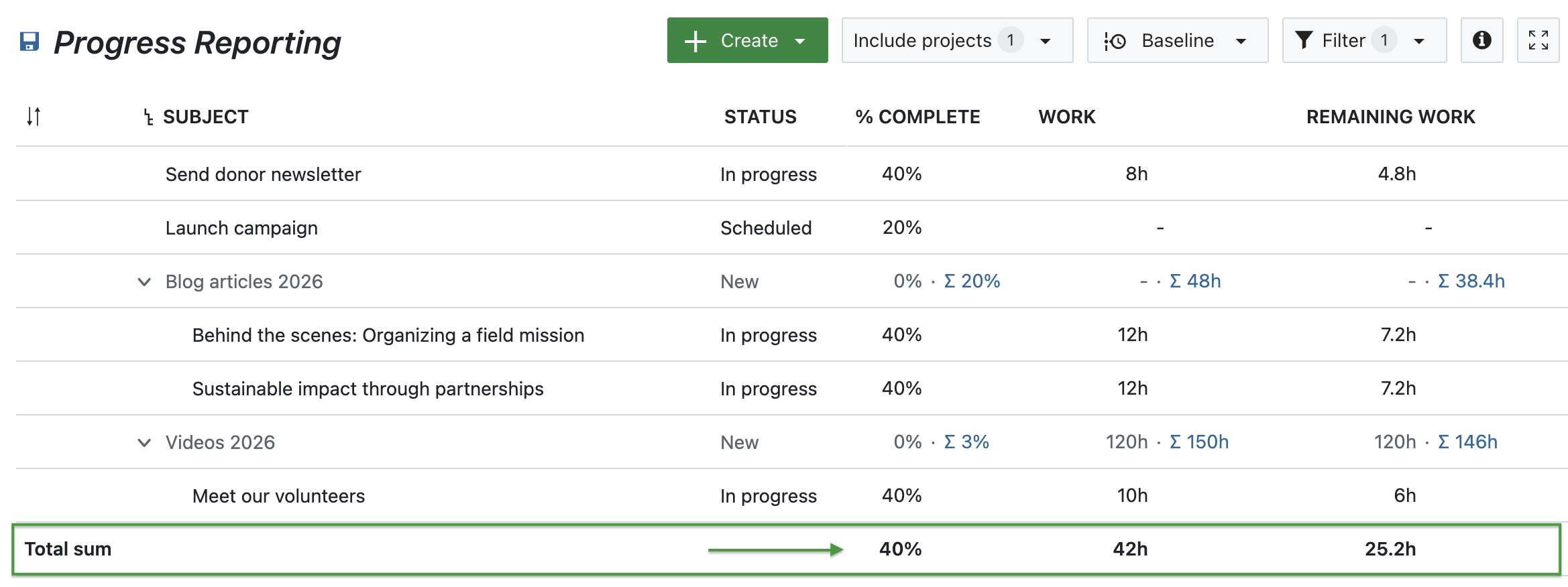
Imagine you’re part of an NGO marketing team planning newsletters, blog articles, and videos for the upcoming year. Each campaign includes several tasks — like writing a blog post titled Behind the scenes: Organizing a field mission or producing the video Meet our volunteers. Both are in progress and marked as 40% complete.

With OpenProject 15.5, it’s now easier to get an overview of your content pipeline: the % Complete value is included in the sum row of work package tables. Alongside Work and Remaining work, this provides a quick snapshot of overall progress — in this case, 42 hours of work planned, 25.2 hours remaining, and an overall completion rate of 40%.

All three values are calculated based on the selected progress tracking mode, giving you accurate insights tailored to your team’s workflow — whether you’re tracking effort manually or automatically.

Work package table showing % Complete, Work and Remaining work – with highlighted sums

Advanced accessibility

Accessibility is not just a feature — it’s a fundamental part of building inclusive software. With version 15.5, we’ve taken another step forward in making OpenProject more accessible, especially for users who rely on screen readers or keyboard navigation.

The date picker now provides clearer, more meaningful feedback during manual input, ensuring that everyone can interact with project timelines confidently and independently. This means that screen readers now announce when switching between manual and automatic scheduling modes. Changes to one field, such as the Start date or Duration, are immediately announced when they affect related fields. The “Today” shortcuts come with ARIA labels that give users helpful context — for example, “Select today as start date.”

These improvements are part of our ongoing ARIA implementation strategy to ensure that OpenProject is usable by as many people as possible. Further accessibility enhancements are planned for upcoming versions.


OpenProject 15.5: Migration, installation, updates and support

Follow the upgrade guide for the packaged installation or Docker installation to update your OpenProject installation to OpenProject 15.5. We update your hosted OpenProject environments (Enterprise cloud) today, April 16, 2025.

You will find more information about all new features and changes in our Release notes or in the OpenProject Documentation.

If you need support, you can post your questions in the Community Forum, or if you are eligible for Enterprise support, please contact us and we are happy to support you personally.

Credits

A very special thank you goes to the City of Cologne, Deutsche Bahn and ZenDiS for sponsoring released or upcoming features. Your support, alongside the efforts of our amazing Community, helps drive these innovations.

Also, a big thanks to our Community members for reporting bugs and helping us identify and provide fixes. Special thanks for reporting and finding bugs go to Abhiyan Paudyal, Andreas H., Paul Kernstock, Patrick Stapf, and Stefan Weiberg.

Last but not least, we are very grateful for our very engaged translation contributors on Crowdin, who translated quite a few OpenProject strings! This release we would like to particularly thank the following users:

  • Yuliia Pavliuk, for a great number of translations into Ukrainian.
  • Adam Siemienski, for a great number of translations into Polish.
  • NCAA, for a great number of translations into Danish.
  • greench, for a great number of translations into Turkish.

Would you like to help out with translations yourself? Then take a look at our translation guide and find out exactly how you can contribute. It is very much appreciated!

As always, we welcome any feedback on this release. 💙

  •  

Prioritize what matters: How Attribute highlighting helps growing teams stay focused

Whether you’re a team of five or fifty — as your organization grows, so does the number of projects, tasks, and priorities. At some point, work packages that once fit on one board become a sea of cards, and keeping focus becomes a challenge.

That’s why we created the Attribute highlighting feature: it helps you immediately see what needs your attention most. In this article, we’ll walk you through a relatable scenario and show how this Enterprise add-on can support you in staying focused and scaling successfully.


You’ve grown — now it’s time to change how you work

Things are going well. Your organization is growing. More clients, more projects, more team members. But with growth comes complexity. What used to be a simple backlog is now a multi-project list of dozens — maybe hundreds — of open tasks. And suddenly, you’re no longer sure what’s urgent, what’s blocked, or what’s been waiting for weeks.

Your system hasn’t changed, but your needs have. And that’s a good thing — because it means it’s time to invest in new ways to keep your growing team aligned.

Clean up your work package table by highlighting priority, status or finish date

Let’s take your team’s work package table as an example.

You’ve filtered for this month’s deliverables — but the list is still long. You spot tasks with due dates coming up, some that are marked high priority, and one that was updated just now. But it takes a few minutes of scrolling and reading to get the full picture.

That’s where Attribute highlighting comes in. This Enterprise add-on allows you to visually emphasize specific values in your work package table using color: overdue tasks can turn red, high-priority items might stand out in orange, and different status values can appear in clearly distinguishable shades.

With just a glance, your team can now immediately see:

  • What’s overdue,
  • What’s marked as high or urgent priority,
  • What’s resolved or in progress.

Important

The Attribute highlighting feature is part of the Enterprise add-ons in OpenProject. You can find more information about it in our documentation.


How Attribute highlighting works

Let’s say your team uses the Priority attribute and a custom status workflow. You can highlight individual attributes inline (Status, Priority, Finish date) or apply full-row highlighting based on Status, Type, or Priority.

Once you’ve set this up in the work package table view, your team sees these visual cues automatically — without needing to open each task individually.

Tip

You can configure which colors are used for each priority and status in the System administration. Learn how to adjust them for priorities and for statuses.

Let’s look at an example work package table and how it looks with different attributes highlighted. Please note that you can change the colors for work package attributes and that they might look different in dark mode or light mode.

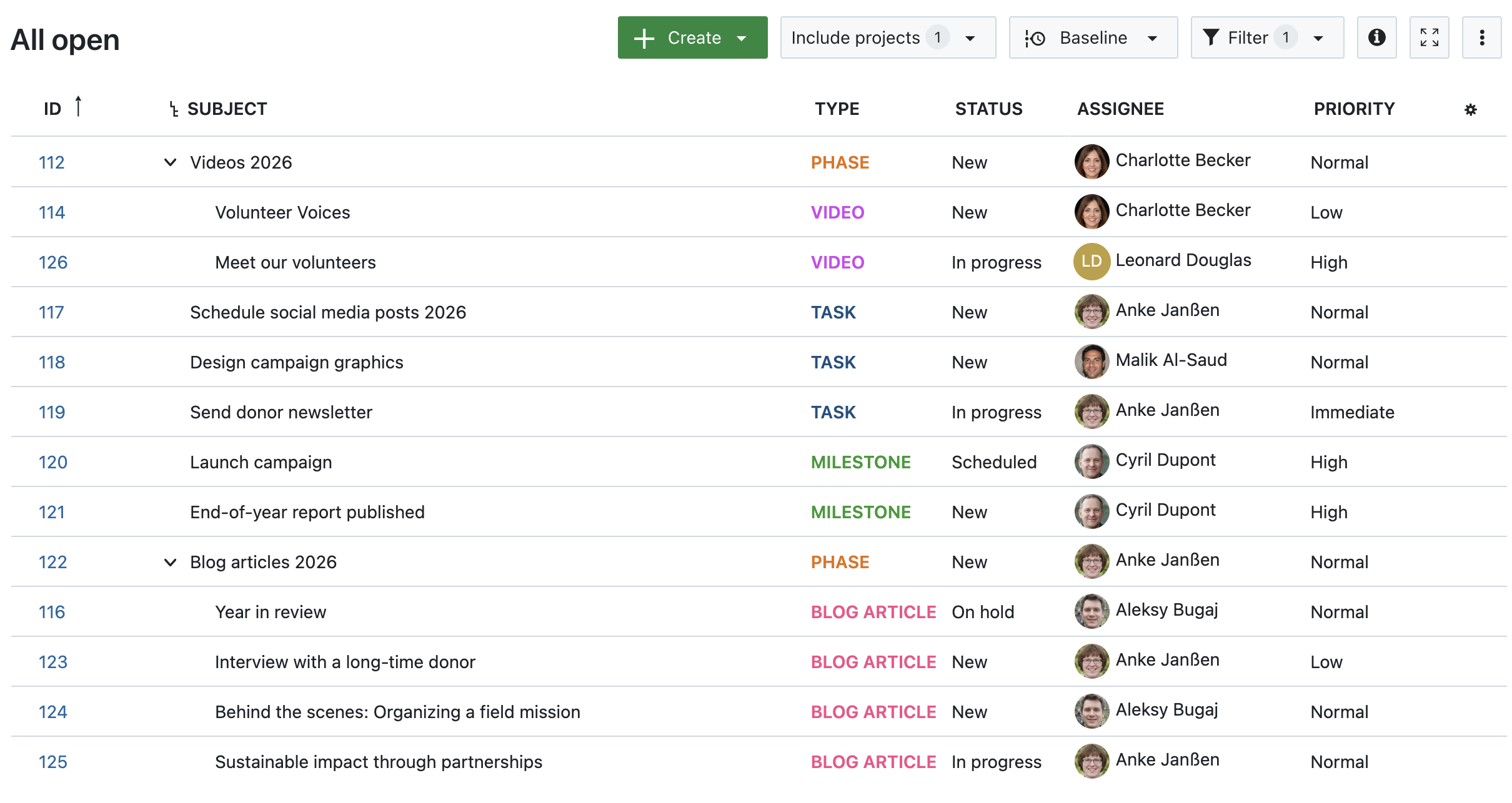
1. No attribute highlighting

Work package table in OpenProject, no attributes highlighted

Image 1: A work package table in OpenProject, no attributes highlighted.

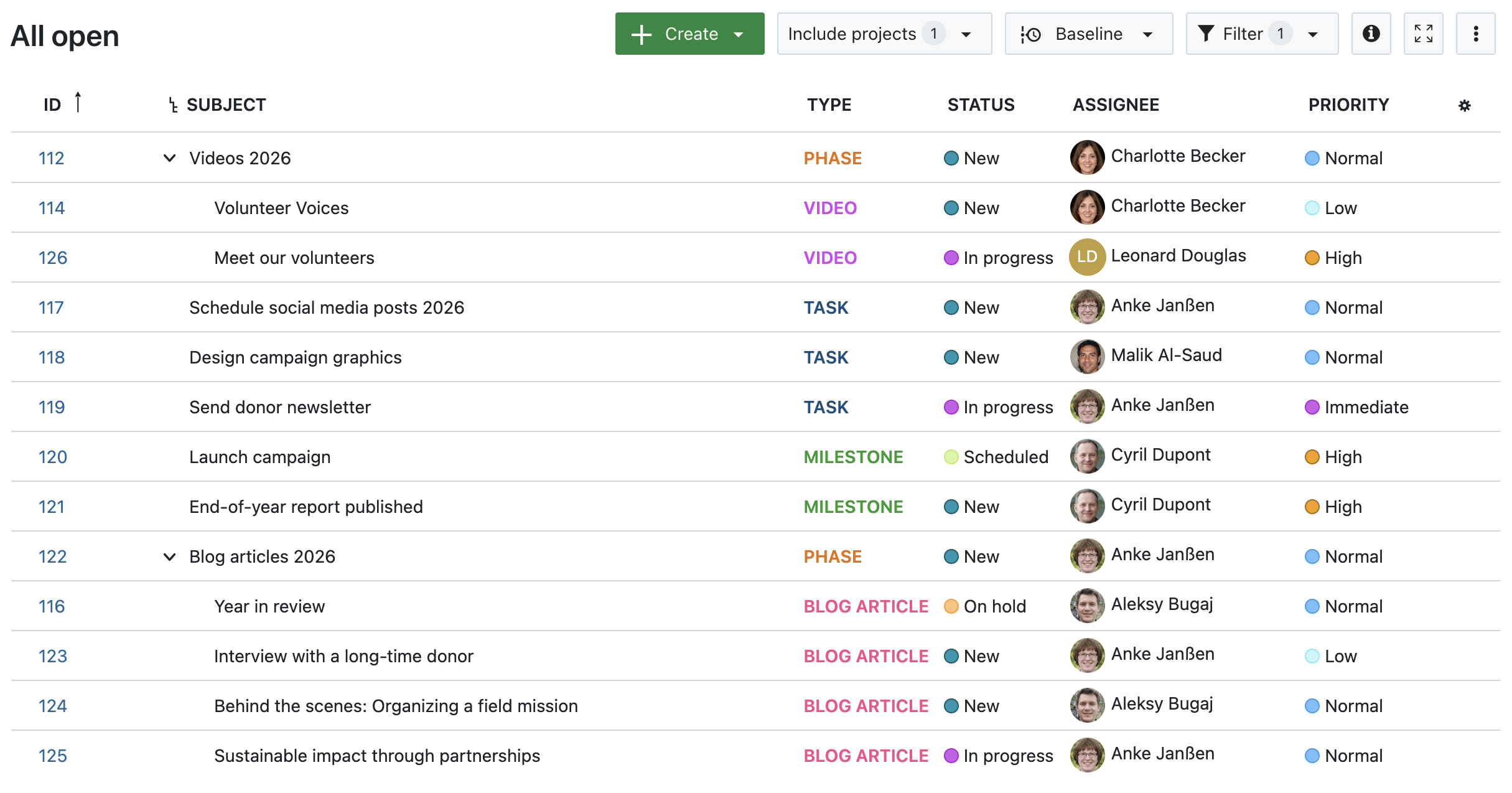
2. Status, Priority and Finish date highlighted inline

Work package table in OpenProject, inline-highlighted Status, Priority and Finish date

Image 2: A work package table in OpenProject, with inline-highlighted Status, Priority and Finish date.

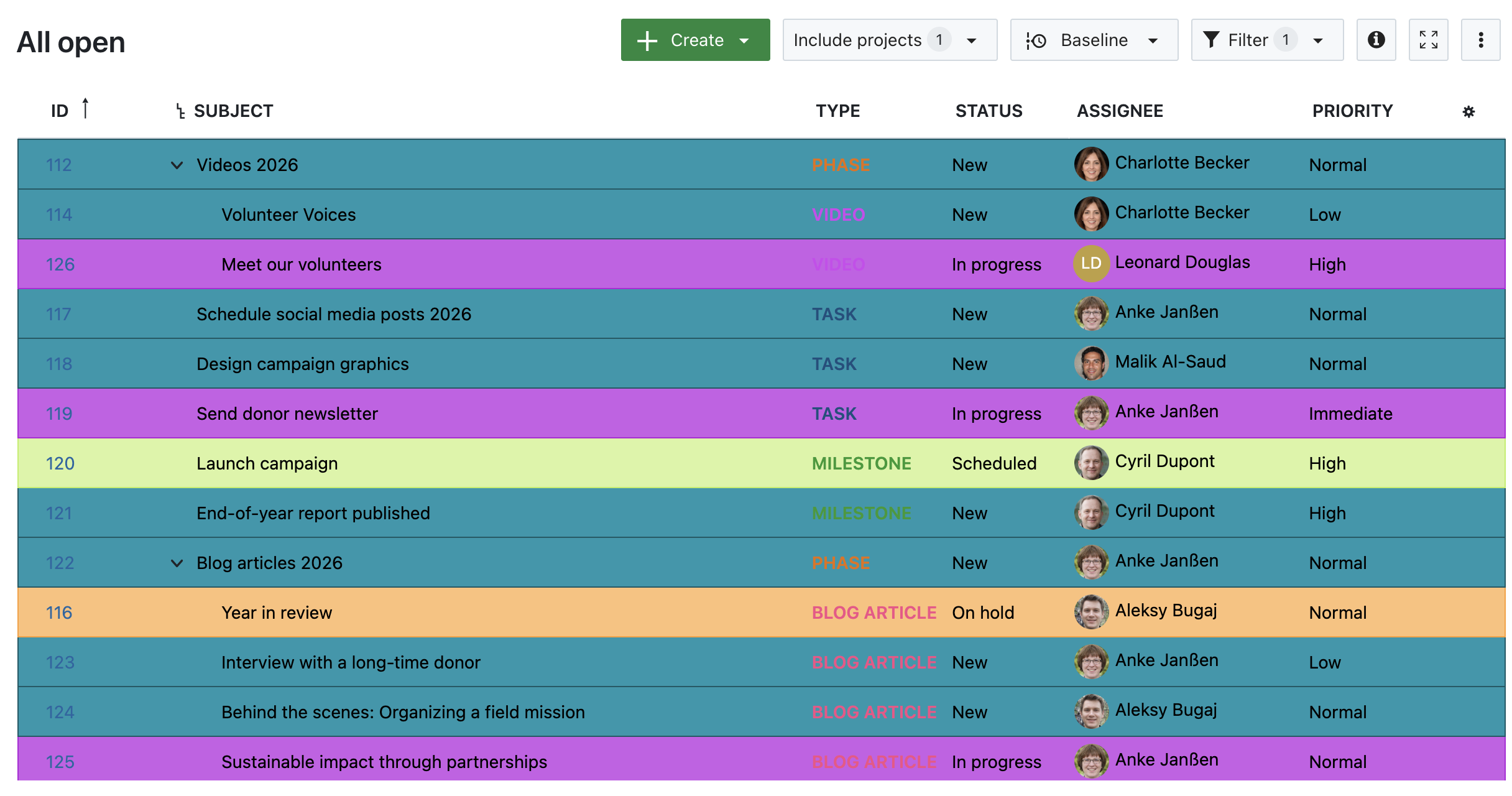
3. Highlighted by Status

Work package table in OpenProject, highlighted by Status

Image 3: A work package table in OpenProject, highlighted by Status.

4. Highlighted by Type

Work package table in OpenProject, highlighted by Type

Image 4: A work package table in OpenProject, highlighted by Type.

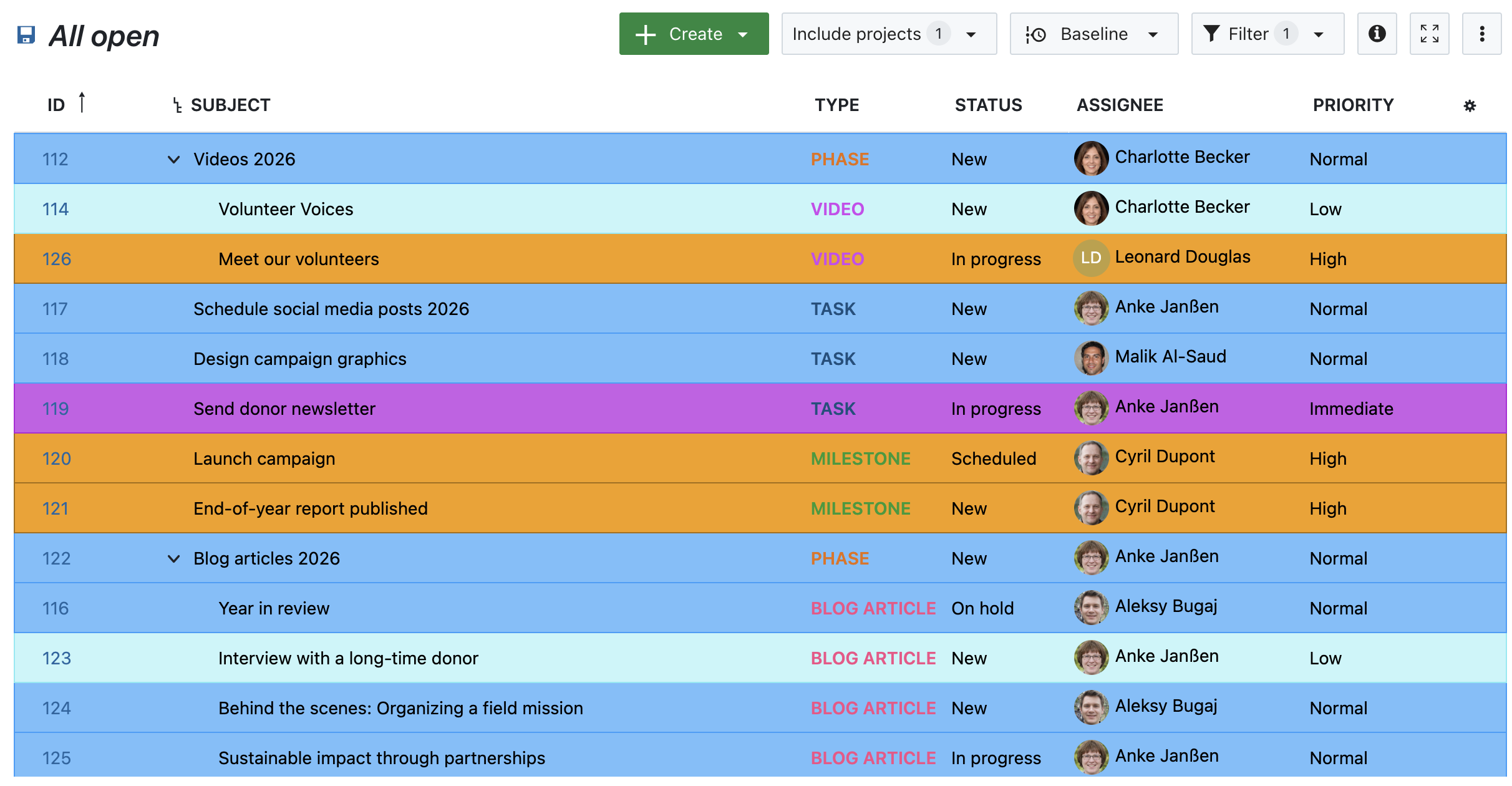
5. Highlighted by Priority

Work package table in OpenProject, highlighted by Priority

Image 5: A work package table in OpenProject, highlighted by Priority.


Other helpful features for prioritizing work packages

Attribute highlighting works best in combination with other prioritization features. Here are a few tools to support your growing team:

  • Work package priorities
    Assign Low, Normal, or High to indicate importance.

  • Status workflows
    Define which status transitions are possible and by whom, helping structure review and approval processes.

  • Date alerts and reminders
    Automatically notify assignees or watchers when a due date is approaching.

  • Versions
    Group work packages under a common version to align delivery and deadlines across tasks.

  • Custom fields
    Add structured information to work packages that you can then use for filtering, highlighting, or grouping.

Each of these features helps you bring structure to complexity — and together, they make it easier to stay focused.


Stay focused as you scale

Growth is exciting — but only sustainable if your tools grow with you. Features like Attribute highlighting can make a real difference: not by changing how you work, but by making it easier to see what matters.

With a growing team and more responsibilities, the ability to focus at a glance isn’t just a nice-to-have — it’s essential. Let OpenProject help you take that next step.

  •  

Classic meetings will be replaced: What changes with OpenProject 16.0

When we released dynamic meetings in version 13.1 of OpenProject, it was the start of a larger redesign of the Meetings module. Since, we have continued to improve it by adding new features and optimizing the design based on user feedback.

Until now, the new ‘dynamic’ meetings lived alongside the ‘classic’ meetings with the goal of eventually replacing it entirely. We are excited to announce that this May, we will be able to completely remove classic meetings and fully transition to the more modern and versatile dynamic meetings.

This blog article explains why we’re making this change, what it means for your existing classic meetings and what you can expect for the Meetings module in upcoming versions of OpenProject.

Important

With version 15.5 (coming April 2025), classic meetings will still be available but we strongly advise against using it. You can create one-time and recurring meetings instead.

What is changing regarding classic meetings

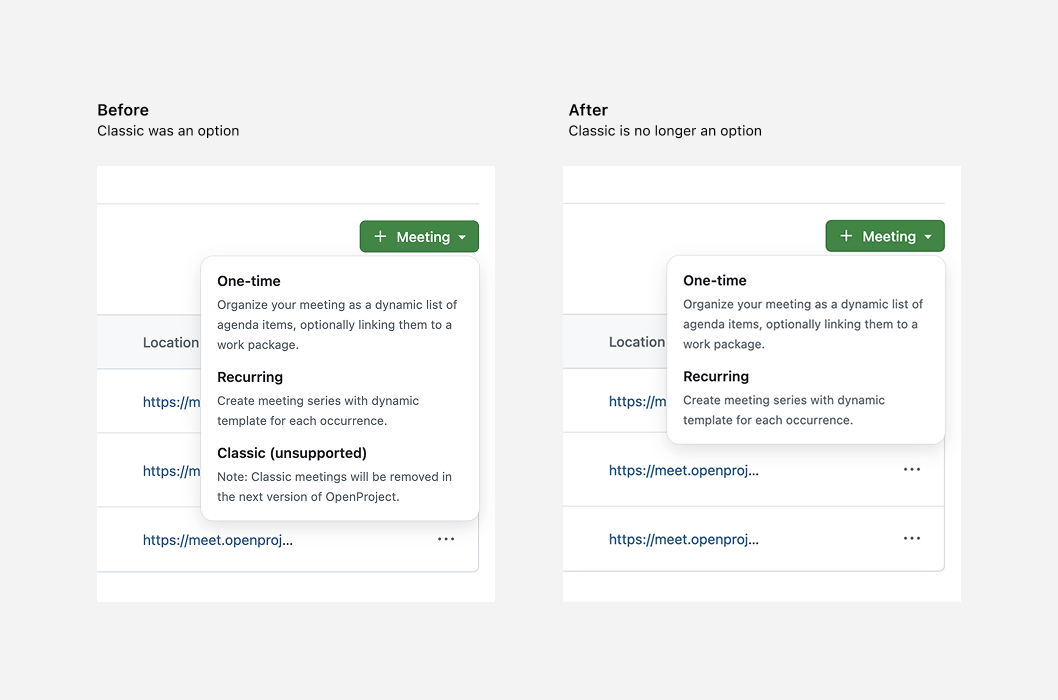
When you create a new meeting in OpenProject in version 15.4, you have three choices: one-time, recurring and classic. Starting with 16.0, the third ‘classic’ option will no longer be offered.

To further prepare our users, it will already be marked as ‘unsupported’ in the upcoming version (15.5) this April, 2025. The actual removal will happen in May 2025, with the release of OpenProject 16.0.

Classic meetings will no longer be a choice in the create meeting dropdown

Why we are removing classic meetings

Ever since 13.1, our goal has been to replace classic meetings with an entirely new, more modern and versatile Meetings module. Since the first release of dynamic meetings in version 13.1, we have added a number of new features and improvements, including:

  • grouping agenda items into sections
  • creating meeting series for recurring meetings
  • an iCal integration
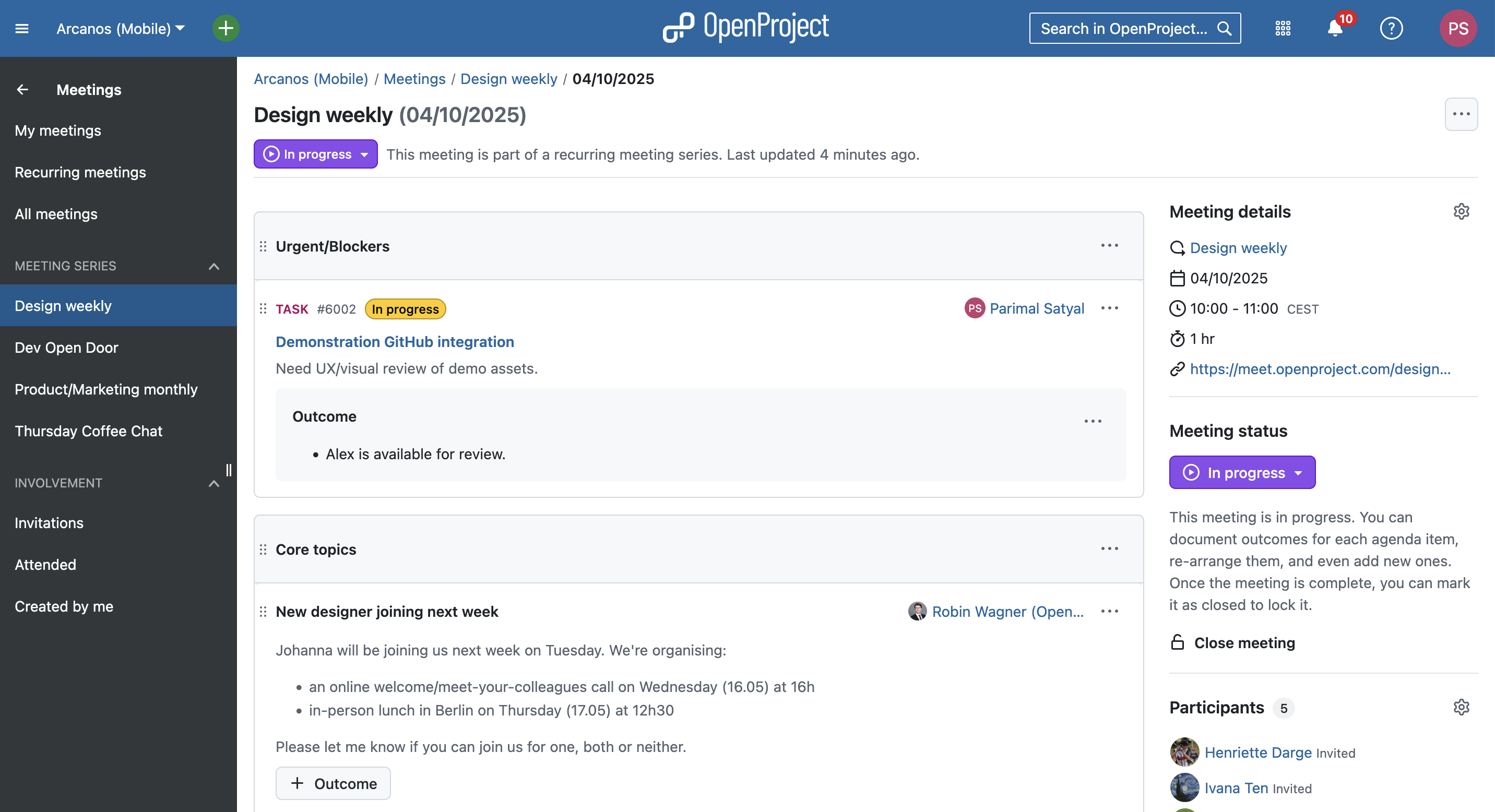
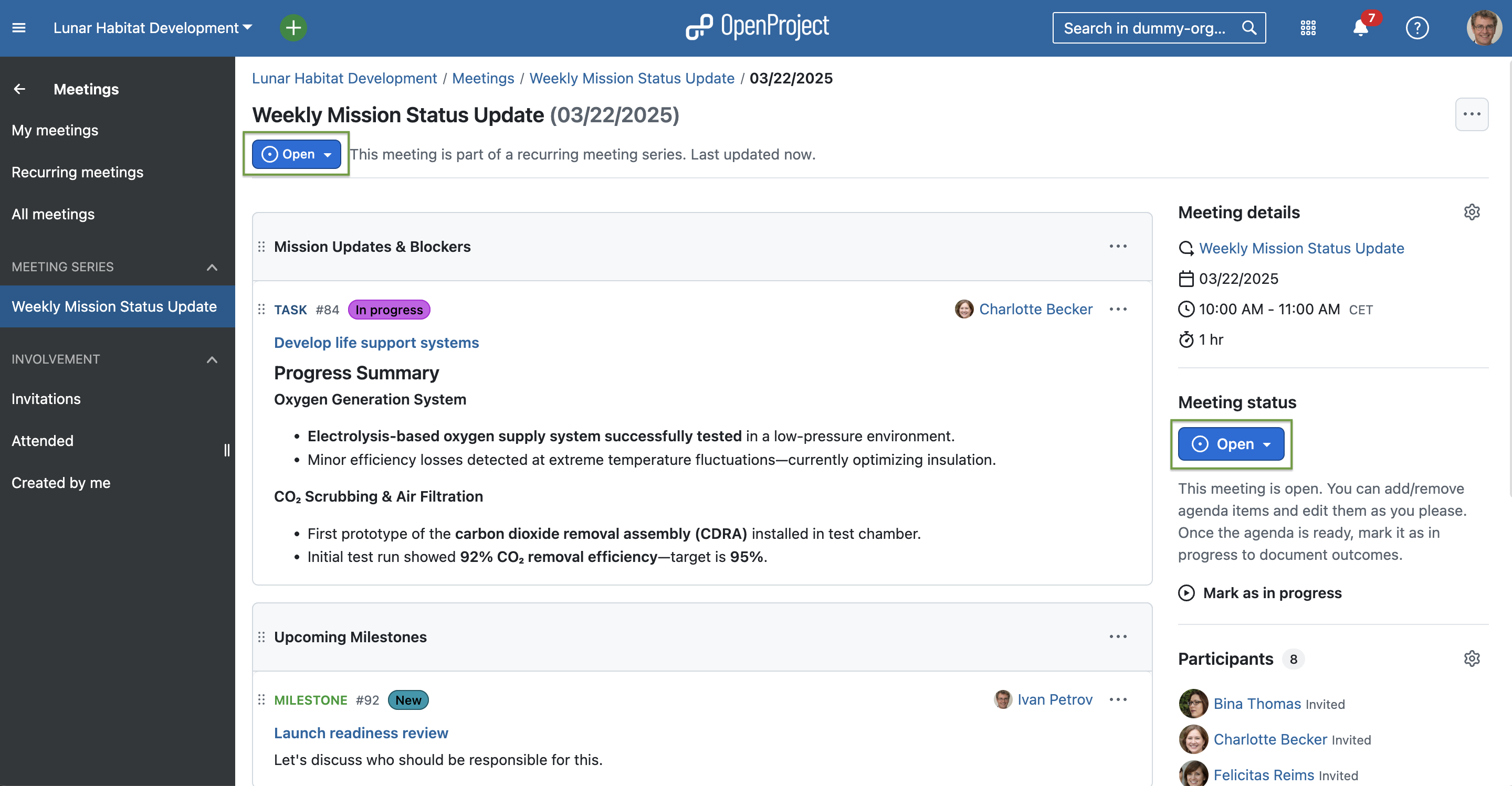
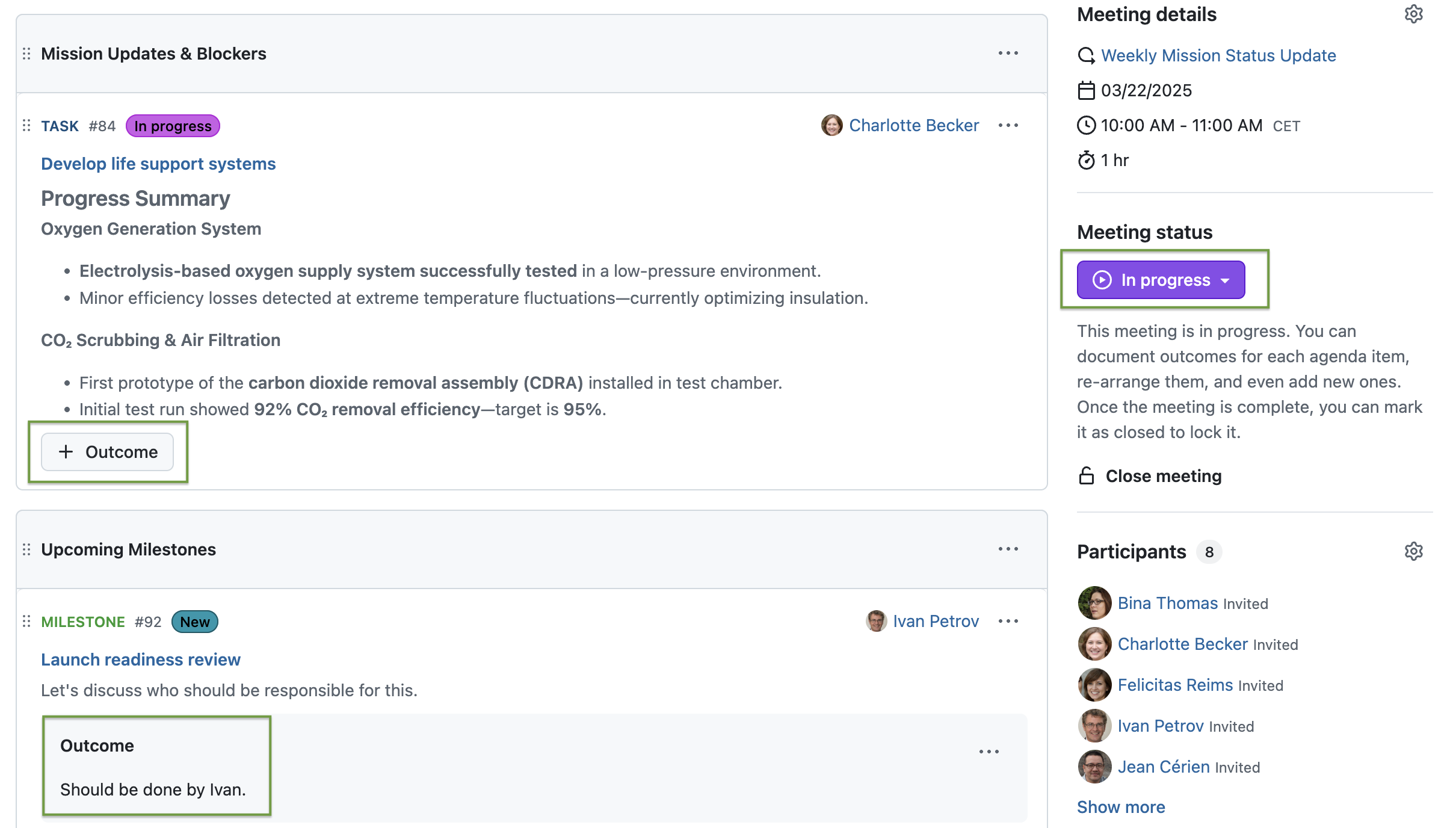
  • the ability to document outcomes for each agenda item when a meeting is in progress

An example meeting in progress with work packages, sections, meeting notes and outcomes

To completely replace classic meetings, we had to ensure that all existing features in the old module were available in the new one and that we had a clear migration strategy.

With the release of meeting outcomes in OpenProject 15.4, we now meet both conditions. Our users have also had a chance to get used the new Meetings module over the past year.

Migration to 16.0: What happens to your existing classic meetings

All existing classic meetings will be converted to dynamic (one-time) meetings when migrating to OpenProject 16.0.

How will former classic meetings be displayed?

Since classic meetings did not support individual agenda items, your older meetings will simply contain a single agenda item with the content of the ‘Agenda’ tab. This will have a single outcome, with the content of the ‘Minutes’ tab.

Can I still edit my former classic meetings?

All past classic meetings will be set to a ‘Closed’ state, which makes them read-only. However, roles that have the permission to manage the agenda item will nevertheless be able to modify the meeting status and thereby re-open the meeting to change the content.

What happens with already-created upcoming classic meetings?

Upcoming classic meetings will also be converted to dynamic meetings but with an ‘Open’ meeting state.

What happens to other information and data in my classic meetings?

All existing meeting details, participant list and attachments will be retained unchanged. All information concerning the agenda, the minutes and meetings data will be preserved. Meeting modification history will, however, not be available.

Continuous improvement

Although sunsetting classic meetings marks the completion of a planned transition to the new Meetings module, we will continue to add new features and optimize the design based on user feedback.

Very soon, we will be adding meeting backlogs, allowing you to “park” agenda items in a separate space for more efficient meeting planning. This includes a ‘series’ backlog that is shared with all occurrences of a meeting, enabling you to move things in and out of the backlog to particular occurrences.

We will also update the admin permissions model related to meetings to make them easier to understand and better adapted to new features.

Your feedback

Our motivation for all these changes is to enable teams to have more efficient, better-organized meetings. We extensively use the Meetings module internally at OpenProject and have received positive feedback from a number of our users.

Your feedback helps us know if we’re going in the right direction, if there are things we can improve on and what our users are missing.

As an open source software company, we value the ideas and feedback of our user Community. If you have opinions about these changes or have feature requests, feel free to join our Community instance and share your thoughts on upcoming features related to meetings.

Thank you for your continued support and for being a part of the OpenProject Community.

  •  

Portuguese OpenProject website and user guides now available

At OpenProject, we are continuously working to make our platform as accessible as possible for all users. A big part of that is offering our content in multiple languages. We are excited to announce that our website and user guides are now available in Portuguese!

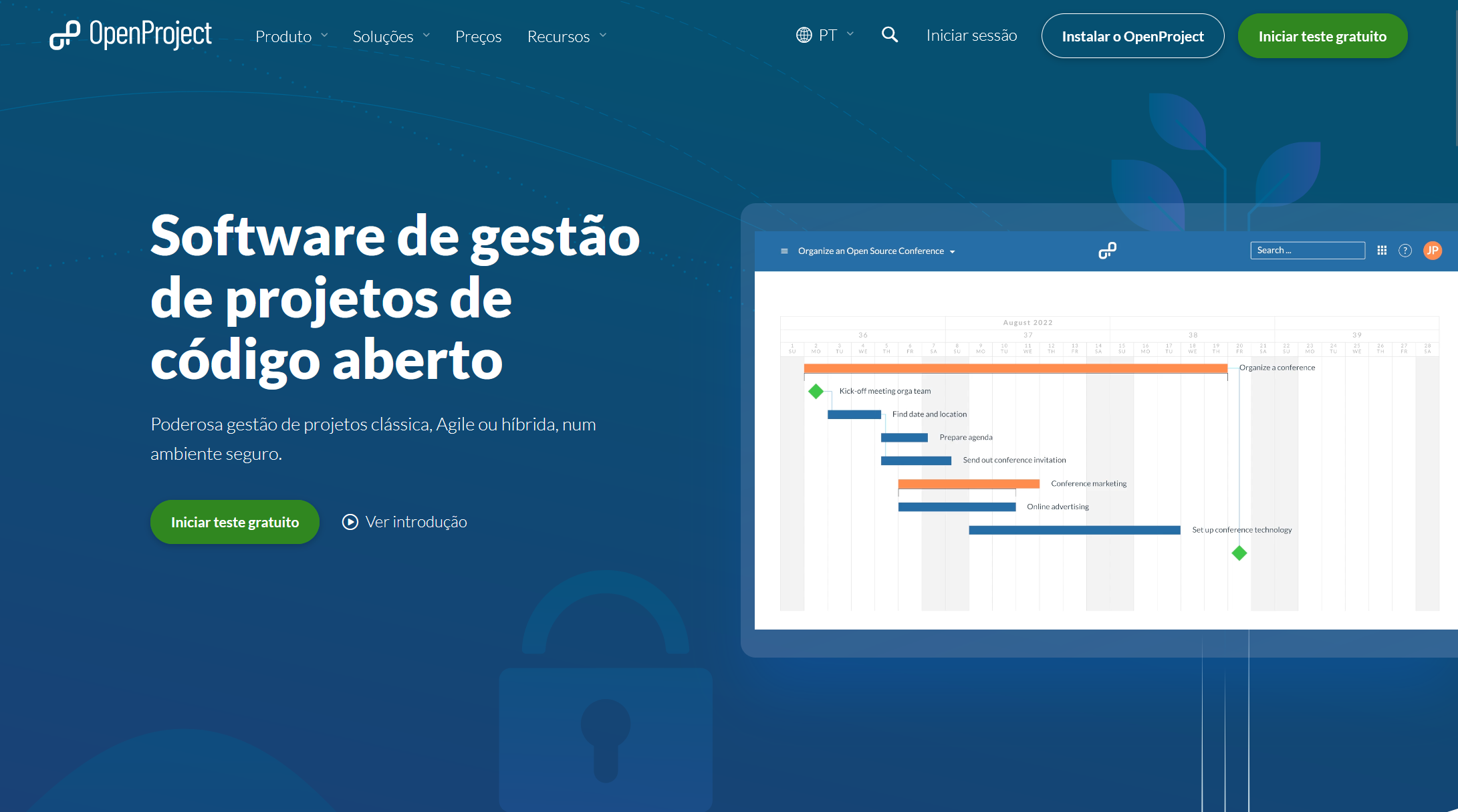
OpenProject website in Portuguese

We’re happy to offer our Portuguese-speaking community a fully translated version of our website. While not all past blog articles will be translated, relevant new content will be published in Portuguese moving forward.

Screenshot OpenProject Portuguese website

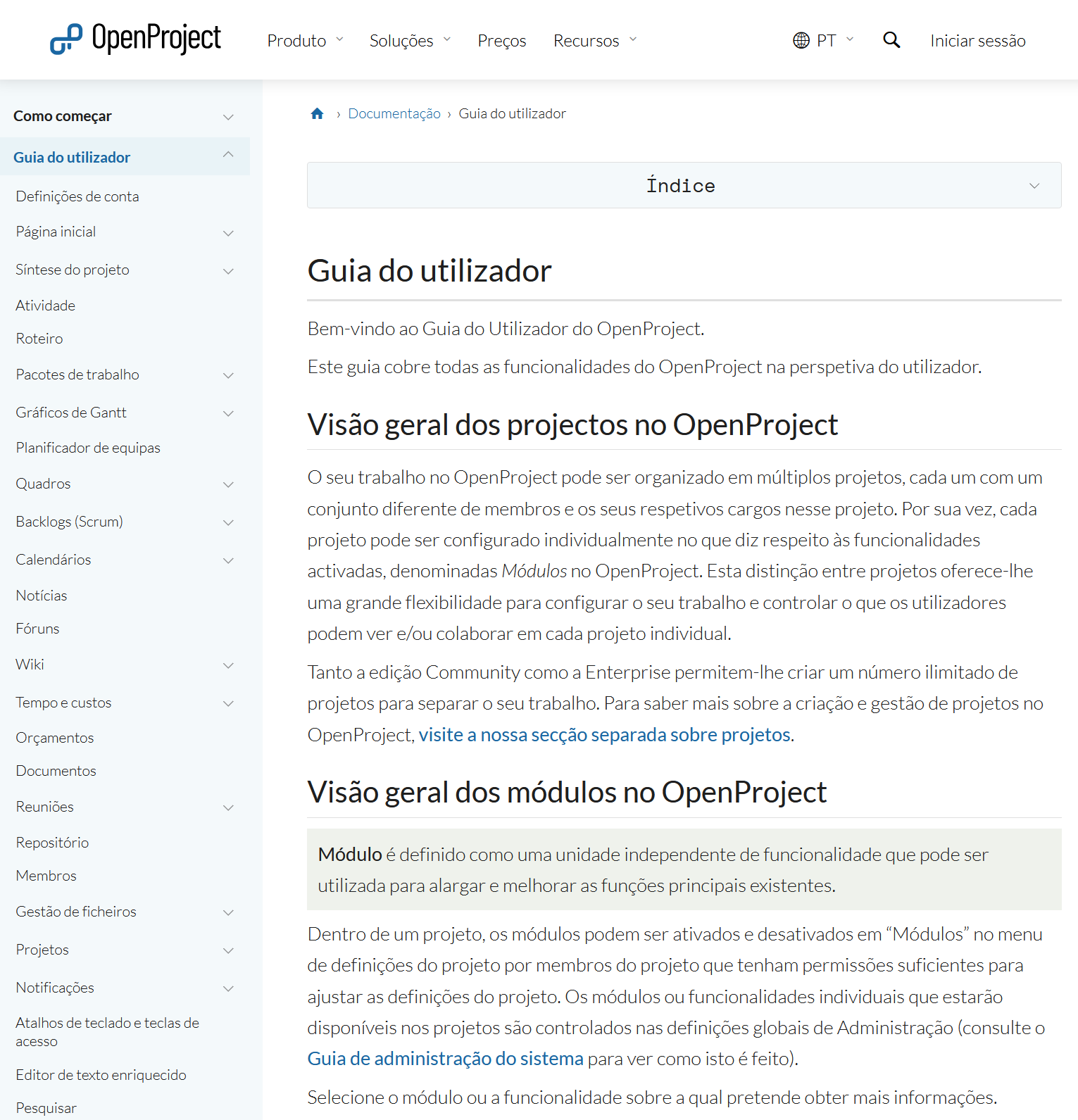
OpenProject user guide in Portuguese

Also, we have translated the OpenProject getting started guide as well as the user guide to Portuguese. These resources explain OpenProject’s features and functionality in detail, helping new and experienced users alike.

Screenshot of OpenProject user guide in Portuguese

Documentation in other languages

In addition to Portuguese, OpenProject user guides are also available in:

Help us translate OpenProject

OpenProject translations are managed publicly via Crowdin, and we welcome contributions from our global Community! You can help translate both the OpenProject application and the documentation.

We love seeing our community get involved — thank you for helping make OpenProject accessible to everyone!

  •  

How to create, configure and manage your projects with OpenProject

You decided to take your project management to the next level and chose OpenProject as your open source project management software? You might be excited to get started. But as usual with a new tool: where to start? We put together an overview of the first steps to manage your projects in OpenProject. Please note that all steps described in this article require a project admin status.

Here’s an overview of this article for your quick navigation:

Start your projects

Create and open projects

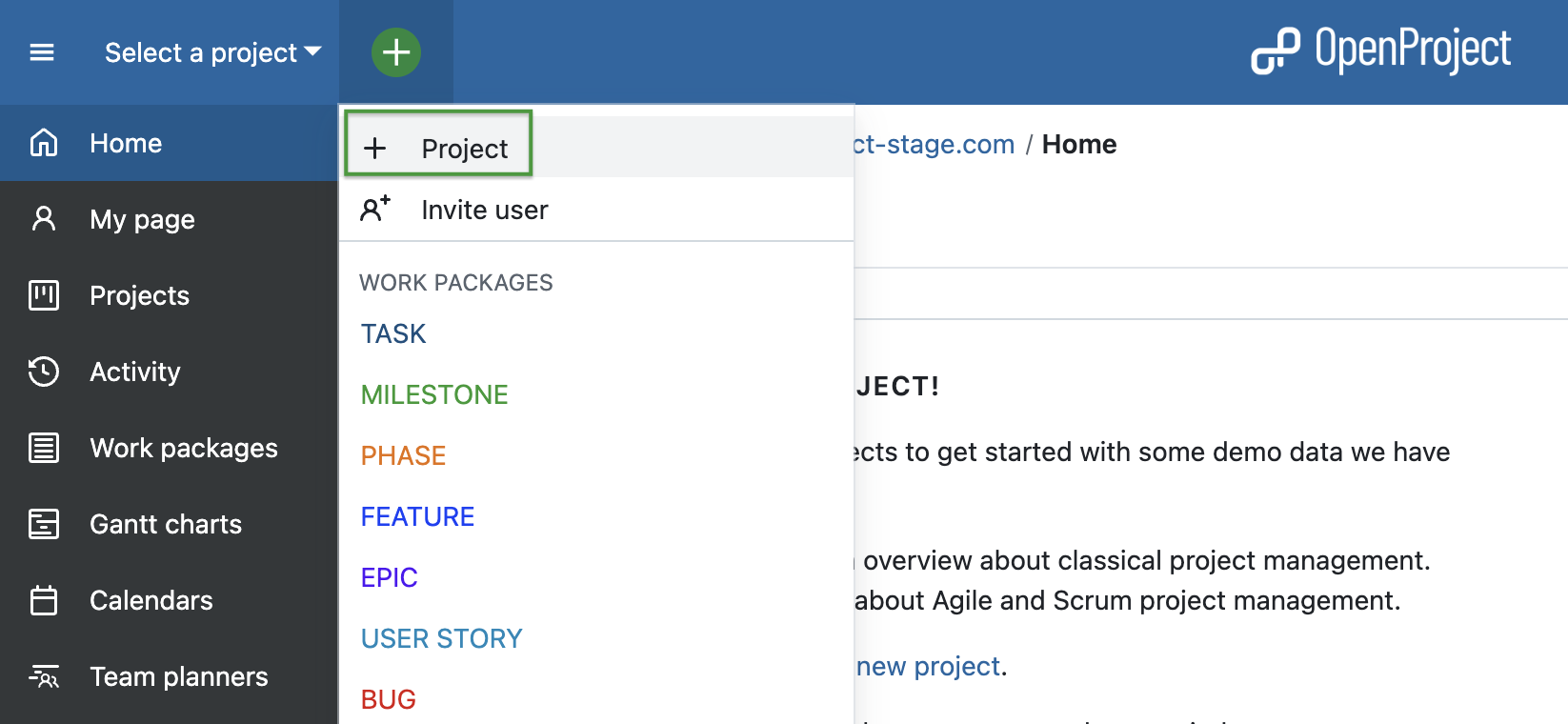
First of all, you would want to create a project. Log in to OpenProject and on the first page in the top left corner under Select a Project you can create a new project by clicking + Project.

Add new project in OpenProject - via project lists dropdown menu

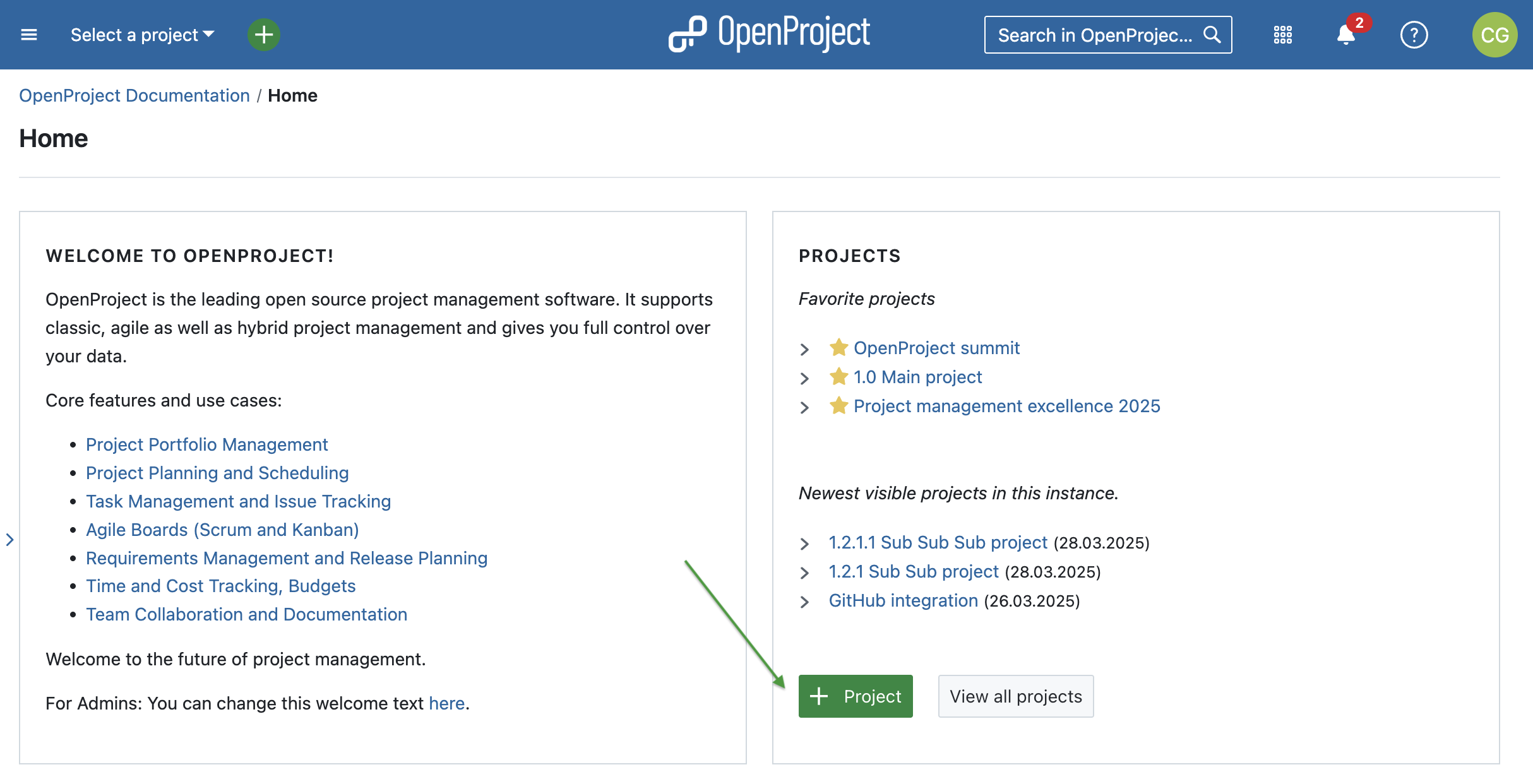
Alternatively, on the same start page, in the Projects widget you can create a new project by clicking on the green + Project button. Please note that you can remove, add and change position of widgets on your project overview page.

Add new project in OpenProject - via project overview page

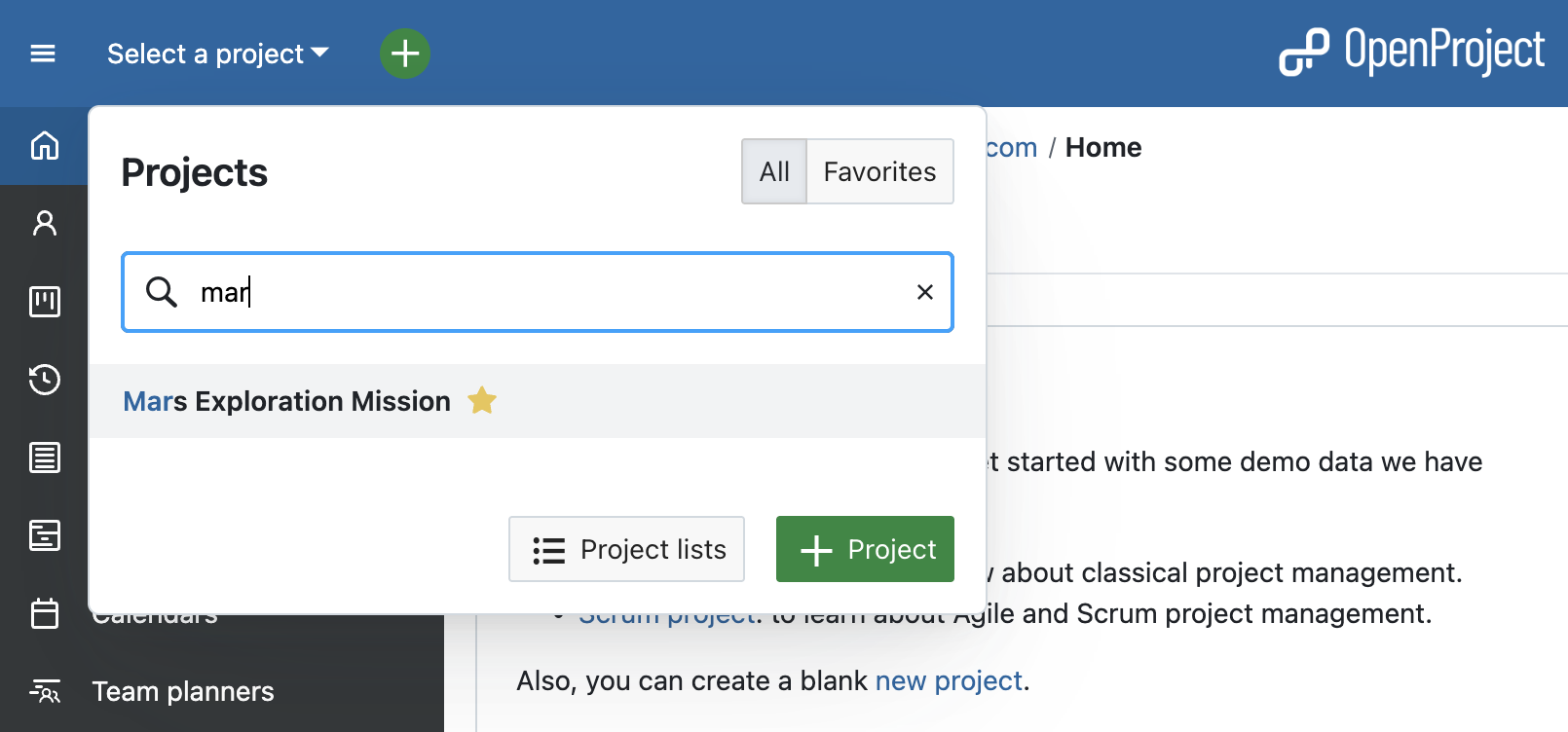
Once you or other team members created some projects in OpenProject, you can log in and choose a project to open. In order to open an existing project, click the Select a project drop-down menu in the upper left corner of the header and select the project you want to open. You can also start by typing in a project name to filter by the project’s title.

Search for a project in OpenProject

Please note that you have to be a member of a project to be able to see and select it.

[!TIP] You will also see a project if a work package from this project was shared with you, but in this case only the Work packages module and the shared work package will be visible to you within the project.

Project hierarchy

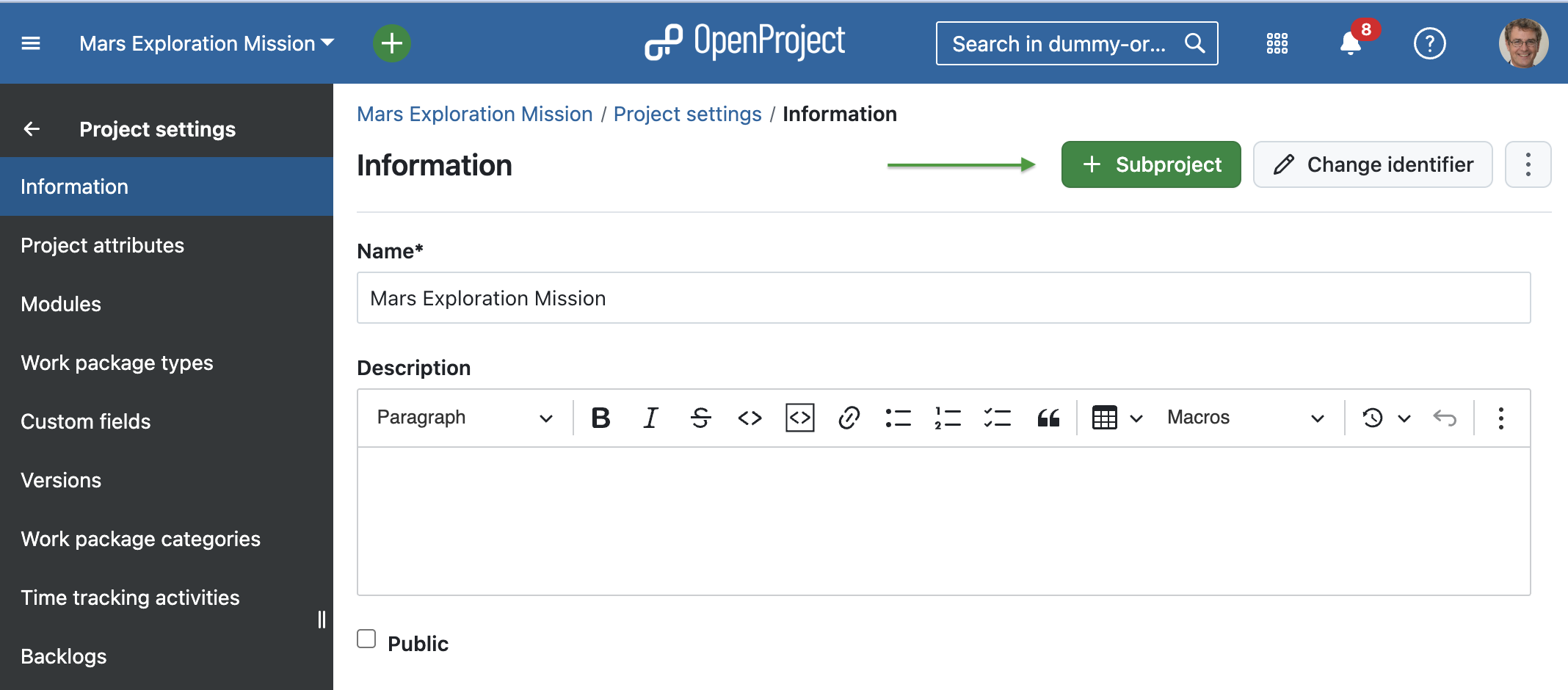
OpenProject allows you to organize your projects in a hierarchy by creating projects with subprojects. In order to create a subproject, you can do so in the project setting of the main project.

OpenProject screenshot: create subprojects in the project setting of the main project

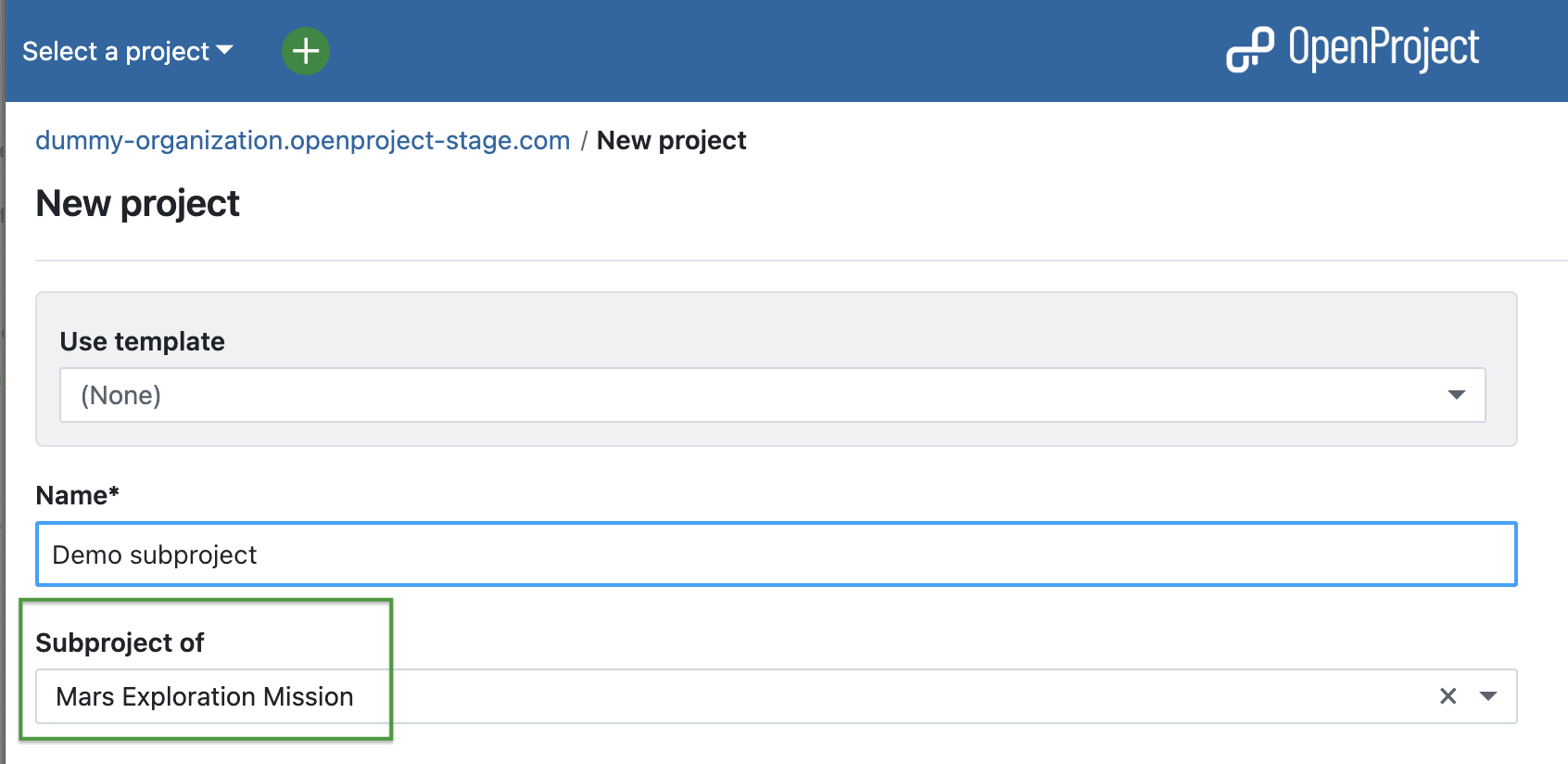
You can also create a project and define its parent project in the settings when creating a new project.

OpenProject screenshot: Define parent when creating a new project

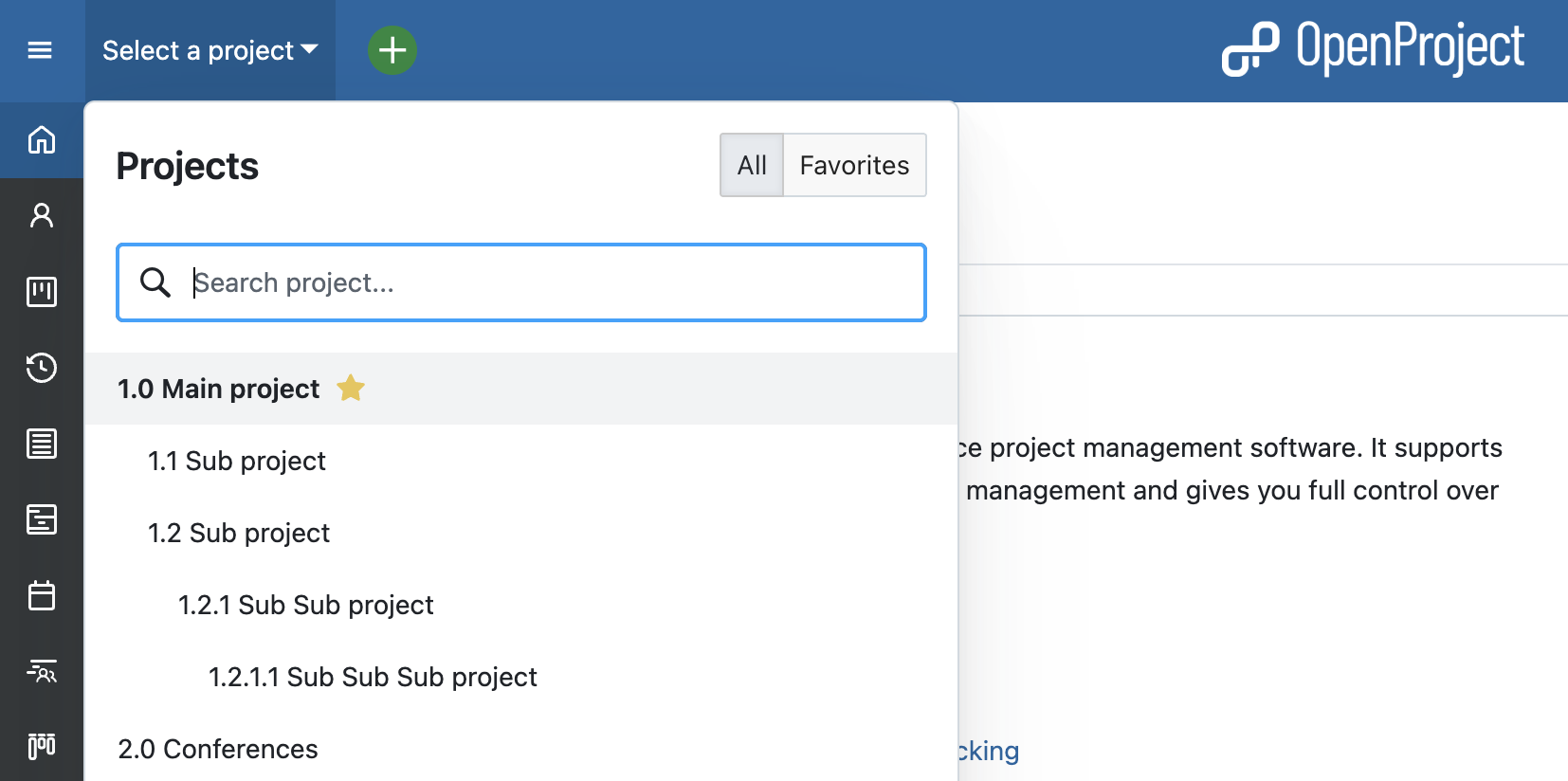
Projects and subprojects are displayed according to their hierarchy in the Select a project drop-down menu.

OpenProject screenshot: create subprojects in the dropdown menu

Project dashboard

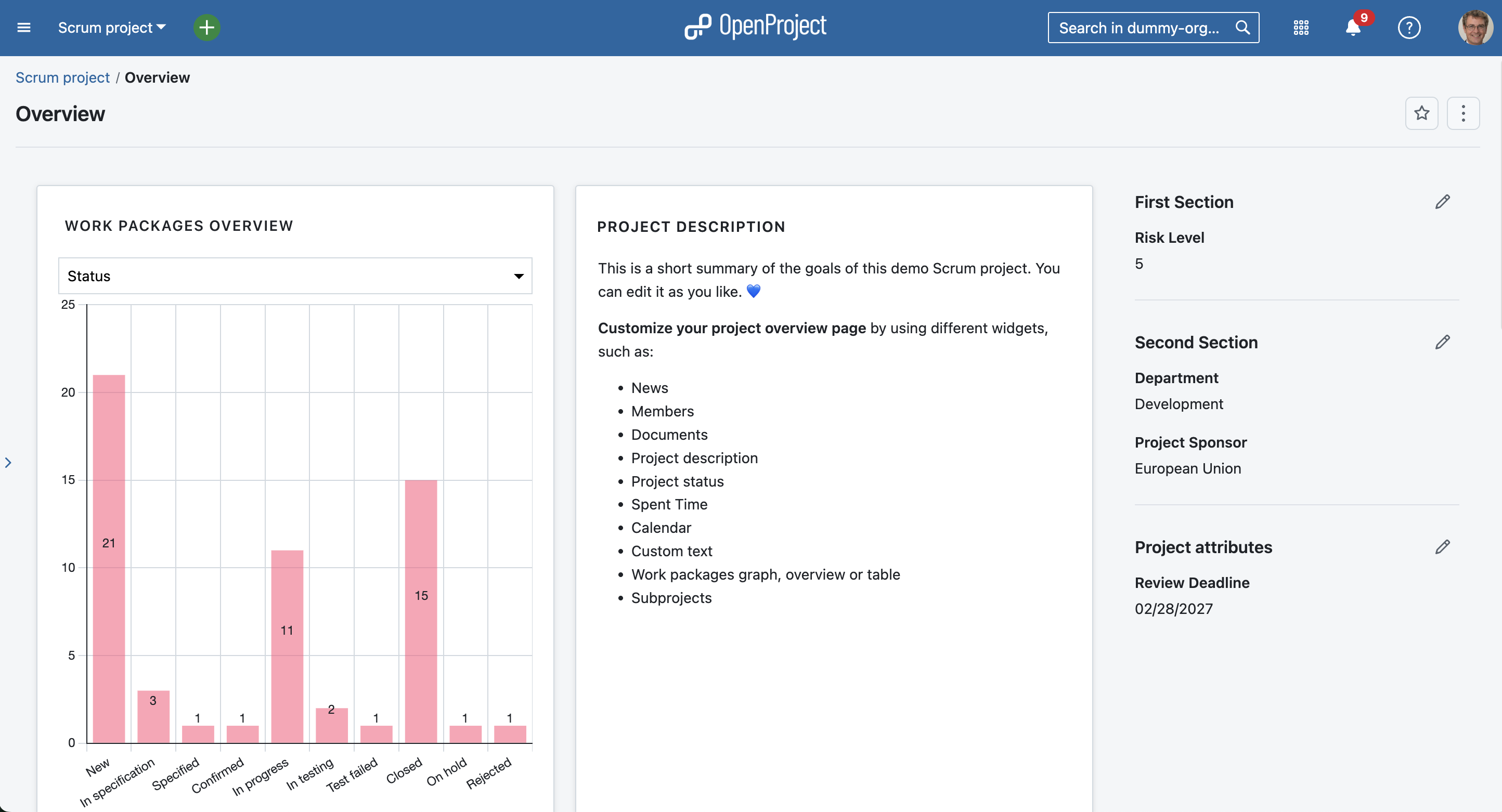
In order to manage your projects successfully, you should make sure to be up to date about the status at all times. This allows you to keep the project on track and readjust quickly if needed. OpenProject’s project overview is a single dashboard page with important project information.

You can display relevant information for your team, such as members, news, project description, work package reports, or a project status. Remove or add project information as widgets to the dashboard, and order and re-size the widgets according to your needs.

OpenProject overview page which functions as a project dashboard

There are several widgets to choose from, such as:

  • News,
  • Members,
  • Documents,
  • Project description,
  • Project status,
  • Spent time,
  • Calendar,
  • Subprojects,
  • Work packages graph, overview or table,
  • Custom text.

Project portfolio

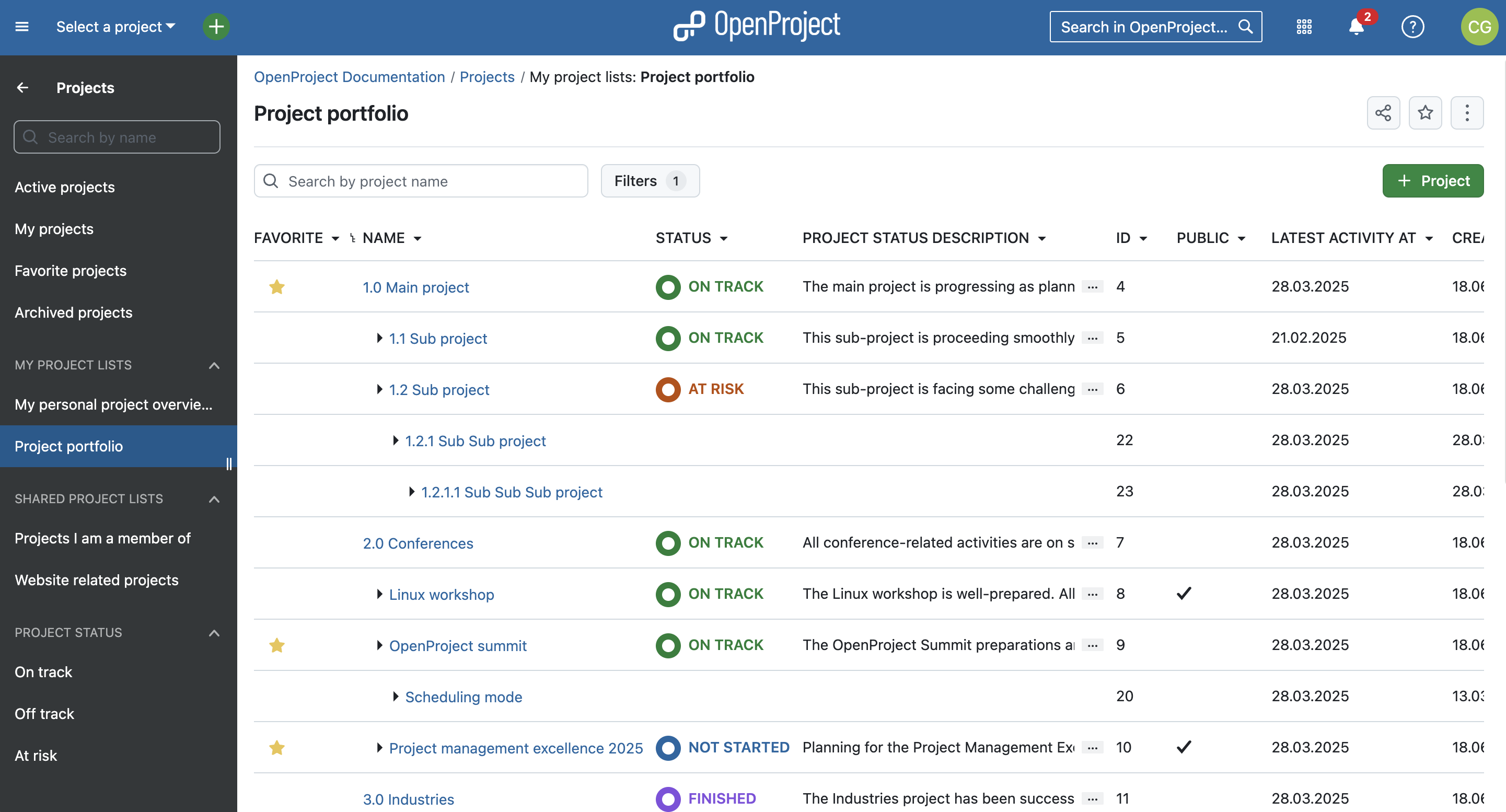
To get an overview of all projects that you are involved in, you can check the status and more details under Project lists in the top left corner underneath Select a project. This overview shows you all projects with attributes such as status, latest activity and description. Use filters to customize the view and show the information you need. You can also create custom fields to add any custom information you want.

As with work packages, you can customize your project list, save it as a new view and also add it to your favorites. Read more in our documentation on project lists.

OpenProject project lists that function as a project portfolio

Add projects to your favorites

You might have noticed the yellow stars next to some projects in the screenshots above. These are favorite projects. Users can add projects to their favorites by either clicking the star icon in the project list (first column). Or by navigating to the project overview page and activating the star on the right upper corner. Favorites are personal and you don’t have to be an admin to use this feature.

Project templates

In order to save time and be coherent across projects, use the project templates in OpenProject. You just create a new project and then save it as a template. You can also make a project you are already working with a project template by changing the project settings to Set as a template. With a project template, you set up everything you want available for future projects, such as:

  • Project members,
  • Modules,
  • Default project structure in the Gantt chart,
  • Work package templates and more.

Import tasks to OpenProject

In case you are managing your projects in Excel or any other project management software, OpenProject offers you an Excel Sync to upload your tasks into the OpenProject application. First export your tasks from the legacy project management system and then use the Excel Sync to upload them to OpenProject.

Organize and visualize your project

Projects vary and require a different view by project. Depending on what type of projects you are managing, you might want to use a work package table view, Agile Boards, Gantt charts, Backlogs, Task Board or a Roadmap. OpenProject offers both traditional and agile project management and allows you to combine both to a hybrid project management approach.

We would like to show you the major OpenProject modules that offer different project views. However, as mentioned, you can also combine them.

Work packages

Work packages are the base for your project collaboration in OpenProject. They are items in a project (such as tasks, features, risks, user stories, bugs, change requests – and any other type you want to create) and capture various additional attributes, such as status, assignee, priority, or due date. The work package table view shows all work packages as a list with selected attributes in the columns. You can customize the view by filtering by attributes and choosing the attributes shown in the columns, and then save your customized view.

OpenProject work packages table view

Gantt charts

The Gantt charts module in OpenProject displays the work packages in a timeline. You can collaboratively create and manage your project plan. Have your project timelines available for all team members and share up-to-date information with stakeholders. You can add start and finish date and adapt it with drag and drop in the Gantt chart. Also, you can add dependencies, predecessor or successors within the Gantt chart.

Tip

In March 2025, we added an automatic scheduling mode which simplifies managing complex project setups. Read more about automatic and manual scheduling modes in our user guide.

OpenProject gantt chart

Agile boards

Boards support agile project management methodologies, such as Scrum or Kanban. Our agile boards can be for anything you would like to keep track of within your projects: Tasks to be done, Bugs to be fixed, Articles to be reviewed, Features to be developed, Risks to be monitored, Ideas to be spread, anything! The boards consist of lists (columns) and cards.

You can choose between a Basic board (Community feature) and various Action boards (Enterprise add-on). The following board shows a Kanban example where you move your work packages from one status to the next. If you want to find out more about the different agile boards, please click here.

OpenProject agile kanban board

Backlogs

The starting point for effective work in Scrum teams is a well-maintained and prioritized product backlog as well as the creation of sprint backlogs. In OpenProject, you can easily record and specify requirements represented by user stories. Moreover, you can respond to inquiries and sort them by priority for implementation.

Product backlog

Task boards for Scrum meetings (Backlogs)

To support daily scrum meetings, all of a team’s tasks and sprint impediments are recorded in a digital task board. The digital task board thus allows team members to get a fast overview of the current state of a sprint.

OpenProject task board for backlogs in scrum projects

Roadmap

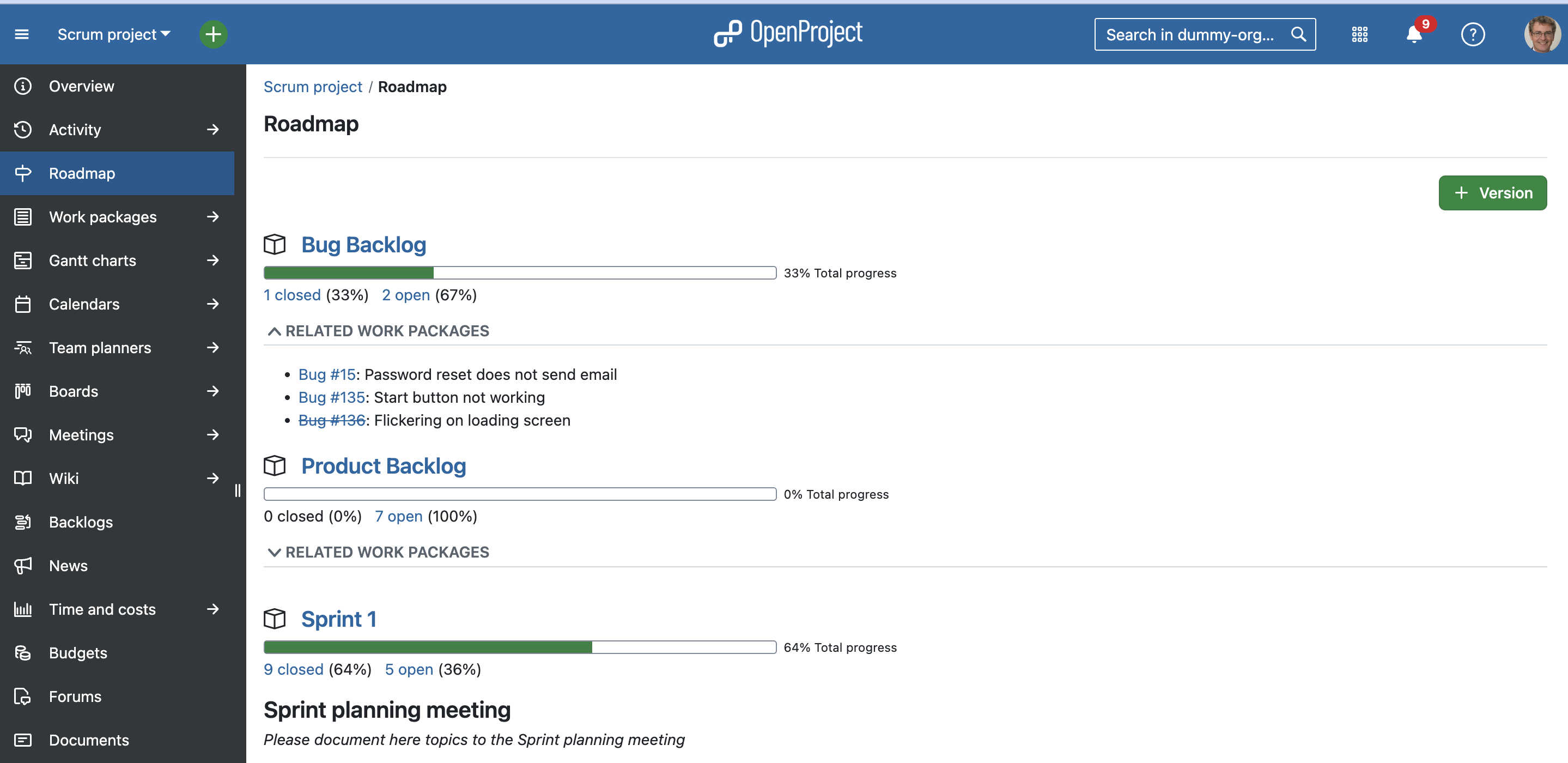
Share your product roadmap with your stakeholders, get feedback about your ideas and break it down into a detailed release plan. In the roadmap, you can see all work packages and their status listed by versions at a glance. For each version, the related work package can be assessed from the list displayed in the roadmap view. Subjects which are crossed out represent closed work packages.

OpenProject Roadmap


More support and information

We included quite a few links to our documentation in this article which also entails videos to make to easier for you to discover how to use OpenProject. If you would like to discover more videos, please check out the OpenProject YouTube channel.

Other guides and articles that might be helpful for you:

  •  

High-quality documentation and videos: Insights from OpenProject’s video producer

With a rich feature set comes a certain degree of complexity. That’s why good documentation matters, especially in the form of video tutorials that make it easier to learn and navigate OpenProject. In this article, we share our approach to high-quality documentation and video content, and ask our video production manager Dicle what makes a great OpenProject video.

High quality software documentation

When we ask our users what they love about OpenProject, we often hear great feedback about our documentation. This is encouraging because we believe in clear, well-structured, and complete documentation as the foundation for user success.

With monthly releases, we also update our documentation regularly. Of course, our product team strives to make OpenProject as intuitive as possible. But as the platform grows, some features require extra explanation. After all, software is only as good as users’ ability to make the most of it.

That’s why high-quality documentation — and especially helpful video content — is so important to us.

User documentation in English, German, Spanish and French

High-quality documentation starts with accessibility. That’s why key parts of our comprehensive documentation are available not only in English, our primary language, but also in German, Spanish, and French. This includes all user-focused guides designed to particularly support first-time users:

Tip

We will soon be providing user documentation in Portuguese as well. As our documentation expands each month, we take the time to ensure high-quality translations.

More technical sections, such as the installation and operations guide or the system admin guide remain in English to serve IT professionals.

High quality video content: Tutorials, release overviews and more

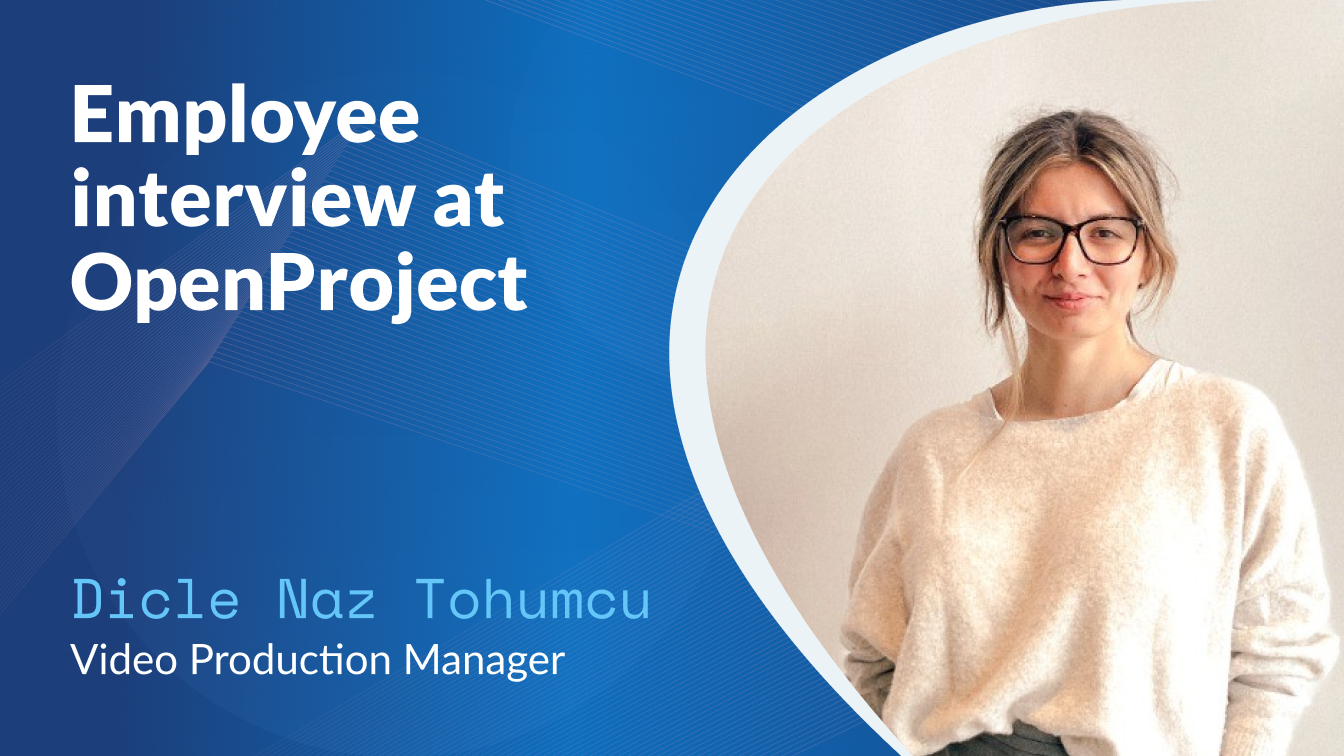
To further enhance our documentation and website content, we welcomed a dedicated video producer to our team in January 2025, Dicle Naz Tohumcu. With her expertise in video content, she creates engaging tutorials, walkthroughs, and release overviews. Her videos help users quickly grasp OpenProject’s key features and workflows.

Subscribe to our YouTube channel

Looking for a specific video? Browse our YouTube channel for:

  • Feature tutorials
  • Getting started tips
  • Product demo webinars
  • Release overviews

Since January 2025, we’ve been publishing videos more frequently, and continue to do so. For example, here are a few recent uploads:

Now is the perfect time to subscribe and stay updated!

Interview with OpenProject’s Video Production Manager Dicle

Previously, we’ve introduced various OpenProject team members, such as Customer Success Manager Samantha or Senior Software Engineer Marcello. Now, let’s meet Dicle Naz Tohumcu, our Video Production Manager, and get her insights on OpenProject video content.

Dicle Naz Tohumcu, OpenProject Video Production Manager

Hi Dicle, would you tell us a bit about yourself?

I’m from Ankara, Turkey, with a background in directing fashion, product, and commercial videos. Over time, my work has expanded into content production, with a focus on AI and digitalization.

What do you like about OpenProject?

The slogan “open source, open mind” perfectly captures its spirit, and that’s exactly what I love about OpenProject. The people here are open-minded and collaborative, and it’s exciting to contribute to a product that is constantly evolving.

What makes a good OpenProject video in your opinion?

The most important aspect is enhancing the user experience by clearly presenting new features and improvements. Our goal is to ensure users understand and benefit from updates while also highlighting team collaboration and workflow efficiency. I joined two months ago, and moving forward, one of my goals is to create a diverse range of videos that cover different aspects of OpenProject, using various formats and platforms to reach our audience in the best possible way.

We value user feedback

We’re always looking to improve our documentation and video content. Is there a tutorial you’d like to see, or a topic that needs more explanation? Let us know by commenting on our YouTube videos or joining the discussion in our Community forums.

  •  

Migrating between installation types: What to consider when switching OpenProject setups

Whether you’re moving from Docker to a package-based installation, changing databases, or upgrading an older setup, migrating your OpenProject installation can raise important questions. To help you navigate the process, we’ve compiled an overview of supported migration paths, key considerations, and links to detailed documentation. This article gives you the big picture. For in-depth instructions, please refer to our documentation.

Quick navigation overview:

Why switch installations — our recommendation

OpenProject supports several installation methods: Docker, DEB/RPM packages, Helm Charts for Kubernetes, and manual installations. Depending on your infrastructure and technical requirements, one setup may suit you better than another.

For most users, we recommend the Docker-based installation. It’s the easiest to set up, requires minimal system configuration, and is simple to maintain — especially when updating to new OpenProject versions. This makes Docker the most future-proof option.

Important

We will not build packages for new Linux versions (such as Ubuntu 24.04). We will, however, keep releasing new package versions for the currently supported Linux versions until their EOL (end of life). Learn more in our packaged installation documentation.

Migration between Docker and packaged installations

It is possible to migrate between Docker and packaged (DEB/RPM) installations in both directions. In both cases, the process involves:

  • Exporting the PostgreSQL database,
  • Copying attachments and configuration files,
  • Re-importing the data in the new environment.

You might consider migrating to a packaged installation if your IT environment requires tight system-level integration, custom deployment configurations, or traditional OS-based monitoring tools. In this case, please follow this detailed guide in our documentation: Migrating your packaged OpenProject installation to another environment.

On the other hand, migrating from a packaged installation to Docker is a future-proof choice. It simplifies upgrades and deployments — especially since OpenProject will no longer release packages for newer OS versions such as Ubuntu 24.04, and recommends Docker-based installations for long-term use. To switch from packaged to Docker installation, please see this detailed guide in our documentation.

Migration to Kubernetes (Helm)

Migrating to Kubernetes using Helm charts is a powerful option for teams that need to scale OpenProject in dynamic environments or integrate it into an existing Kubernetes infrastructure. This setup is especially relevant for DevOps teams managing multiple services in containers.

While we don’t provide a step-by-step migration guide at this point, the Helm-based deployment is well-documented and maintained. Please note that this path requires advanced Kubernetes and Helm knowledge.

Tip

Helm-based deployments are ideal for teams with Kubernetes experience. If you’re new to Kubernetes, consider evaluating Docker first — it provides a more accessible starting point with fewer moving parts.

To learn more about the benefits and setup, see this article that compares different OpenProject installation types, with a focus on Helm charts.

Migration between PostgreSQL versions

OpenProject uses PostgreSQL as its database backend. If you’re upgrading PostgreSQL (for example, from version 10 to version 13), you’ll need to migrate the database using a controlled process to avoid data loss or compatibility issues.

We provide specific documentation depending on how OpenProject was installed:

Make sure to create a full backup before performing any PostgreSQL migration.

Tip

Instead of upgrading the database in place, we recommend doing a backup of OpenProject and restoring it on a newly installed database with the newer version where possible.

Migration from an old MySQL database

If you’re using a much older version of OpenProject, you may not be able to directly upgrade to the current version. In that case, we recommend a fresh installation of the latest version and a manual migration of your data.

This method is especially relevant if you’re switching from an unsupported OS or an outdated setup. Please read our documentation on upgrading older OpenProject versions.


Conclusion: Migrations are manageable

Most migrations between installation types are technically straightforward — especially with a clear plan and the right tools. Always make sure to consult our installation documentation and follow our backup and restore guide before making changes.

If you have questions or want to exchange with other users, feel free to ask in the Community forum.

  •  

OpenProject recognized as top project management software in 2025 by Gartner Digital Markets

OpenProject among top products in 2025

We are thrilled to announce that OpenProject has once again been recognized by Gartner Digital Markets in 2025, earning accolades across multiple platforms for our unwavering commitment to excellence in project management solutions.

Gartner Digital Markets is a Gartner business unit composed of Capterra, GetApp, and Software Advice. It is the world’s premier source for software vendors to connect with in-market buyers, through research, reviews, and lead generation.

In 2025, OpenProject has been honored with the following distinctions:

OpenProject is recognized as top product by Gartner in 2025

In 2024, OpenProject achieved an impressive overall score of 4.5 out of 5 across all three Gartner Digital Markets platforms: Capterra, GetApp, and Software Advice. This year, we have continued to build on that success, higher improving our rating to 4.6 out of 5, maintaining our high standards and dedication to our users. Our consistent recognition by Gartner Digital Markets is a testament to the trust and satisfaction of our user community.

Gratitude to our Community

We extend our heartfelt gratitude to our users for their continuous support and valuable feedback. Your insights drive us to innovate and improve, ensuring that OpenProject remains at the forefront of project management solutions.

As we celebrate these achievements, we remain committed to empowering teams worldwide with robust, reliable, and innovative project management solutions.

Want to review OpenProject yourself?

We greatly appreciate your valuable feedback and look forward to many more reviews.

  •  

Best practice: Efficient ticket management for municipal administrations

How do cities and municipalities keep track of internal tasks, complaints, and maintenance requests? Without a structured solution, delays, unclear responsibilities, and high coordination efforts arise. OpenProject provides a digital ticket management solution for municipalities that simplifies processes and increases transparency. Read this article to learn how to use OpenProject as ticket management, on the example of a German city administration.


Why digital ticket management is essential for public administration

Digital ticket management is more than just processing inquiries. Many municipalities still record daily tasks and internal reports via email, phone, or Excel spreadsheets — often with unclear responsibilities and long processing times.

Every day, cities and municipalities must coordinate numerous inquiries, complaints, and tasks:

  • Citizens report issues such as noise disturbances or illegal waste disposal.
  • Public buildings need maintenance and management.
  • Public order services coordinate operations within the city.

Yet, many municipalities still lack a structured solution for internally recording, processing, and assigning these tasks. Instead, they rely on emails, Excel sheets, or even paper notes — leading to high coordination efforts, unclear responsibilities, and delays.

What happens internally to these tickets once they are created? How can it be ensured that they are efficiently assigned to the right personnel with the necessary capacity and expertise? And how do we ensure that all essential information is included?

OpenProject: More than just project management

A digital ticket management system like OpenProject solves exactly this problem. Employees can record tasks in a structured manner, assign them directly to the right people, and track progress — efficiently, transparently, and without complex IT integration.

OpenProject is more than a traditional project management tool — and also more than a classic ticketing system. The software combines both approaches in a way that suits the users’ needs. While typical ticketing systems are mostly designed for external requests, OpenProject focuses on internal organization and processing of tasks.

This makes OpenProject an ideal solution for municipalities to manage daily administrative tasks and internal processes more efficiently — whether for citizen inquiries, building maintenance, or deployment planning:

  • Flexible configuration: Custom workflows tailored to different municipal departments.
  • Structured recording: Tickets contain all relevant information from the start.
  • Transparent processing: All stakeholders can track status and next steps.
  • No media disruption: Communication and documentation happen directly in the system — without email clutter or files like “Ticket-2338-in-progress-2”.

Due to its high configurability, OpenProject allows great flexibility for users.

Best practice: How a city administration uses OpenProject for digital ticket management

To illustrate how this works in practice, let’s look at an example: Think of a typical German city administration that handles inquiries via emails, phone calls, and Excel spreadsheets. As this is a time-consuming and error-prone process, the city wants to introduce digital ticket management and decided to use OpenProject.

The city administration now centrally uses OpenProject for ticket management — from complaints in the public order office to building maintenance. With OpenProject as its central ticket management platform, the city administration is now able to:

  • Record and prioritize complaints and inquiries centrally.
  • Clearly define responsibilities and deadlines.
  • Track the processing status in real-time.
  • Work more efficiently and transparently.

Now, let’s dive deeper into the praxis and look at two concrete practical examples: How does this German city use ticket management in the area of public order services and in building management?

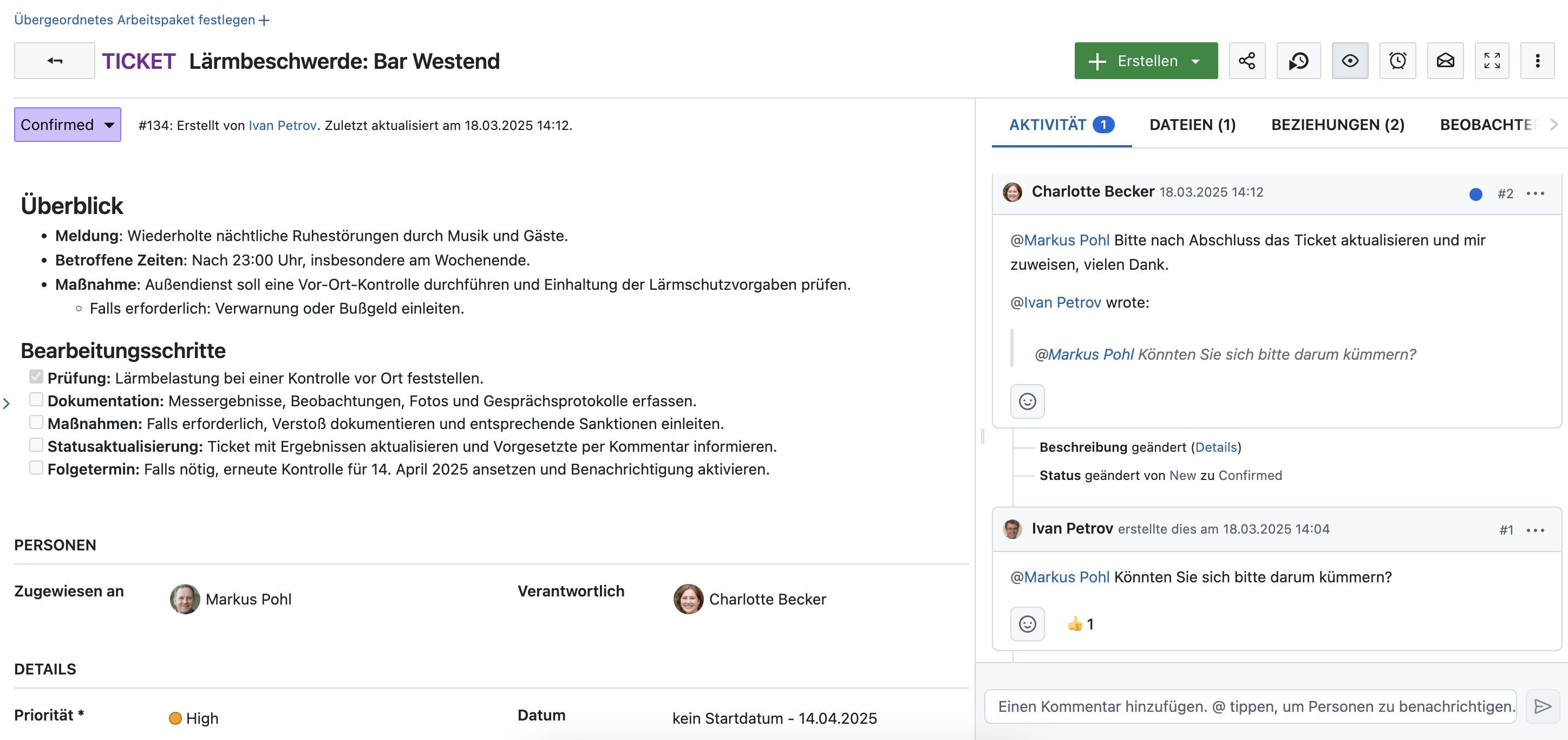
Use case: Ticket management for public order services

The public order office of our example city uses OpenProject to manage daily operations and complaints efficiently:

  • Incoming complaints (e.g., noise disturbances, illegal parking, waste issues) are recorded as tickets and automatically assigned to the responsible staff.
  • Task scheduling is managed through an agile board with priorities and deadlines.
  • Employees document progress in real-time, including evidence or notes directly in the ticket.
  • Citizen inquiries are handled faster and more transparently.

The advantage of OpenProject as a digital ticket system for public order services: Less coordination effort, faster processing, and transparent tracking.

Example: Managing a noise complaint with OpenProject

Here’s how a noise complaint could be processed using OpenProject:

  1. A citizen reports repeated nighttime noise disturbances from a bar.
  2. A public order officer logs the complaint as a work package of type ‘Ticket’ in OpenProject.
  3. The department head prioritizes the case and assigns the work package to an on-site inspector.
  4. The inspector conducts an on-site check and documents the findings within the ticket.
  5. The status is updated to ‘Resolved’, with additional details added to the ticket’s activity log. The department head, tagged in the entry, automatically receives a notification.
  6. If necessary, the bar is informed and a follow-up inspection is planned — a new work package is created, with a date and automatic reminder for a review in a few weeks.

Here’s how such a noise complaint ticket could look like in OpenProject:

A work package in OpenProject, type ticket, named ‘Lärmbeschwerde: Bar Westend’, with discussions in the Activity tab, priority high and a set end date.

Image: A work package in OpenProject, type ticket, named ‘Lärmbeschwerde: Bar Westend’, with discussions in the Activity tab, priority high and a set end date.


Use case: Ticket management for building maintenance

A municipal administration has to manage and maintain many buildings. This is another great example on how to use OpenProject as digital ticket management software:

Each maintenance request or issue is logged as a ticket and assigned to the responsible team. Automated reminders ensure that regular inspections and maintenance are carried out on time. Priority repairs (e.g., defective heating in winter) can be handled immediately. The administration maintains a complete record of all completed actions. And all data, communication and information is centralized in the ticket.

The advantage of OpenProject as a digital ticket system for facility management: Structured maintenance planning, no overlooked tasks, and better resource allocation.

The city administration can configure OpenProject so that each building is represented via work package types, subdivided by building category. All tasks for these buildings - from repairs to regular inspections - are created directly in the system as associated subtasks and assigned to the responsible team members for processing. No need to search through lists or Excel sheets. And, of course, automated reminders – in-app and/or per email – prevent forgotten maintenance tasks.

An example of a simple agile status board with tickets in OpenProject could look like this:

Screenshot of an agile status board in OpenProject, with work packages of types like ‘Stadtmuseum’ or ‘Kita Regenbogenland’, sorted by status

Image: An agile status board with tickets of types like ‘Stadtmuseum’ or ‘Kita Regenbogenland’, sorted by status.

Example: Managing a heating repair in an elementary school

Here’s how a heating repair could be handled in OpenProject:

  • The facility management team logs the issue as a work package of type ‘Ticket’ and adds the school name as a custom field of type ‘Building’.
  • The responsible janitor, added as an external person, receives a notification.
  • The repair is documented within the ticket, including photos and notes.
  • Once completed, the ticket is closed and serves as a permanent record.

Why OpenProject is the ideal ticket management solution for public administrations

There are many software options for task and ticket management. With its open source approach and hosting in Europe, OpenProject is an excellent choice for European municipalities and government agencies.

Why OpenProject is the ideal ticket management solution for the public sector:

  • Easy implementation and no complex IT integration.
  • Open source and GDPR-compliant — developed for European administrations.
  • Choice between secure cloud solutions or self-hosting.
  • Flexible customization — from facility management to public order offices.
  • Open source and independent — no vendor lock-in with U.S.-based providers.
  • Part of openDesk — the digital workplace solution for public institutions.

Learn more about OpenProject for the public sector, including more best practices and case studies.

  •  

How Chemnitz, European Capital of Culture 2025, manages hundreds of projects for the Digital Agenda with OpenProject

Not just anyone can become a European Capital of Culture. Since 1985, the European Union has awarded this title to cities whose applications were convincing in six criteria of a multi-year selection process. These include long-term strategy, European dimension, cultural and artistic content, but also the ability to implement the project and the successful involvement of society and administration.

A city who manages to do this proves that they are capable of managing the largest and most complex projects, and Chemnitz in Saxony has achieved this: in 2025, Chemnitz proudly bears the title of “European Capital of Culture”, accompanied by a long list of events.

Out of the silos, a single source of truth was needed

Alexander Hoffmann is responsible for digitalization in Chemnitz. Hoffmann has a background in IT project management, was originally trained as a classic project manager (IT), but later switched to agile project management and attaches great importance to using the right approaches and tools for the job. “The added value lies at the process level,” he explains. Many years ago, he took on the task of setting up project management at the City of Chemnitz’s IT department. “There were a lot of projects that had to be implemented and there still are - and we had to get out of the silos.” And that’s where OpenProject came in. Hoffmann was already familiar with the software and also has direct and close contact with Chemnitz Hospital, which also uses OpenProject.

Alexander HoffmannAlexander Hoffmann is Head of Digitization and Development at the Office for Information Processing of the City of Chemnitz

The most important motivation behind the project management in OpenProject is also to promote the digitalization of the City of Chemnitz internally and externally and also to provide the platform for other municipal projects, such as residents’ meetings or construction projects, of the City of Chemnitz. To this end, Chemnitz operates a self-hosted instance of OpenProject, in-house and completely in the city network. 2500 potential users could register and work with it, and there are also plans to offer the software to external partners and connect it to Nextcloud. The approach to open source is not ideological, but very pragmatic. Chemnitz also uses around 200 MS Project licenses, of which around one hundred will probably remain. The approach does not follow any ideology “If we halve the number, we will have recouped the costs for OpenProject,” says Hoffmann happily.

Low entry barriers with open source

Open source as a value in itself is also playing an increasingly important role as a decision-making factor in Chemnitz. “If we can use open source software, then we combine two opportunities: the entry barrier is lower, we can test and evaluate software without consultants, tenders and thoughts about purchasing licenses. This flexibility alone makes it worthwhile for us to increasingly rely on open source software.” And the fact that the IT architecture for open source software are transparent and comprehensible from the outset also plays a major role. “Whenever we make a purchase, we always check whether there are open source options, which is the first step for all cross-sectional applications, including project management. This is also a question of security,” confirms Hoffmann. “And the fact that we can always use free software solutions the way we want plays a role. It also has to be self-hosted; in many cases, externally hosted clouds are no (longer) an option.”

Implementation of the Digital Agenda

Chemnitz is not alone in this, but the topics of the Digital Agenda, such as the Online Access Act or the e-file and how access for citizens and stakeholders can be created in practice, are also on Hoffmann’s mind day in, day out. “Every e-file that we introduce is a project in a clearly defined tree structure. The “Digital Agenda” is the overarching element in OpenProject and each pillar is a sub-project.

Roadmap digital agenda City of Chemnitz

Image source: City of Chemnitz, Roadmap of Digital Agenda

OpenProject is very well suited for this and we can also use it to directly inform the top management. They get an up-to-date status quickly and easily without us having to write extra reports.” Mayors who can read along directly in project management sounds unusual, and of course “we prepare the views for the decision-makers, but since we have introduced the software, it has made our work much easier.”

Project templates reduce workload to a fifth

For implementing these challenging goals, there are project managers who maintain the projects and keep their status up to date. Project templates in OpenProject (e.g. for the e-file) help to reduce the effort for new projects to 20% during planning. Chemnitz uses templates, checklists, wiki articles, and more in OpenProject, so that a project manager only has to adapt the project plan according to the new project.

Project template e-file in OpenProject by City of Chemnitz

Image source: City of Chemnitz, project template e-file in OpenProject

“It’s a matter of a few hours, and it frees up the project managers to concentrate on managing the teams and projects. They’re all happy for every bit of administrative work they’re spared,” shares Hoffmann.

Example task in OpenProject by City of Chemnitz

Image source: City of Chemnitz, example work package template e-file in OpenProject

Although Chemnitz also operates a separate wiki, the wiki in OpenProject is used for all project-specific content. Time recording is also used, but only in the sense of overall time recording, i.e. estimated for projects, with a target/actual comparison for rough resource planning and personnel requirements planning. Meetings are also planned in OpenProject, “the project management software serves as a single source of truth for the many participants.”

Waterfall and agile: boards, tasks, sprints

Chemnitz combines classic project management with agile methods for its project work. Boards and tasks are used in the projects, even if “the projects of the Digital Agenda are mostly organized in a classic way, development assignments are managed agile with backlogs, roadmaps, sprints, sprint planning and so on. We use both approaches, including hybrid ones,” explains the department head. “Not all employees always use all the options that we and the software offer, nor do they have to. We have the backlogs module, but not everyone needs the burn-down and burn-up charts, story points, and sometimes the employee rights also prevent us from using various approaches, for example if this would make performance control and monitoring possible. But we work a lot with the basics, such as epics and the like.”

Configurable down to the last detail

The administration of the European Capital of Culture is also innovative: it defines its own project types and more and more using the project lists in OpenProject. The developers of OpenProject are now working on project phases, a feature that Chemnitz configured via tasks and milestones and thus automatically fills the timeline. This then almost automatically displays “endangered” projects or extended attributes, for example criteria such as “This is an important infrastructure project”. In a current project, the City of Chemnitz is currently introducing a new work package type “project” - this is also possible due to the flexible open source nature of the software.

Hundreds of projects at work

There are currently 345 projects being planned in Chemnitz, around 116 of which are active, and of which around 60 percent are digitalization projects. Other IT projects make up almost the entire remainder. “The Digital Agenda in particular has led to a huge increase in projects. Many new projects are only named in the beginning. They are given a short title and classification and still have to go through the process of specification to become a real ‘project’”. Only when the stakeholders and milestones and everything else have been defined clearly are the projects fully implemented in OpenProject. In the past, all of this was kept in Excel, but today the plans are already available in OpenProject via a link and are waiting to become a project at some point. “The many necessary budget processes beforehand make this necessary - and we can’t yet map them properly. But we are hopeful that we will be able to map this with a ‘project’ work package type at some point.”

Open source is more flexible than the proprietary competition

The conscious decision to use project templates for almost all project types makes everyday life easier for employees and managers. “It is now also a very conscious and comprehensible decision as to when a work package type becomes a project.” Once this is done, the project manager, for example, is also appointed straight away. “We have two views implemented in OpenProject: On the one hand, IT project planning with work package view ‘Project’ and the project list itself. This allows us to mix agile and classic projects - that’s priceless flexibility, not at all like the tight corset imposed by the proprietary competition.”

With OpenProject, Chemnitz has not only found the right tool to manage hundreds of projects efficiently but also created a sustainable foundation for future collaboration and innovation. By integrating the open source project management software into their digital strategy, the city is proving that transparency, flexibility, and self-reliance are key to successfully managing the Digital Agenda and the European Capital of Culture 2025.

  •  

OpenProject 15.4: Automatic scheduling mode, meeting outcomes and more

We are happy to announce the release of OpenProject 15.4. Among other changes, users now benefit from automatic scheduling, in addition to manual scheduling. Other great new features are agenda item outcomes for our Meetings module and exciting updates regarding generating professional PDF documents based on your work packages.

In this blog article, we will take a closer look at these major three feature updates:

And there are many more great updates in this version again! For more details on other changes, features and bug fixes in 15.4, please check out our release notes.

Enable automatic scheduling mode - to start as soon as possible

At OpenProject, we are passionate about automation. Our software should take over whenever possible – but without limiting users in their options. This is no easy goal and sometimes there is a fine line between both. With our new scheduling mode, we are exactly on this line: New work packages start with the manual scheduling mode, which means no change to earlier versions. In this mode, users can freely choose start and end dates.

But if the automatic scheduling is enabled, OpenProject takes over and schedules the work packages to the earliest date possible, based on predecessor or child relations.

See the difference of both scheduling modes in Gantt view:

Single date mode

Another great feature that comes together with the new scheduling modes is the single date mode: Previously, all work packages (except milestones) included both start and finish date fields, even when only one was necessary. Now, new work packages default to having only a finish date, streamlining workflows for teams that don’t require a date range.

For more information, see this blog article that our product team recently published, explaining the changes to scheduling. And, as always, check our documentation to learn how to use the new scheduling mode.

Set agenda item outcomes for meetings

The OpenProject Meetings module has been once again enhanced with great features in version 15.4. Just last month, we released recurring meetings that help many users manage their weeklies, dailies and other regular appointments – again with the help of automation.

With the new release, users can set outcomes for agenda items, making it much easier to document what was decided in the meeting. If an outcome is set for a work package in a meeting, the respective work package will automatically update as well and show the outcome on the Meetings tab.

Example: Meeting outcomes for a weekly project discussion

Let’s imagine you are part of a scientific team that collaborates on an aerospace project and has weekly mission status update meetings. Participants may work in very different areas and this meeting is a core opportunity to exchange updates. However, as is natural with such larger meetings, not everyone can always attend. Good documentation of the meeting is therefore essential to keep all project members on the same page – while also saving valuable time and avoiding the need to send follow-up emails with questions about meeting proceedings.

So how does such a meeting look like in OpenProject?

1. When the meeting is open

As this would be a recurring meeting, OpenProject will automatically create the following weekly. All invited users can add, edit and assign agenda items before and during the meeting. If there is the need to talk about a specific work package, users can easily add this work package, which automatically creates a link between the meeting and the work package, on both sides. By default, the status is open:

Screenshot showing a meeting in OpenProject, with added work packages and the status being open.

2. When the meeting is in progress

When the meeting starts, participants can set the meeting status to in progress. This adds a + Outcome button on each agenda item or work package listed. By clicking it, users can document what was discussed or decided during the meeting. In this example, the scientific group decided that Ivan should be responsible for the Milestone to launch the readiness review:

Screenshot showing a meeting in OpenProject, the status is “in progress”, the first agenda item shows a + Outcome button and the second one an already documented outcome: “Should be done by Ivan.”

As mentioned above, adding an outcome to a work package in a meeting automatically adds it to the Meetings tab on the work package as well:

Screenshot showing the Meetings tab of the work package that was linked in the example meeting, with two past meetings, one with a documented outcome displayed.

3. When the meeting is closed

With the release of version 15.4, users can now click on an agenda item and move it to the next meeting, as long as it is part of a meeting series like in our example. This is very helpful for teams working with recurring meetings. For example, if Ivan – the person responsible for the work package – is not participating at that meeting, their colleagues can move this work package to the next meeting, when Ivan will be back.

When the meeting is over, the status can be set to “closed”. Currently, this has no further impact except that, like with the “open” status, no outcome can be added. Please note that a meeting can be re-opened again, so no harm will be done if you accidentally close a meeting too early.

Tip

We continue developing updates for the Meetings module. In a future release, participants of recurring meetings will also be able to move all agenda items without outcomes to the next meeting(see this feature). Also, a meeting agenda items backlog for recurring meetings is planned (see this feature).

Generate PDF documents from a work package description

The third great feature we want to highlight in this article is an improvement to PDF exports. Previously, you could only generate PDFs that included the entire work package, including attributes like the assignee in a table format at the beginning of the document. Now, you can also export only the work package description — formatted specifically for use in German contracts. While this is a very specific use case that is appreciated by our German customers, e.g. in the public sector, it can also be helpful for other users.

The main aspect here is, again, automating tasks that used to cost a lot of time and nerves when done manually. With OpenProject, we aim to provide users with work packages that include all important information for all stakeholders at all times. This way, we also want to give users the possibility to create beautifully styled PDF files for contracts, approval notices, project orders and other formal documents.

To do so, the “Download PDF” option on work packages has now been renamed to Generate PDF and offers expanded customization options. Clicking it opens an interface where you can tailor your document — for example, by enabling hyphenation or adding a footer text.

Most importantly, you can now choose between two templates:

  • Attributes and description: This template creates a document similar to the one used before version 15.4, including a table showing the work package’s attributes, along with the description.
  • Contract: Choosing this template creates a PDF designed in the style of a German contract, and includes only the work package description.

We will continue working on this feature and plan to add other templates.

Our CEO Niels Lindenthal published a blog article called “Beyond documents” about this feature when it was still in development. Read this article to learn about our motivation on developing features like this. If you want to know how to use the feature to generate PDF files based on work package descriptions, please see our documentation.


OpenProject 15.4: Migration, installation, updates and support

Follow the upgrade guide for the packaged installation or Docker installation to update your OpenProject installation to OpenProject 15.4. We update your hosted OpenProject environments (Enterprise cloud) today, March 19, 2025.

You will find more information about all new features and changes in our Release notes or in the OpenProject Documentation.

If you need support, you can post your questions in the Community Forum, or if you are eligible for Enterprise support, please contact us and we are happy to support you personally.

Credits

A very special thank you goes to the City of Cologne, Deutsche Bahn and ZenDiS for sponsoring released or upcoming features. Your support, alongside the efforts of our amazing Community, helps drive these innovations. We also thank Klinikum Chemnitz for their active and enthusiastic feedback during the design process of the new automatic scheduling mode.

Also, a big thanks to our Community members for reporting bugs and helping us identify and provide fixes. Special thanks for reporting and finding bugs go to René Schodder, Abhiyan Paudyal, Gunter Ohrner and Markus K..

Last but not least, we are very grateful for our very engaged translation contributors on Crowdin, who translated quite a few OpenProject strings! This release we would like to particularly thank user greench, for an outstanding number of translations into Turkish.

Would you like to help out with translations yourself? Then take a look at our translation guide and find out exactly how you can contribute. It is very much appreciated!

As always, we welcome any feedback on this release. 💙

  •  

The future of project management is open source

The time of closed, proprietary software is coming to an end. The future belongs to open source solutions. More and more organizations, especially in the public sector, are realizing the benefits and making the switch. By choosing open source software for their project management, governments not only significantly reduce costs but also foster innovation, increase transparency, and ensure digital sovereignty.

Imagine waking up to find your entire project infrastructure locked away just because a foreign government changed its policies. Sounds extreme? Yet, this is the risk of relying solely on proprietary software controlled by big tech monopolies from the USA. The public sector remains dependent on decisions made abroad, including policies from erratic leaders that could suddenly limit access to critical tools.

At the same time, proprietary software is expensive and restrictive. High costs and vendor lock-in force organizations into long-term contracts. Open source project management isn’t just an alternative — it is essential for an innovative and independent Europe.

High prices limit collaboration

Many project management tools charge per user, making collaboration costly. Imagine paying for every person who receives an email? Ridiculous, right? Yet, proprietary software forces organizations to exclude key stakeholders or pay excessive fees just so people can participate. This pricing model drives teams to manage projects through inefficient email threads or static MS Office documents.

At OpenProject, we do things differently. Our Community Edition is completely for free, so organizations can get started with open source project management easily without financial barriers. For mission-critical projects, our Unlimited Plans provide enterprise-level features and professional support. This ensures organizations have a secure, high-performance system with expert guidance and support. Public institutions can finally focus on their projects without worrying about restrictive pricing models.

Image of vendor lock-in

PM²: an open and accessible framework

I recently learned that a key OpenProject customer — a federal state in northern Germany — chose PM² as its project management framework because OpenProject supports it. This shows how open methodologies, combined with the right tools, deliver scalable solutions for public administration.

Working with the creators of PM² has been truly inspiring. Their commitment to open and accessible project management aligns perfectly with our mission. Unlike commercial methodologies, PM² evolves based on real-world needs rather than profit motives. Seeing institutions like the BVA customize PM² into PMflex proves that open collaboration leads to better solutions.

Unlike proprietary frameworks such as PRINCE2, PMP, or IPMA, which require expensive certifications and strict licensing, PM² is free. Public organizations can download, study, and adapt it to fit their needs, something commercial methodologies don’t allow. PRINCE2 and PMP do not even provide free access to their core materials, let alone the ability to customize them.

At OpenProject, we support this transition. Open source solutions, built on open standards, give public institutions full control over their software, free them from high fees, and ensure long-term independence. By integrating with PM², OpenProject provides a flexible, future-proof alternative to proprietary tools.

Open source project management is the future

Why should European taxpayers fund software they cannot even modify nor rely on? Why continue spending billions on proprietary software licenses when open solutions offer more flexibility at lower costs?

The era of proprietary project management software and methodologies is coming to an end. The shift to open source project management is inevitable. More institutions are recognizing the benefits and making the switch. Governments and public organizations must act now. Many governments, municipalities, cities, and other public institutions already successfully collaborate with OpenProject — not only to save money, but to drive innovation, transparency, and digital sovereignty.

This change is already happening, and digital sovereignty is now firmly on the political agenda. The collaboration between ZenDiS in Germany, Dinum in France, and openDesk demonstrates how European institutions are actively working together to build independent digital infrastructure and reduce reliance on foreign providers. It’s time to rethink project management, break free from restrictive systems, and embrace open collaboration.

  •  

OpenProject: The open source alternative to Jira

Jira is a well-known agile project management tool. For many, Jira is a household name for issue tracking software. However, Jira is not open source. OpenProject is - and offers quite similar features. On top of that, OpenProject provides both a cloud or on-premises edition. Jira has chosen to focus on the cloud side of things and has terminated the self-hosted option. Let’s compare Jira and OpenProject.

Hosting

Jira shifted its focus to the cloud edition and has discontinued the on-premises offer. This move marks a shift in focus towards the cloud edition. Jira users who self-host their software had been requested to make plans to move to the cloud or data center, as support for self-hosted Jira is no longer available since spring 2024. Since then, many Jira customers already migrated to an alternative or are still looking for an easy way to do so.

OpenProject continues offering both the cloud and on-premises editions. OpenProject Enterprise on-premises edition enables companies to install OpenProject on their own servers and offers additional Enterprise add-ons and security features, as well as support. It provides the flexibility of self-hosting while ensuring a high level of security and extensibility with additional features.

Tip

In February 2025, an open source developer wrote a migration script for Jira to OpenProject – the OpenProject Jira importer. Read more about it on our blog article A Community-driven solution for your Jira exit: The OpenProject Jira importer, or navigate directly to the migration tool on GitHub.

Open source

OpenProject is an open source software and as such provides independence and complete autonomy. Its source code is publicly available on GitHub. It allows users to modify code and create new plug-ins for maximum flexibility. Being open source means that users can customize and tailor it to their needs, making it an attractive option for businesses looking for a flexible and adaptable project management solution. With OpenProject, users can take full control of their project management process and make it fit their unique workflows.

Jira is a proprietary software, which means that the software code cannot be reviewed, so the users are dependent on the vendor for reliability, code adjustments and upgrades. This also means that certain features require third-party plugins and can significantly increase maintenance costs.

Data security

Data security is an important aspect when choosing a project management tool. Both OpenProject and Jira treat the subject with the seriousness it requires.

Large companies often have strong data privacy and data security guidelines which might prohibit the use of web-based solutions, making use of Jira cloud solutions potentially problematic. Furthermore, the location of data storage must be considered. Jira uses AWS storage services. While storing customer data in the European AWS region is possible, it must be actively requested.

For OpenProject data security is a top priority, our processes meet all requirements of the EU General Data Protection Regulation. Whether you decide to use the cloud or a self-hosted edition, you can be sure that your data is safe. All our customer data for the cloud edition is hosted and kept in the EU. For the self-hosted edition, you have absolute control over your data.

Features

OpenProject and Jira both offer comprehensive and customizable project management tools that offer a range of features to support agile, classic, and hybrid project management. They both provide similar capabilities for issue tracking, backlog maintenance, reporting, user management and more. It should be noted that with Jira, some of the functionalities or more advanced versions of such functionalities come through integrating one or more plugins. This can mean additional maintenance efforts, not to mention additional costs.

Let’s take a look at how some of the features compare.

Issue & task tracking

Both Jira and OpenProject offer sophisticated issue tracking with custom fields and workflow customization.

Jira

In Jira users can create new issues either directly in the list view of the existing issues or in a popup window. The displayed fields can be configured, and the view can be customized to users’ needs. It is possible to specify workflows for different issue types.

IssueTracking-Jira1Image: Issue tracking in Jira Jira issues list viewImage: A list view of issues in Jira.

OpenProject

In OpenProject you can create new issues from the work package table. Similar to Jira, the displayed attributes can be configured for each issue type. On top of this, you can display help texts to assist users in setting the correct attribute values. You can adjust the workflow for each issue type, as well as for the author and assignee of a work package.

Work Package CreateImage: Create a work package in OpenProject. OpenProject issues list viewImage: A list view of work packages in OpenProject.

Project planning with Gantt charts

Managing a project plan is a critical component for successful project management.

Jira

The core version of Jira previously did not include a Gantt chart. This has now been compensated be the timeline function that displays the project time plan. Sophisticated Gantt chart options are available via installing additional plugins.

Jira timeplanImage: A time plan in Jira.

OpenProject

OpenProject enables creating and managing project plans using Gantt charts, both for single projects, as well as multi-hierarchy projects. The dynamic and interactive Gantt chart in OpenProject can be displayed on the work package table. This allows a seamless transition from the list view to the Gantt chart view. Start and due dates can be easily updated by either setting the dates in the list view or using drag & drop in the Gantt chart. Thereby, you can choose between top-down and bottom-up planning. You can also create and visualize dependencies in the Gantt chart. Project managers can create and visualize the progress, even for complex Gantt charts which span multiple projects. It is also possible to add a baseline comparison to also display planning changes.

OpenProject Gantt chart designImage: A Gantt chart time plan in OpenProject.

Time and cost tracking

An essential feature for any larger project is the ability to track the time, as well as the costs spent on a project.

Jira

Jira supports time tracking, including the detailed specification of working times and hours. In the basic version, the time spent on an issue can be logged in the detailed view of a task but is not displayed in the list of all the tasks. More advanced time tracking options are available through various add-ins. Jira does not support cost tracking in the basic version. However, it is possible to download add-ins in the Atlassian marketplace for cost tracking.

OpenProject

You can enable time and cost tracking for each project separately within OpenProject. Additionally, OpenProject allows users to track costs - both personnel costs as well as unit costs. Furthermore, you can create budgets within projects to compare planned and realized costs. You can create and save detailed time and costs reports filtered and grouped based on your needs. A sophisticated permission model allows users to restrict the data that users can see. This includes for example whether a user can only see and edit own tracked time.

Log time list viewImage: A time tracking overview in OpenProject.

Conclusion: OpenProject vs Jira

In conclusion: Jira is a very powerful application with more than 2,000 add-ons and a large following. It is highly customizable. However, this flexibility comes at a price: Many add-ons come with a significant price tag which adds up. Also, going forward, Jira is putting its cloud version first, deprioritizing server products.

OpenProject is open source, it offers very similar features all from the same source without additional expense. The decision between the cloud or on-premises editions is entirely up to you. OpenProject is the best open source Jira alternative.

Do you need a demo or want to switch?

If you want to take a glance at OpenProject or test all features thoroughly you can create a free OpenProject trial.

Take a look at other customers who have decided to switch to OpenProject from Jira and read about their experience.

If you consider moving from Jira to OpenProject, there is a way to import tickets from Jira to OpenProject. First, you can export your tasks from Jira into an Excel file and then import these tasks via an Excel plugin into OpenProject. Additionally, there is the user-built OpenProject Jira importer, as mentioned in the beginning of the article. If you would like to discuss your specific case, you can always get in touch with us.

  •  

Agile administration made easy: Digitalize internal tasks with OpenProject

Agile methods make administrations more effective - but without the right software, good ideas often remain good ideas. Modern task management makes it possible to control processes efficiently and react flexibly to changes. OpenProject offers exactly this possibility: a customizable open source solution that ensures full control over data with a high level of functionality. Cost-effectively.

In this article, you can learn…


Making digital administration work: Cutting complexity, boosting efficiency

Endless Excel lists, lost emails, and overflowing inboxes—does that sound familiar? Many administrative teams struggle with outdated tools and rigid workflows that slow down rather than support their daily work. Digitalization is supposed to help, but too often it brings complicated, expensive, and impractical solutions.

We understand—many people don’t want to hear about digitization anymore. Too many initiatives have promised improvement but ended up adding more complexity instead. The real question is: How can digital tools actually simplify work in administration — without creating new obstacles?

OpenProject offers a pragmatic approach here. The open source project and task management software helps to clearly structure tasks and make processes more efficient. Without burdening employees with unnecessary complexity. Freedom of design for administrators, simple and perfectly tailored application for employees.

Introducing agile processes with efficient task management

Digital task management is a key building block on the path to greater agility in administration. Every day, numerous tasks, approvals and processes are created in public administrations that need to be coordinated. Without a clear structure, this leads to lags, extra work and a lack of transparency. Professional task management ensures that:

  • responsibilities are clearly defined,
  • all tasks can be tracked at all times,
  • work processes run efficiently and transparently.

Agile working does not mean chaos, but flexibility with a basic structure at the same time. Administrative staff can react more quickly to changes and adapt their work to current requirements. Instead of constantly adapting rigid processes, agile structures can create more efficient workflows that grow dynamically. This enables a sustainable, future-proof way of working in administration.

What features does task management software need in administration?

For task management in administration to function simply and efficiently, the software must have the following features:

  • Easy to use: Only administrators have to deal with technical details - for everyone else, operation is uncomplicated and intuitive.
  • Flexible methods: Personalized composition of agile and classic methods - in a modular system, suitable for the working methods of the respective administration.
  • Tasks in work packages: All information collected in one place, with clear responsibilities and traceable progress.
  • Data protection and compliance: Security and GDPR compliance must of course be guaranteed.
  • No vendor lock-in: Public administrations must retain full control over their data at all times.

Five stars for OpenProject - perfect for task management in administration

The demands on modern administrations are increasing at every turn: More tasks, more regulations - and more digitalization. OpenProject is a solution that was developed precisely for these challenges. No more Excel spreadsheets like “xxx_new-2”, just centralized task management supported by agile processes.

Let’s put OpenProject to the test and take a closer look at the five requirements mentioned above:

Feature Description
⭐ Easy to use for all employees - Administrators can set up the instance with the help of extensive configuration options, so that it is easy to use for users.
⭐ Structured workflows with clear responsibilities - Tasks are assigned transparently, so everyone knows who is responsible for what.
- Status updates and automatic notifications ensure that the entire workflow remains traceable.
⭐ Flexibility with agile and traditional methods - Whether Kanban, Scrum, or Gantt charts – OpenProject supports various ways of working.
- Government teams can use hybrid methods and gradually introduce agile processes.
⭐ Data protection and digital sovereignty - OpenProject is open source, giving public administrations full control over their data.
- GDPR compliance and secure hosting options ensure maximum security.
⭐ Future-proof and sustainable solution - No dependency on proprietary vendors, as OpenProject is open, extensible, and customizable.
- Regular updates and an active community drive continuous development.

Tip

openDesk - your secure office and collaboration suite: Do you already know openDesk? The office and collaboration suite bundles proven open source tools explicitly for digital administrative work - including OpenProject for efficient task management and agile processes. Learn more about openDesk.

Features for agile administration with OpenProject - an overview

Successful digital administrative work requires more than just task management. OpenProject offers a wide range of features that are specially tailored to the needs of public administrations, such as:

  • Agile Boards - Manage tasks and processes visually, prioritize them flexibly and maintain an overview.
  • Meetings - Plan meetings in a structured way, link them to work packages and thus easily integrate agile methods such as dailies.
  • Date alerts and notifications - Never miss important dates again and be informed in good time.
  • Individual actions and workflows - Define automated processes for recurring tasks and make workflows more efficient.
  • Time and cost tracking - Track working hours and budgets accurately to manage projects and resources optimally.

Here’s an example status board created in OpenProject:

OpenProject screenshot showing a status board with work packages from a public administration

Tip

Did you know? OpenProject is your best choice, if you do not exclusively use either agile or classic project management features. It offers a high range of customization and flexible administration. Read about your best mix with hybrid project management here.

European public administrations successfully work with OpenProject

OpenProject has been a popular choice for project and task management in the public sector long before the launch of openDesk. We’ve already outlined several reasons for this. Now, take a look at concrete real-world examples. We’ve spoken with customers and created case studies to provide transparency on the typical challenges faced by public administrations and how exactly OpenProject – and its key features – offers a solution.

How do public institutions in Germany use OpenProject?

You can find the following and more case studies on this page about project management for the public sector.

FITKO (Federal IT Cooperation)

“With OpenProject as part of openDesk, we have a centralized, flexible platform that greatly facilitates our work as the office of the Federal IT Standardization Board – from meeting planning, execution, and documentation to the centralized management of federal IT standards. The software supports us in collaboration and the coordination of our initiatives.”
Tobias Schuh, IT Standards Coordinator at FITKO (Federal IT Cooperation)

FITKO faces the significant challenge of coordinating and streamlining numerous tasks and stakeholders. With the introduction of openDesk, FITKO members now have access to a centralized and secure office and collaboration suite that enables just that. Read more in FITKO’s case study with OpenProject.

FITKO Logo and laptop

City of Ravensburg

“OpenProject enables us to plan long-term and reliably without overburdening our staff. As a municipality, OpenProject has finally given us the opportunity to properly manage our resource planning. The platform provides high reliability and transparency regarding workload distribution.”
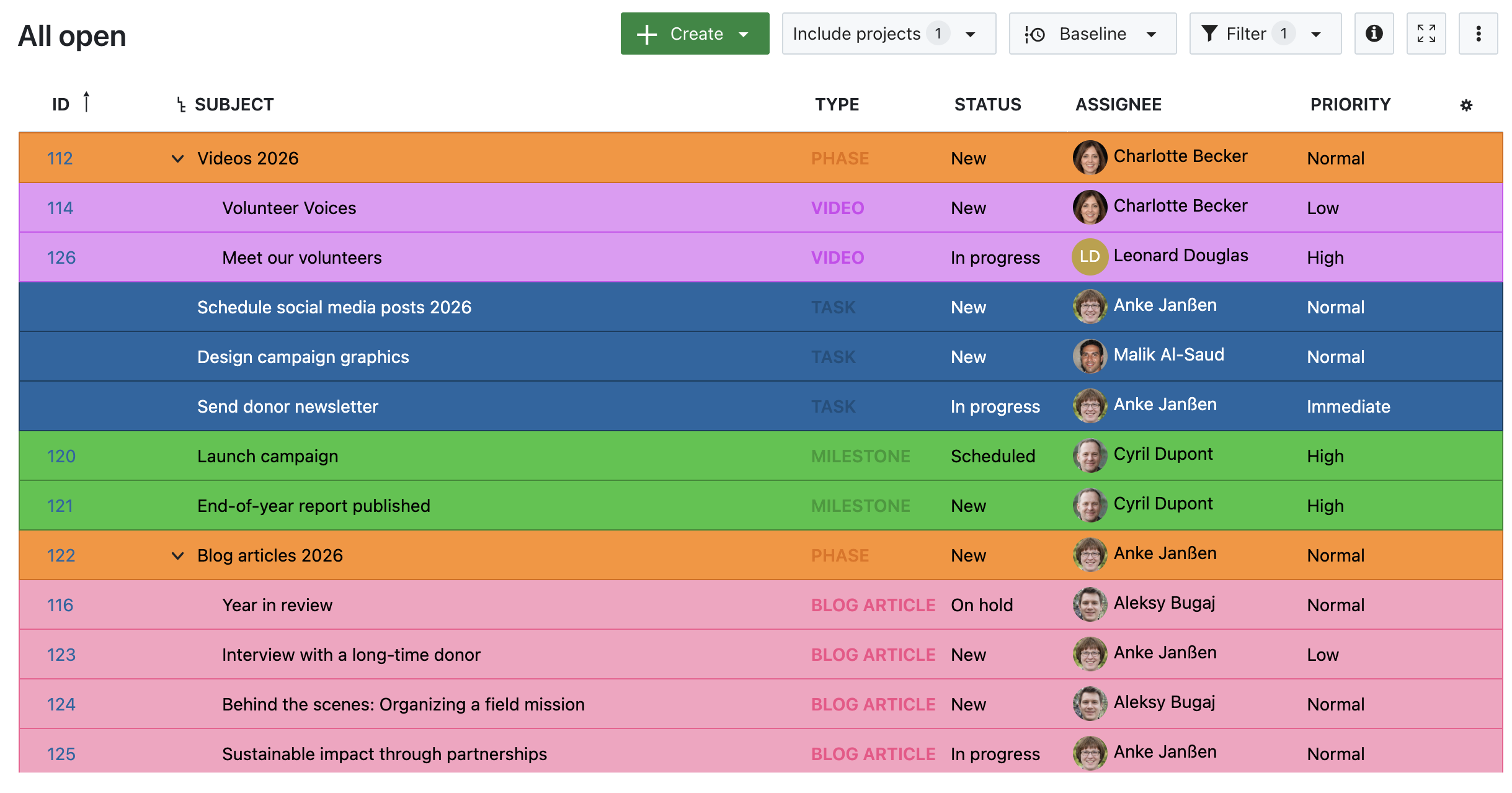
Eric Fischer, former Process and Project Manager in Digitalization at the City of Ravensburg

The City of Ravensburg is just one of many municipalities relying on OpenProject. Since 2023, Ravensburg has been using OpenProject primarily for traditional project management, utilizing features like Gantt charts and the time and cost module. One major challenge before introducing OpenProject was making employees’ workloads visible at all. Now, it is possible to track workloads precisely and, most importantly, in time to redistribute tasks when necessary. Read more in the case study on City of Ravensburg and OpenProject.

City of Ravensburg with logo

Conclusion: Start agile now - at your own pace

The best way to get to know OpenProject? Just give it a try! You can test OpenProject free of charge for 14 days - no strings attached. Discover for yourself how intuitive and powerful digital task management can be for your administration.

Would you like an individual introduction or in-depth training? No problem! We offer customized training and consulting to provide you and your team with the best possible support.

  •  

Project management software made in Germany

Why is the location of a project management software provider important?

Choosing the right project management software is not just about features — it is also about data protection and data sovereignty. The location of your software provider determines the legal framework under which your data is processed and stored.

With project management software, you handle confidential company data: business processes, customer and supplier information, internal documentation, employee details, and intellectual property. That is why data security should be one of the most important factors when selecting a provider.

Many software providers are based in either the EU or the USA. Companies should be aware of the different data protection regulations to ensure that their sensitive data is processed under the desired legal framework.

Why a European project management software?

Europe has long been committed to privacy and data security. The General Data Protection Regulation (GDPR) was introduced as a unified law to establish clear priorities for:

  • Data protection principles and secure data processing
  • Personal rights and consent to data processing
  • Data protection by design and by default
  • The “right to be forgotten”

Companies that violate the GDPR face severe fines. To avoid legal risks, it is advisable for European businesses and organizations to choose project management software from Germany or the EU, ensuring compliance with the highest data protection standards.

Why a project management software made in Germany?

Besides being part of the EU and consequently enforcing the GDPR, Germany is well known for data protection. Germany was the first country worldwide to introduce a data protection law in 1970. This was in the State of Hesse and 7 years later it was followed by the Federal Data Protection Act seven years later. That means, in Germany, the protection of the citizens’ personal data is a state responsibility.

So even before the GDPR, the German Federal Data Protection Act was one of the strictest in the world and many amendments of the GDPR did not present anything new for Germany as it had already been implemented previously.

Continuing its pioneering role in data protection, Germany was also the first country to implement all new requirements of the European directive in the so-called German Data Protection Amendment Act (GDPAA) in 2017.

For organizations looking for task or project management software from Germany, it is crucial to choose a provider that fully adheres to local data protection regulations.

OpenProject is made in Germany

OpenProject is a leading open source project management software from Germany, designed to meet the highest data protection and security standards.

As a company based in Berlin, OpenProject strictly adheres to European and German data protection laws. Our software can be hosted on-premises, giving organizations full control over their data. Alternatively, OpenProject offers hosting in certified German data centers that comply with the highest security and privacy standards.

Hosting and server location: Full control over your data

  • GDPR-compliant hosting in Germany or other parts of Europe – no personal data stored outside the EU.
  • On-premises option – full control over your infrastructure.
  • Highest security standards – servers in certified European or optionally German data centers.

Learn about the importance of a German server location for your project management: Secure project management software with servers in Germany

One of the biggest advantages of OpenProject is its open source license, which provides organizations and developers with freedom and security. Because the code is publicly available, the Community can review it for potential security vulnerabilities and fix them quickly — an advantage that proprietary software does not offer.

Learn more about data protection and security at OpenProject: Data Protection & Security at OpenProject

openDesk: The all in one office and collaboration suite, not only for the public sector

Alongside OpenProject, openDesk is part of a new generation of digital open source solutions. openDesk is your secure all in one office and collaboration suite, specifically designed for public institutions and data-sensitive organizations.

With openDesk, organizations can rely on an independent and GDPR-compliant alternative to traditional US-based providers. OpenProject is a core component of this solution, enabling secure and efficient project and task management for public administration.

Learn more about openDesk and how it supports public institutions.

Project management for the public sector in Europe

For public administrations and government institutions, digital sovereignty is a top priority. With OpenProject and openDesk, there is now an open source alternative designed to meet the specific needs of the public sector.

Why is OpenProject ideal for the public sector in Germany and Europe?

  • GDPR-compliant & BSI-recommended – Designed for government and public institutions.
  • Modular setup for hybrid project management – Combines agile and classic methodologies.
  • On-premises or EU hosting – Full control over your data.
  • Sovereign open source solution – No dependence on proprietary providers.

Learn more about OpenProject in the public sector: Project management for public institutions

Conclusion: Why choosing project management software from Germany matters

When selecting project management software, security, compliance, and digital sovereignty are just as important as functionality. Organizations handling sensitive data — whether in businesses or the public sector — need solutions that ensure full control over their information while complying with GDPR and national data protection laws.

By choosing project management software developed in Germany, organizations benefit from high security standards, legal clarity, and transparent open source development. OpenProject, as a German open source alternative, offers flexible hosting options, including on-premises deployment and secure German-based cloud hosting, allowing teams to collaborate efficiently while maintaining control over their data.

As digital sovereignty becomes increasingly relevant, OpenProject continues to support businesses and public institutions with a transparent, secure, and community-driven approach to project management.

  •  

News from the Product Desk: New automatic scheduling mode

Tip

Update on March 19, 2025: This feature is now released in version 14.5.

An upcoming version of OpenProject will introduce automatic scheduling for work packages. This highly-requested feature will make the process of setting up complex predecessor/successor relations a lot more practical for users who rely on OpenProject for complex project setups.

This blog post describes the upcoming changes and how they might affect you.

Note

The upcoming changes will not overwrite existing dates for any existing work packages but can change the scheduling mode. Please read on more more details. Don’t have much time? Skip directly to the summary.

Why we need this change

Especially in large projects with many assignees and stakeholders, scheduling can be a complex task. In the current version of OpenProject (15.3), there are two ways to schedule: a manual mode in which you can freely enter fixed dates which are never affected by relations, and a default mode where the dates are sometimes automatically adjusted, derived or constrained by relations. Whilst the current approach is functional, it is not always consistent.

For example, in default (non-manual) mode, a predecessor is able to push a successor to the future but unable to pull a successor earlier in time. This means that if, for example, a predecessor ends later than initially planned, it will push the follower back by as many days. However, if the predecessor ends earlier than initially planned, the follower stays where it was. Users rightly reported that this behaviour was inconsistent.

This behaviour does not affect work packages that are manually scheduled: users are already able to make the successor’s dates unaffected by those of the predecessor by choosing manual scheduling for the successor.

The upcoming changes will address this inconsistency and make scheduling more dependable.

Two scheduling modes: Manual and automatic

An upcoming version of OpenProject will introduce two distinct scheduling modes for work packages: manual and automatic.

New scheduling modes: Automatic and Manual

  • Manual Mode: In this mode, users have the freedom to select dates at their discretion. This flexibility allows project managers to set timelines based on specific needs, deadlines, or external factors that may influence project delivery. Manually scheduled work packages behave as they do today: they can still have predecessor, successor, parent or child relations but these relations will not affect the manually input dates.

  • Automatic Mode: In automatic mode, it is not possible to manually enter a start date. This means that when a task is scheduled, the date picker will automatically calculate the appropriate start date based on the nearest predecessor. You can still enter a duration (and effectively change the finish date). This makes it possible to create a dependable chain of automatically scheduled work packages that automatically adjust to planning changes.

Note

Automatic scheduling mode will only be available to work package that have predecessors or have children.

Enhanced context in automatic mode

The work package date picker in OpenProject already gave you helpful context. With the upcoming release, they will provide even more precise context in both automatic and manual modes:

Date pickers banners are even more useful

The context includes information about the task’s scheduling, such as:

  • Which related work package is determining the start date in automatic mode (predecessors or children)
  • If there is a significant gap between the predecessor and successor when the successor is in manual mode
  • If there is an overlap of dates with the predecessor and successor in manual mode

This improvement is designed to enhance user understanding and confidence in the scheduling process by making things more transparent.

Improved navigation with tabs

Another enhancement is the introduction of tabs within the date picker.

New tabs in the date picker show existing relations

There will be three new tabs that display existing relations in addition to the default Date tab:

  • Predecessors: Tasks that must be completed before the current one can begin. In automatic mode, the closest predecessor from which the current work package derives its dates is marked with a “closest” label.
  • Successors: Tasks that will commence after the current one is finished. In automatic mode, the start dates of these are affected by the current work package’s finish date.
  • Children: Sub-tasks that fall under the current work package. If a work package has children, it will by default be in automatic scheduling mode. The start and finish dates of the parent will cover the dates of all containing children.

This structure allows users to quickly navigate through related tasks, making it simpler to understand project dependencies and manage timelines effectively.

Default setting for new work packages

By default, new work packages will be set to manual scheduling. This change allows users to begin by setting their own dates, which can be particularly beneficial in the initial planning stages of a project. It ensures that project managers have the flexibility to establish timelines that best suit their workflow from the outset. Switching to automatic mode remains a one-click operation in the date picker.
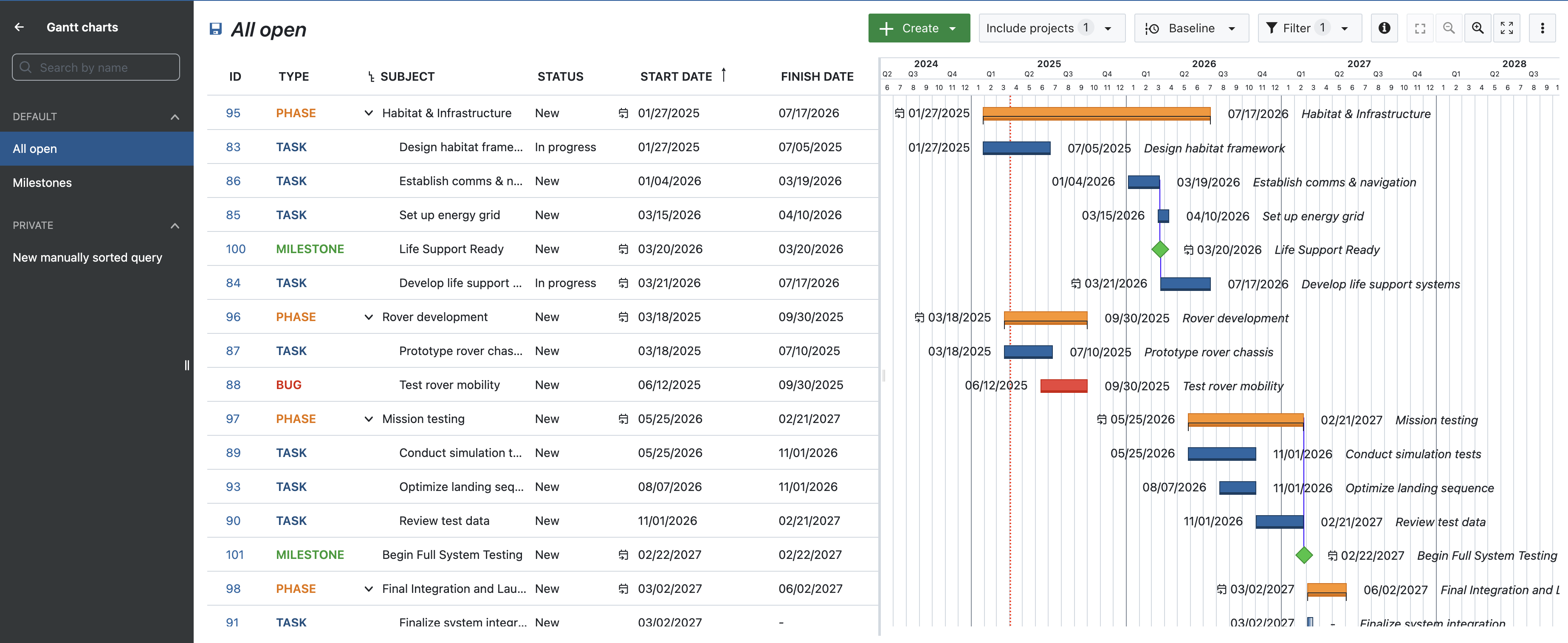
Single date mode

Along with automatic scheduling, an upcoming version of OpenProject will bring another feature to the date picker: single date mode.

Currently, all work packages except milestones have two date fields: start date and finish date. In other words, the date field is always a range. Of course, you do not always have set both dates, and you can also set the two dates to be the same. But in many cases, you don’t need two fields; a simple finish date is enough to signal a deadline or a delivery date.

By default, new work packages will only ask for a finish date

To enable this, the date field for work packages in an upcoming version will by default only ask for the finish date. This simplifies things for users who don’t need both, but this is just the default; the user can in a single click go from single date mode to range mode (like today) by clicking on the + Start date button or adding a duration. The date picker will then behave as is does today. Of course, if the user wants single date mode with just a Start date instead of a Finish date, this is possible too.

Work packages in single date mode work exactly like work packages do today when only one date is entered and the other left empty. This will therefore not involve a change in behaviour and scheduling, simply a change in the default behaviour and UI of the date picker.

In summary

Here is a summary of changes coming in an upcoming version:

  • The date picker now offers two scheduling modes: manual and automatic scheduling.
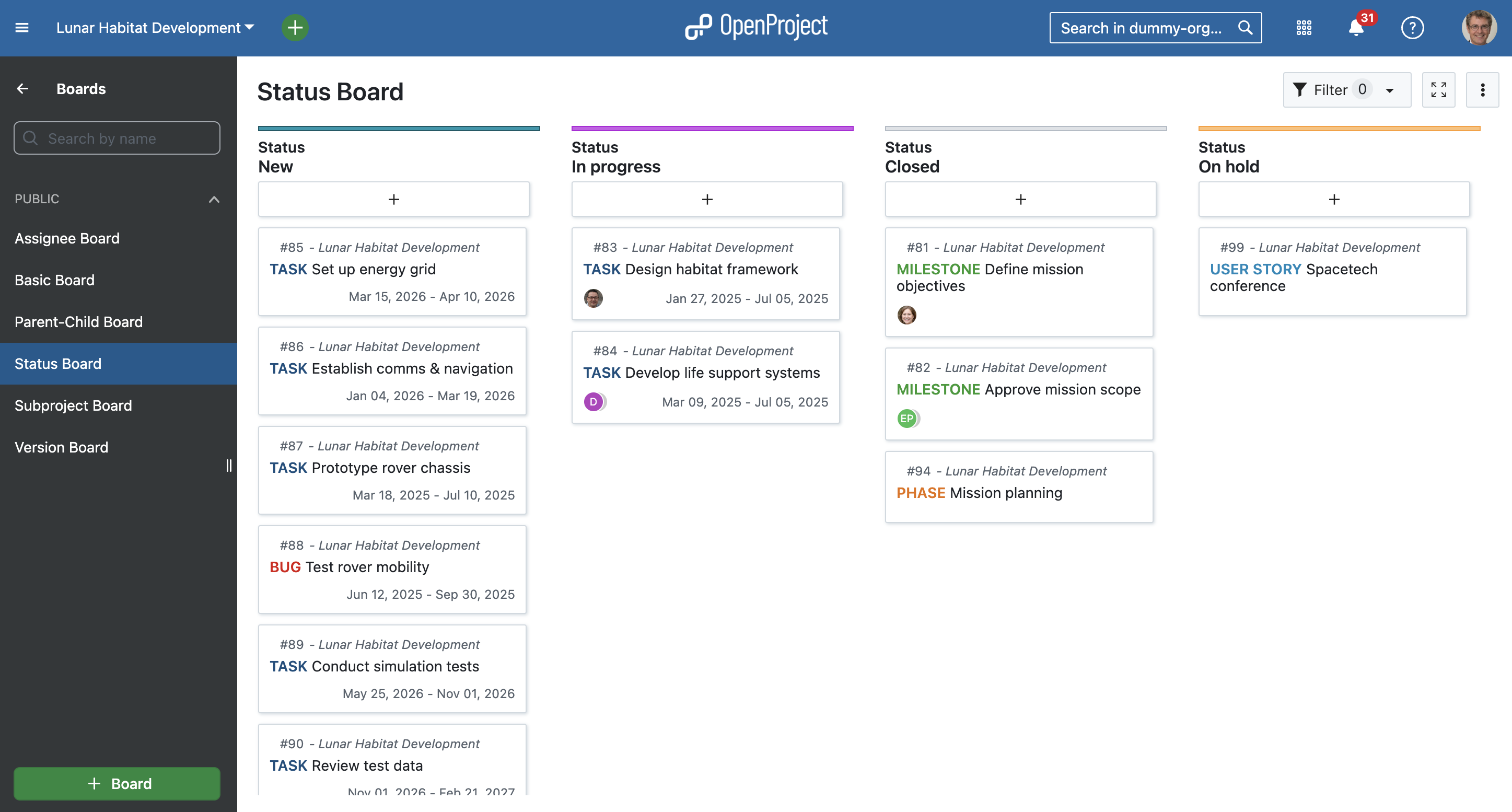
    • Dates can be selected freely in manual mode and will not be affected by relations.
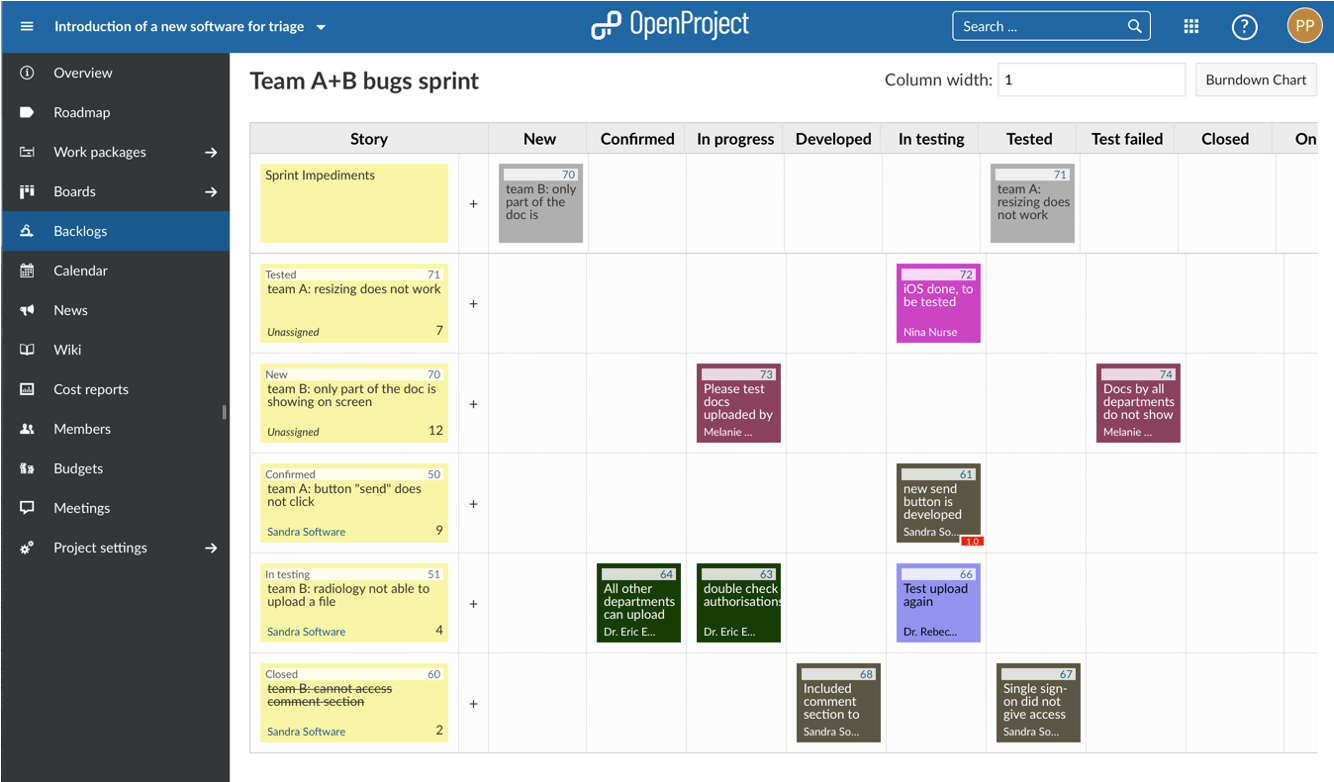
    • The start date is automatically derived in automatic mode based on predecessors or children; the duration can still be manually input.
  • In automatic mode, the date picker banners will give more helpful context about what the start date is derived from.
  • The date picker will include tabs that list predecessors, followers and children.
  • Scheduling mode for new work packages will be manual by default.
  • New work packages will default to a single date mode with finish date only; users can easily switch to range mode by adding a start date or duration.

Your feedback

As an open source software company, we value the ideas and feedback of our user Community. This upcoming changes are directly a result of user feedback. If you have opinions about these changes or have feature requests, feel free to join our Community instance and share your thoughts on this feature. We hope you’re looking forward to this improvement as much as we are looking forward to releasing it.

  •  
❌