Reading view

Happy Birthday, iPad: Apple's Tablet Turns 16

Today marks the 16th anniversary of when Apple released the first-generation iPad. After Steve Jobs announced the ‌iPad‌ on January 27, 2010, it launched a few months later on April 3, 2010.


Apple's original ‌iPad‌ looked like a larger version of the iPhone, featuring thick bezels, a 9.7-inch multitouch display with a 1,024 x 768 resolution, a Home Button, and a 30-pin dock connector. The ‌iPad‌ was the first device that Apple released with a custom-designed chip, the Apple A4.

The concept of a tablet device like the ‌iPad‌ actually predated the iPhone, and Apple had a prototype project in the works in 2004. Then-Apple CEO Steve Jobs wanted to prioritize the iPhone, so the ‌iPad‌ was put on hold until after the iPhone was established.

Apple priced the ‌iPad‌ at $499, and Jobs called it a "magical and revolutionary device at an unbelievable price." Like the iPhone, the ‌iPad‌ dominated the tablet space, and it still continues to do so today. Apple sold a million iPads in the first month, and while competitors like Microsoft and Samsung quickly came out with competing tablets of their own, the ‌iPad‌ has no match.

Apple has led the global tablet market for over a decade and no competitor comes close to matching its tablet market share. As of the fourth quarter of 2025, Apple's market share was 44.9 percent, with Samsung the next closest at 14.7 percent.

Apple has expanded its ‌iPad‌ lineup over the years, and we now have multiple sizes at multiple price points. The 11-inch ‌iPad‌ is available for those who want a low-cost option, while the 11-inch and 13-inch iPad Air are mid-range products with a Mac chip. The 8.3-inch iPad mini is available for those who want a smaller-sized tablet, and for those who want top-of-the-line performance with Apple's latest Mac chip, the 11-inch and 13-inch iPad Pro models are available.
This article, "Happy Birthday, iPad: Apple's Tablet Turns 16" first appeared on MacRumors.com

Discuss this article in our forums

  •  

X Moves X Pro Behind $40/Month Premium+ Paywall With No Notice to Users

Social network X is now limiting X Pro access to customers who subscribe to the X Premium+ plan, which is priced at $40 per month (or $33/month when paid annually). X Pro is a multi-column web interface for managing multiple feeds and lists.


X Pro was known as TweetDeck before Elon Musk bought Twitter, and it was free to use. Before March 26, X subscribers with the standard $8/month Premium plan were able to use X Pro, and now X is requiring a plan that's 5x more expensive.

No notice was provided to X Pro users about the change and access was suddenly cut off, leading to multiple complaints on the social network. On its website, X says features included in Premium "are subject to change at any time as we continue to improve the service." The X Help center clearly states that access to X Pro is now limited to the Premium+ tier.

X has three subscription tiers: Basic for $3/month or $32/year, Premium for $8/month or $84/year, and Premium+ for $40/month or $395/year. Basic still includes ads, Premium has half the number of ads, and Premium+ has no ads except for sponsored content. Paid plans provide vanity blue checkmarks that used to serve as an actual account verification method prior to Musk's takeover.

Other premium features include expanded post reach, post editing, longer post length, and longer video uploads.
This article, "X Moves X Pro Behind $40/Month Premium+ Paywall With No Notice to Users" first appeared on MacRumors.com

Discuss this article in our forums
  •  

Apple Has Released More Than 10 Products and Accessories This Month

It has been a busy March for Apple, which has unveiled more than 10 products and accessories this month. However, aside from the all-new MacBook Neo and Studio Display XDR, the devices received faster chips or new colors and little else.


The new products include an iPhone 17e, iPad Air models with the M4 chip, MacBook Air models with the M5 chip, MacBook Pro models with M5 Pro and M5 Max chips, the all-new MacBook Neo, an updated Studio Display, a higher-end Studio Display XDR, AirPods Max 2, and the Nike Powerbeats Pro 2. The new accessories include iPhone cases, Apple Watch bands, and the iPhone's Crossbody Strap in a range of fresh color options like Bright Guava, Vanilla, Soft Pink, Clementine, and/or Electric Lavender.

iPhone 17e features the same overall design as the iPhone 16e, but it gains Apple's A19 chip, MagSafe for magnetic wireless charging and magnetic accessories, Apple's second-generation C1X modem for faster 5G, and a doubled 256GB of base storage. In the U.S., the iPhone 17e starts at $599, just like the iPhone 16e did.

The new iPad Air's key upgrades include Apple's M4 chip, an increased 12GB of RAM, Apple's N1 chip with Wi-Fi 7 support, and the C1X modem in cellular models.

The MacBook Air received a faster M5 chip, and a doubled 512GB of base storage, but the starting price increased from $999 to $1,099 as a result of a 256GB configuration being dropped. With the N1 chip, the MacBook Air now has Wi-Fi 7 and Bluetooth 6, and it now comes with Apple's 40W Dynamic Power Adapter with 60W Max.

The higher-end 14-inch and 16-inch MacBook Pro models finally received M5 Pro and M5 Max chips, plus up to twice as fast SSD speeds and a doubled 1TB of base storage. Battery life has increased slightly across all of the models, and the N1 chip extends to the MacBook Pro line now for Wi-Fi 7 and Bluetooth 6 support.

The regular Studio Display gained Thunderbolt 5 support and improved speakers, and the camera now supports Desk View. There is also an all-new, higher-end Studio Display XDR that gained all of those benefits, plus bigger improvements such as a 120Hz refresh rate, mini-LED backlighting, increased brightness, and more.

The colorful new MacBook Neo starts at just $599 in the United States, and at an even lower $499 for college students. Available in Blush, Citrus, Indigo, and Silver, the MacBook Neo is powered by the A18 Pro chip from the iPhone, and it is equipped with a 13-inch display, up to 512GB of storage, and a non-configurable 8GB of RAM.

AirPods Max 2 have a handful of upgrades over the previous AirPods Max, including Apple's H2 chip, increased active noise cancellation, improved sound quality, and features such as Adaptive Audio, Conversation Awareness, Voice Isolation, and Live Translation. Plus, the Digital Crown has a new Camera Remote function.

The special-edition Nike Powerbeats Pro 2 are the same as the regular Powerbeats Pro 2, except they have a two-tone design consisting of black and Nike's signature Volt neon green-yellow color. The earbuds have both Nike and Beats logos.

To learn more, read our coverage:All of the products and accessories listed above have been released, except for the AirPods Max 2, which are available to pre-order starting Wednesday, March 25.
This article, "Apple Has Released More Than 10 Products and Accessories This Month" first appeared on MacRumors.com

Discuss this article in our forums
  •  

Apple Acquires Final Cut Pro Plugin Company MotionVFX

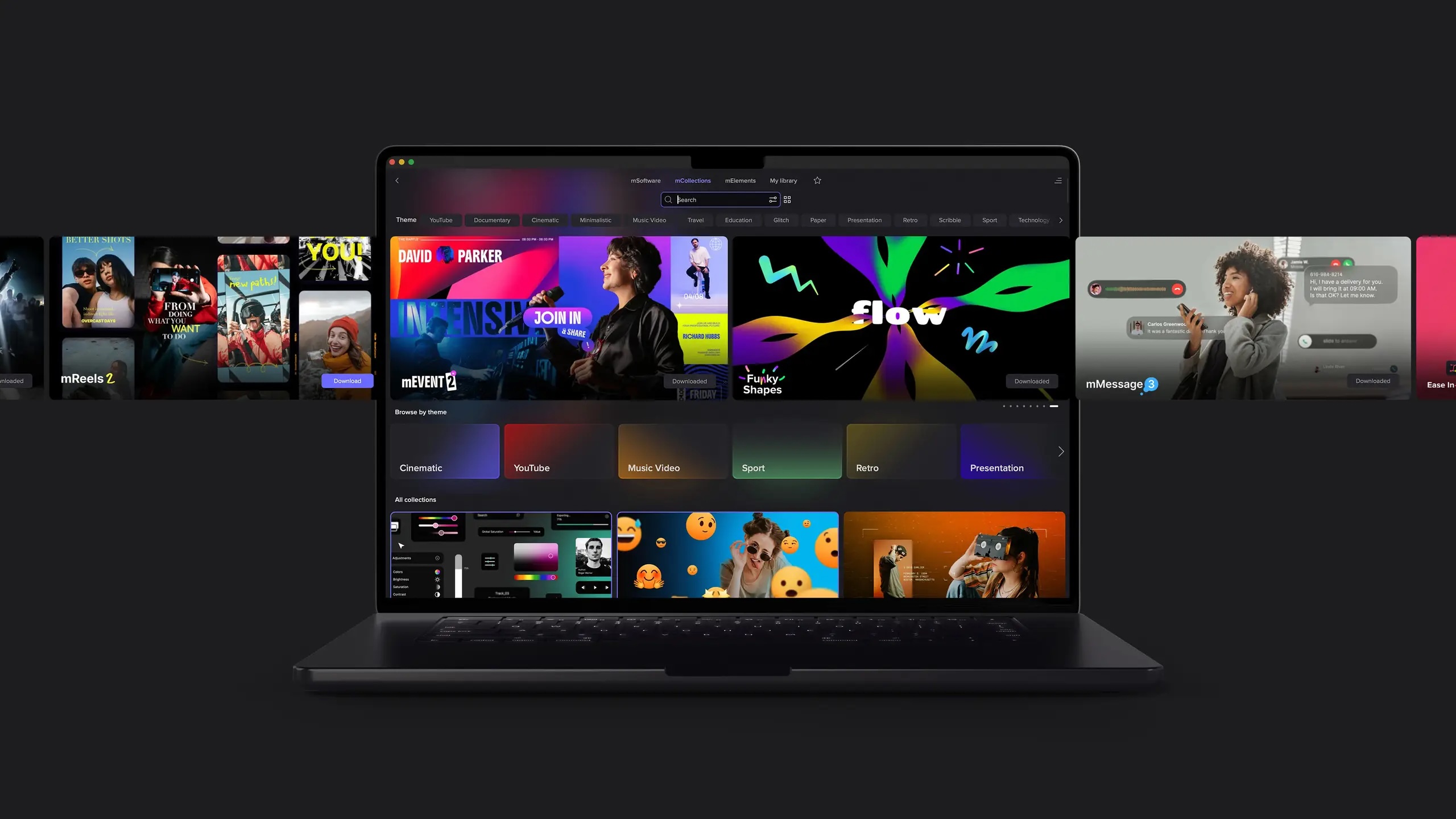
Apple today acquired MotionVFX, a major developer of plugins, visual effects, and motion graphics tools for Final Cut Pro.


MotionVFX is a Polish software company founded by Szymon Masiak in 2009. It creates high-quality plugins, transitions, templates, and visual effects (VFX) for video editors, specializing in tools for Final Cut Pro, DaVinci Resolve, and Apple Motion. From MotionVFX's website today:

We are extremely excited to share that MotionVFX is joining the Apple team to continue to empower creators and editors to do their best work.

For over 15 years, we've been on a mission to create world-class, visually inspiring content and effects for video editors. From the very beginning, we’ve been all about quality, ease of use, and great design. These are also the values that we admire most in Apple’s products, and we’re thrilled to be able to embrace them together.

We'd like to take this opportunity to thank all our amazing customers and supporters who have been with us through all these years. You inspired us, you challenged us, and you helped our products become what they are today. We are incredibly grateful to be part of this amazing community and excited to continue our work to serve you.

This is the beginning of something truly wonderful!


MotionVFX has long been one of the most prominent third-party developers in the Final Cut Pro ecosystem. Its plugins are widely used by YouTubers, filmmakers, and broadcast editors looking to add high-end motion graphics and stylized visual effects without building them from scratch.

Among its most popular tools are mFilmLook, which provides cinematic color grading and film emulation effects, and mO2, a powerful plugin that enables the use of 3D models directly inside Final Cut Pro and Apple Motion. MotionVFX also offers Design Studio, a panel extension that allows users to browse and install effects and templates directly within Final Cut Pro.

MotionVFX's expertise in templates, transitions, and 3D workflows could help Apple improve Final Cut Pro's built-in graphics tools, potentially reducing reliance on third-party plugins. The acquisition will likely strengthen Apple's latest push into professional video production, especially as the company continues to bolster its new Apple Creator Studio subscription service.

MotionVFX's 70 employees today joined Apple as part of the acquisition. The company was already a worldwide partner of Apple.

MotionVFX did not indicate whether its existing products will continue to be sold independently following the acquisition. For now, the company's plugin catalog remains available through its website and the MotionVFX marketplace.
This article, "Apple Acquires Final Cut Pro Plugin Company MotionVFX" first appeared on MacRumors.com

Discuss this article in our forums

  •  

Apple to Host 50th Anniversary Celebrations Around the World

Apple today announced that it will be celebrating its upcoming 50th anniversary by hosting gatherings "around the world" throughout the month of March.


Apple's 50th anniversary is on April 1, 2026. The company has yet to reveal exactly where and when it will be hosting additional celebrations, but possibilities include major cities like San Francisco, Los Angeles, London, Paris, and Tokyo.

"Each gathering highlights human creativity and ingenuity in action, and showcases the remarkable things people can do when they have the right Apple products in their hands," said Apple, in a press release.

"Stay tuned for more updates," said Apple.

17-time Grammy Award-winning music artist and producer Alicia Keys kicked off the celebrations today with a surprise performance at Apple's Grand Central store in New York. Apple invited selected content creators to the impromptu concert, which was also open to the public for anyone who happened to be in the area at the time.


Apple's CEO Tim Cook, hardware engineering chief John Ternus, marketing chief Greg Joswiak, retail chief Deirdre O'Brien, and others were in attendance at Grand Central.

"Thinking different has always been at the heart of Apple," said Cook. "It's what has driven us to create products that empower people to express themselves, to connect, and to create something wonderful. As we celebrate 50 years, we are deeply grateful to everyone who has been part of this journey and who continues to inspire what comes next."


Cook previously shared a "50 Years of Thinking Different" letter.

The letter touches on the upcoming 50th anniversary and says that "the world is moved forward by people who think different." For those unaware, "Think Different" was a famous advertising slogan used by Apple in the late 1990s to early 2000s.

"At Apple, we're more focused on building tomorrow than remembering yesterday," said Cook, in the letter. "But we couldn't let this milestone pass without thanking the millions of people who make Apple what it is today."
This article, "Apple to Host 50th Anniversary Celebrations Around the World" first appeared on MacRumors.com

Discuss this article in our forums

  •  

Apple Kicks Off 50th Anniversary With Surprise Alicia Keys Concert in New York

Apple mysteriously shut down its Grand Central Terminal store in New York City today, and it turns out it was for an impromptu Alicia Keys concert to celebrate Apple's upcoming 50th anniversary.


Apple quietly invited select YouTubers and members of the media (including MacRumors) to the store location, but kept the performer secret until Alicia Keys took the stage. Preparations for the concert started yesterday, with Apple setting up a stage, audio equipment, and lights, complete with Keys' signature pink piano.

Apple CEO Tim Cook, marketing chief Greg Joswiak, retail head Deirdre O'Brien, and hardware engineering boss John Ternus were at the Grand Central Terminal location for the concert. Members of the public that are in the area are also able to watch the performance.


Alicia Keys has a history with Apple, and has performed at Apple events several times in the past. In September 2016, she was at the Apple Music Festival 10 in London, and she sang at the NYC Holiday Masquerade Ball in December 2022 as part of Apple's live concert series. Keys also was one of the first artists to have an immersive video experience on Apple Vision Pro with the 3D Alicia Keys: Rehearsal Room experience.


Earlier this week, Cook said that Apple planned to celebrate Apple's 50th anniversary over the coming weeks, recognizing the "creativity, innovation, and impact that people around the world have made possible with Apple technology."

It appears that the private concert is the first of Apple's celebrations that are set to take place over the next two and a half weeks. Apple was founded on April 1, 1976, so the company's actual 50th anniversary is on April 1, 2026.
This article, "Apple Kicks Off 50th Anniversary With Surprise Alicia Keys Concert in New York" first appeared on MacRumors.com

Discuss this article in our forums

  •  

Apple Releases iOS 18.7.6 to Address Australia Emergency Call Issue

Apple today released iOS 18.7.6 for older devices, addressing an issue that caused some older iPhones in Australia to be unable to connect to emergency services.


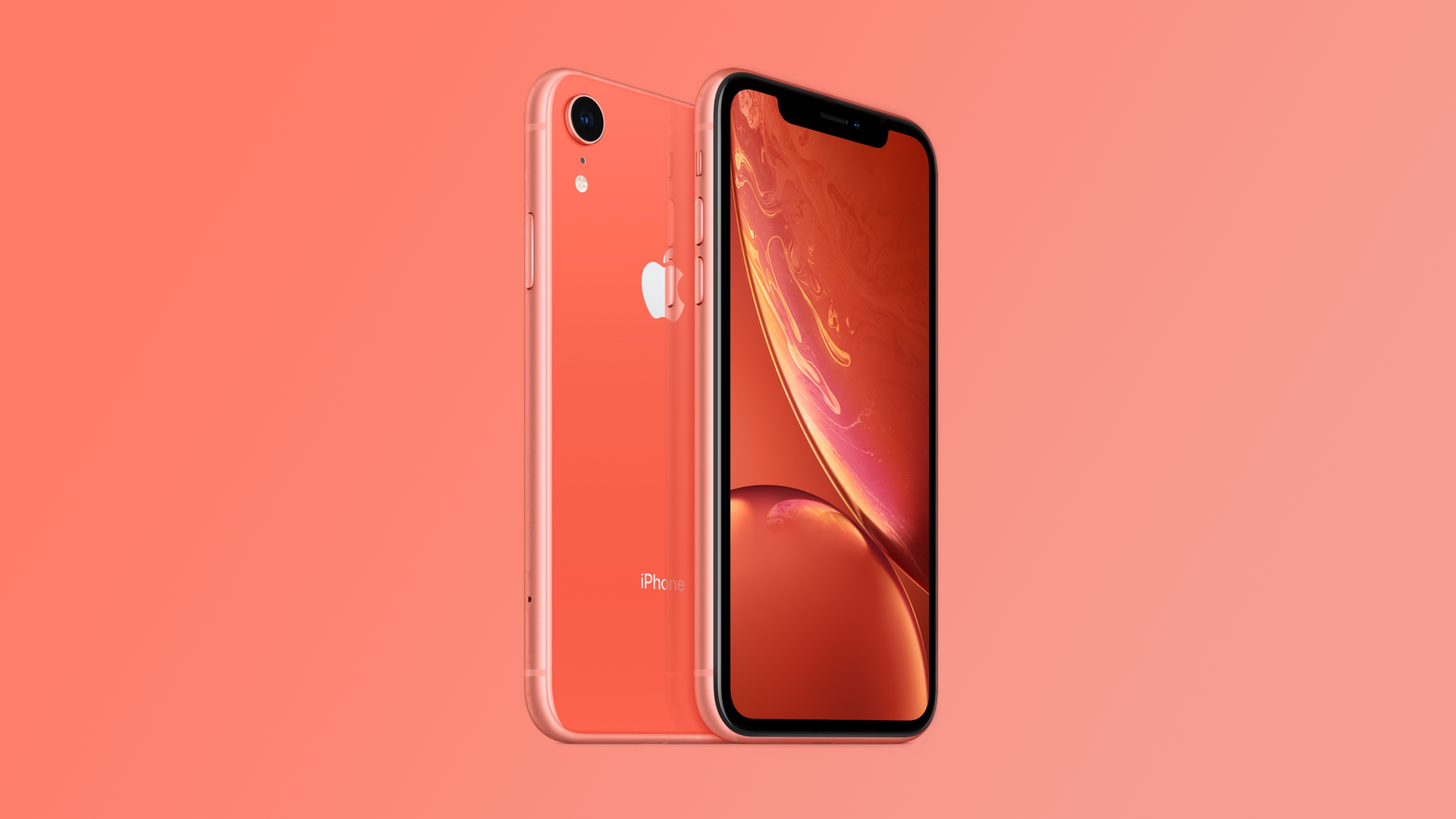
According to Apple's release notes, the update fixes an issue that was preventing the iPhone XS and ‌iPhone‌ XR from properly connecting to emergency networks in Australia.

  • This update addresses a mobile network issue for ‌iPhone‌ XS models and ‌iPhone‌ XR when establishing a connection to emergency services in Australia.


Australian mobile network operators have been improving support for emergency calling on their networks, which has led to a host of problems with older iPhones connecting to emergency situations in some situations. Apple has released several updates to address the problem, including iOS 16.7.4 and iOS 26.2.1.

Some of Apple's updates exacerbated the issue, and Apple ended up temporarily pulling iOS 18.7.4, iOS 16.7.13, iOS 15.8.6, and iOS 12.5.8 back in December. Since then, additional updates have been released to further fix the emergency calling bugs, including the new iOS 18.7.6. update.
This article, "Apple Releases iOS 18.7.6 to Address Australia Emergency Call Issue" first appeared on MacRumors.com

Discuss this article in our forums

  •  

Apple Releases Third watchOS 26.4, tvOS 26.4, and visionOS 26.4 Betas

Apple today provided developers with the third betas of upcoming watchOS 26.4, tvOS 26.4, and visionOS 26.4 betas for testing purposes. The software comes a week after Apple released the second betas.


The software updates are available through the Settings app on each device, and because these are developer betas, a free developer account is required.

watchOS 26.4 adds a new Average Bedtime metric to the sleep features that sync to the health app, so you can better keep an eye on how bedtime impacts overall sleep quality.

tvOS 26.4 eliminates the iTunes Movies and iTunes TV Shows apps on the Apple TV. These apps haven't worked for some time and have directed users to the ‌Apple TV‌ app for purchases, but Apple is finally phasing them out entirely. Apple also added a Continuous Audio Connection option for HDMI output.

visionOS 26.4 includes support for foveated streaming for apps and games. Foveated streaming allows video to be streamed to the precise area where a user is looking, and peripheral areas are compressed. It allows for higher visual quality and lower latency.

This article, "Apple Releases Third watchOS 26.4, tvOS 26.4, and visionOS 26.4 Betas" first appeared on MacRumors.com

Discuss this article in our forums

  •  

MacRumors Turns 26: Here's What Our Readers Thought About the iPod, iPhone, and More

MacRumors turns 26 today, and we want to take the opportunity to thank everyone who has read and supported our website over the years.


MacRumors was founded by Arnold Kim on February 24, 2000, while he was a medical student, and it has since become one of the world's most popular Apple news websites. Kim was profiled in The New York Times in 2008. Coincidentally, we share our birthday with Steve Jobs, who would have turned 71 years old today.

Our website has been around for many major Apple product announcements, including the iPod, MacBook Pro, iPhone, iPad, Apple Watch, and more.

Here are the forum threads for each product:
This article, "MacRumors Turns 26: Here's What Our Readers Thought About the iPod, iPhone, and More" first appeared on MacRumors.com

Discuss this article in our forums

  •  

Apple Launches New 'Sales Coach' App

Apple today debuted a new Sales Coach app for the iPhone and the iPad, replacing the former SEED app. Designed for Apple Store and Apple Authorized Service Provider (AASP) employees, Sales Coach provides training resources and information useful for Apple device sales.


Sales Coach is available for ‌Apple Store‌ and AASP employees worldwide, and Apple has released it as an update to the former SEED app. Those who have the SEED app will see it change to Sales Coach when installing the latest update. Sales Coach is not a publicly available app.

Compared to the SEED app, Sales Coach adopts Apple's updated Liquid Glass design, and it will include a new AI chatbot that will answer product-related questions. The chatbot can be accessed through an upcoming "Ask" tab, and it is similar to the chatbot in the Apple Support app. Employees will be able to get instant information on specific ‌iPhone‌ capabilities, details on how different software features work, and more, across all of Apple's products.

Apple doesn't appear to have rolled out the chatbot just yet, but we learned about it when we we first shared details about the Sales Coach app earlier this month. Sales Coach is also available on the web at salescoach.apple.com.
This article, "Apple Launches New 'Sales Coach' App" first appeared on MacRumors.com

Discuss this article in our forums
  •  

iPhone's Emergency SOS via Satellite Feature Helped Rescue Skiers Caught in Lake Tahoe Avalanche

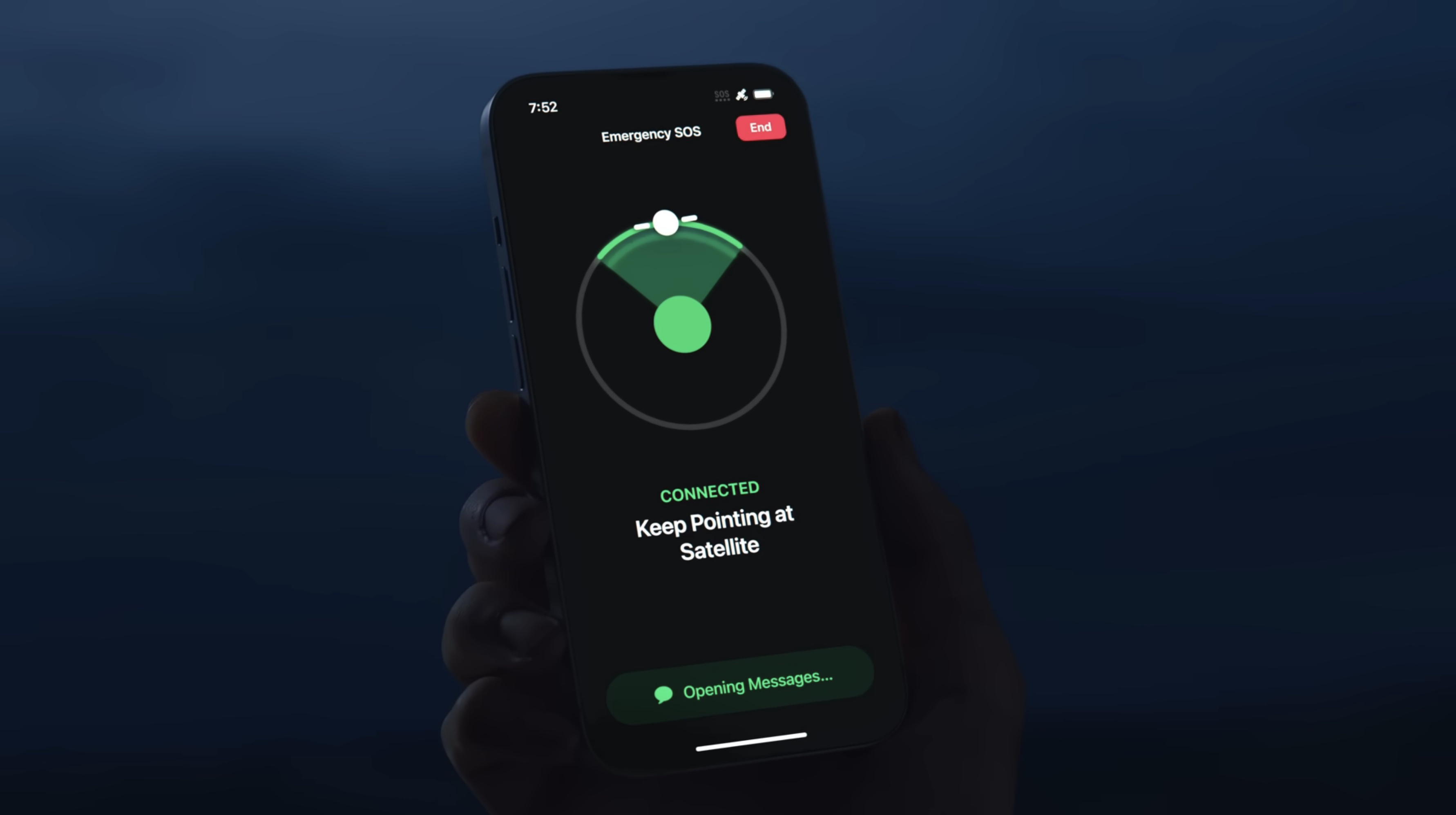
Six skiers who survived the avalanche near Lake Tahoe on Tuesday used the Emergency SOS via satellite feature on the iPhone to get help, reports The New York Times. Emergency SOS via satellite lets ‌iPhone‌ users communicate with emergency responders via text when a cellular or Wi-Fi connection is not available.


The skiers were able to stay connected to the Nevada County Sheriff's Office for several hours while rescue efforts were coordinated. "One of my personnel was communicating with one of the guides over a four-hour period, giving information back to the Nevada sheriff's office and coordinating what rescues could be permitted," said Don O'Keefe, law enforcement chief for California's Office of Emergency Services.

Emergency SOS via satellite is available on the ‌iPhone‌ 14 and later, as well as the Apple Watch Ultra 3. Apple offers the functionality for free.

Emergency SOS via satellite has been credited with helping people in multiple off-grid emergencies, from car accidents to wild fires. The feature works in Australia, Austria, Belgium, Canada, France, Germany, Ireland, Italy, Japan, Luxembourg, Mexico, the Netherlands, New Zealand, Portugal, Spain, Switzerland, the U.K., and the U.S.
This article, "iPhone's Emergency SOS via Satellite Feature Helped Rescue Skiers Caught in Lake Tahoe Avalanche" first appeared on MacRumors.com

Discuss this article in our forums

  •  

Apple TV Sports Content Including F1, MLS, and Friday Night Baseball Coming to Bars and Restaurants

Apple has inked a deal with EverPass Media to bring Apple TV sports content to EverPass customers in the United States. EverPass is a company that bundles premium sports content for restaurants, hotels, casinos, sports bars, and other businesses that want to air sporting events.


EverPass will now be able to offer Formula 1, Major League Soccer, and Major League Baseball content to its customers at no additional cost through the main EverPass Core content package. That package also includes Paramount+'s UEFA Champions League, Prime Video's Thursday Night Football, NBA, WNBA and more.

The deal includes all-access coverage of every F1 Grand Prix, including practice, qualifying, and Sprint sessions. For MLS, EverPass customers will be able to show enhanced feature matches every weekend during the regular season, plus MLS All-Star Game, Leagues Cup, MLS Cup, and pre-and post-match programming. Also included is Friday Night Baseball, with two MLB Friday night games per week.

‌Apple TV‌ sporting content will be available through EverPass alongside NFL Sunday Ticket, Peacock Sports Pass, Prime Video sports content, and Paramount+.
This article, "Apple TV Sports Content Including F1, MLS, and Friday Night Baseball Coming to Bars and Restaurants" first appeared on MacRumors.com

Discuss this article in our forums

  •  

iOS 26.4 Highlights Your Personal Hotspot Data Usage More Prominently

iOS 26.4 moves the feature to show how much mobile data connected devices have used via Personal Hotspot to a more prominent and easily accessible location.


Now available in Personal Hotspot settings below the "Maximize Compatibility" toggle, the functionality breaks down data usage by device, with non-Apple devices simply showing up as a group of "Other Devices." Total Personal Hotspot Data usage is also displayed.

Previously, the feature was buried in cellular settings. It may be particularly helpful to those with a data limit on their carrier plan.

iOS 26.4 is now available in beta to developers. A public beta will be released in the near future. Apple plans to release the update in the spring.
This article, "iOS 26.4 Highlights Your Personal Hotspot Data Usage More Prominently" first appeared on MacRumors.com

Discuss this article in our forums

  •  

Apple Event Set for March 4, Updated Hardware Expected

Apple has scheduled an event for Wednesday, March 4, and it’s a good bet that updated hardware will be unveiled. Somewhat unusually, Apple has scheduled the event for three different locations around the world; New York, London, and Shanghai. Usually Apple just hosts events at their Cupertino Apple Park location, so making this a global ... Read More
  •  

macOS Tahoe Finder Bug Underscores Apple's Slipping UI Polish

Apple released macOS Tahoe last September, but despite two point updates since then, it is still struggling to resolve an embarrassing interface issue in Finder that appears to have been introduced with its Liquid Glass redesign.


If you updated your Mac to macOS Tahoe and you prefer to work in Finder's column view, there's a good chance you've been frustrated by the glitch, which developer Jeff Johnson has been admirably tracking over on his blog.

finder
Scroll bar blocking column resize handles (Original image: Jeff Johnson)

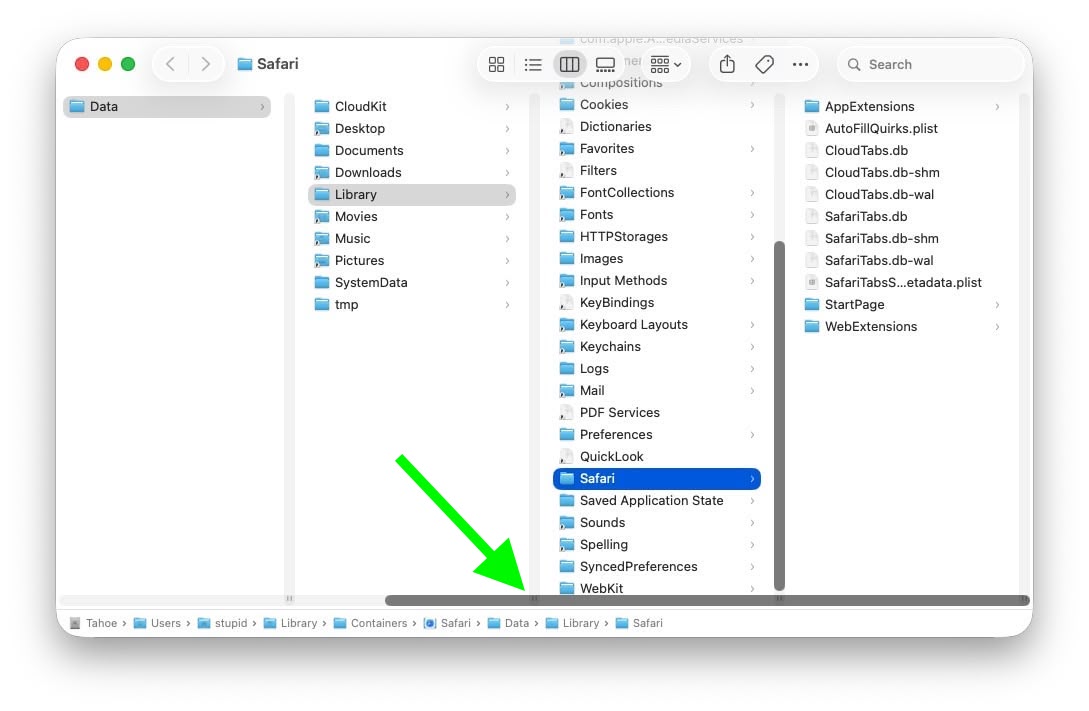
At the bottom of each Finder column are handy little resize handles allowing you to expand or reduce each column as you see fit. But in macOS 26 and macOS 26.2, when scroll bars are set to "always show," the horizontal scroll bar at the bottom overlaps and covers those handles, so you can't click them to adjust column widths the way you could in earlier macOS versions like Sequoia.

finder
Scroll bar occluding column content (Original image: Jeff Johnson)

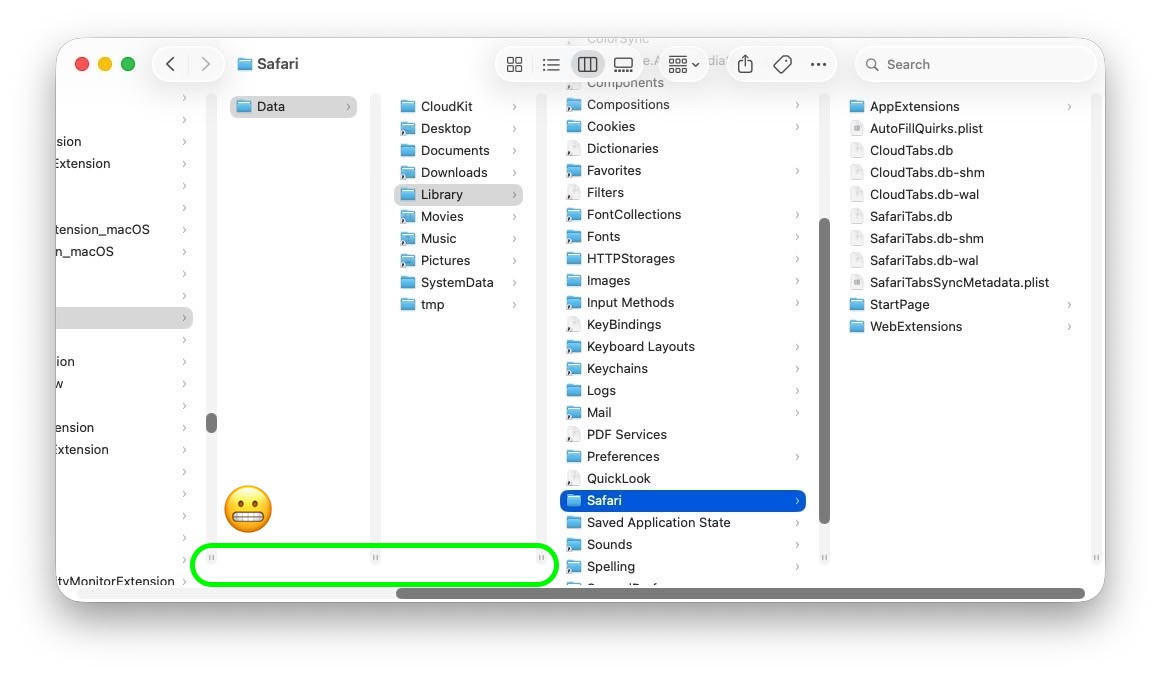
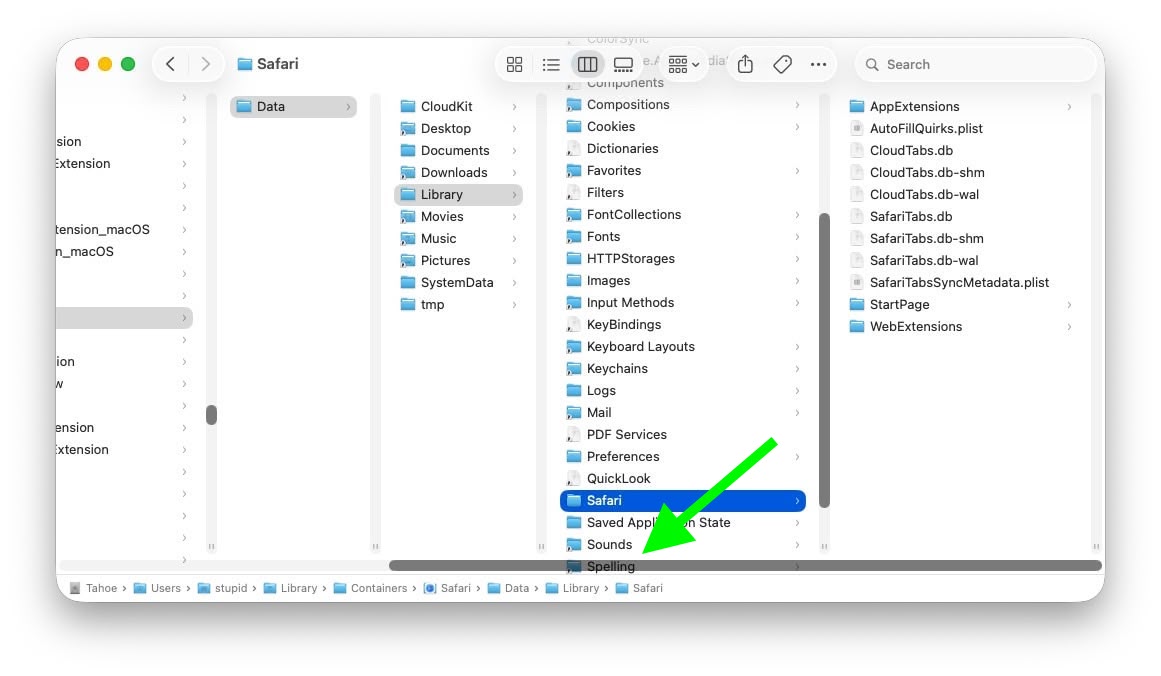
With the recent release of macOS 26.3, Apple attempted a fix. The vertical scrollers were shortened so the resizing widgets now sit above the horizontal bar and are technically clickable again. Unfortunately though, as Johnson points out, the horizontal scroll bar still overlaps file names in the view, causing it to regularly obscure content. Moreover, if you hide the path bar and status bar, the layout leaves a weird amount of empty space below the scrollers, making the whole thing look unfinished (see image below).

finder
Column resize handles suspended in mid-air (Original image: Jeff Johnson)

Johnson's take is basically that while the most disruptive bug is less bad now, the overall column view layout still feels half-baked – especially for anyone who keeps scroll bars always visible.

As Daring Fireball's John Gruber points out, it's an embarrassing fudge for a company that used to pride itself on pixel-perfect settings across its Mac operating system.

At this point, it's unclear when Apple will manage to iron out the UI irregularities introduced by Liquid Glass. macOS Tahoe‌ 26.4 is likely to be released in March or April, and could introduce some new Siri features, though at least some of the capabilities that we were expecting may have been delayed, depending on who you believe. The update is also expected to introduce new emoji characters.
This article, "macOS Tahoe Finder Bug Underscores Apple's Slipping UI Polish" first appeared on MacRumors.com

Discuss this article in our forums
  •  

Live Activities Taking Over Your Apple Watch? Here's the Fix

In watchOS 26, the Smart Stack for your Apple Watch is pretty clever. The collection of widgets can be pulled up with a scroll of the Digital Crown, and shows you relevant information throughout your day. But sometimes, its eagerness to help can be a bit much, especially when it comes to Live Activities.


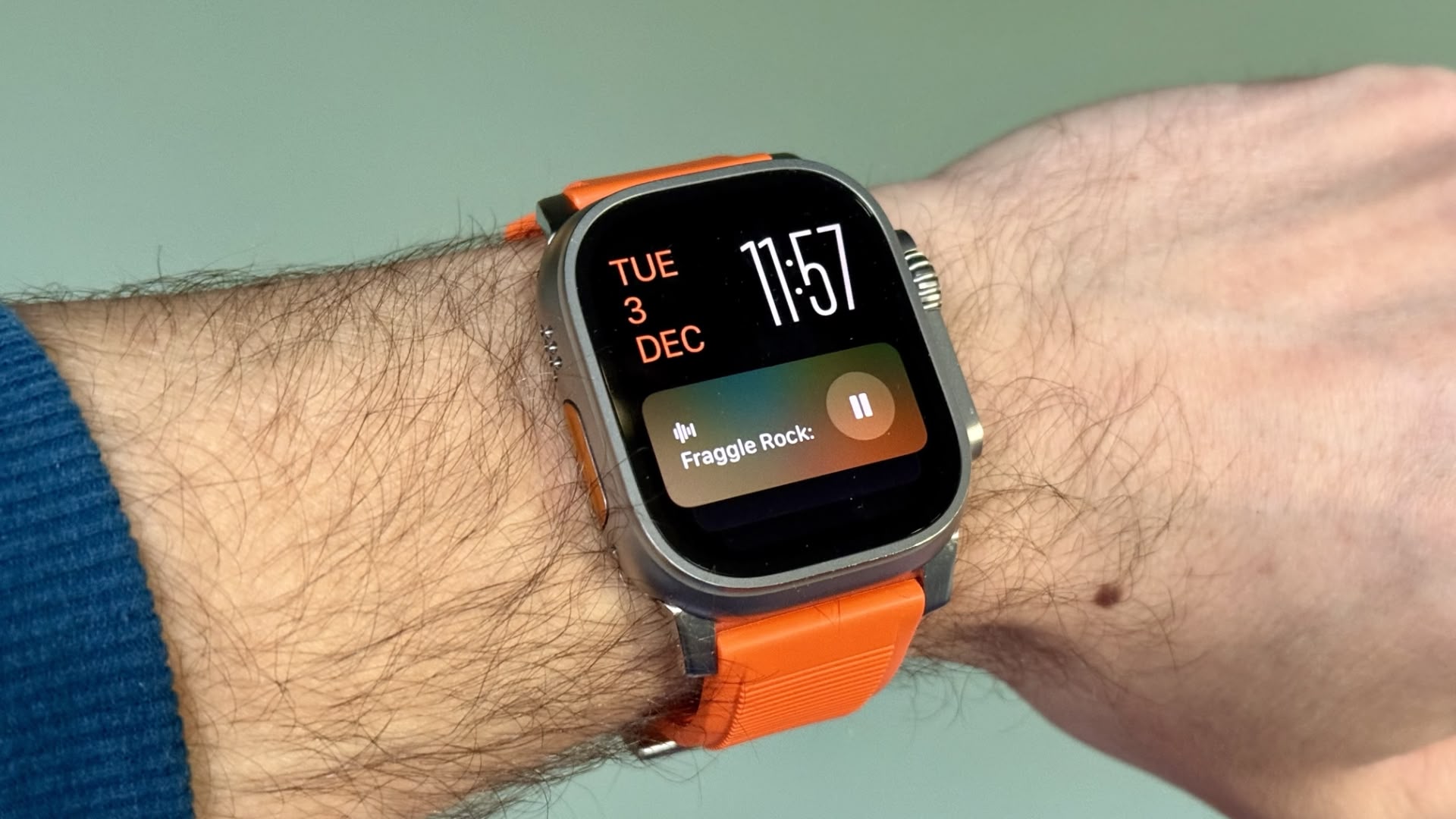
You're probably familiar with this scenario: You raise your wrist expecting to see your customized watch face, but it's been replaced by media playback controls because someone's watching your Apple TV, or a timer you set earlier for cooking that still has ages left to run. Live Activities in the Smart Stack can clearly be useful, but having them automatically take over your display isn't always ideal. Here's how to take back control:

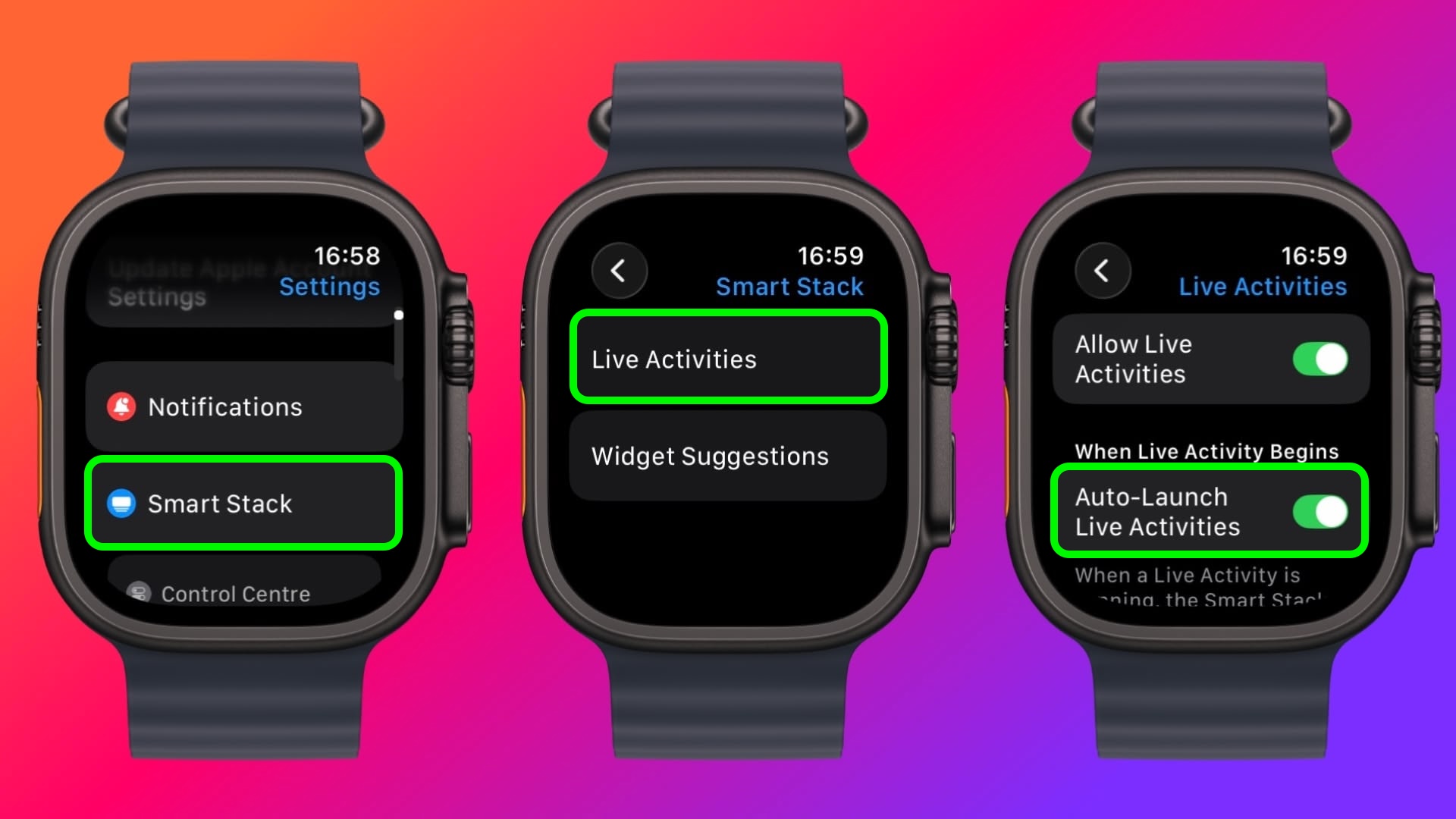
  1. Open Settings on your Apple Watch.

  2. Tap Smart Stack.

  3. Select Live Activities.

  4. Toggle off the switch next to Auto-Launch Live Activities.

settings

After disabling auto-launch, Live Activities will still be available in your Smart Stack when you want them – you'll just need to manually scroll to see them instead of having them pop up automatically.

If you want more granular control, you're in luck. From the same settings screen you can control which Apple apps display Live Activities. Using the Watch app on your iPhone, you can also manage Live Activities settings for third-party apps. This lets you keep the notifications you find useful while preventing the less important ones from interrupting your watch face.

Pro Tip: If it's just those persistent media controls that bug you, head to Media Apps in the same settings menu and turn off Live Activities completely, or alternatively under "Auto-Launch," select Off or Smart Stack for a more focused watch face experience.
This article, "Live Activities Taking Over Your Apple Watch? Here's the Fix" first appeared on MacRumors.com

Discuss this article in our forums

  •  

Apple Releases watchOS 26.3, tvOS 26.3 and visionOS 26.3 Release Candidates

Apple today provided developers with the release candidate versions of upcoming watchOS 26.3, tvOS 26.3, and visionOS 26.3 updates for testing purposes. The software comes a week after Apple provided the third betas. The release candidates are the final version of the updates that will be provided to the public as long as no bugs are found.


The software updates are available through the Settings app on each device, and because these are developer betas, a free developer account is required.

We don't know what new features might be added in watchOS 26.3, visionOS 26.3, and tvOS 26.3, and nothing new has been discovered so far. Apple doesn't typically provide release notes for betas, so we might not know what's new until the software updates see a public launch unless there are outward-facing changes.

The software updates will likely launch next week now that RCs are available.
This article, "Apple Releases watchOS 26.3, tvOS 26.3 and visionOS 26.3 Release Candidates" first appeared on MacRumors.com

Discuss this article in our forums
  •  

Apple Stops Signing iOS 26.2, Blocking Downgrades From iOS 26.2.1

Apple today stopped signing iOS 26.2, which means that iPhone users who have updated to iOS 26.2.1 are no longer able to downgrade to the earlier version of iOS. Apple released iOS 26.2.1 last week with support for the AirTags 2.


Software "signing" means that it has passed the server-side verification check that Apple performs when a user downloads a new version of iOS on an ‌iPhone‌. An update can't be installed unless it passes the verification check.

Apple does not show users earlier versions of iOS once an upgrade has come out, but when software is still signed, it is possible to downgrade using the macOS Finder on a Mac or the Apple Devices app on a Windows PC. Until today, users would have been able to downgrade from iOS 26.2.1 to iOS 26.2 if desired for some reason.

Unsigning software prevents Apple customers from installing outdated, less secure versions of iOS, and Apple typically stops signing an update a week or so after new software comes out.

Apple has also stopped signing several older versions of iOS provided for devices unable to update to iOS 26, including iOS 12.5.7, iOS 15.8.5, iOS 16.7.12, and iOS 18.7.3. iOS 12.5.8, iOS 15.8.6, and iOS 18.7.4 were released last week, while an updated version of iOS 16 came out today.
This article, "Apple Stops Signing iOS 26.2, Blocking Downgrades From iOS 26.2.1" first appeared on MacRumors.com

Discuss this article in our forums

  •  

Apple Releases macOS 11, watchOS 10, and watchOS 9 Updates to Keep iMessage and FaceTime Working on Older Devices

Apple today released macOS 11.7.11, watchOS 10.6.2, and watchOS 9.6.4 for older Macs and Apple Watches that are not able to run the current watchOS and macOS 26.


According to Apple's release notes, the updates extend the certificate that features like device activation, iMessage, and FaceTime use. The certificate update ensures that these functions will continue to work after January 2027.

On the Mac, the update can be installed through the Settings app, while on the Apple Watch, the updates can be installed through the Apple Watch app on iPhone.

watchOS 9.6.4 and the update that preceded it are the final versions of watchOS that support devices like the ‌iPhone‌ 8, ‌iPhone‌ 8 Plus, and ‌iPhone‌ X, which are limited to iOS 16 and cannot be updated to iOS 17. watchOS 10.6.2 is available for the Apple Watch Series 4, Apple Watch Series 5, and the original Apple Watch SE.

Update: Apple has also released macOS Catalina Security Update 2026-001 and watchOS 6.3.1 for older devices.


This article, "Apple Releases macOS 11, watchOS 10, and watchOS 9 Updates to Keep iMessage and FaceTime Working on Older Devices" first appeared on MacRumors.com

Discuss this article in our forums
  •  

Public Mobile Offering 60GB of 5G Data for $20/Month in Canada

Canadian cell phone plans have historically been very expensive compared to other countries, so we want to highlight a really good deal that has popped up.


In Canada, the carrier Public Mobile has launched a limited-time flash sale that offers 50% off its 5G Canada — U.S. — Mexico plans for a two-year period.

Here are the discounted plans available to new customers through January 26, with each also including unlimited calling and text messaging:
  • 60GB of 5G data for $20 per month (regularly $40 per month)

  • 80GB of 5G data for $25 per month (regularly $50 per month)

  • 100GB of 5G data for $30 per month (regularly $60 per month)
Public Mobile says these discounted plans are available for new activations only, and the promotion will expire 24 months after it is applied. Existing customers were briefly able to switch to a 100GB plan for just $20 per month (down from $40 per month) in the Public Mobile app, but this is no longer possible as of writing.

You can use your allotted data while roaming in the U.S. and Mexico at no additional cost, but note that Public Mobile limits 5G speeds to up to 250 Mbps. And after the allotted amount, data speeds are reduced to a maximum of just 512 Kbps.

Public Mobile is a prepaid carrier, meaning that you pay upfront for your monthly plan, with no credit check required. You can cancel your subscription at any time.

As a Telus subsidiary, Public Mobile uses the Telus network in Canada. However, Public Mobile customers may be deprioritized in busy areas if necessary, and cellular coverage can vary based on your location. All in all, service might not always be comparable to a major carrier like Bell or Rogers, but your mileage may vary.

Update: Existing customers were briefly able to switch to a 100GB plan for just $20 per month (down from $40 per month), but this is no longer possible. Still, the 60GB for $20 per month offer for new customers is a great deal by Canadian standards.
This article, "Public Mobile Offering 60GB of 5G Data for $20/Month in Canada" first appeared on MacRumors.com

Discuss this article in our forums
  •  
❌