Reading view

Software alternatives to Atlassian – free and open source

With the end of Jira Data Center announced and prices rising year after year, vendor lock-in is no longer just an abstract risk, it has already become reality. Many organizations now face a costly migration to the cloud, whether they want it or not.

But there’s another way. Open source software gives you back control: over your data, your infrastructure, and your budget. It’s built on transparency, community, and long-term reliability, without locking you into a single company’s roadmap or pricing. And while Atlassian has been steadily raising prices, open source has grown into a powerful, future-ready alternative.

OpenProject is your secure, self-managed alternative to Jira, and it’s only one piece of the puzzle. Whether you also rely on Confluence, Bitbucket, or other parts of the Atlassian stack, there are strong open source options ready to support your team. You’re not stuck. You’ve got choices. And we’re here to help.

Migrating away from Atlassian: We know it’s not easy

If you’re looking for an alternative to Atlassian, you’re not alone. Many organizations are now preparing to move away from Jira Data Center and Confluence. Not because they want to, but because they have to. With Atlassian ending support for self-managed hosting and pushing users toward the cloud, the pressure is mounting.

Still, switching tools isn’t a decision you make lightly. You’ve built entire workflows around Jira and Confluence. You’ve got hundreds of users, complex integrations, and a mountain of project data to manage. The idea of replacing your Atlassian stack can feel overwhelming, and we understand that.

But here’s the good news: there is a way forward. With powerful, professional open source software, you can migrate from Atlassian on your own terms, without compromising on functionality, security, or support. Whether you’re seeking a Jira replacement, a Confluence alternative, or a complete open source stack, we’re here to support you during this journey.

Tip

Why open source? Open source software means no vendor lock-in, giving you full control over your infrastructure, updates, and data, with affordable pricing. It offers transparency, letting you inspect the source code and know exactly how your tools work. And with Community-driven development, features evolve based on real need, not shareholder interests. And these are just some of at least 8 reasons to choose an open source software.

The open source ecosystem is ready for you

You don’t have to give up powerful workflows just because you’re moving away from Atlassian. Today’s open source tools are mature, well-integrated, and ready to replace the full Atlassian stack, from project management and documentation to team chat and file sharing.

Niels Lindenthal, CEO of OpenProject, in front of a building with “The future is Europe” written on it, together with a symbol for open source

OpenProject as alternative to Jira

OpenProject provides issue tracking, agile boards, Gantt charts for project timelines, cost and time tracking, and much more — fully self-managed or hosted, with a strong focus on data sovereignty. You decide if you want to host your data in the cloud or on your own servers. So if you’re looking for a Jira Data Center alternative, OpenProject is built for you.

Learn more about migrating to OpenProject as a Jira alternative.

XWiki as alternative to Confluence

XWiki is a powerful and extensible open source wiki platform. It enables collaborative documentation, structured content management, and fine-grained access control, making it a flexible alternative to Atlassian Confluence. And: Since July 2025, XWiki and OpenProject are officially partners to offer a strong alternative to Confluence and Jira.

Learn more about XWiki as Confluence alternative.

Element as alternative to Atlassian Team Chat

Element, based on the Matrix protocol, offers secure, end-to-end encrypted messaging and collaboration. It’s perfect for teams looking for a self-hosted alternative to Atlassian’s chat tools or Slack.

Learn more about Element as Atlassian team chat alternative.

Nextcloud as alternative to Atlassian’s file management tools

Nextcloud is the most popular self-hosted open source platform for file sharing and collaboration. With advanced access control, integration options, and European data protection standards, it’s a strong alternative to proprietary cloud file systems. And: Nextcloud integrates with OpenProject and vice versa.

Learn more about Nextcloud as Atlassian’s file management alternative.

Collabora as alternative to Microsoft 365

Collabora Online is a powerful open source office suite for editing documents, spreadsheets, and presentations in real time. It’s a great choice for teams looking to replace Confluence and Microsoft 365 with a self-hosted solution.

Learn more about Collabora as Atlassian Office alternative.

Frequently asked questions about Atlassian alternatives

Switching away from Atlassian isn’t just a technical decision, it’s a strategic one. If you’re considering alternatives to Jira, Confluence, or other Atlassian tools, you likely have questions about features, pricing, migration, and the open source ecosystem. Here are some answers to help you navigate the transition with confidence.

Why is open source software free and still costs money?

Open source doesn’t mean zero cost. It means freedom: to use, inspect, modify, and host the software yourself. Many open source vendors like OpenProject offer a free Community edition, alongside paid support and enterprise features. This ensures long-term sustainability and helps teams get professional assistance where needed. Still, open source software like OpenProject is often more affordable than proprietary tools like Atlassian. And if your budget ever becomes tight, your data stays safe, because OpenProject will always provide a cost-free Community edition.

Read more about why free open source software costs money.

I want one suite for all tools. Does that exist for open source?

Yes. In Europe, there is openDesk, your secure all in one office and collaboration suite. It brings together leading open source solutions — including OpenProject, XWiki, Nextcloud, and more — to create a fully sovereign digital workplace. The tools are interoperable, user-friendly, and developed with long-term public and enterprise use in mind.

Does OpenProject include the features I currently use in Jira, or do I need plugins?

OpenProject comes feature-rich out of the box. Unlike Jira, which often requires multiple plugins for core functionality, OpenProject includes agile boards, Gantt charts, cost tracking, time logging, custom workflows, and more — all in one system. This makes it especially attractive for teams moving away from Jira Data Center or self-managed Jira installations.

Of course, OpenProject is not exactly the same product as Jira, and users will need to adapt to some differences in workflows. However, OpenProject customers value its personalized and responsive support, as well as documentation available in English, German, French, Spanish and Portuguese.

How can I migrate my data from Atlassian / Jira or Confluence?

You have several options for migrating your data, whether you’re switching from Jira, Confluence, or both. Here’s what we recommend:

For a fully supported migration, we recommend contacting ALM Toolbox, an experienced migration partner that specializes in Atlassian to OpenProject transitions.

Need help deciding? Contact us, we’ll help you find the right path. More information on: https://migration.openproject.org/
  •  

Review: Mophie's Max Charging Stand for AirPods Max is Pricey but Good

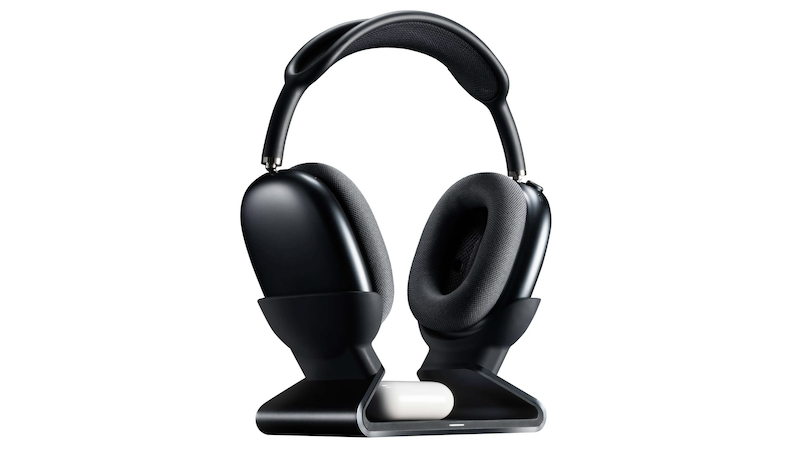
Last month, Mophie announced the launch of its Max Charging Stand. Aimed squarely at those with multiple sets of Apple's headphones, it can charge AirPods Max headphones plus a pair of AirPods or AirPods Pro at the same time.


Priced at $150, it immediately garnered criticism in our forum, largely over its price point compared to its functionality. But is it actually worth it? I've spent a few weeks with it to see.

Design and Build


The charging base is aluminum lined with smooth silicone along every surface that comes into contact with your devices. The bottom also has a large rectangular pad of this same silicone so that it doesn't slide easily on your desk. The Mophie logo is subtly stamped on the top just under the square indentation that shows you where to place your AirPods (or other Qi-enabled device) for charging.

At 15.7 ounces (445 g) on my kitchen scale, it's weighty enough to hold my ‌AirPods Max‌ without wobbling. But more on this later...

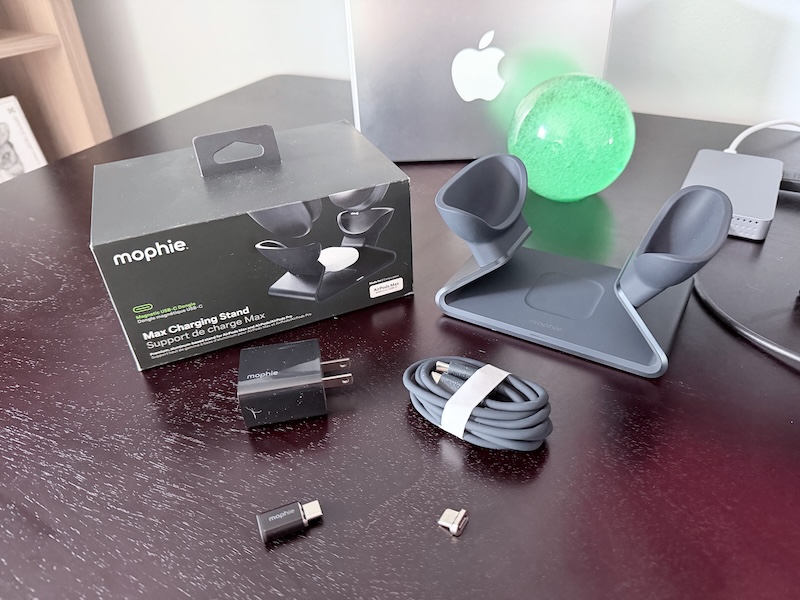
It comes with a decently long 5-foot USB-C cable coated with the same silicone that covers the stand, a 20W wall adapter, two magnetic charging dongles, and a pass-through adapter.


To use the stand, you insert one of the magnetic dongles into the USB-C port of the ‌AirPods Max‌. This dongle then connects automatically to the charging port in the stand thanks to its magnetism. The second magnetic dongle included is a spare which is a nice touch, especially at this price point.

The pass-through adapter allows you to leave a charging dongle in the Max's charging port at all times so you can still charge it with a standard USB-C cable, avoiding wear and tear on the port with frequent removals and insertions. But on the other hand, this is another adapter to carry around and avoid losing. The pro tip here is to just leave this dongle attached to a USB-C cable you use to charge the headphones when you're away from home.

Using the included pass-through adapter to a USB-C cable

The charging dongle does not pass through audio, so if you use your ‌AirPods Max‌ with a cable for lossless audio or to connect to a 3.5mm analog device, you'll have to remove the dongle each time.

The magnetic dongle is the key feature of the stand and it isn't a new concept—charging stands that make use of a magnetic dongle have been released by smaller companies over the years (e.g., the Max Stand a few years ago) and Mophie's is a premium entry by one of the larger Apple accessory makers.

How It Works


When you place the ‌AirPods Max‌ on the stand, the white LED on the front of the stand illuminates for a few seconds and then turns off. Since you can't see the status light next to the USB-C port on the headphones themselves to verify charging while it's in the stand, it's a bit frustrating to not be able to see charging status after the stand's light turns off.

Additionally, since the stand places the headphones in sleep mode using magnets built into the ear cup holders, you can't even see its charge level on another Apple device in Control Center or the Battery widget unless you remove it from the stand. I'd rather this light stay on or pulse while the headphones are charging.


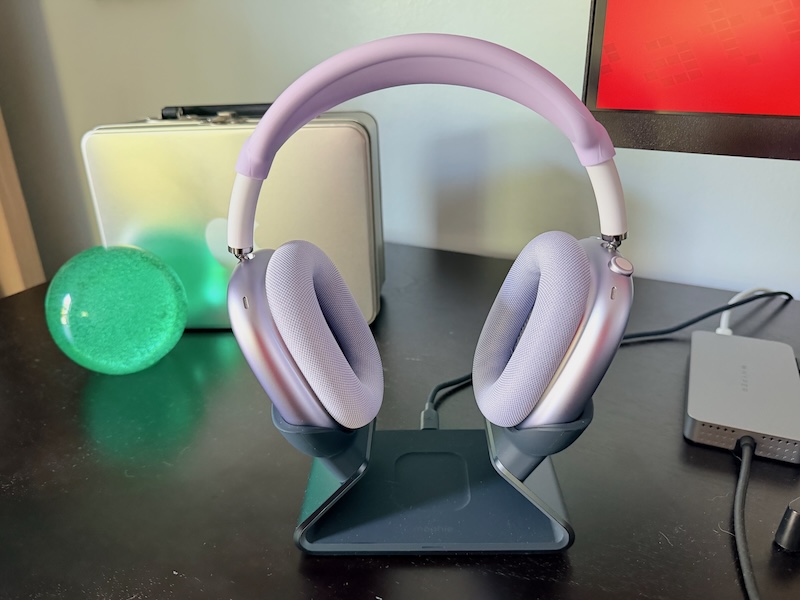
Removing the ‌AirPods Max‌ requires two hands since the stand, while weighing in at nearly a pound, is not heavy enough to overcome the magnetic force from the charging dongle. You must also use two hands to place the headphones into the stand since the ear cup holders are placed far enough apart that you need to stretch the headband wider.

This ear cup holder placement does, however, allow the stand to accommodate AirPods or another Qi-enabled device in the center. I'd been using a simple 3D-printed ‌AirPods Max‌ stand with no charging capability where the ear cup holders are close enough together that it's easy to drop in and remove the ‌AirPods Max‌ with one hand, so this was an adjustment for me.

The center charger fits an AirPods Pro case easily and the indentation makes it easy to target where it should go. It's even large enough to accommodate the large case cover I use on mine. It also charged my iPhone 17 Pro although it takes a few seconds to line it up in the right spot.

The center charger is nice to have but seems like an addition meant to add value to the stand to justify the price. I'd like to see a version at a lower price point without this center charger that would also allow a narrower placement of the holders for the ear cups.

Next to my (non-charging) 3D-printed stand

In my charging tests, I saw no significant differences between charging my ‌AirPods Max‌ directly with Apple's USB-C cable to a 20W wall adapter, using the Max Stand, or using the USB-C cable with the pass-through adapter that Mophie includes. Apple states that a 5-minute charge adds 1.5 hours of listening but does not claim any fast-charging features beyond this, nor does Apple specifically recommend using a high-wattage wall adapter.

Per iFixit, the USB-C ‌AirPods Max‌ has the same battery cells as the original model released in 2020 with a total capacity of 664 mAh. ‌AirPods Max‌ automatically limits the amount of power drawn during charging and using a higher-wattage wall adapter doesn't increase charging speeds.

With this stand on my desk, I noticed that I was no longer ultra-careful about taking every opportunity to put my headphones into sleep mode to avoid draining the battery. I started leaving my ‌AirPods Max‌ around the house willy-nilly without a charging care in the world since I knew I could easily pop them on the stand for a quick charge anytime. Using a USB-C cable to charge them is not hard of course, but it takes more steps than just dropping the headphones into a stand.

The Big Question


Will Mophie offer a Lightning dongle that will allow the stand to work with older ‌AirPods Max‌ models that have Lightning ports? It seems like this would be an easy thing to do since the stand is only handling low power to the headphones and no data, and it would open up the consumer base greatly for Mophie to sell more of these. This is the most commonly-asked question on the stand's product page and there's no official answer from Mophie there at the time of this review, though there is someone who claims that Mophie responded to them directly and said no. We asked Mophie directly and they did not respond prior to publication of this review.

A closer view of the magnetic dongle

We presume that the official answer to this question is no. While disappointing, it's likely a licensing issue that's preventing a Lightning dongle. The Lightning connector is a proprietary one and Apple offers licensing of its use through its MFi program, while USB-C is not proprietary. If Mophie has done the math here, it must be that licensing a Lightning dongle is more costly than offering it, even if it means missing out on a potentially large user base of Lightning ‌AirPods Max‌ owners.

Who It's For


You use your ‌AirPods Max‌ frequently throughout the day at or near a desk and want an easy and quick way to charge them. Or you are out and about all day and want to drop your ‌AirPods Max‌ in a dock near the door when you get home to charge fully overnight before you grab them and go in the morning. And you have $150 to burn.

I was salty about the price when this was first announced, but I have appreciated this dock more and more and even find myself using my ‌AirPods Max‌ more because of it. Like much in life, making something easier has a large impact on how often it's used or done. So is it worth it? For me, the answer is yes.

Pros:


  • Solid, quality build

  • Aesthetically pleasing

  • Can charge two devices at once

  • Easy and convenient charging


Cons:


  • No at-a-glance charging status indicator

  • Need two hands to place and remove headphones

  • Stretches headband

  • Pass-through adapter is another thing to lose

  • Price


Note: Mophie provided MacRumors with a Max Stand for the purpose of this review. No other compensation was received. MacRumors is an affiliate partner with Mophie. When you click a link and make a purchase, we may receive a small payment, which helps us keep the site running.
Related Roundup: AirPods Max
Tag: Mophie
Buyer's Guide: AirPods Max (Buy Now)
Related Forum: AirPods

This article, "Review: Mophie's Max Charging Stand for AirPods Max is Pricey but Good" first appeared on MacRumors.com

Discuss this article in our forums

  •  
❌