The OpenProject integration app for Nextcloud was updated to version 2.9! ✨ This update fully supports the OIDC authentication between Nextcloud and OpenProject.
We recommend to update to the newest version of the app through your Nextcloud app center to take advantage of the latest enhancements and fixes.
Changes of the release 2.9.0:
Support OIDC authentication method between Nextcloud and OpenProject
Add option to enable/disable token exchange with external OIDC provider
Add information for OpenProject version and plan required for OIDC setup
Support setup with Nextcloud Hub
Thanks, Nextcloud, for our continued partnership! 💙
OpenProject 16.0 has been released and this new major version introduces a range of new features and improvements. We look forward to hearing your thoughts and feedback on the latest updates. Please take a few minutes to learn what changes for you. We will summarize the most important changes in this blog article and, as always, please see our release notes that contain all changes, features and bug fixes.
In this blog article, we will present these feature updates:
We are especially excited about this improvement: Meeting backlogs make organizing and preparing meetings even easier — and help make the transition from classic meetings to the newer one-time and recurring meeting types even more powerful.
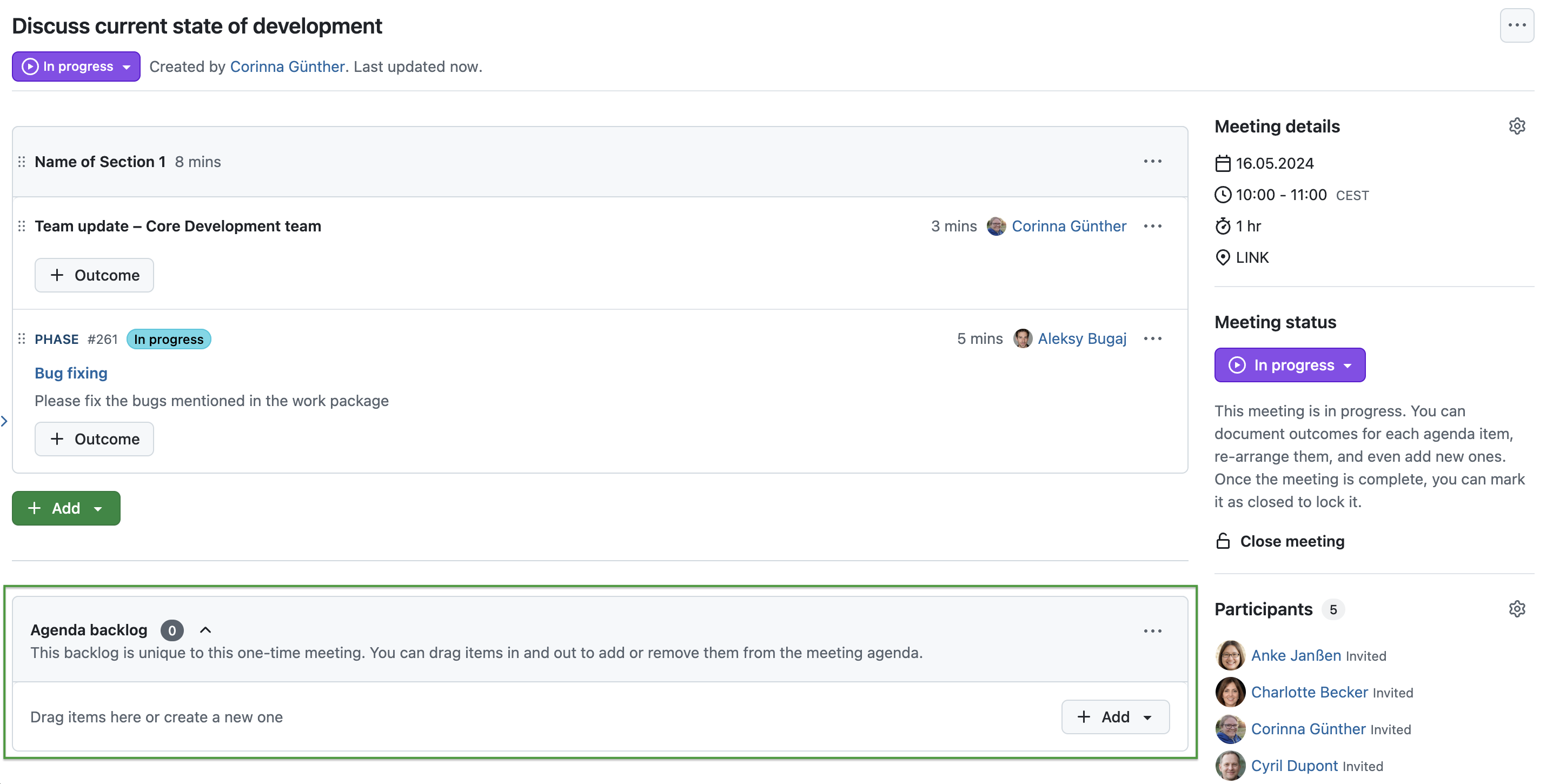
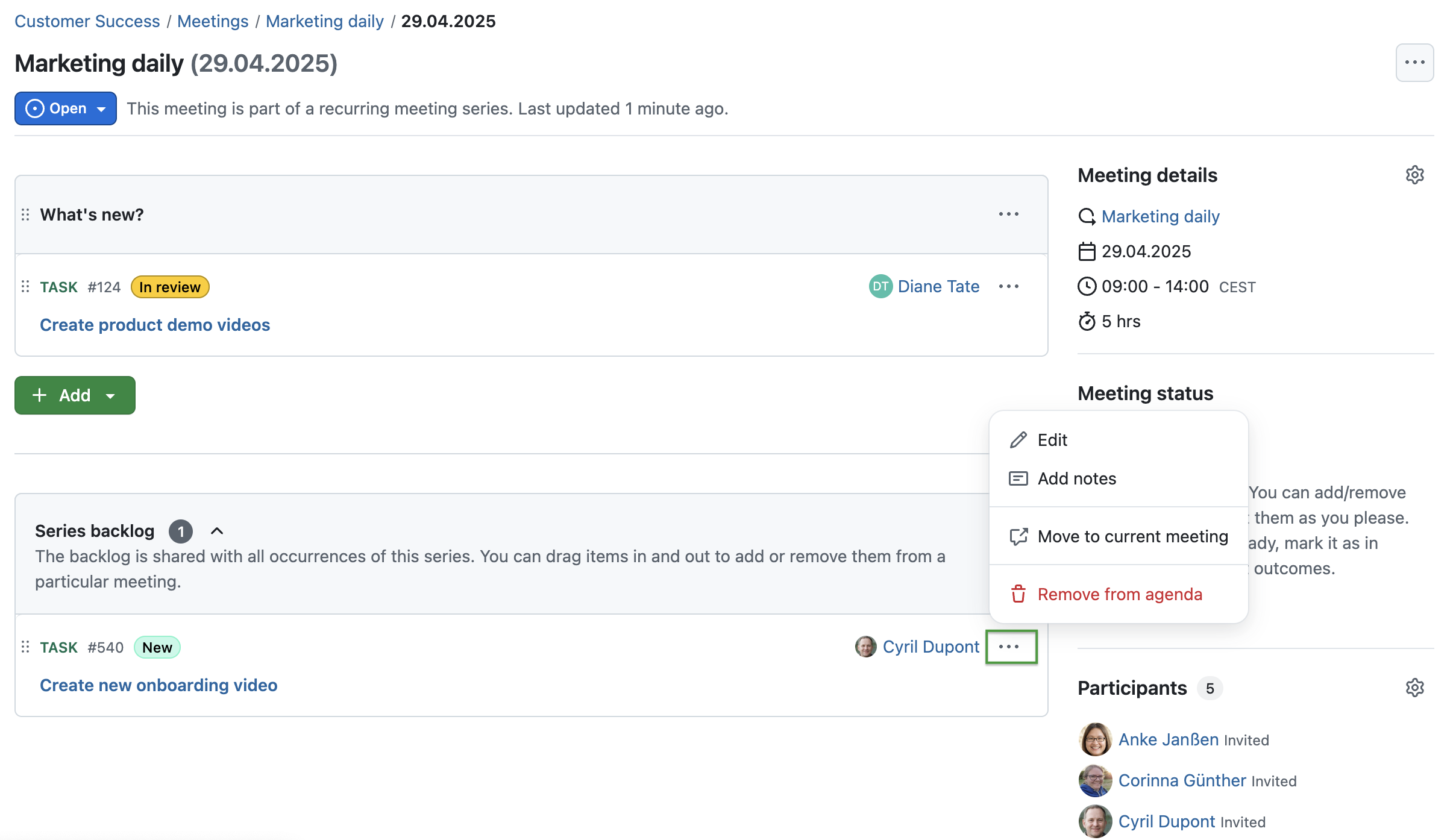
In OpenProject 16.0, users can now collect and manage agenda items flexibly using the new backlog feature. For one-time meetings, the Agenda backlog offers a space to store topics that are not yet scheduled but might be added later. For recurring meetings, the Series backlog allows teams to track open points across all meetings in a series and move items between occurrences as needed — without having to manually copy or recreate them.
Agenda items can easily be dragged from the backlog into a meeting or moved back again. Work packages can also be added directly to the backlog. Even if a meeting has no agenda yet, it can still maintain a list of important topics through the backlog.
Here’s an example of an Agenda backlog for one-time meetings:
And this is how a Series backlog for a recurring meeting looks like – with the option to move an agenda item to the current meeting:
Meeting backlogs bring more flexibility, better preparation, and a clearer structure to the way teams organize discussions — and are another great step toward making OpenProject’s meeting management even more efficient. Learn more about OpenProject meeting management in our documentation.
The end of classic meetings
As we announced earlier in this blog article, the Classic meeting type is no longer available in OpenProject 16.0. Existing classic meetings have been automatically converted into one-time meetings. No data is lost during this transition, apart from the meeting history.
To manage your meetings going forward, you can choose between one-time and recurring meetings. These dynamic formats give you more flexibility to structure your agendas and meeting workflows. For documenting decisions and results, you can use the Outcome feature, which replaces the classic Minutes functionality.
Internal comments in work packages (Enterprise add-on)
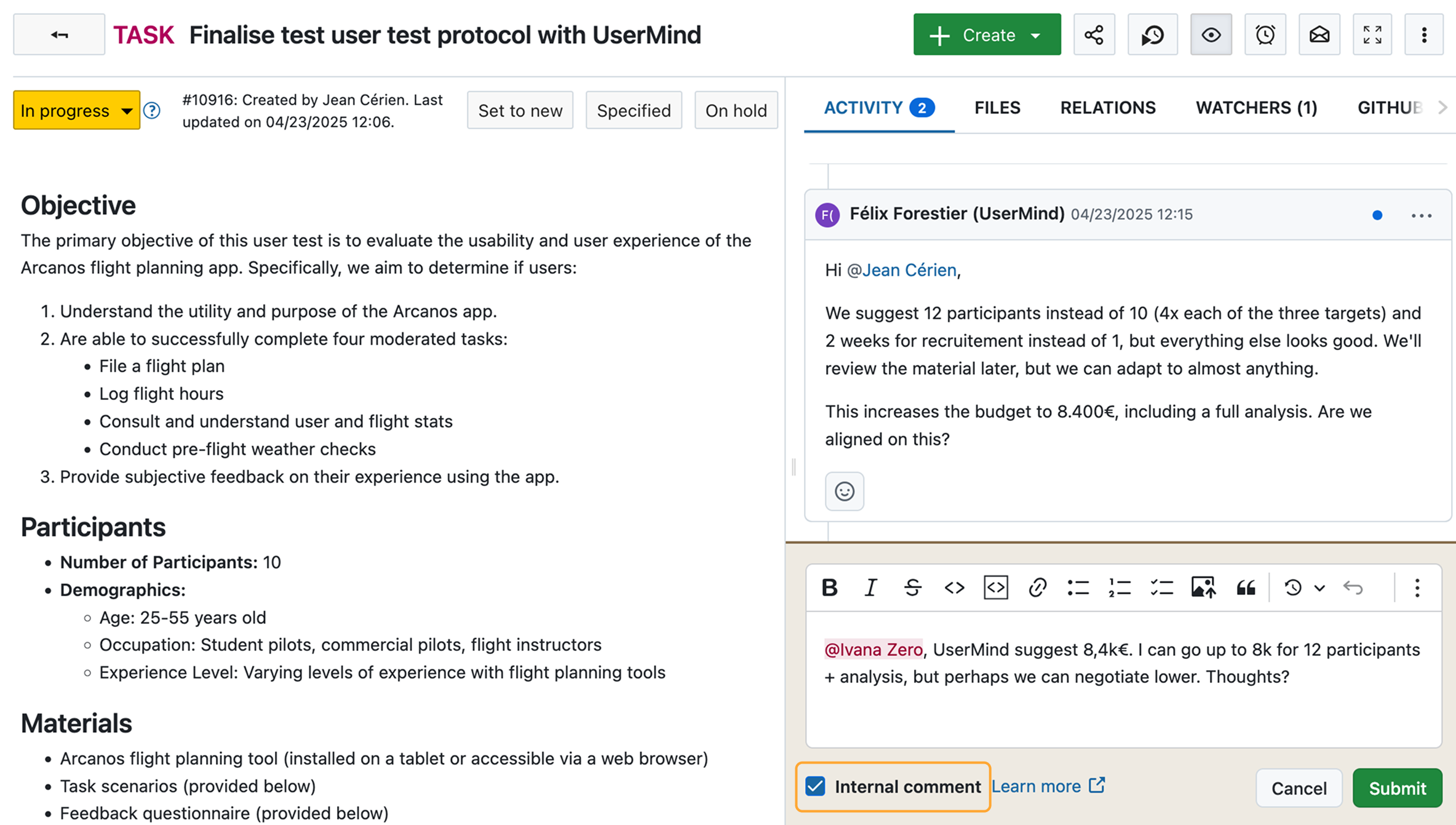
A new Enterprise add-on, available in the Professional plan and higher, allows adding internal comments to work packages. Internal comments are visible only to authorized users and help teams keep sensitive information separate from public discussions.
This feature is a further step to replace Atlassian Jira Service Management functionalities.
Automatically generated work package subjects (Enterprise add-on)
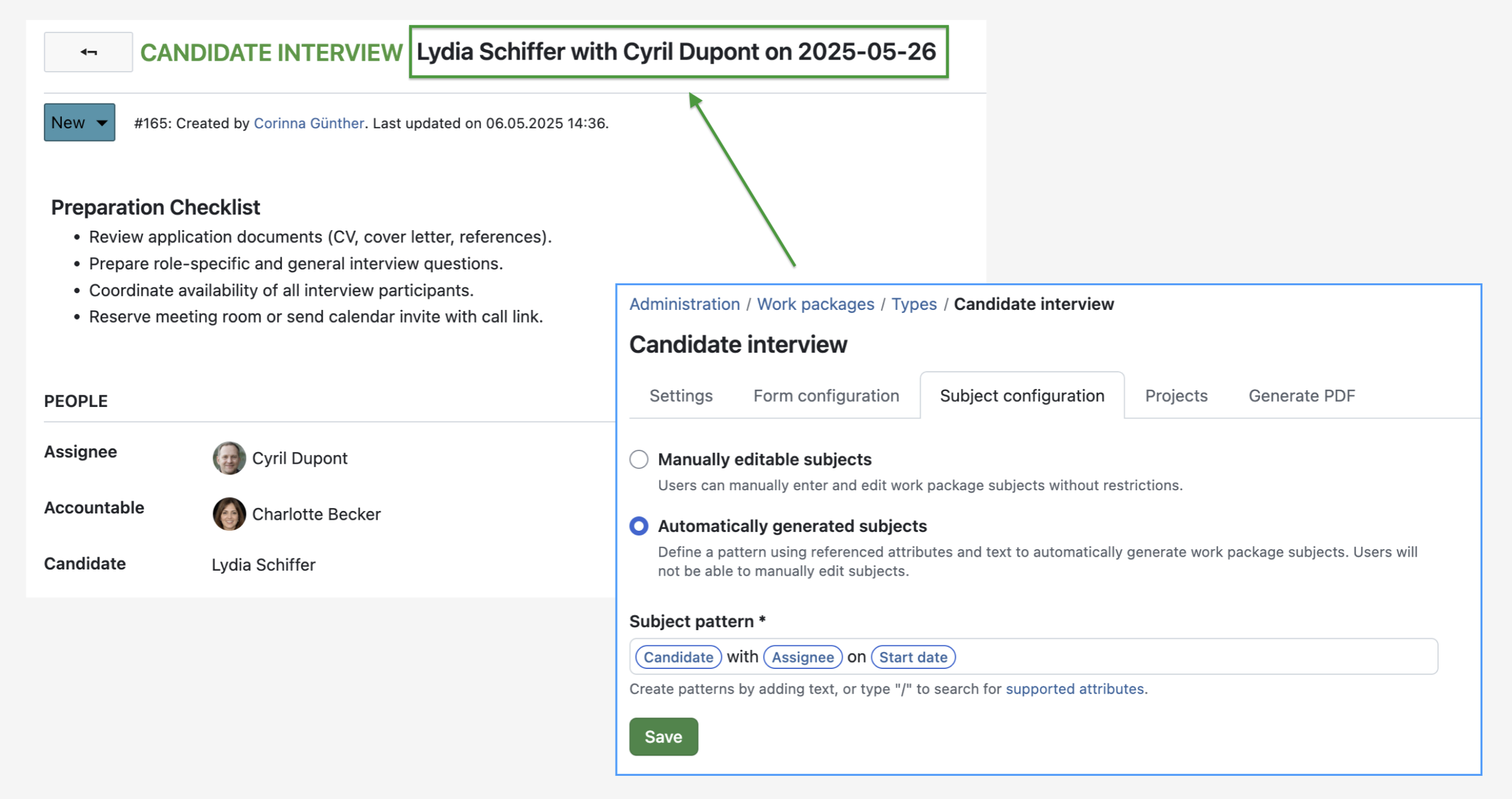
Consistent naming of work packages is now easier than ever. Users of the Enterprise Professional plan and higher can now automatically generate work package subjects based on predefined patterns. Subjects are created automatically during work package creation and do not need to be entered manually.
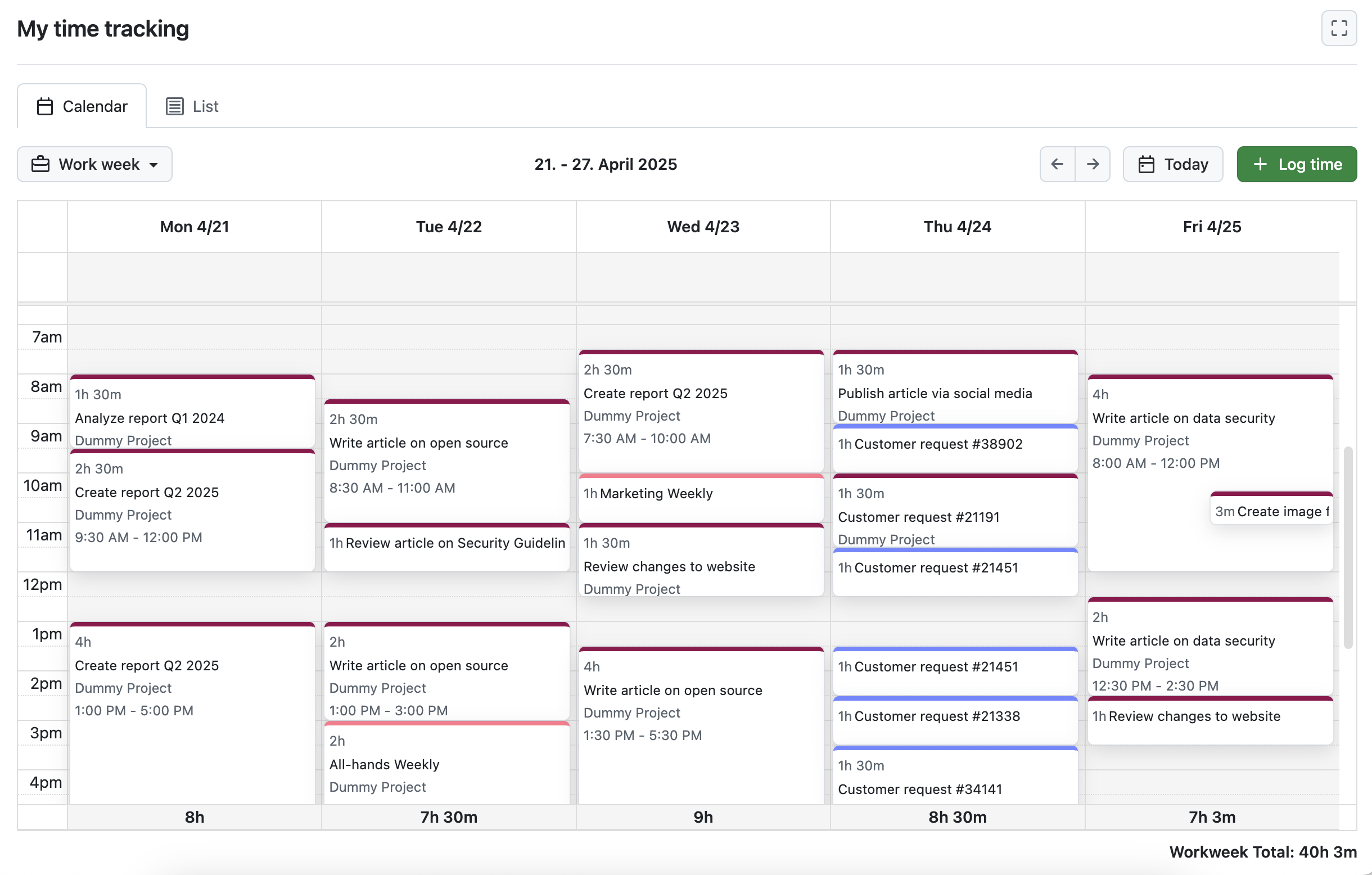
Tracking and reviewing time entries is now even more convenient. OpenProject 16.0 introduces the My time tracking module, which is personal to each user and must be activated by an administrator. Users can view, edit and log time entries either in a structured list or in a new calendar view for better overview.
Release to Community: Graphs on project overview page
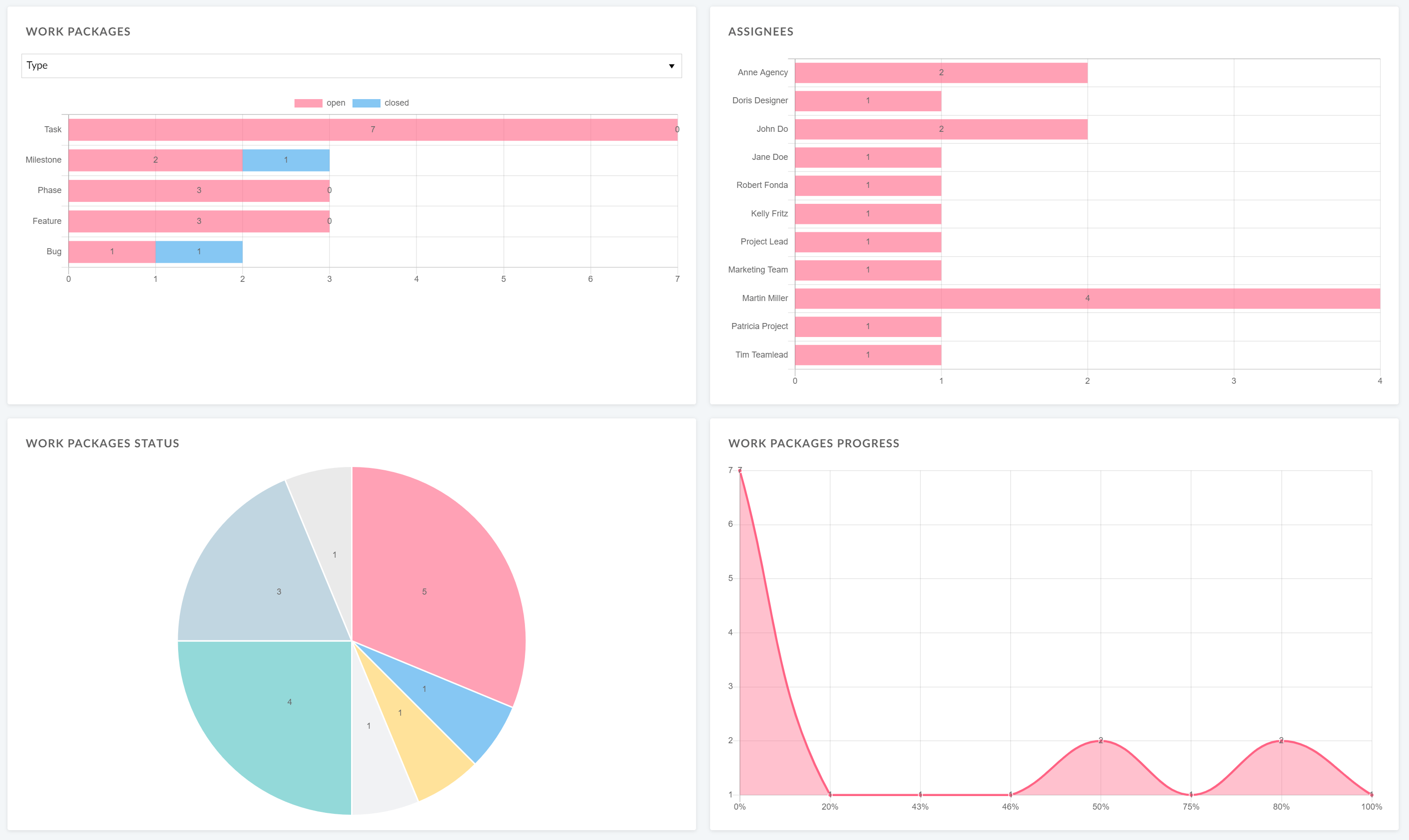
We are happy to share that a feature previously available only as an Enterprise add-on is now released to the Community version with OpenProject 16.0: Displaying different types of work package graphs directly on the project overview page.
This means that all users can now display graphs directly on the project overview page to visualize important project information and communicate project status at a glance. Users can choose between different graph types, such as bar charts or pie charts, depending on their needs.
Updated Enterprise plans
With 16.0 OpenProject has updated its Enterprise offering. Each Enterprise plan (Basic, Professional, Premium, Corporate) now comes with a clearly defined set of Enterprise add-ons on top of the additional services and support levels.
This means that, going forward, some new Enterprise add-ons will be introduced in higher-tier plans. For example, the new Internal comments Enterprise add-on is part of the Professional plan.
Important information about these changes:
Pricing remains unchanged.
Support levels remain unchanged.
No features are removed for existing Enterprise customers.
If you are not yet using an Enterprise plan, you can easily test all Enterprise add-ons:
You will find more information about all new features and changes in our Release notes or in the OpenProject Documentation.
If you need support, you can post your questions in the Community Forum, or if you are eligible for Enterprise support, please contact us and we are happy to support you personally.
New to OpenProject? To test all features of OpenProject 16.0 right away, create a 14 days free trial instance for our OpenProject Enterprise cloud.
Prefer to run OpenProject 16.0 in your own infrastructure? Here you can find the Installation guidelines for OpenProject.
A very special thank you goes to the City of Cologne, Deutsche Bahn and ZenDiS for sponsoring released or upcoming features. Your support, alongside the efforts of our amazing Community, helps drive these innovations.
Also, a big thanks to our Community members for reporting bugs and helping us identify and provide fixes. Special thanks for reporting and finding bugs go to alex e, Klaas vT, Daniel Elkeles, Regina Schikora, Çağlar Yeşilyurt, and Александр Татаринцев.
Last but not least, we are very grateful for our very engaged translation contributors on Crowdin, who translated quite a few OpenProject strings. This release we would like to particularly thank the following users:
Сергей Баранов, for a great number of translations into Russian.
Gzyyy, for a great number of translations into Chinese simplified.
rlmpereira, for a great number of translations into Portuguese.
Would you like to help out with translations yourself? Then take a look at our translation guide and find out exactly how you can contribute. It is very much appreciated!
As always, we welcome any feedback on this release. 💙
 Login
Login