Reading view

OpenProject 16.2: New header and sidebar with improved navigation and design

OpenProject 16.2 has been released and this version introduces new features and improvements again. We look forward to hearing your thoughts and feedback on the latest updates. Please take a few minutes to learn what changes for you. We will summarize the most important changes in this blog article and, as always, please see our release notes that contain all changes, features and bug fixes.

In this blog article, we will focus on the design updates and briefly summarize some more important features. Here is a quick navigation to all feature descriptions:

New header and sidebar with improved navigation and design

The most striking change from 16.1 to 16.2 is the more modern design and improved user experience of the sidebar and header navigation. The reason for these changes is to give the application a more contemporary look and to ensure compatibility with the openDesk application. It is important to us to provide the best possible user experience in openDesk when navigating between the different applications within openDesk.

The updates in OpenProject itself also follow familiar logic. For example, the project navigation has moved consistently into the sidebar. Here’s an overview of what’s new in OpenProject 16.2, regarding header and sidebar navigation:

  • The hamburger sidebar toggle has moved from the header to the sidebar.
  • The default sidebar color in light mode is now brighter.
  • The search and create buttons have a new, more intuitive position in the header.

Please note that these changes will not affect your already customized designs.

See a comparison between OpenProject version 16.1 (top) and 16.2 (highlighted below):
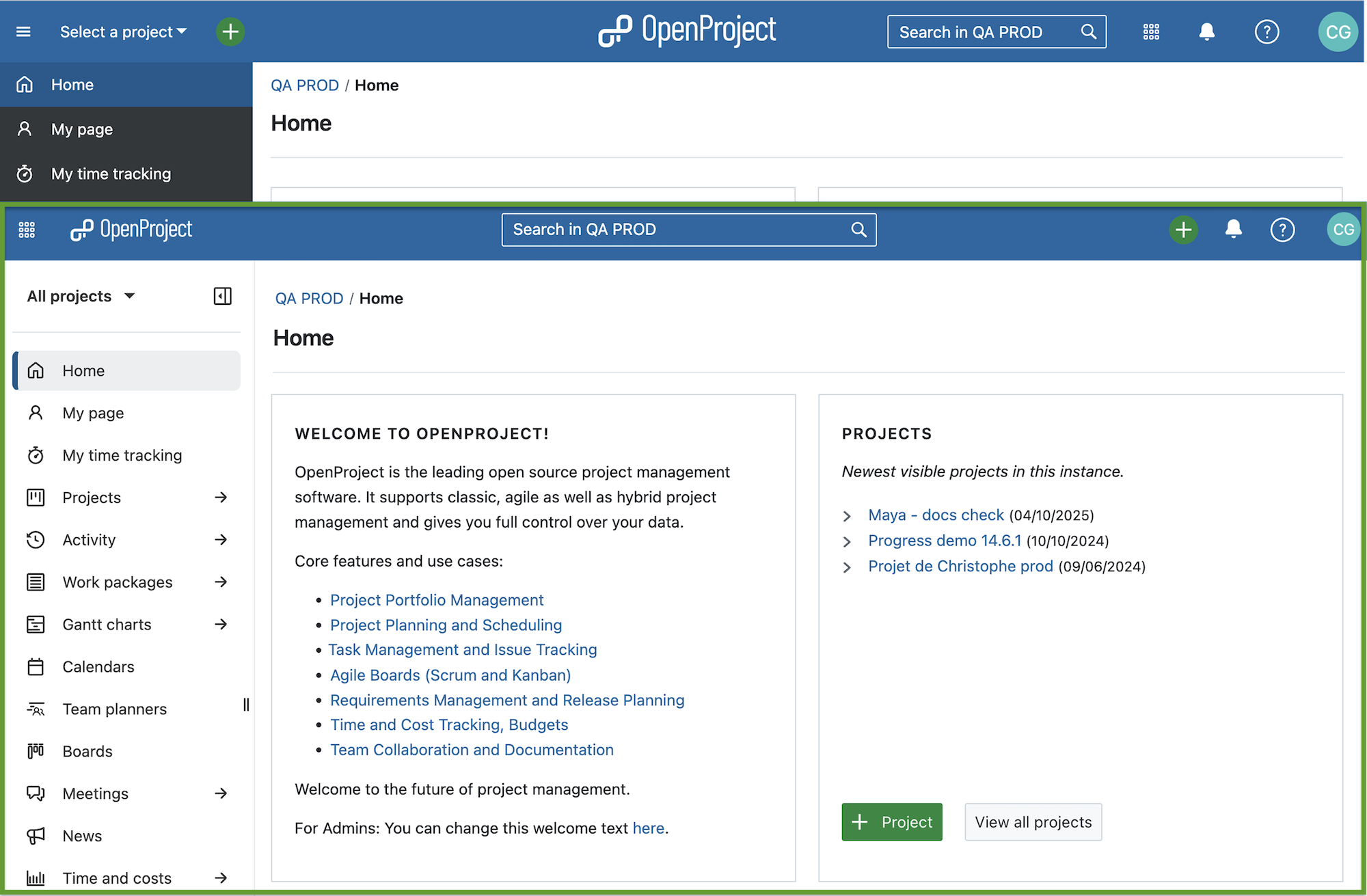
Home Page in OpenProject in comparison: Version 16.1 and Version 16.2 with updated header and sidebar

What do you think of these updates? As with any change, it may take some time to get used to the new navigation, but we hope that it will provide you with a better user experience in the long run and a more intuitive start for new users.

Other design updates in OpenProject 16.2

The changes to the header and sidebar weren’t the only design changes: as part of the ongoing updates to the Primer design system, the user interface and process for creating a new project or copying an existing one has also been improved. For example, when you create a project based on a template, you can now immediately select which modules and parts you want to copy and which you want to skip.

Also, in the Relations tab of a work package, the + Relation dropdown now uses second-level navigation: Only the first relations are shown directly, others are displayed when clicking on “Other relations”.

Seamless integration of open source applications with a SCIM API (Enterprise add-on)

While this is a rather technical update, the newly added SCIM API can be a huge benefit for seamless integration with other open source applications. It allows your identity provider (IdP) to automatically provision and de-provision users in OpenProject, based on the open SCIM standard.

This reduces manual work for administrators, ensures your user data stays in sync across systems, and improves overall security.

The SCIM API is available as an Enterprise add-on in the Corporate plan. Administrators can configure SCIM clients directly in OpenProject, generate secure system tokens, and see which users are managed by which client – all within the authentication settings.
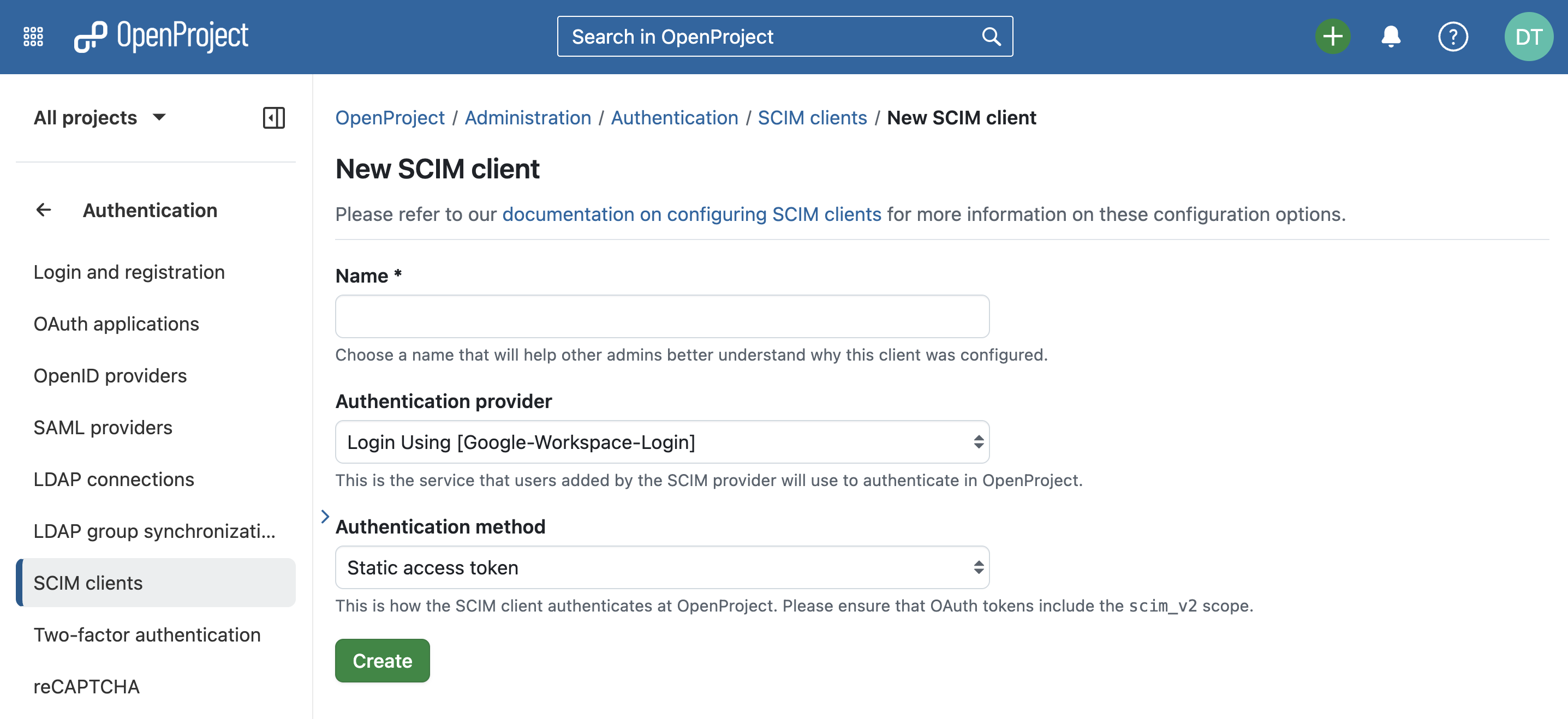
Screenshot of the OpenProject administration to add a new SCIM client

This is particularly valuable for organizations looking to connect OpenProject to other open source tools such as Nextcloud or Keycloak, supporting a fully sovereign and integrated digital workspace.

See our system admin guide to learn more about authentication methods for OpenProject.

Non-Latin languages and emojis supported in PDF exports

We’re especially happy about this update, because it makes OpenProject even more international and inclusive: PDF exports of work packages now fully support non-Latin scripts and emojis, so languages like Arabic, Chinese, Japanese, Korean and many others appear exactly as intended. This means your multilingual project data and even your favorite emojis are displayed correctly in your exported documents.
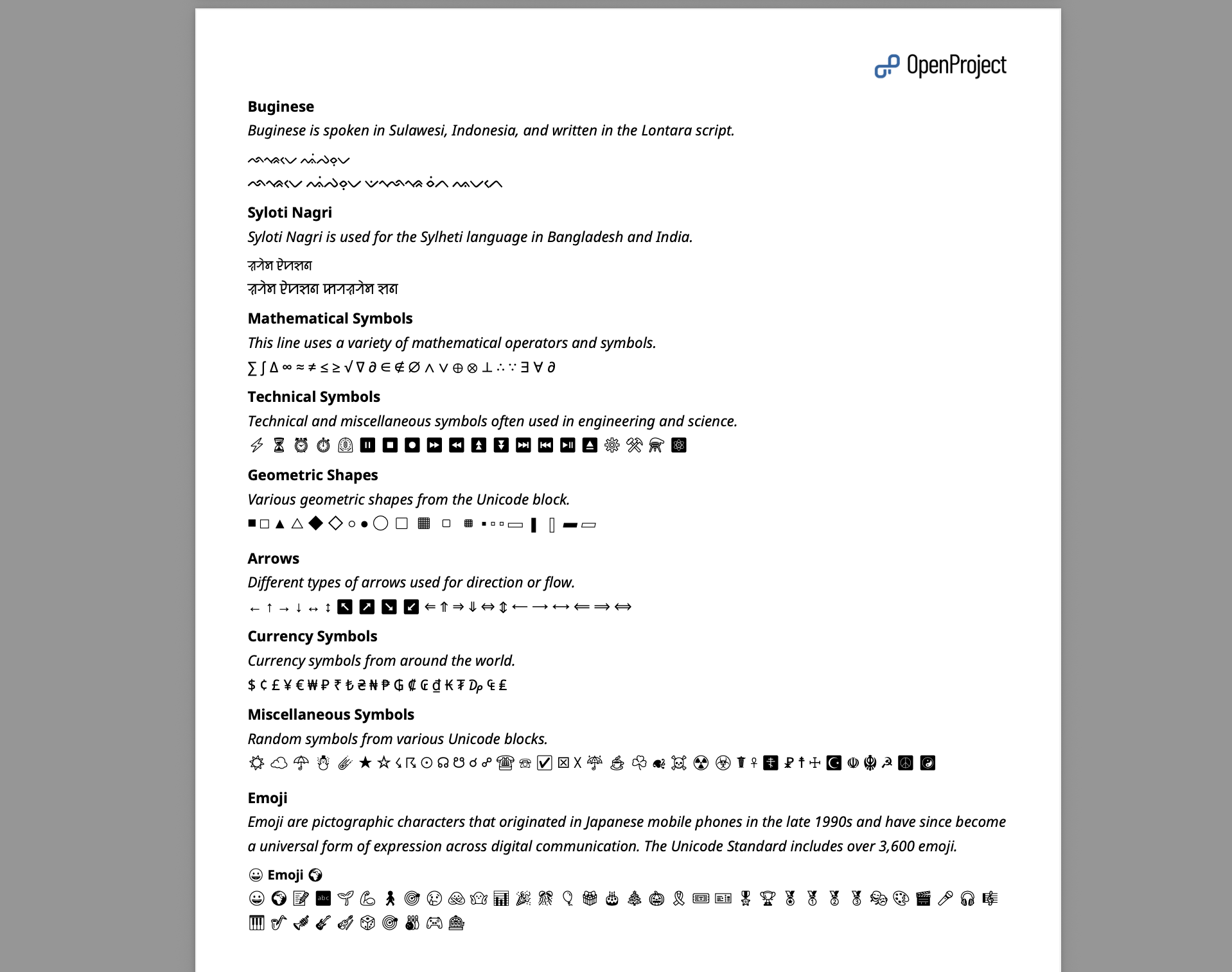
PDF export extract from an OpenProject work package that contains emojis, symbols and non-Latin characters

Option to disable keyboard shortcuts for better accessibility

Here comes another step in improving accessibility across OpenProject. Users can now disable all keyboard shortcuts in their personal settings. That’s not only helpful for people working with screen readers or other assistive technologies, but also for anyone who prefers to avoid unintended shortcut actions.
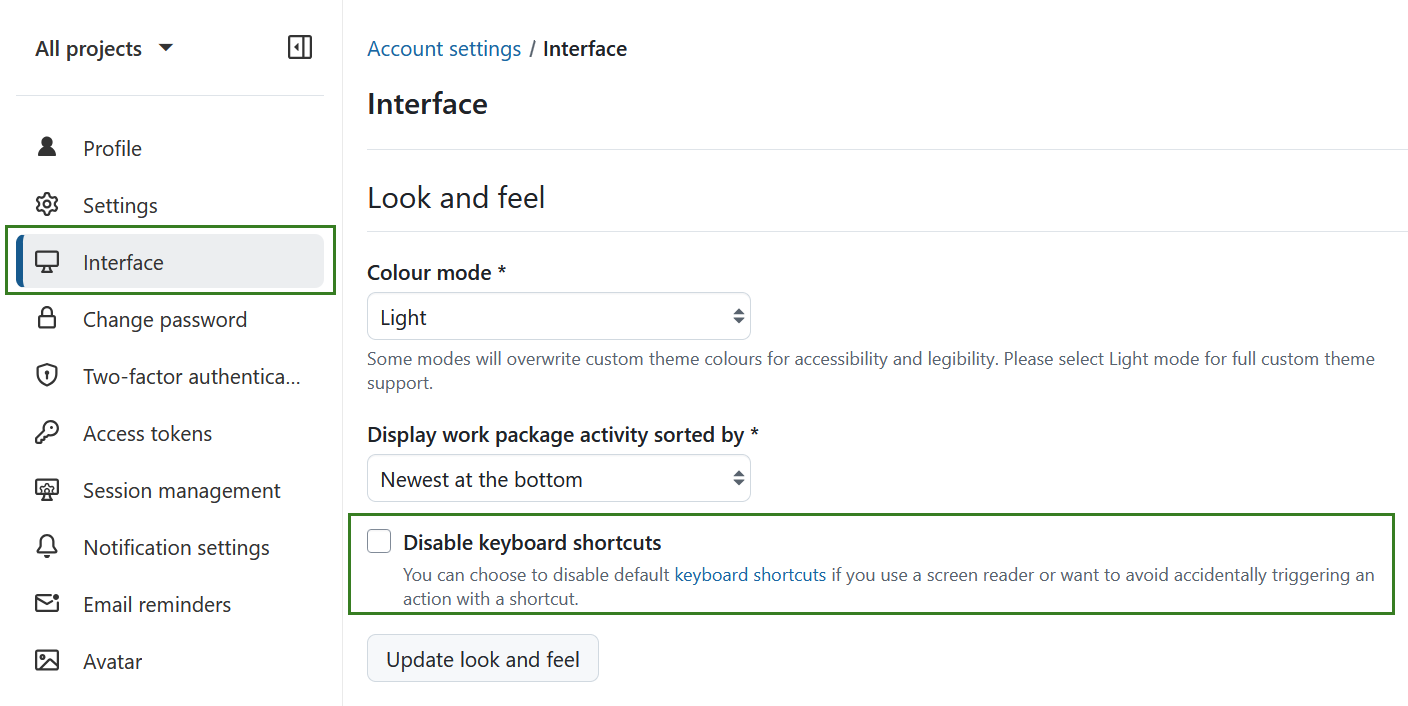
OpenProject account settings on interface options, with highlighted option to disable keyboard shortcuts

Tip

Have you noticed? We recently also updated the font on our website to make it easier to read. While improving the OpenProject application is our main focus, we are also aware of accessibility issues on our website and in our documentation, and we are working to address them.

Smoother experience with Custom fields, Meetings, and My time tracking

Apart from the already mentioned feature updates, OpenProject 16.2 includes many small improvements that make everyday work just a bit smoother.

When creating custom fields or project attributes, you can now pick the field type right at the start — saving clicks and making the setup process clearer.

For meetings, OpenProject is now listed as the organizer in calendar invitations instead of the person who created the meeting. This means everyone can freely accept or decline without accidentally canceling the event for all participants.

And in the My time tracking module, weekly views now collapse future days, helping you stay focused on what matters today.

OpenProject 16.2: Migration, installation, updates and support

Follow the upgrade guide for the packaged installation or Docker installation to update your OpenProject installation to OpenProject 16.2. We update your hosted OpenProject environments (Enterprise cloud) today, July 16, 2025.

You will find more information about all new features and changes in our Release notes or in the OpenProject Documentation.

If you need support, you can post your questions in the Community Forum, or if you are eligible for Enterprise support, please contact us and we are happy to support you personally.

Credits

A very special thank you goes to City of Cologne, Deutsche Bahn and ZenDiS for sponsoring released or upcoming features. Your support, alongside the efforts of our amazing Community, helps drive these innovations. Also a big thanks to our Community members for reporting bugs and helping us identify and provide fixes. Special thanks for reporting and finding bugs go to Michael Lathion, Jason Culligan, Sven Kunze, and Gábor Alexovics.

Last but not least, we are very grateful for our very engaged translation contributors on Crowdin, who translated quite a few OpenProject strings! This release we would like to particularly thank the following users:

  • William, for a great number of translations into Chinese Traditional.
  • rmiyata, for a great number of translations into Japanese.
  • rubenpedrolopez, for a great number of translations into Spanish.

Would you like to help out with translations yourself? Then take a look at our translation guide and find out exactly how you can contribute. It is very much appreciated!

As always, we welcome any feedback on this release. 💙

  •  

FreshRSS 1.26.3

This is a bug-fix release for FreshRSS 1.26.x

A few highlights ✨:

  • Keep sort and order criteria during navigation
  • Implement loading spinner for marking as favourite/read
  • Many bug fixes

This release has been made by @Alkarex, @Inverle and newcomers @CarelessCaution, @the7thNightmare

Full changelog:

  • Features
    • Keep sort and order criteria during navigation #7585
    • Add info about PDO::ATTR_CLIENT_VERSION (relevant for MySQL / MariaDB with obsolete driver) #7591
  • Bug fixing
    • Fix SQL request for user labels with custom sort (affecting PostgreSQL) #7588
    • Fix regression for favicon in GReader and Fever APIs #7573
    • Fix newest articles (within last second) not shown #7577
    • Fix duplicate HTTP header for POST #7556
    • Fix important articles on reader view #7602
    • Fix remove last share method #7613
    • Fix API handling of default category #7610
    • Fix user self-deletion #7626
    • Move PHP minimum version check #7560
  • Security
    • Fix encoding of themes #7565
    • Fix .htaccess.dist for access to /scripts/vendor/ #7598
  • SimplePie
    • Strip more HTML deprecated styles attributes: bgcolor, text, background, link, alink, vlink #7606
  • UI
    • Implement loading spinner for marking as favourite/read #7564
    • Provide theme class for CSS #7559
  • Deployment
    • Use HTTP Cache-Control: immutable for some files #7552
    • Drop Apache 2.2 (only support Apache 2.4+) #7561
  • I18n
  • Misc.

  •  

FreshRSS 1.26.2

This is a security-focussed release for FreshRSS 1.26.x, addressing several CVEs (thanks @Inverle) 🛡

A few highlights ✨:

  • Implement JSON string concatenation with & operator
  • Support multiple JSON fragments in HTML+XPath+JSON mode (e.g. JSON-LD)
  • Multiple security fixes with CVEs
  • Bug fixes

Notes ℹ:

  • Favicons will be reconstructed automatically when feeds gets refreshed. After that, you may need to refresh your Web browser as well.

This release has been made by @Alkarex, @Frenzie, @hkcomori, @loviuz, @math-GH
and newcomers @dezponia, @glyn, @Inverle, @Machou, @mikropsoft

Full changelog:

  •  

Prioritize what matters: How Attribute highlighting helps growing teams stay focused

Whether you’re a team of five or fifty — as your organization grows, so does the number of projects, tasks, and priorities. At some point, work packages that once fit on one board become a sea of cards, and keeping focus becomes a challenge.

That’s why we created the Attribute highlighting feature: it helps you immediately see what needs your attention most. In this article, we’ll walk you through a relatable scenario and show how this feature can support you in staying focused and scaling successfully.

Important

Before February 2026, Attribute highlighting was part of the Enterprise edition in OpenProject. With the release of version 17.1, it is part of the free Community edition, because we value our Community a lot and aim to give “back” Enterprise add-ons to all users every few releases. You can find more information about this feature in our documentation.


You’ve grown — now it’s time to change how you work

Things might be going well. Your organization is growing. More clients, more projects, more team members. But with growth comes complexity. What used to be a simple backlog is now a multi-project list of dozens — maybe hundreds — of open tasks. And suddenly, you’re no longer sure what’s urgent, what’s blocked, or what’s been waiting for weeks.

Your system hasn’t changed, but your needs have. And that’s a good thing — because it means it’s time to invest in new ways to keep your growing team aligned.

Clean up your work package table by highlighting priority, status or finish date

Let’s take your team’s work package table as an example. Imagine you’ve filtered for this month’s deliverables — but the list is still long. You spot tasks with due dates coming up, some that are marked high priority, and one that was updated just now. But it takes a few minutes of scrolling and reading to get the full picture.

That’s where Attribute highlighting comes in. This feature allows you to visually emphasize specific values in your work package table using color: overdue tasks can turn red, high-priority items might stand out in orange, and different status values can appear in clearly distinguishable shades.

With just a glance, your team can now immediately see:

  • What’s overdue,
  • What’s marked as high or urgent priority,
  • What’s resolved or in progress.

How Attribute highlighting works

Let’s say your team uses the Priority attribute and a custom status workflow. You can highlight individual attributes inline (Status, Priority, Finish date) or apply full-row highlighting based on Status, Type, or Priority.

Once you’ve set this up in the work package table view, your team sees these visual cues automatically — without needing to open each task individually.

Tip

You can configure which colors are used for each priority and status in the System administration. Learn how to adjust them for priorities and for statuses.

Let’s look at an example work package table and how it looks with different attributes highlighted. Please note that you can change the colors for work package attributes and that they might look different in dark mode or light mode.

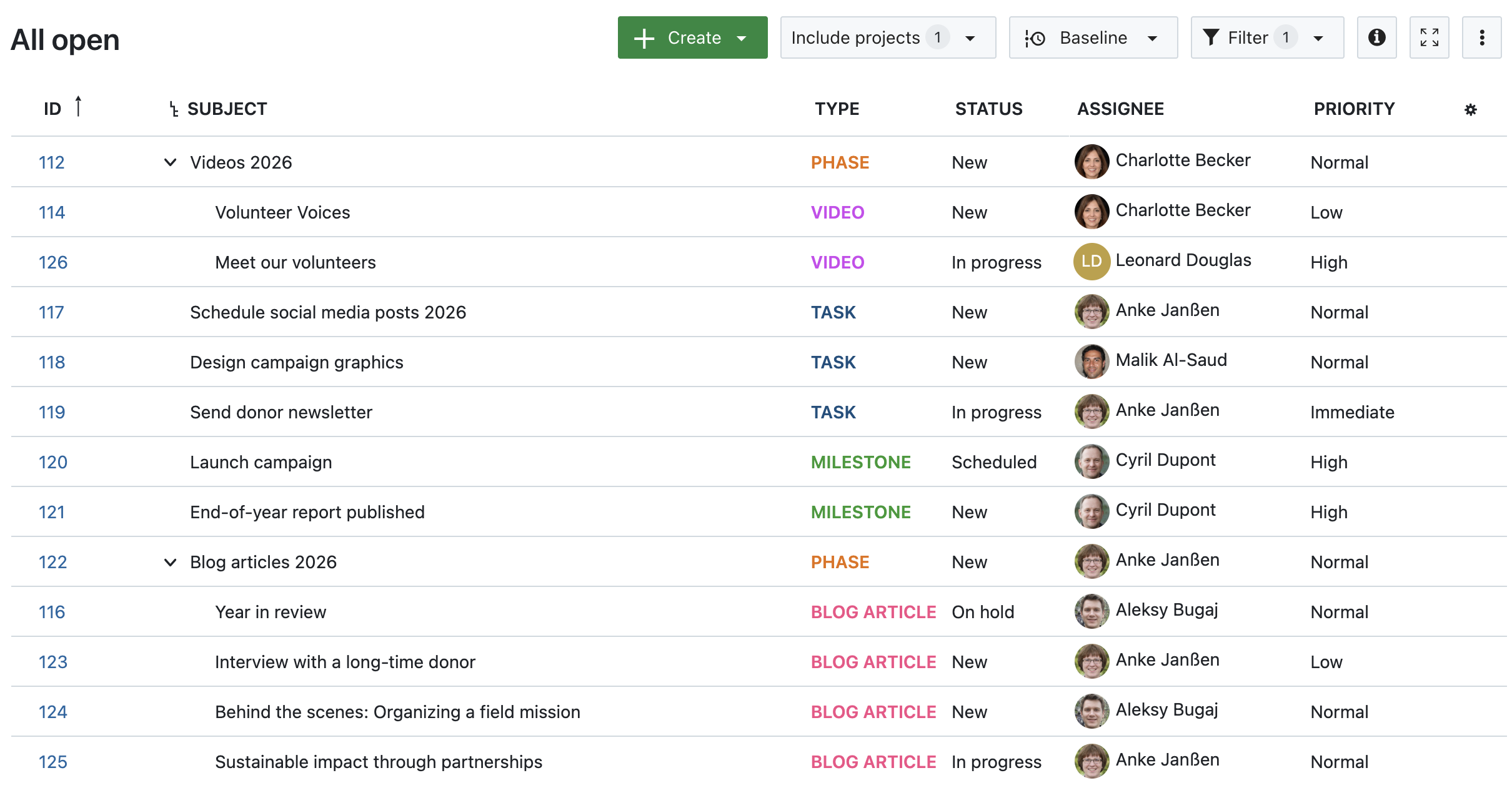
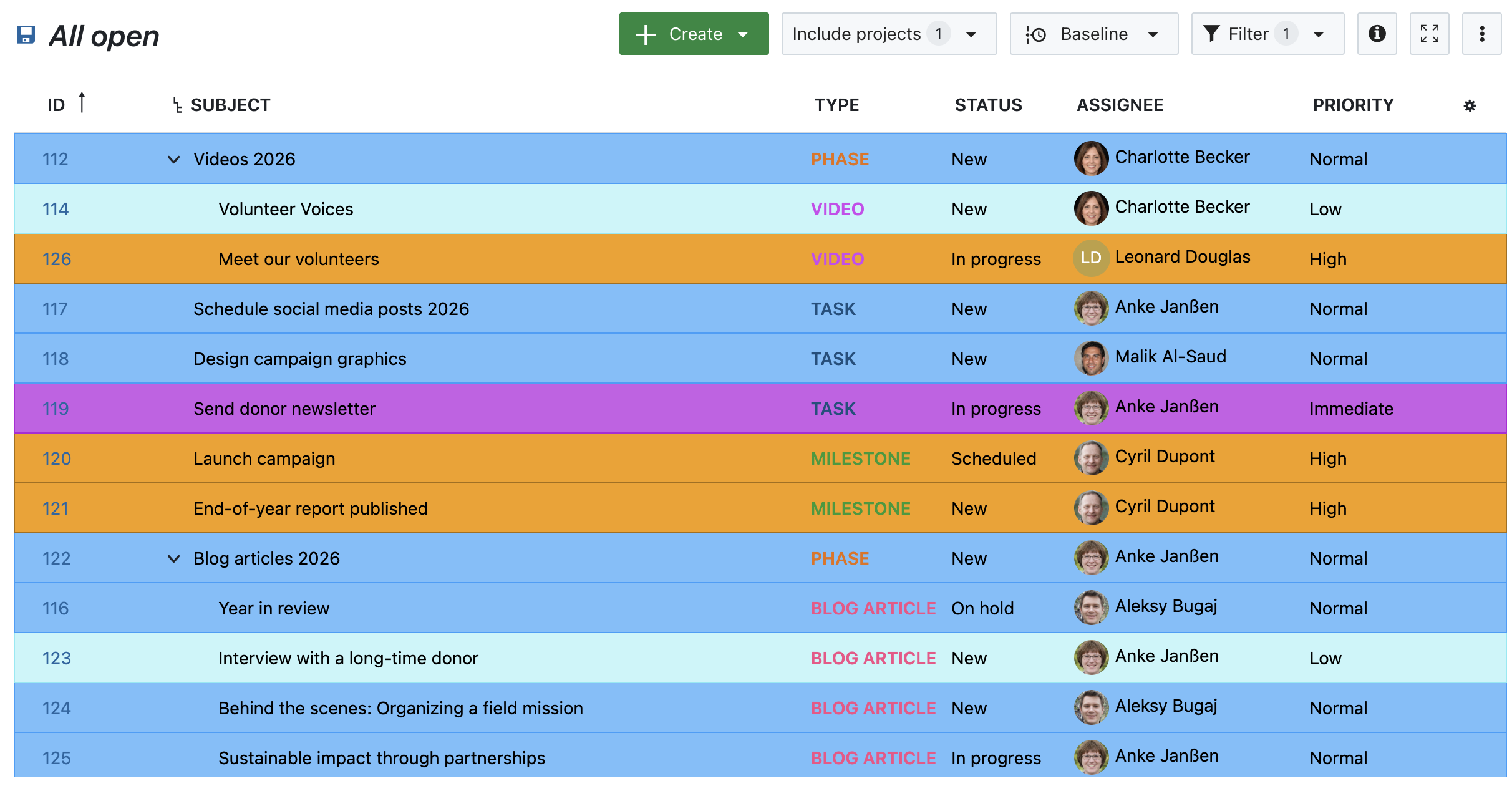
1. No attribute highlighting

Work package table in OpenProject, no attributes highlighted

Image 1: A work package table in OpenProject, no attributes highlighted.

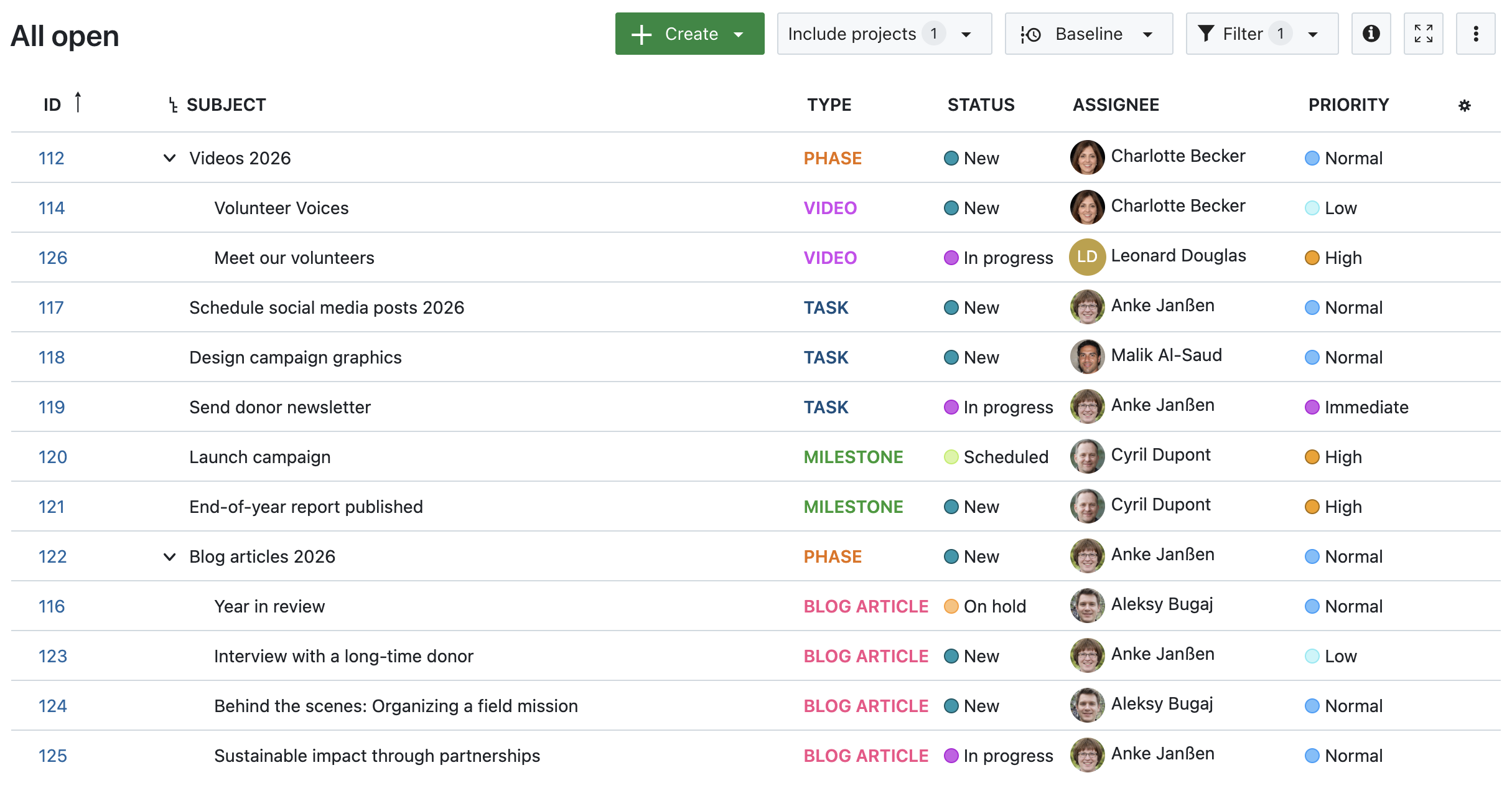
2. Status, Priority and Finish date highlighted inline

Work package table in OpenProject, inline-highlighted Status, Priority and Finish date

Image 2: A work package table in OpenProject, with inline-highlighted Status, Priority and Finish date.

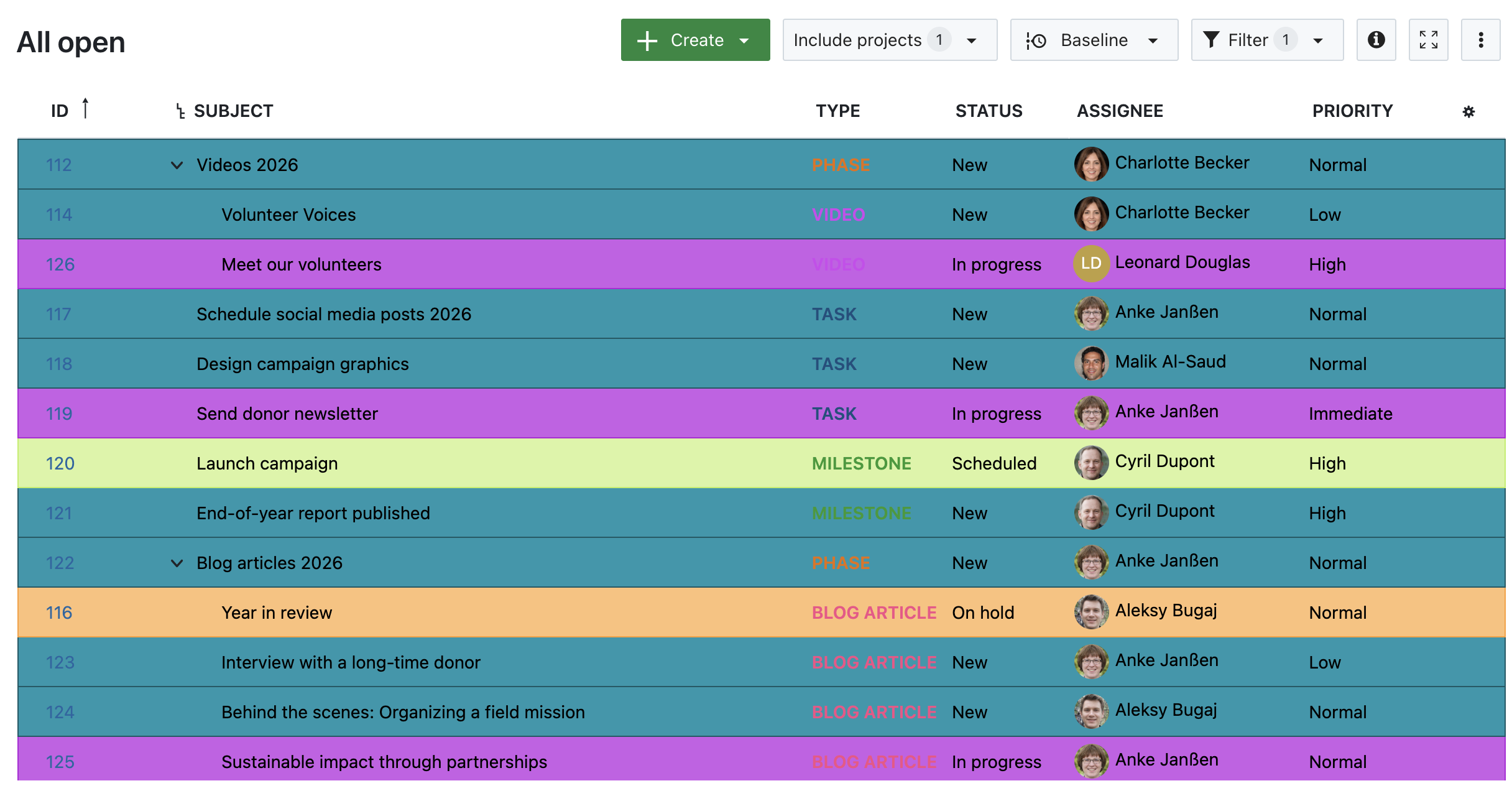
3. Highlighted by Status

Work package table in OpenProject, highlighted by Status

Image 3: A work package table in OpenProject, highlighted by Status.

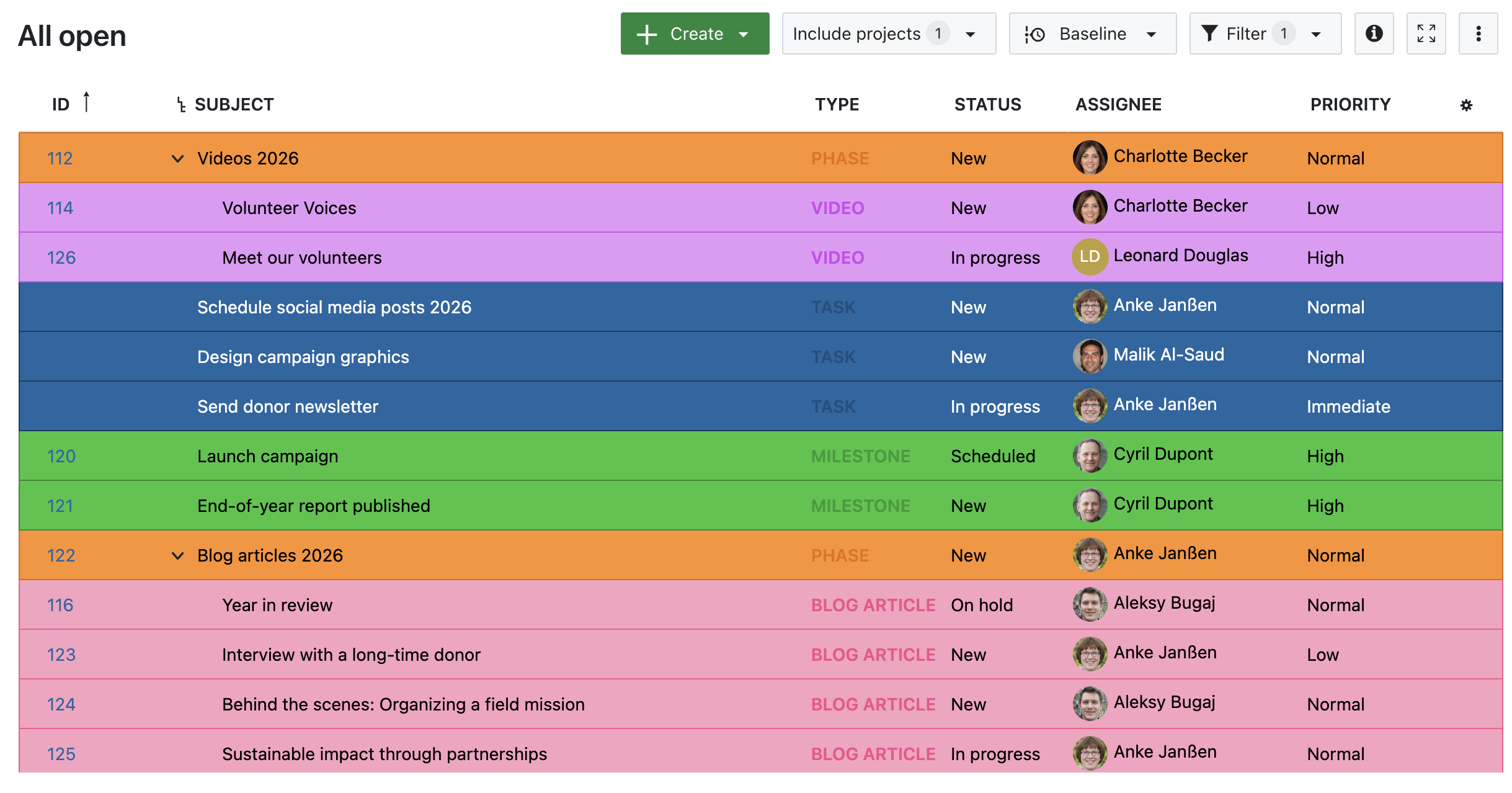
4. Highlighted by Type

Work package table in OpenProject, highlighted by Type

Image 4: A work package table in OpenProject, highlighted by Type.

5. Highlighted by Priority

Work package table in OpenProject, highlighted by Priority

Image 5: A work package table in OpenProject, highlighted by Priority.


Other helpful features for prioritizing work packages

Attribute highlighting works best in combination with other prioritization features. Here are a few tools to support your growing team:

  • Work package priorities
    Assign Low, Normal, or High to indicate importance.

  • Status workflows
    Define which status transitions are possible and by whom, helping structure review and approval processes.

  • Date alerts and reminders
    Automatically notify assignees or watchers when a due date is approaching.

  • Versions
    Group work packages under a common version to align delivery and deadlines across tasks.

  • Custom fields
    Add structured information to work packages that you can then use for filtering, highlighting, or grouping.

Each of these features helps you bring structure to complexity — and together, they make it easier to stay focused.


Stay focused as you scale

Growth is exciting — but only sustainable if your tools grow with you. Features like Attribute highlighting can make a real difference: not by changing how you work, but by making it easier to see what matters.

With a growing team and more responsibilities, the ability to focus at a glance isn’t just a nice-to-have — it’s essential. Let OpenProject help you take that next step.

  •  

FreshRSS 1.26.1

This is a bugfix release for 1.26.0, addressing some regressions 🐛

A few highlights ✨:

  • Fix regression with cURL HTTP headers breaking conditional HTTP requests
  • Fix regression with saving states of user queries
  • Fix regression with dynamic OPML

This release has been made by @Alkarex, @FromTheMoon85, @marienfressinaud, @math-GH
and newcomers @abackstrom, @BryanButlerGit, @culbrethj, @EricDiao, @Karvel, @ViPeR5000

Full changelog:

  • Features
    • Add cURL version to page about system information #7409
  • Bug fixing
    • Fix regression with cURL HTTP headers breaking conditional HTTP requests #7403, FreshRSS/simplepie#33
    • Fix regression with saving states of user queries #7400
    • Fix regression with dynamic OPML #7394
    • Fix update of the user’s last activity on login action #7406
    • Fix setting category option Maximum number of articles to keep per feed #7416
    • Fix priority field when processing a new feed from an extension #7354
  • Deployment
    • Fix regression with 64-bit timestamps on 32-bit platforms #7375
    • Fix back-compatibility with cURL 7.51 (we require cURL 7.52+ for CURLPROXY_HTTPS) #7409
  • UI
    • Use case-insensitive sort for categories #7402
    • Improve dark mode of Origine theme #7413
    • Added API password indicator #7340
  • I18n
    • Fix (es, fa, sk): do not translate XPath code #7404
    • Fix date bug in Finish #7423
    • Add Portuguese from Portugal #7329
    • Improve Hungarian #7391
  • Misc.

  •  

FreshRSS 1.26.0

In this release, we have restarted to focus on features. A long-awaited feature has been added, namely sorting articles by various criteria: received date (existing, default), publication date, title, link, random.

A few highlights ✨:

  • Add order-by options to sort articles by received date (existing, default), publication date, title, link, random
  • Allow searching in all feeds, also feeds only visible at category level with &get=A, and also those archived with &get=Z
    • UI accessible from user-query view
  • New shortcuts for adding user labels to articles
  • Several improvements and bug fixes

This release has been made by @Alkarex, @b-reich, @hkcomori, @math-GH, @UserRoot-Luca
and newcomers @a6software, @aftix, @bl00dy1837, @brtmax, @Roan-V, @ShaddyDC, @UncleArya

Full changelog:

  • Features
    • Add order-by options to sort articles by received date (existing, default), publication date, title, link, random #7149
    • Allow searching in all feeds, also feeds only visible at category level with &get=A, and also those archived with &get=Z #7144
      • UI accessible from user-query view
    • Add search operator intext: #7228
    • New shortcuts for adding user labels to articles #7274
    • New About page with system information #7161
  • Bug fixing
    • Fix regression denying access to app manifest #7158
    • Fix unwanted feed description updates #7269
    • Ensure no PHP buffer for SQLite download (some setups would first put the file in memory) #7230
    • Fix XML encoding regression in HTML+XPath mode #7345
    • Improve cURL proxy options and fix some constants #7231
    • Fix UI of global view unread articles counter #7247
    • Hide base theme in carrousel #7234
  • Deployment
    • Reduce superfluous Docker builds #7137
    • Docker default image (Debian 12 Bookworm) updated to PHP 8.2.26 and Apache 2.4.62
    • Docker alternative image (Alpine 3.21) updated to PHP 8.3.16
  • UI
    • Add footer icons to reader view #7133
    • Remove local reference to font Open Sans to avoid bugs with some local versions #7215
    • Improve stats page layout #7243
    • Smaller mark as read button in mobile view #5220
    • Add CSS class to various types of notifications to allow custom styling #7287
    • Various UI and style improvements: #7162, #7268
      Security
    • Better authorization label for OIDC in the UI #7264
    • Allow comments in force-https.txt #7259
  • I18n:
  • Misc.

  •  

FreshRSS 1.25.0

In this release, the coding focus has been on moving to PHP 8.1+ and refactoring the integration of the SimplePie library (which was long due). At the same time, plenty of new features have been added. Enjoy! 🎄

Breaking changes 💥:

  • Require PHP 8.1+ (and improved support of PHP 8.4+)
  • Require PostgreSQL 10+ or MariaDB 10.0.5+ or MySQL 8+

A few highlights ✨:

  • Add support for regex search (regular expressions)
    • ⚠️ Advanced regex syntax for searches depends on the database used (SQLite, PostgreSQL, MariaDB, MySQL),
      but FreshRSS filter actions such as auto-mark-as-read and auto-favourite always use PHP PCRE2 syntax.
  • Allow dynamic search operator in user queries, like search:UserQueryA date:P1d
  • New feed mode HTML+XPath+JSON dot notation (JSON in HTML)
  • Better HTTP compliance with support for HTTP response headers Cache-Control: max-age and Expires
  • New unicity policies and heuristic for feeds with bad article IDs (reduce the problem of duplicated articles)
  • New option to automatically mark new articles as read if an identical title already exists in the same category
  • Add ability to remove content from articles with CSS selectors, also when not using full content
  • New condition option to selectively retrieve full content of articles
  • New UI feature to download a user’ SQLite database or a database SQLite export (to be produced by CLI)
  • Supported by Capy Reader (Android, open source)
  • Many bug fixes, UI improvements, and a lot more

This release has been made by @aledeg, @Alkarex, @Art4, @ColonelMoutarde, @Frenzie, @math-GH, @ramazansancar
and newcomers @DevGrohl, @UserRoot-Luca, @aarnej, @andrey-utkin, @bhj, @christophehenry, @davralin, @drego85, @ev-gor, @killerog, @kwarraich, @minna-xD, @mtalexan, @oshaposhnyk, @patHyatt

Full changelog:

  • Features
    • Add support for regex search (regular expressions) #6706, #6926
      • ⚠️ Advanced regex syntax for searches depends on the database used (SQLite, PostgreSQL, MariaDB, MySQL),
        but FreshRSS filter actions such as auto-mark-as-read and auto-favourite always use PHP PCRE2 syntax.
    • Allow dynamic search operator in user queries, like search:UserQueryA date:P1d #6851
    • New feed mode HTML+XPath+JSON dot notation (JSON in HTML) #6888
    • Better HTTP compliance with support for HTTP response headers Cache-Control: max-age and Expires #6812, FreshRSS/simplepie#26
    • Support custom HTTP request headers per feed (e.g. for Authorization) #6820
    • New unicity policies and heuristic for feeds with bad article IDs #4487, #6900
    • Fallback to GUID if article link is empty #7051
    • New option to automatically mark new articles as read if an identical title already exists in the same category #6922
    • New reading view option to display unread articles + favourites #7088
      • And corresponding new filter state &state=96 (no UI button yet)
    • Add ability to remove content from articles with CSS selectors, also when not using full content #6786, #6807
    • Update phpgt/cssxpath library with improved CSS selectors #6618
      • Support for :last-child, :first-of-type, :last-of-type, ^=, |=
    • New condition option to selectively retrieve full content of articles
      #33fd07f6f26310d4806077cc87bcdf9b8b940e35, #7082
    • Allow parentheses in quoted search #7055
    • New UI feature to download a user’ SQLite database or a database SQLite export (to be produced by CLI) #6931
    • New button to delete errored feeds from a category #7030
    • Better import of Inoreader user labels #6791
    • Rebuild feed favicon on cache clear #6961
    • New sharing with Bluesky #7116
    • New sharing with Telegram #6838
  • Bug fixing
    • Fix searches with a parenthesis before an operator like ("a b") or (!c) #6818
    • Fix auto-read tags #6790
    • Fix CSS selector for removing elements #7037, #7073,
      #7081, #7091, #7083
    • Fix redirection error after creating a new user #6995
    • Fix favicon error in case of wrong URL #6899
    • Use cURL to fetch extensions list (allows e.g. IPv6) #6767
    • Fix XML encoding in cURL options #6821
    • Fix initial UI scroll for some browsers #7059
    • Fix menu for article tags in some cases #6990
    • Fix share menu shortcut #6825
    • Fix HTML regex pattern during install for compatibility with v mode #7009
    • More robust creation of user data folder #7000
  • API
    • Fix API for categories and labels containing a + #7033
      • Compatibility with FocusReader
    • Supported by Capy Reader (Android, open source) capyreader#492
    • Improved UI for API #7048
    • Allow adding multiple feeds to a category via API #7017
    • API support edit multiple tags #7060
    • API return all categories also those without any feed #7020
  • Compatibility
  • Deployment
    • Docker: dev image freshrss/freshrss:oldest updated to Alpine 3.16 with PHP 8.1.22 and Apache 2.4.59 #6711
    • Docker alternative image updated to Alpine 3.21 with PHP 8.3.14 and Apache 2.4.62 #5383
    • Update Dockerfiles to newer key-value format #6819
    • Docker minor improvement of entrypoint #6827
  • SimplePie
  • Security
    • Apache protect more non-public folders and files #6881, #6893, #7008
    • Add privacy settings on extension list retrieval #4603, #7132
    • Fix login in unsafe mode when using a password with special XML characters #6797
    • Fix login in e.g. Brave browser by avoiding synchronous XHR #7023
    • Fix invalid login message #7066
    • Modernise windows.open noopener (to avoid flash of white page in dark mode) #7077, #7089
  • UI
    • Searchable My Labels field #6753
    • Add subscription management button to reading view #6946
    • New option for showing label menu in article row #6984
    • Move to next unread label on mark as read #6886
    • Improved article footer for small / mobile screens #7031
    • Improve Web accessibility: fix aria-hidden bug, and use HTML5 hidden #6910
    • Default styles for <pre> and <code> #6770
    • Refactor the sharing menu to use a <template> instead of duplicated HTML code #6751, #7113
    • Refactor the label menu to use a <template> #6864
    • Rework UI for authors #7054
      • Avoid Unicode escape of authors in HTML UI #7056
    • Improved subscription management page #6816
    • Improve user query management page #7062
    • Restore JavaScript form validation compatibility with Web browsers using older engines (SeaMonkey) #6777
    • Reorganise some options #6920
    • New shortcut ? to show shortcut page and help #6981
    • Use of consistent colours in statistics #7090
    • Various UI and style improvements #6959
  • Extensions
    • New extension hook simplepie_after_init #7007
  • I18n
  • Misc.

  •  
❌