Reading view

Fourth macOS Tahoe 26.5 Beta Now Available for Developers

Apple today provided the fourth beta of an upcoming macOS Tahoe 26.5 update to developers for testing purposes, with the update coming a week after the third beta.


Developers can download the ‌macOS Tahoe‌ 26.5 update by opening up the System Settings app, selecting the General category, and then choosing Software Update. Beta Updates will need to be enabled, and a free developer account is required.

No new features were found in the first three ‌macOS Tahoe‌ 26.5 betas, and it's likely the update primarily focuses on bug fixes and performance improvements.
Related Roundup: macOS Tahoe
Related Forum: macOS Tahoe

This article, "Fourth macOS Tahoe 26.5 Beta Now Available for Developers" first appeared on MacRumors.com

Discuss this article in our forums

  •  

Third macOS Tahoe 26.5 Beta Now Available for Developers

Apple today provided the third beta of an upcoming macOS Tahoe 26.5 update to developers for testing purposes, with the update coming a week after the second beta.


Developers can download the ‌macOS Tahoe‌ 26.5 update by opening up the System Settings app, selecting the General category, and then choosing Software Update. Beta Updates will need to be enabled, and a free developer account is required.

No new features were found in the first two ‌macOS Tahoe‌ 26.5 betas, and it's likely the update primarily focuses on bug fixes and performance improvements.
Related Roundup: macOS Tahoe
Related Forum: macOS Tahoe

This article, "Third macOS Tahoe 26.5 Beta Now Available for Developers" first appeared on MacRumors.com

Discuss this article in our forums

  •  

Apple Releases Second iOS 26.5, iPadOS 26.5, tvOS 26.5 and watchOS 26.5 Public Betas

Apple today provided public beta testers with the second releases of upcoming iOS 26.5, iPadOS 26.5, watchOS 26.5, and tvOS 26.5 updates for testing purposes. The public betas come a day after Apple provided the betas to developers.


After signing up for beta testing on Apple's beta site, public beta testers can download the updates using the Software Update section of the Settings app on each device.

iOS 26.5 and iPadOS 26.5 include a new Suggested Places feature for recommending nearby locations to visit, and Apple is also gearing up to start showing ads in Maps.

Apple is testing end-to-end encryption for RCS messages between iPhone and Android users again, and there are proximity pairing, notification forwarding, and Live Activities for third-party wearables in the EU.
Related Roundups: iOS 26, iPadOS 26, macOS Tahoe
Related Forums: iOS 26, macOS Tahoe

This article, "Apple Releases Second iOS 26.5, iPadOS 26.5, tvOS 26.5 and watchOS 26.5 Public Betas" first appeared on MacRumors.com

Discuss this article in our forums

  •  

How to Highlight the Active Foreground Window on Mac with HazeOver (MacOS Tahoe Fix)

One common complaint of MacOS Tahoe users is that it can be difficult to determine which window is active or in the background. With all of the flatter and low contrast design elements in Tahoe, there is a significant reduction in contrast between background and foreground apps and windows, which can make visual focus less ... Read More
  •  

Second macOS Tahoe 26.5 Beta Now Available for Developers

Apple today provided the second beta of an upcoming macOS Tahoe 26.5 update to developers for testing purposes, with the update coming two weeks after the first beta.


Developers can download the ‌macOS Tahoe‌ 26.5 update by opening up the System Settings app, selecting the General category, and then choosing Software Update. Beta Updates will need to be enabled, and a free developer account is required.

No new features were found in the first ‌macOS Tahoe‌ 26.5 beta, and it's likely the update primarily focuses on bug fixes and performance improvements.
Related Roundup: macOS Tahoe
Related Forum: macOS Tahoe

This article, "Second macOS Tahoe 26.5 Beta Now Available for Developers" first appeared on MacRumors.com

Discuss this article in our forums

  •  

MacOS Tahoe 26.4.1 Update Released with Bug Fixes

Apple has released MacOS Tahoe 26.4.1 as a software update for Mac users running the Tahoe operating system. The update includes unspecified bug fixes, making it recommended for all Tahoe users to install. The MacOS Tahoe 26.4.1 update is particularly important for users of the new M5 MacBook Air and M5 MacBook Pro series to ... Read More
  •  

Apple Continues Promoting iOS 26 and macOS 26 Liquid Glass With Updated Design Gallery

Apple is continuing to highlight the Liquid Glass aesthetic that it introduced in iOS 26, iPadOS 26, and macOS 26. The company has shared an updated Liquid Glass Design Gallery that shows off Liquid Glass in third-party apps.


The visual gallery features several iPhone and iPad apps, with screenshots that show the difference between app design in iOS 18 and ‌iOS 26‌.
In the latest edition of our new design gallery, find out how teams of all sizes are taking advantage of the new design and Liquid Glass to create natural, responsive experiences across Apple platforms.

Apps included in the gallery have adopted Liquid Glass for elements like tab bars, navigation buttons, bottom toolbars, and more. Apple also highlights pop-out menu interfaces and the separate search buttons that some apps have implemented, both of which are Liquid Glass design elements that Apple has added to its own apps.

AllTrails, Carrot Weather, Fantastical, Kroger, SketchPro, Trello, and Le Monde are among the apps featured.

Apple previously shared a Liquid Glass gallery after the ‌iOS 26‌ launch, and that gallery provides more Liquid Glass design examples.

Since debuting Liquid Glass, Apple has made small changes like adding a slider bar to the Lock Screen clock for adjusting the Liquid Glass level, but no major updates have been introduced. Rumors suggest that iOS 27, iPadOS 27, and macOS 27 will continue to feature the Liquid Glass aesthetic with little change, but Apple could also add a system-wide slider bar for Liquid Glass opacity adjustments.
Related Roundups: iOS 26, iPadOS 26, macOS Tahoe
Related Forums: iOS 26, macOS Tahoe

This article, "Apple Continues Promoting iOS 26 and macOS 26 Liquid Glass With Updated Design Gallery" first appeared on MacRumors.com

Discuss this article in our forums

  •  

Apple Releases First iOS 26.5, iPadOS 26.5 and macOS Tahoe 26.5 Public Betas

Apple today provided public beta testers with the first releases of upcoming iOS 26.5, iPadOS 26.5, macOS Tahoe 26.5, watchOS 26.5, and tvOS 26.5 updates for testing purposes. The public betas come four days after Apple provided the betas to developers, though Apple seeded updated iOS 26.5 and iPadOS 26.5 betas to developers earlier today.


After signing up for beta testing on Apple's beta site, public beta testers can download the updates using the Software Update section of the Settings app on each device.

iOS 26.5, iPadOS 26.5, and ‌macOS Tahoe‌ 26.5 include a new Suggested Places feature for recommending nearby locations to visit, and Apple is also gearing up to start showing ads in Maps.

Apple is testing end-to-end encryption for RCS messages between iPhone and Android users again, and there are proximity pairing, notification forwarding, and Live Activities for third-party wearables in the EU.
Related Roundups: iOS 26, iPadOS 26, macOS Tahoe
Related Forums: iOS 26, macOS Tahoe

This article, "Apple Releases First iOS 26.5, iPadOS 26.5 and macOS Tahoe 26.5 Public Betas" first appeared on MacRumors.com

Discuss this article in our forums

  •  

How to Downgrade from MacOS Tahoe to MacOS Sequoia

macOS Tahoe 26 has been a controversial release of MacOS system software, mostly due to it’s completely redesigned interface built around what Apple calls Liquid Glass, which has a new look, but includes some major usability and legibility issues. Tahoe is also just buggier and less refined than other Mac operating systems like Sequoia. Accordingly, ... Read More
  •  

MacOS Tahoe 26.4 Update Released with New Emoji, Bug Fixes, Security Patches

MacOS Tahoe 26.4 has been released as a software update for all Mac users running the Tahoe operating system. The update includes a few mission critical new Emoji icons like the cryptid Bigfoot, and some unspecified bug fixes, along with security updates, and is therefore recommended for all macOS Tahoe users to install. There are ... Read More
  •  

Apple Releases Background Security Improvement Update for macOS Tahoe 26.3.1, iOS 26.3.1, and iPadOS 26.3.1

Apple today released the first Background Security Improvement (BSI) update, replacing the rapid security updates that it used to seed out a few years ago. The first BSI updates address a WebKit vulnerability that could allow maliciously crafted web content to bypass Same Origin Policy. There's a macOS Tahoe 26.3.1, iOS 26.3.1, and iPadOS 26.3.1 BSI update, as well as a ‌macOS Tahoe‌ 26.3.2 BSI update exclusive to the MacBook Neo.


Apple says that the vulnerability was addressed with improved input validation.

Background Security Improvements were added with iOS 26, iPadOS 26, and ‌macOS Tahoe‌, and Apple tested them in iOS 26.3, iPadOS 26.3, and ‌macOS Tahoe‌ 26.3 before today's official release.

The updates are meant to provide additional security protections between software updates for Safari, WebKit, and other system libraries. Background Security Improvements can be installed in the Privacy and Security section of the Settings app. Scroll down, and then select the Install option to install the update. If Automatically Install is toggled on, BSIs will be automatically installed when they come out.

Users who opt not to install Background Security Improvements will receive the fixes in a subsequent standard software update.

Apple warns that Background Security Updates can result in "rare instances of compatibility issues." Should that occur, the updates may be temporarily removed and enhanced in another software update.
Related Roundups: iOS 26, iPadOS 26, macOS Tahoe
Related Forums: iOS 26, macOS Tahoe

This article, "Apple Releases Background Security Improvement Update for macOS Tahoe 26.3.1, iOS 26.3.1, and iPadOS 26.3.1" first appeared on MacRumors.com

Discuss this article in our forums

  •  

Fix Bluetooth Mouse or Keyboard Disconnecting in MacOS Tahoe

Some Mac users have noticed an annoying issue with recent MacOS updates (including both MacOS Tahoe and Sequoia) where Bluetooth accessories like a mouse or keyboard randomly disconnect, briefly stop responding, or disconnect for 10-30 seconds and then reconnect leading to lengthy lags in using the cursor or keyboard. Some users even report that some ... Read More
  •  

macOS Tahoe 26.3.1 Update Released with Support for New Studio Displays

Apple has released macOS Tahoe 26.3.1 with support for the newly updated Apple Studio Display and Studio Display XDR. The update also apparently includes bug fixes, though none are specified in release notes. No security patches are included in this update. Unless you plan on getting one of the new Apple Studio Displays for your ... Read More
  •  

Apple Releases macOS Tahoe 26.3.1 With Support for Studio Display and Studio Display XDR

Apple today released macOS Tahoe 26.3.1, a minor update to the ‌macOS Tahoe‌ operating system that came out last September. ‌macOS Tahoe‌ 26.3.1 comes three weeks after Apple launched macOS Tahoe 26.3.


Mac users can download the new software by opening up the System Settings app and navigating to the Software Update section.

According to Apple's release notes for the update, it adds support for the new Studio Display and ‌Studio Display‌ XDR. Apple has also released a firmware update for the new displays.

The new monitors are available for pre-order and will launch on Wednesday, March 11.
Related Roundup: macOS Tahoe
Related Forum: macOS Tahoe

This article, "Apple Releases macOS Tahoe 26.3.1 With Support for Studio Display and Studio Display XDR" first appeared on MacRumors.com

Discuss this article in our forums

  •  

Apple Releases Third macOS Tahoe 26.4 Public Beta

Apple today provided public beta testers with the third release of an upcoming macOS Tahoe 26.4 update for testing purposes. The public beta comes a week after Apple seeded the second beta.


After signing up for beta testing on Apple's beta site, public beta testers can download the updates using the Software Update section in the settings app for each update.

‌macOS Tahoe‌ 26.4 includes several new features. The Compact tab layout has been reimplemented in Safari for those who missed having the option in earlier versions of ‌macOS Tahoe‌, and there is a new Charge Limit feature that lets Mac users select a maximum charge level that ranges from 80 percent to 100 percent.

Apple silicon Mac users will see now see warnings about apps that are still using Rosetta 2, because Apple is phasing out Rosetta after macOS 27. ‌macOS Tahoe‌ is also the final version of macOS that will run on Intel-based Macs, and Apple is working to remove all lingering Intel features.

We could see additional features in upcoming versions of ‌macOS Tahoe‌ 26.4, such as new emoji characters. Apple is expected to test the update for the next several weeks, with a launch planned for the spring.
Related Roundup: macOS Tahoe
Related Forum: macOS Tahoe

This article, "Apple Releases Third macOS Tahoe 26.4 Public Beta" first appeared on MacRumors.com

Discuss this article in our forums

  •  

Apple Releases Second macOS Tahoe 26.4 Public Beta

Apple today provided public beta testers with the second releases of upcoming macOS Tahoe 26.4, tvOS 26.4, and watchOS 26.4 updates for testing purposes. The public betas comes a day after Apple provided the beta to developers, and a week after Apple seeded the first betas.


After signing up for beta testing on Apple's beta site, public beta testers can download the updates using the Software Update section in the settings app for each update.

‌macOS Tahoe‌ 26.4 includes several new features. The Compact tab layout has been reimplemented in Safari for those who missed having the option in earlier versions of ‌macOS Tahoe‌, and there is a new Charge Limit feature that lets Mac users select a maximum charge level that ranges from 80 percent to 100 percent.

Apple silicon Mac users will see now see warnings about apps that are still using Rosetta 2, because Apple is phasing out Rosetta after macOS 27. ‌macOS Tahoe‌ is also the final version of macOS that will run on Intel-based Macs, and Apple is working to remove all lingering Intel features.

We could see additional features in upcoming versions of ‌macOS Tahoe‌ 26.4, such as new emoji characters. Apple is expected to test the update for the next several weeks, with a launch planned for the spring.
Related Roundup: macOS Tahoe
Related Forum: macOS Tahoe

This article, "Apple Releases Second macOS Tahoe 26.4 Public Beta" first appeared on MacRumors.com

Discuss this article in our forums

  •  

Three Upcoming Apple Products Seemingly Spotted in macOS 26.3 Code

macOS 26.3 hints at Apple's rumored lower-cost MacBook, and two new Studio Display models, according to Macworld's Filipe Espósito.


Espósito found the following codenames within macOS 26.3's source code, and he revealed the upcoming products that they likely correspond with, based on previous reporting from Bloomberg's Mark Gurman and others.

The codenames:
  • J700: Lower-cost MacBook

  • J427: A new Studio Display

  • J527: A new, higher-end Studio Display
This is far from the first time that these codenames have been spotted in Apple's software updates. According to MacRumors contributor Aaron Perris, the codenames were also present in updates such as macOS 26.2 and iOS 18.5 last year.

As more and more hints stack up, it is clear that all three products are inching closer to release.

The prevailing assumption is that Apple will unveil the lower-cost MacBook as part of three days of new product announcements in the first week of March. The media would then receive hands-on time with the laptop during the "Apple Experience" in New York, London, and Shanghai on Wednesday, March 4 at 9 a.m. Eastern Time.

The new Studio Displays are expected to be released in the first half of 2026, but it is unclear if they will be part of the announcements in the first week of March.


The lower-cost MacBook is rumored to be powered by a version of the iPhone 16 Pro's A18 Pro chip, rather than an M-series chip. The laptop will apparently be available in a variety of bright colors, such as yellow, green, blue, and/or pink. Other rumored specs include a 12.9-inch display and 8GB of RAM. The starting price remains to be seen, with estimates ranging from $599 to $799 in the United States.

The lower-cost MacBook would be an all-new model positioned below the MacBook Air, and it would mark a revival of the "MacBook" brand (with no "Air" or "Pro" designation). Apple sold an Intel-based 12-inch "MacBook" from 2015 to 2019.

At least one of the new Studio Display models is rumored to feature a 27-inch screen with mini-LED backlighting, up to a 90Hz or 120Hz refresh rate, HDR support, and an A19 chip or A19 Pro chip. No major design changes are expected.

If the next Studio Display receives mini-LED backlighting and HDR support, its maximum brightness and contrast ratio would be higher than the current model. And a newer A19 or A19 Pro chip — up from the A13 Bionic currently — should contribute to performance improvements, camera-related enhancements, and more.

There are no details about the second Studio Display. Presumably, it would be a higher-end model, and we can only dream of a larger 32-inch screen size.

The current Studio Display launched in March 2022, alongside the first Mac Studio. It has a 27-inch screen without mini-LED backlighting, a 5K resolution, a 60Hz refresh rate, up to 600 nits brightness, a built-in camera and speakers, one Thunderbolt 3 port, and three USB-C ports. In the U.S., pricing starts at $1,599.
Related Forums: Mac Accessories, macOS Tahoe

This article, "Three Upcoming Apple Products Seemingly Spotted in macOS 26.3 Code" first appeared on MacRumors.com

Discuss this article in our forums

  •  

Tinkle Highlights Your Active Window on MacOS

One of the major complaints of the new Liquid Glass design on macOS Tahoe is that it’s difficult to differentiate windows, and that there is so little contrast between the active window and a background window that it can be challenging for many users to tell them apart quickly. Tinkle attempts to help you immediately ... Read More
  •  

Apple Releases First macOS Tahoe 26.4 Public Beta

Apple today provided public beta testers with the first release of an upcoming macOS Tahoe 26.4 update for testing purposes. The public beta comes a day after Apple provided the beta to developers.


After signing up for beta testing on Apple's beta site, public beta testers can download the updates using the Software Update section in the System Settings app.

‌macOS Tahoe‌ 26.4 includes several new features. The Compact tab layout has been reimplemented in Safari for those who missed having the option in earlier versions of ‌macOS Tahoe‌, and there is a new Charge Limit feature that lets Mac users select a maximum charge level that ranges from 80 percent to 100 percent.

Apple silicon Mac users will see now see warnings about apps that are still using Rosetta 2, because Apple is phasing out Rosetta after macOS 27. ‌macOS Tahoe‌ is also the final version of macOS that will run on Intel-based Macs, and Apple is working to remove all lingering Intel features.

We could see additional features in upcoming versions of ‌macOS Tahoe‌ 26.4, such as new emoji characters. Apple is expected to test the update for the next several weeks, with a launch planned for the spring.
Related Roundup: macOS Tahoe
Related Forum: macOS Tahoe

This article, "Apple Releases First macOS Tahoe 26.4 Public Beta" first appeared on MacRumors.com

Discuss this article in our forums

  •  

Apple Brings iPhone-Style Battery Charge Limits to the Mac in macOS Tahoe 26.4

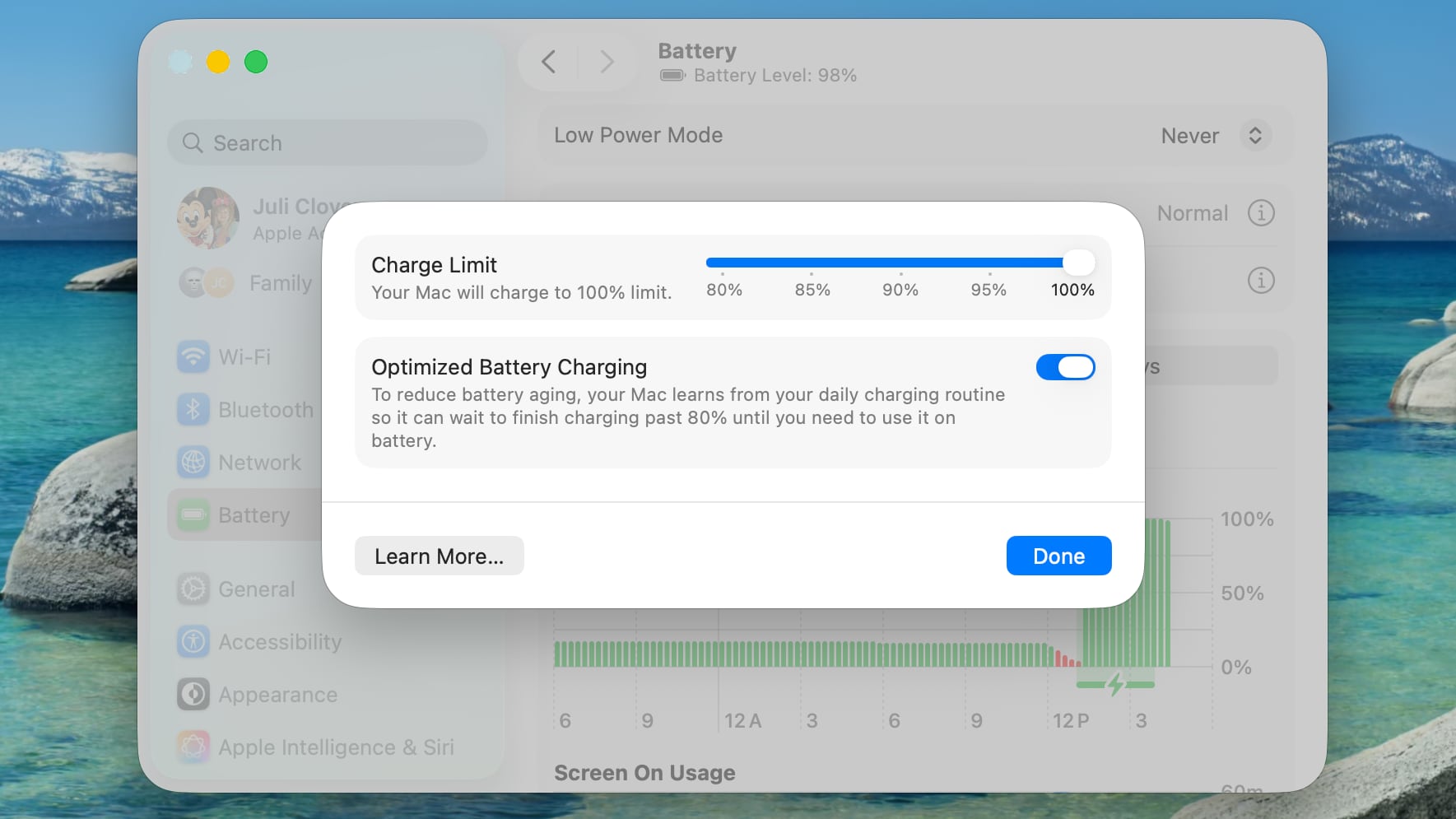
The macOS Tahoe 26.4 beta that Apple released today includes a Charge Limit feature for the Mac. There is a new slider bar that lets Mac users select a charge level from 80 percent to 100 percent.


The Charge Limit is a setting that's available in addition to Optimized Battery Charging, and it can prevent a Mac from ever charging to 100 percent.

Apple's existing Optimized Battery Charging feature keeps a Mac from charging to 100 percent until it's needed for use, with the option using your daily charging routine to determine when to charge to full. While Optimized Battery Charging can help preserve battery life, it still regularly allows a Mac to charge to 100 percent.

The new Charge Limit feature is a hard restriction that keeps a Mac's battery at 80 percent, 85 percent, 90 percent, 95 percent, or 100 percent, giving users more control over the Mac's maximum charging level. Keeping a Mac's battery at 80 percent could increase battery longevity by preserving battery health over time.

Charge Limit can be enabled by opening up the System Settings app, going to Battery, and clicking on the "i" button next to Charging.

Apple's iPhones have had a charge limit feature since the iPhone 15 lineup launched in 2023.
Related Roundup: macOS Tahoe
Related Forum: macOS Tahoe

This article, "Apple Brings iPhone-Style Battery Charge Limits to the Mac in macOS Tahoe 26.4" first appeared on MacRumors.com

Discuss this article in our forums

  •  
❌