Reading view

OLED iPad Mini: Release Date, Pricing, and What to Expect

According to the latest rumors, Apple is close to launching its next-generation iPad mini. So what should we expect from the successor to the iPad mini 7 that Apple released over a year ago? Read on to find out.


Processor and Performance


Apple is working on a next-generation version of the iPad mini (codename J510/J511) that features the A19 Pro chip, according to information found in code that Apple mistakenly shared in August.

Apple's A19 Pro chip since debuted in the iPhone Air and iPhone 17 Pro models. The iPhone 17 Pro models include the higher-end version of Apple's A19 Pro chip with a 6-core CPU and a 6-core GPU, while the iPhone Air uses a mid-tier A19 Pro chip with one fewer GPU core than the A19 Pro chip used in the iPhone 17 Pro and Pro Max.

If the code leak is accurate for the iPad mini 8, Apple is likely to use the mid-tier A19 Pro chip found in the iPhone Air. This is based on the fact that the A17 Pro chip used in the iPad mini 7 has a 6-core CPU with two high-performance cores and four efficiency cores, along with a 5-core GPU, compared to the 6-core GPU found on the A17 Pro used in the iPhone 15 Pro.

Apple built the A19 Pro chip on an upgraded third-generation 3-nanometer N3P process for modest speed and efficiency improvements. The chip includes a 16-core Neural Engine, next-generation dynamic caching, and unified image compression.

The GPU in the A19 Pro has an upgraded architecture with a larger cache, more memory, and Neural Accelerators that are built into each core. Apple says that this change provides 3× the peak GPU compute over the prior-generation chip. There's also an upgraded 16-core Neural Engine for AI tasks.

There is an outside chance that Apple opts for the A20 Pro chip for the new iPad mini. The claim has been made by a MacRumors tipster who analyzed a macOS kernel debug kit containing internal Apple codenames. However, the iPad mini has not always received Apple's newest A-series chip at the time it was updated, so the A19 Pro cannot be ruled out at this time. iPhone 18 Pro models are also expected to use the A20 Pro chip, which will reportedly be fabricated with TSMC's advanced 2nm process.

Display


Apple's plan to transition the ‌‌iPad mini‌‌ from an LCD to an OLED display is widely rumored. According to Bloomberg's Mark Gurman, the small form-factor tablet is likely to be the next Apple device to adopt OLED. According to a Chinese leaker with sources in Apple's supply chain, Apple has evaluated a Samsung-made OLED display for its next iPad mini model.

It remains unclear whether the iPad mini 8 will feature a higher refresh rate than the 60Hz LCD display used in the existing iPad mini 7, but since the new base iPhone 17 now uses a 120Hz ProMotion panel, it would be reasonable to expect the same on the first OLED iPad mini. A separate report has suggested the ‌‌‌iPad mini 8‌‌‌'s screen could increase in size from 8.3 inches to 8.7 inches with the adoption of OLED.

OLED panels can individually control each pixel, resulting in more precise color reproduction and deeper blacks compared to other common display technologies. They also provide superior contrast, faster response times, better viewing angles, and greater design flexibility. All of Apple's flagship iPhones use OLED panels, and in May 2024 the company brought the display technology to the iPad Pro for the first time.

Unlike Apple's ‌iPad Pro‌ models, which feature two-stack low-temperature polycrystalline oxide (LTPO) OLED panels‌, the ‌iPad mini‌ may have a single-stack low-temperature polycrystalline silicon (LTPS) panel, which would make it dimmer.
Chassis Design


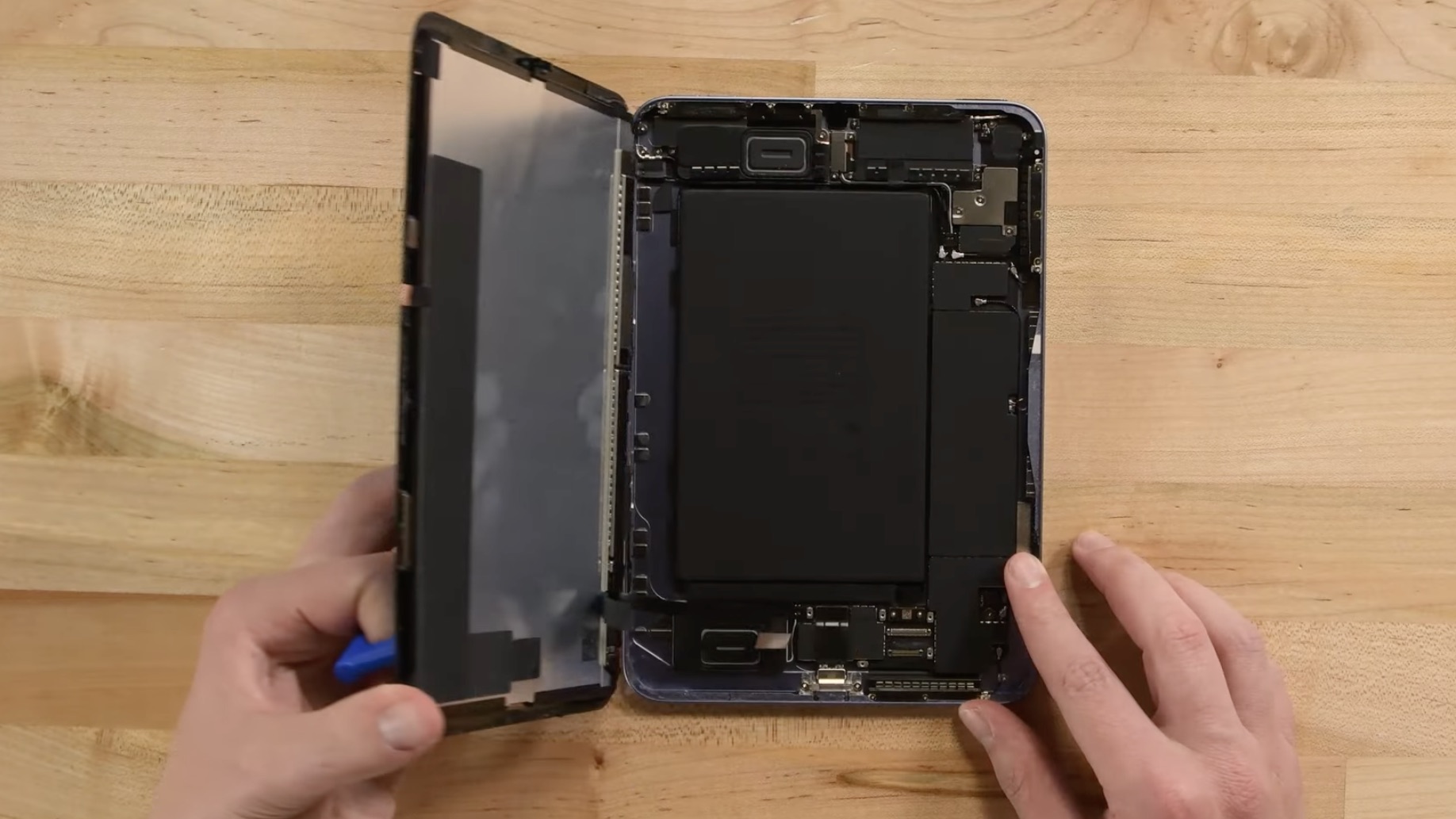
Apple is reportedly working to give the iPad mini 8 a more water-resistant design, according to Bloomberg's Mark Gurman. The updated casing would bring protection levels closer to those of the iPhone, making the tablet safer for use in damp environments.

To achieve this, Apple is said to have designed a new vibration-based speaker system that eliminates the need for traditional speaker holes. By using sound-emitting surfaces instead of open grilles, the company can reduce potential entry points for water and dust, resulting in a more sealed, durable enclosure.

On the iPhone, Apple relies on adhesives and gaskets to shield speakers and other openings from moisture. The iPad mini's approach appears to go further, doing away with the holes altogether. Current iPad mini models lack any official IP rating, but the upcoming version could mark the first in the lineup to feature a certified level of water protection.

Apple patents could offer further clues to the new design direction. For example, a 2014 patent outlines a "mechanically actuated panel acoustic system" that vibrates flat surfaces to generate sound, effectively turning parts of a device's chassis into a speaker diaphragm. This could potentially allow Apple to produce audio without visible speaker holes. The patent suggest Apple has been building towards a sealed, vibration-based acoustic system for several years.

Release Date


According to research firm Omdia, the ‌‌iPad mini‌‌ is expected to adopt an OLED display in 2027. However, Korea's ET News and ZDNET Korea have both suggested that the iPad mini will be updated with an OLED display in 2026. Bloomberg has also said the update could come as soon as this year.

The most recent word on the subject comes from Weibo-based leaker Instant Digital, who claims the OLED iPad mini will be launched in the second half of 2026 at the earliest.

In May 2024, it was reported that Samsung Display had started developing sample OLED panels for a future ‌iPad mini‌, with plans to initiate mass production at its facility in Cheonan in the second half of 2025. The same report claimed that Apple will bring an OLED panel to the iPad Air alongside the ‌iPad mini‌ in 2026, though Apple only refreshed the iPad Air in March, and more recent reporting suggests an OLED iPad Air will arrive in early 2027.

The latter outlook aligns with a December report by analyst firm Display Supply Chain Consultants (DSCC) that said an 8.5-inch OLED iPad mini is planned for a 2026 launch, while 11-inch and 13-inch OLED iPad Air models are expected to follow in 2027.

Ultimately, there are no rumors suggesting exactly when the next ‌iPad mini‌ will be released, but a launch later in 2026 has a high probability.

Pricing


Apple's ‌iPad mini‌ with OLED display technology and improved water resistance is expected to be more expensive, and Apple could charge up to $100 more for the device, according to Bloomberg's Gurman. The ‌iPad mini‌ is currently priced starting at $499. Gurman has previously argued that Apple should consider a lower-end version of the mini, or at least a change to its current $499 starting price, given that it's up against rival products that cost a lot less.

However, Apple users who are looking for a more affordable option should probably consider the 10th-generation iPad instead. Starting at $329, the iPad offers many iPad mini features, such as Touch ID and Center Stage, but at a lower price that balances functionality and affordability.
Related Roundup: iPad mini
Tag: OLED
Buyer's Guide: iPad Mini (Don't Buy)
Related Forum: iPad

This article, "OLED iPad Mini: Release Date, Pricing, and What to Expect" first appeared on MacRumors.com

Discuss this article in our forums

  •  

New Study Highlights Advantages of $549 Windows Laptop Over MacBook Neo

Microsoft has responded to the MacBook Neo by commissioning a study that highlights advantages of some Windows laptops.


Market research firm Signal65 evaluated four Windows laptops:
  • Lenovo's IdeaPad Slim 3x

  • Lenovo's Yoga 7i

  • HP's OmniBook 5

  • HP's OmniBook X Flip
With a starting price of $549.99 on Best Buy's online store in the U.S. at the time of this writing, the IdeaPad Slim 3x is the only laptop in the study that currently rivals the MacBook Neo's starting price of $499 (college students) to $599 (general public). The other three laptops currently start at $749 to $1,029 at Best Buy.

Signal65 outlined some of the IdeaPad Slim 3x's advantages over the MacBook Neo:


Feature IdeaPad Slim 3x MacBook Neo
Display Size 15.3-inch 13-inch
CPU Snapdragon X1 with "90% faster" multi-core Cinebench 2026 score A18 Pro
Base RAM 16GB 8GB
Fingerprint Scanner Included Touch ID limited to $699 model
Ports 1× USB-C, 2× USB-A, SD, and HDMI 2× USB-C only
Wi-Fi Wi-Fi 7 Wi-Fi 6E
Backlit Keyboard Yes No
Touch Screen Yes No

In addition, the IdeaPad Slim 3x achieved longer battery life (16 hours and 29 minutes) compared to the MacBook Neo (13 hours and 28 minutes) in a Tom's Guide test, with Lenovo able to fit a larger battery inside a 15-inch laptop.

The study indicated that the IdeaPad Slim 3x has 512GB of storage, but the $549.99 base model has a 256GB SSD, which matches the MacBook Neo.

Through June 30, Microsoft is offering U.S. college students a free one-year Microsoft 365 Premium subscription, a free one-year Xbox Game Pass Ultimate subscription, and a free Xbox controller with the purchase of a qualifying Windows laptop, including the IdeaPad Slim 3x. The bundle has a value of more than $500.

On the other hand, the MacBook Neo has some advantages over the IdeaPad Slim 3x:


Feature MacBook Neo IdeaPad Slim 3x
Display Resolution 2,408×1,506 pixels (Retina quality) 1,920×1,200 pixels
Display Brightness 500 nits 300 nits
Build Material Fully aluminum enclosure Mix of aluminum and plastic
Webcam 1080p camera 720p camera

Moreover, many reviewers indicated that the MacBook Neo has a superior trackpad and speakers compared to Windows laptops within the same price range. Plus, the MacBook Neo runs macOS instead of Windows, so it benefits from Apple's tight hardware and software integration and features that work across multiple Apple devices.

While it is unsurprising that this Microsoft-backed study is focused on promoting Windows laptops, the reality is that the MacBook Neo and the IdeaPad Slim 3x both have pros and cons. More competition in the affordable laptop market is a win overall.
Related Roundup: MacBook Neo
Buyer's Guide: MacBook Neo (Buy Now)
Related Forum: MacBook Neo

This article, "New Study Highlights Advantages of $549 Windows Laptop Over MacBook Neo" first appeared on MacRumors.com

Discuss this article in our forums

  •  

OpenProject 17.4: Jira Migrator now able to import basic custom fields

OpenProject 17.4 has been released and as announced in our blog, the Jira Migrator is now available without feature flag and allows the migration of basic custom fields. This is a great step towards a full functioning Jira migration, on which the OpenProject team is currently working on. Version 17.4 also introduces Backlog buckets and more improvements to agile project management.

In this article, we highlight the most important changes and what they mean for your daily work. And, as always, please see our release notes that contain all changes, features and bug fixes.

A quick article navigation:

Jira Migrator

Most of you are aware that the Jira Data Center will reach the end of life (EOL) on 28 March 2029. After this date, Data Center licenses and apps will expire and become read-only, meaning that cloud hosting will be the only supported option. So teams around the world are searching for a Jira alternative: A highly functional tool that provides flexible hosting options and allows them full control over their data.

However, migrating to a new tool can present challenges ranging from time-consuming tasks to complex technical problems. That is why OpenProject is developing a tool that will make the transition effortless: The Jira Migrator. This ready-to-use solution allows teams to migrate their data from Jira to OpenProject with an easy, user-friendly dialogue. For more details, please refer to our documentation on the Jira Migrator.

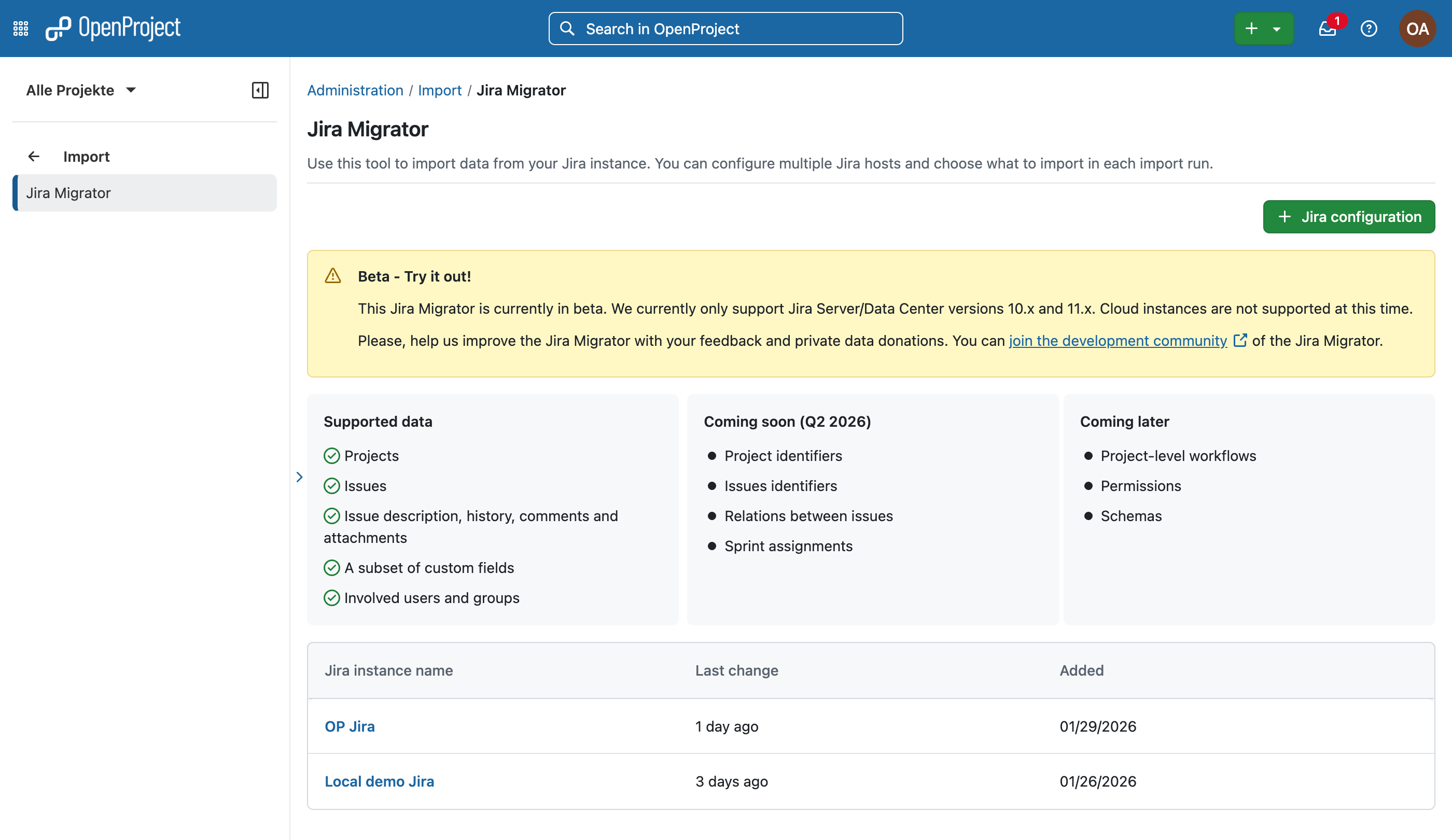
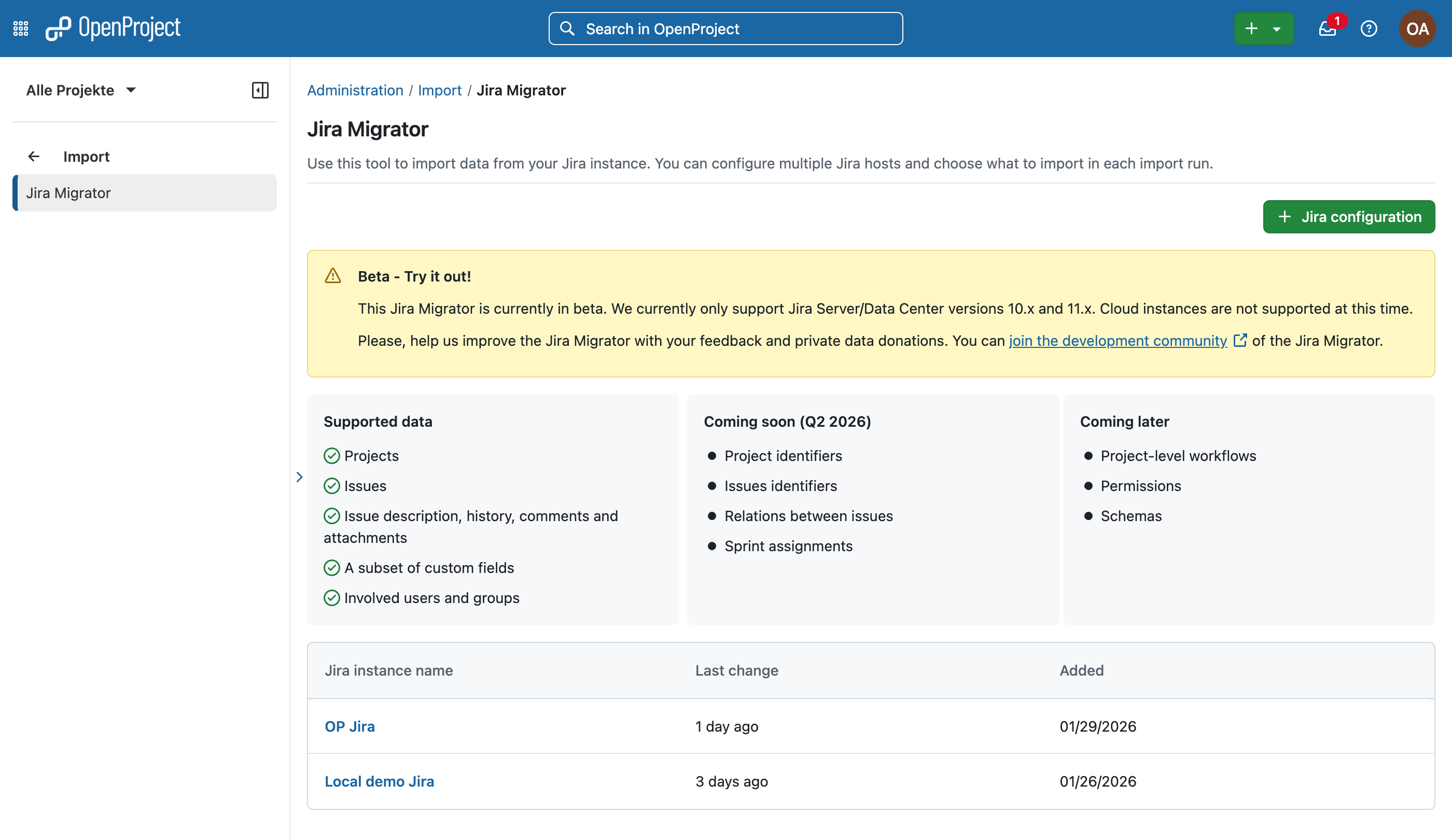
With the release of OpenProject 17.4, the Jira Migrator is available without feature flag, but still in a beta version — we encourage you to test it and give us feedback, but we do not recommend using it in production environments. However, this step represents a major milestone for us, as it will enable us to encourage even more people to try out the Jira Migrator.

OpenProject Jira Migrator with note that it is a Beta version, listing supported data and what is coming soon or later

We understand the importance of the Jira Migrator being fully usable, which is why we have made it an integral part of our roadmap. With every release, we introduce new features and improvements to make migration as easy as possible for as many teams as possible.

For exclusive insights on the Jira Migrator and all Jira migration topics, please contact us and we will put you on the dedicated newsletter list. You can also follow us on social media to get the latest OpenProject news.

New with 17.4: Jira Migrator imports basic custom fields

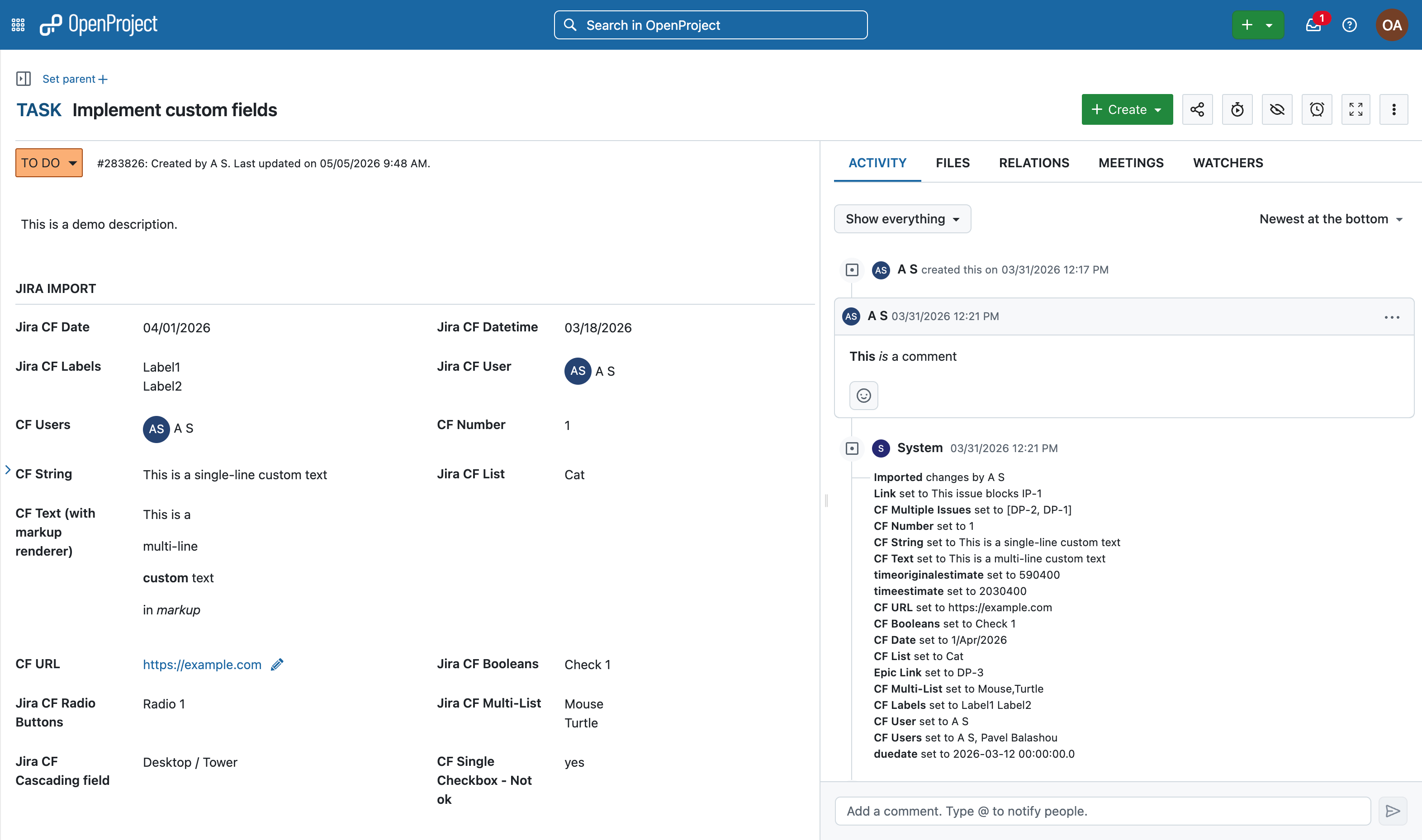
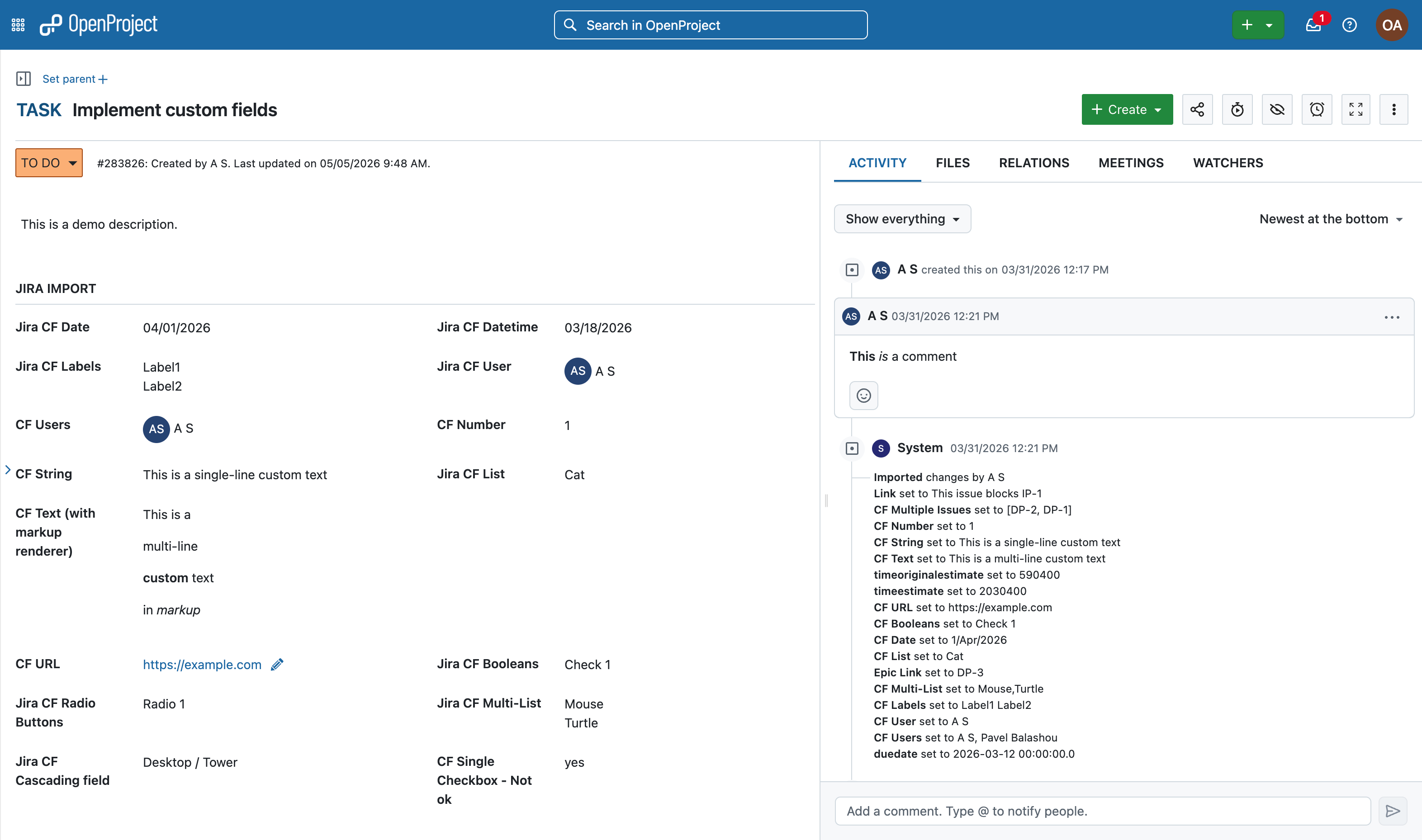
The key new feature in 17.4 is that it is now possible to migrate custom fields from Jira to OpenProject. This applies to custom files that have a corresponding field type in OpenProject, such as text, numbers, dates, and select lists.

Work package in OpenProject with imported custom fields from Jira

This is another important step on our way to providing a comprehensive and user-friendly migration wizard for Jira. The ability to transfer custom fields is a key feature here, as it enables organizations and teams with highly customized project management setups to make the transition with little effort.

To make a migration as easy as possible, there is not only the need for great software but also for a reliable guide on how to use it. We provide you with a detailed instruction manual that guides you step by step through the migration dialogue and explains every function in depth.

Already with previous versions, it was possible to migrate projects, issues (with name, title, description, attachments), users (with name, email, project membership), statuses, and types from Jira to OpenProject. And there is much more to come! We are continuously working on improving the Jira Migrator by adding new data types and improving the migration process itself.

In support of our development process for the Jira Migrator, we are collecting anonymized data samples to test and validate import capacities under real conditions. Please contact us if you want to donate your data; we will sign an NDA to ensure confidentiality.

Agile improvements: Backlog buckets, better drag & drop and more

As we at OpenProject operate using agile workflows ourselves, we understand how important intuitive usability and reliable features are for simplifying workload management.

In this release, we are focusing on speeding up the organization of the backlog and sprint planning process by providing backlog buckets and improved backlog interactions to simplify workflows for agile teams in OpenProject. Individual customization options are particularly important to us, as they support the specific needs of agile teams.

This release is part of our ongoing goal to support agile work in OpenProject, which we also outlined in our recent blog article “The future of agile work”.

Organizing with Backlog buckets

With a long and unstructured backlog, it becomes difficult to keep track of work packages and plan the next sprint efficiently. Without a clear overview, teams often spend too much time searching for items and switching between views.

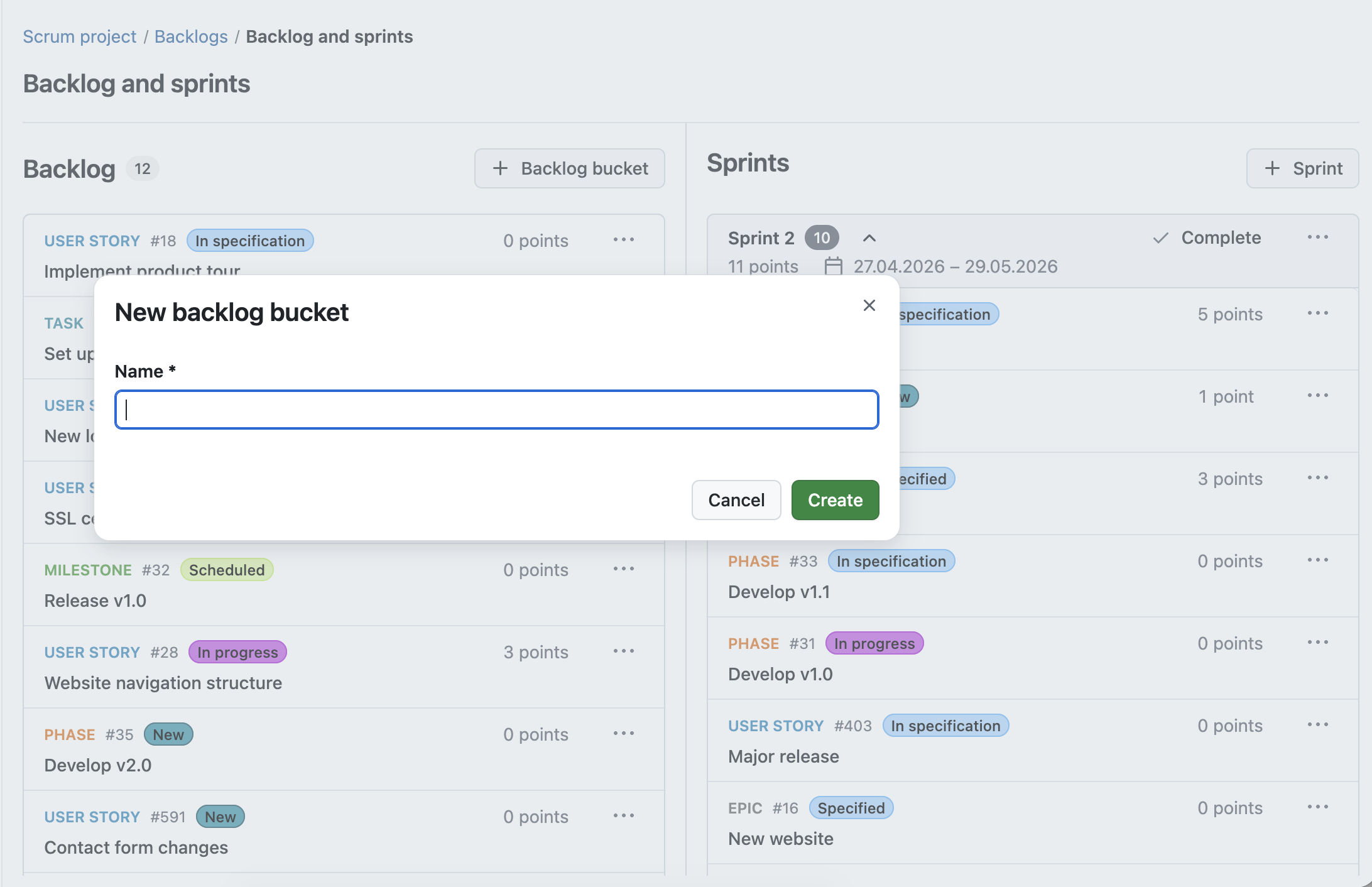
With OpenProject 17.4, we introduce Backlog buckets, a new way to structure your backlog. Work packages can now be grouped into clearly defined lists, making it easier to organize and prioritize upcoming work. Within each bucket, work packages can be sorted and adjusted as priorities change. Each bucket can be named individually, allowing teams to create categories that fit their workflow.

Backlog buckets guarantee an organized backlog, structured into manageable sections. Teams and sprint planners are able to group by their specific needs, making it easier to plan and prioritize their work.

Overlay to create a new backlog bucket in OpenProject, user can enter backlog bucket name

Improved backlog interactions for faster planning

Working with large backlogs requires quick and efficient interactions. When moving work packages or checking details takes too many steps, planning becomes slow and fragmented.

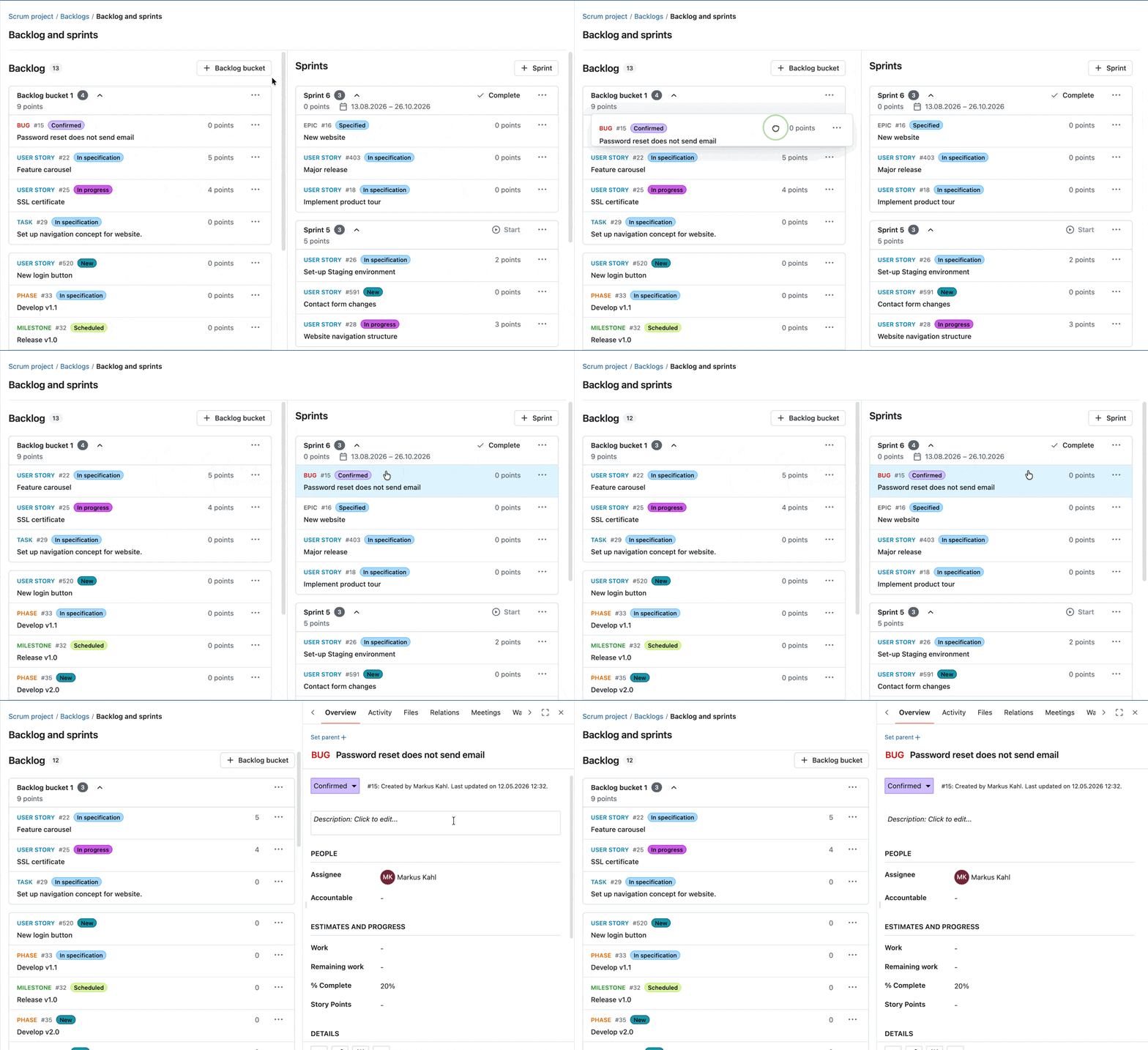
With OpenProject 17.4, we improved how you interact with the Backlogs module. Work packages are now fully draggable, making it easier to move them during backlog refinement and sprint planning. At the same time, you can still open work packages in a side panel with a single click, allowing you to view and edit details without losing context.

Gif showing how to drag and drop a work package from the Backlog bucket to a Sprint, then clicking on it to open in split view

These improvements help you move seamlessly between planning and execution, making backlog refinement faster and more intuitive.

New action button in the sprint header

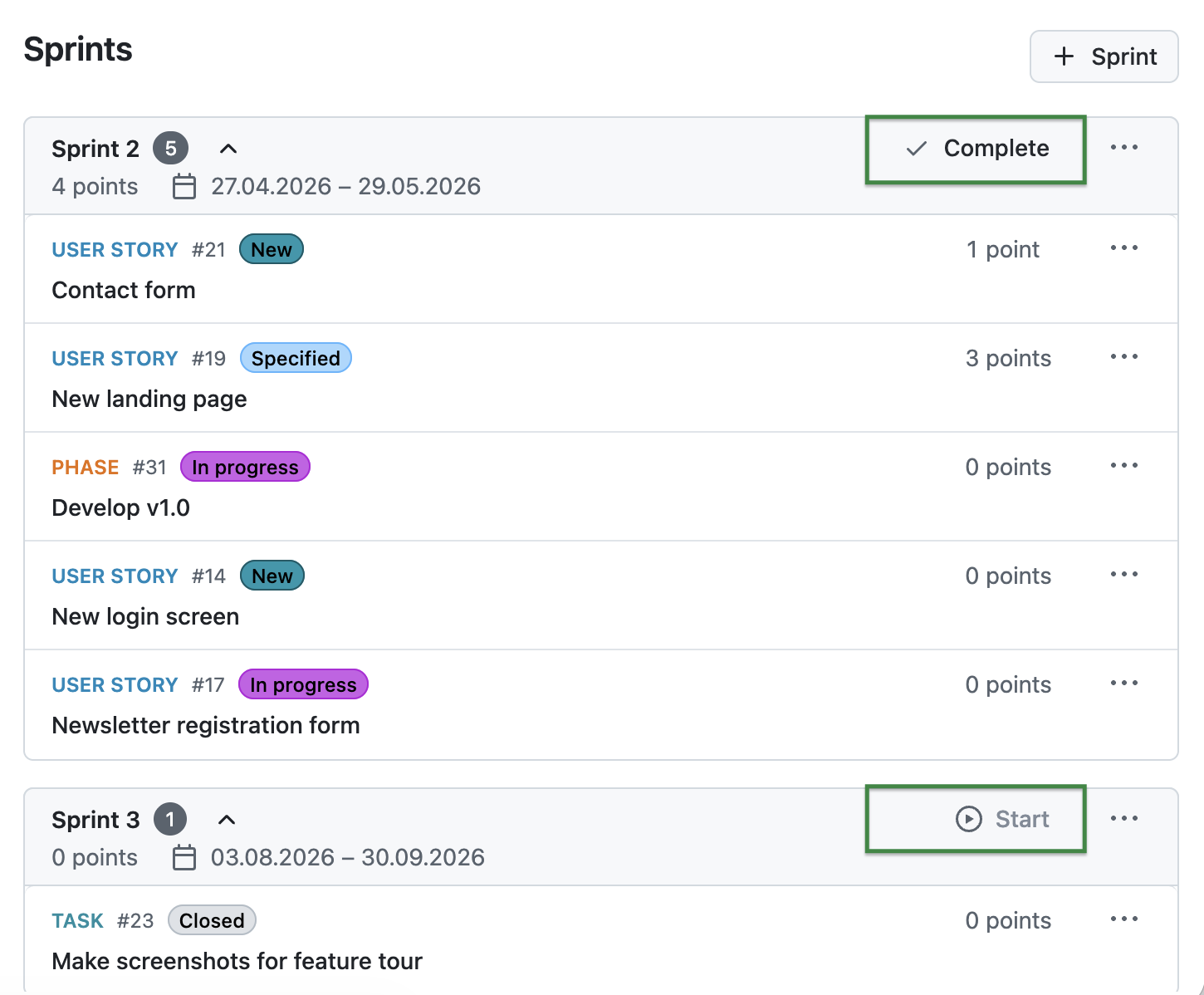
With OpenProject 17.4, you can now start or complete sprints directly from the sprint header using dedicated action buttons. This makes these actions easier to access and improves the visibility of what you can do next in your sprint workflow.

OpenProject Backlogs module, Sprints column with marked buttons: “Complete”  and “Start”

Please also look at our documentation to learn more about OpenProject’s Backlogs module.

Other great improvements with OpenProject 17.4

OpenProject 17.4 offers more features and updates. To keep this article concise, here is a quick look at some additional improvements worth highlighting:

Copy workflow settings between roles

Project workflow settings can now be copied from one role to other roles with a dedicated dialog. This makes it easier to apply consistent workflows across roles and reduces manual configuration effort.

“My Meetings” widget on the Home and Project Overview pages

A new “My meetings” widget now shows your upcoming meetings directly on the Home page. It displays the most relevant information at a glance and allows you to quickly access upcoming meetings.

OpenProject 17.4: Migration, installation, updates and support

Follow the upgrade guide for the packaged installation or Docker installation to update your OpenProject installation to OpenProject 17.4. We update your hosted OpenProject environments (Enterprise cloud) today, May 13, 2026.

You will find more information about all new features and changes in our Release notes and in the OpenProject Documentation.

If you need support, you can post your questions in the Community Forum, or if you are eligible for Enterprise support, please contact us and we will be happy to support you personally.

Credits

A very special thank you goes to Helmholtz-Zentrum Berlin, City of Cologne, Deutsche Bahn and ZenDiS for sponsoring released or upcoming features. Your support, alongside the efforts of our amazing Community, helps drive these innovations. Also a big thanks to our Community members for reporting bugs and helping us identify and provide fixes. Special thanks for reporting and finding bugs go to Andreas H., Madhu Reddy, and Anna Mund.

We also want to thank Community contributor K. Uihlein for contributing to our documentation of the OpenProject GitLab Integration. This is much appreciated.

Last but not least, we are very grateful for our very engaged translation contributors on Crowdin, who translated quite a few OpenProject strings! This release we would like to particularly thank the following users:

  • Samo, for a great number of translations into Turkish.
  • NCAA, for a great number of translations into Danish.
  • Christophe Gesché, for a great number of translations into French.

Would you like to help out with translations yourself? Then take a look at our translation guide and find out exactly how you can contribute. It is very much appreciated!

As always, we welcome any feedback on this release.

  •  

Migrating from Jira: Import custom fields into OpenProject 17.4

Many teams are currently looking for alternatives to Jira. Often under time pressure to find a solution that fits their needs. Migrating, however, requires more than just moving data from one tool to another. It means understanding how your existing setup translates to a new system, as well as being open to workarounds, compromises, and potential improvements.

With the OpenProject Jira Migrator, we support this process step by step. On May 13, it will be available without a feature flag as part of OpenProject 17.4. In addition to the basic functionality already available, it will support the import of basic custom fields — an essential part of task and project management.

In this article, we explain what this means for your Jira exit.

Migrating from Jira is not a one-to-one process

While many core concepts such as work packages, workflows, or custom fields exist in both systems, they are often named, structured, and handled differently.

In Jira, configurations are frequently tailored to individual projects and extended with plugins. Some plugin-based configurations in Jira do not have a direct equivalent in OpenProject and may require alternative approaches. In OpenProject, similar use cases can often be achieved, but sometimes require a different setup or approach. This means that migrating your data is not only about transferring information, but also about adapting it to a new system.

As a result, workarounds and adjustments are often part of the process. Being open to these changes is key to a successful migration, and can also be an opportunity to simplify and improve existing structures.

Preview of OpenProject 17.4: Jira Migrator available without a feature flag

With OpenProject 17.4 (scheduled for May 13), the Jira Migrator will be available and can be used directly. While it is already functional, it is not yet feature complete and is therefore released as a Beta version.

OpenProject Jira Migrator with note that it is a Beta version, listing supported data and what is coming soon or later

Image: OpenProject Jira Migrator version 17.4, to be released on May 13, 2026.

This approach is part of how we develop OpenProject. With monthly releases, we continuously deliver improvements and make features available once they provide real value, even if they are not yet fully finished. This allows teams to start working with new functionality earlier, test it in real scenarios, and provide feedback that directly influences further development.

At the same time, it also means that some limitations still exist and that certain workflows may require adjustments. We believe that this transparent and iterative approach helps us improve the Jira Migrator together with our Community. See our roadmap to learn how OpenProject plans to further support Jira migration and Jira fundamentals.

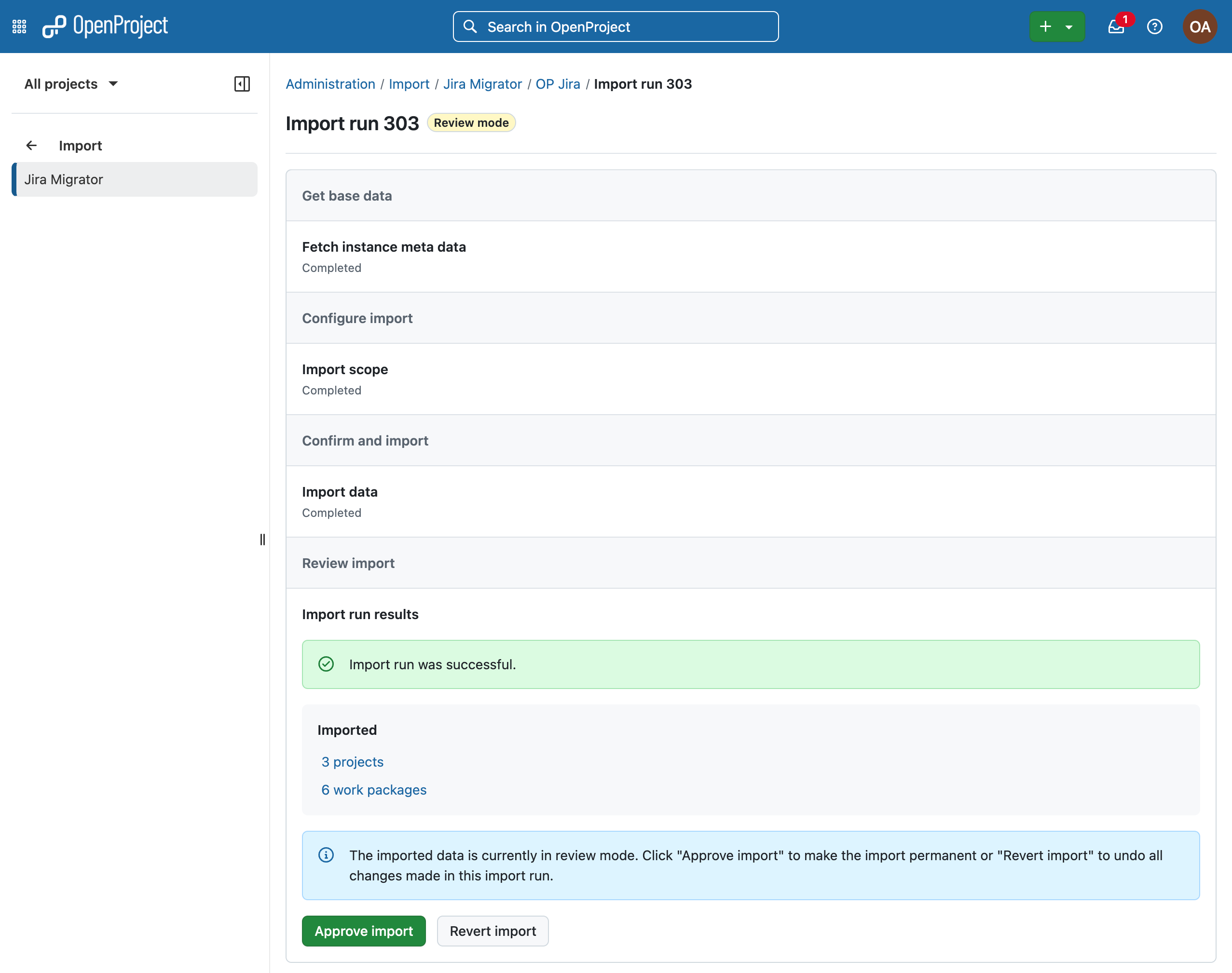
Jira Migrator in OpenProject with example import run 303, imported 3 projects and 6 work packages and option to approve import or revert it

Image: The OpenProject Jira Migrator after a successful import.

Good to know: The Jira Migrator itself is designed as a guided wizard, making the migration process accessible and easy to follow, even for users without deep technical knowledge. See the Jira migration documentation for a step-by-step guide.

Import custom fields from Jira to OpenProject

With OpenProject 17.4, the Jira Migrator will support the import of basic custom fields, an essential part of task and project management. Learn more about custom fields in OpenProject.

Work package in OpenProject with imported custom fields from Jira

Image: A work package in OpenProject with ‘Jira import’ section and import overview in the Activity tab.

Some field types may appear differently in OpenProject compared to Jira. For example, checkboxes in Jira are represented as lists, but offer similar functionality in OpenProject. While the underlying functionality is often comparable, the way these fields are configured and used can differ between Jira and OpenProject.

As we develop in the open, you can follow the specifications for “Jira Migrator imports custom fields” in this work package.

How custom fields are handled during migration

One key difference between Jira and OpenProject is how custom fields are managed: In Jira, custom fields can be configured differently for each project. In OpenProject, custom fields are defined system-wide and then activated for specific projects.

During migration, the Jira Migrator adapts to this difference. If a custom field is used consistently across projects, it will be created as a single custom field in OpenProject. If the same field is configured differently via “Field context” in multiple Jira projects, it will be split into separate custom fields.

To make this transparent, the Migrator adds a suffix with the project identifier to each split field. This allows you to clearly see which field belongs to which project.

Placement of imported custom fields

When custom fields are imported, they need to be placed within the work package layout. To ensure that all imported fields are visible, the Jira Migrator adds them to a dedicated group section called Jira import. From there, administrators can review and adjust the placement of these fields as needed.

What to expect when working with imported data

As with any migration, some adjustments may be required after the import. For example, custom fields may need to be activated for specific projects or reorganized within the work package layout. In addition, users are imported in an inactive state to allow a smooth import process, especially for larger datasets and licensing constraints.

While these steps require some manual review, they ensure that your data is transferred in a consistent and manageable way.

Frequently asked questions (FAQ) about Jira migration

A quick overview of common questions about migrating from Jira and working with the Jira Migrator.

Should I already use the Jira Migrator in its current state?

The Jira Migrator is functional and can already be used, but it is still under active development. It is best suited for testing, evaluation, and early migration scenarios where you are open to adjustments. See our blog article on the Jira Migrator for an overview.

What are the current limitations of the Jira Migrator?

Some features, such as advanced custom fields, or plugin-based configurations, are not yet fully supported. Depending on your Jira setup, certain elements may require manual adjustments or alternative configurations. The following features are coming soon: project & issues identifiers, relations between issues and sprint assignments. Project-level workflows, permissions and schemas coming later. Please have a look at our full development roadmap for a up-to-date list.

How much manual work should I expect after migration?

Migration is not a fully automated process. While core data can be transferred, reviewing custom fields, adjusting configurations, and validating your setup are important steps after the import.

Why does OpenProject release the Jira Migrator before it is fully complete?

OpenProject follows an iterative development approach with monthly releases. By making features available early, users can test them in real scenarios and provide feedback that directly shapes further development.

We ask for our users’ understanding that early availability also means that not everything may work perfectly yet. Feedback from the Community — for example through bug reports — helps us identify issues quickly and address them in upcoming releases.

Help us improve the Jira Migrator

We invite you to try the Jira Migrator with OpenProject 17.4 and explore how it works with your own data. Your feedback is an important part of further development. If you encounter issues or have suggestions, we encourage you to share them with us. This helps us improve the Jira Migrator and better support real-world migration scenarios. Learn how to contribute and share feedback in our Community, for example by reporting bugs.

If you would like to share anonymized data from your migration to support our development team, please reach out to us. We are happy to sign an NDA to ensure confidentiality. We look forward to your feedback and to continuing to improve the Jira Migrator together with our Community.

  •  

FreshRSS 1.29.0

This is a major release.

Feature highlights✨:

  • New sort order preferences at global, category, and feed levels
  • Use feed-provided icon
  • New option to hide sidebar by default
  • Show time since when a feed has problems
  • New functions to handle plural in internationalisation
  • New cli/purge.php to apply purge policy from command line

Bug fixes highlights 🐛:

  • Improve support of PHP 8.5+
  • Several fixes related to searches

Security highlights 🛡:

  • Limit cURL to protocols HTTP, HTTPS

UI highlights 🖼:

  • Improve mobile view with multiple lines when thumbnails and summaries are shown
  • Several themes improved

Extensions highlights 🧩:

  • New Webhook extension for automated RSS notifications
  • New LLM Classification extension to automatically tag incoming articles based on a prompt sent to an LLM

This release has been made by @Alkarex, @Inverle, @Kiblyn11, @math-GH, @rupakbajgain, @xtmd and newcomers @polybjorn, @olivluca, @tomasodehnal, @PeterVavercak, @mrtnrdl, @ale-rt, @cweiske, @rid3r45, @gabbihive, @drosell271, @Kachelkaiser, @zanivann, @nanos, @bowencool, @pe1uca, @matheusroberson, @DenuxPlays, @rlrs, @chanse-syres, @IEEE-754, @umaidshahid, @michi-onl

Full changelog:

  • Features
    • New sort order preferences at global, category, and feed levels #8234
    • New filtering by date of Server modification date #8131, #8576
      • Corresponding search operator, e.g. mdate:P1D for finding articles modified by the author / server during the past day.
      • Especially useful for optimising the API synchronisation.
    • Use feed-provided icon #8633
    • New option to automatically mark new articles as read if an identical GUID already exists in the same category #8673
    • Automatic feed visibility/priority during search #8609
    • Add feed visibility filter to statistics view unread dates #8489
    • Add option to enable/disable notifications, also for PWA #8458
    • Add a form to create new user queries on the User Queries page #8623
    • Allow WebSub hub push from same private network #8450
    • Support category field in JSON feed import #8786
  • Bug fixing
    • Fix wrong search toString in case of regex-looking string #8479
    • Fix article last seen date in case of feed errors #8646
    • Fix search expansion with backslash #8497
    • Fix user query parsing #8543
    • Fix search in shared user queries #8789
    • Fix redirect to wrong view after mark as read in reader and global views #8552
    • Fix SQLite paging when sorting by article length #8594
    • Fix change sorting during paging #8688
    • Fix SQL keyset pagination when sorting by category name #8597
    • Fix SQL duplicates in the user labels when sorting randomly #8626
    • Fix wrong error redirect in subscription management #8625
    • Fix do not include hidden feeds when counting total number of unread articles #8715
    • Update user modify date when changing extensions UserJS / UserCSS #8607
    • Non-strict OPML export #eedefb
  • Security
    • Limit cURL to protocols HTTP, HTTPS #8713
    • Better sanitise favicon URLs #8714
    • New setting for <iframe> referrer allow list #8672
    • Fix email validation and allow error page for unverified email users #8582
    • Add allowfullscreen to <iframe> #8467
    • Rewrite Set-Cookie using native PHP support of SameSite #8447, #8778
      • Sanitize lifetime of session cookies from session.cookie-lifetime in php.ini
    • Update to <meta name="referrer" content="no-referrer" /> from deprecated never #8725
    • Preventive measure against search ingestion #8777
  • UI
    • New option to hide sidebar by default #8528
    • Improve mobile view with multiple lines when thumbnails and summaries are shown #8631
    • New option to disable unread counter in tab title and favicon #8728
    • Show time since when a feed has problems #8670
    • Improve add feed UI #8683
    • Improve slider behaviour when using navigate back button #8496, #8524
    • Improve consistency of slider behaviour after submitting form #8612
    • Create dynamic favicons from SVG instead of PNG canvas #8577, #8588
    • Only display scrollbar everywhere if there's an overflow (especially for Chromium) #8542
    • Fix CSS padding of .content pre code #8620
    • Fix wrong navigation buttons layout on Chromium #8606
    • Fix don’t mark as read if middle click is outside of article link #8553
    • More robust JS #8595
    • Fix sidebar slide animation at narrow viewports #8747
    • Visually dim disabled users in user management table #8768
    • Improve multiple UI themes #8711, #8732,
      #8733, #8734, #8735,
      #8736, #8737, #8738,
      #8739, #8743, #8746,
      #8749, #8761, #8781,
      #8784, #8785
    • Various UI and style improvements: #8537, #8538,
      #8541, #8624, #8731,
      #8774
  • Deployment
    • Also push Docker images to GitHub registry #8669
    • Improve support of PHP 8.5+ using Pdo\Mysql #8526
    • Add support for Podman in Makefile #8456
    • Re-add database status in installation check #8510
    • Docker / CLI: Allow chown/chmod to fail with warning #8635
  • Extensions
    • New Webhook extension for automated RSS notifications Extensions#456
    • New LLM Classification extension to automatically tag incoming articles based on a prompt sent to an LLM Extensions#458
    • New extension methods to get typed configuration values #8696
    • New hook: Minz_HookType::ActionExecute #8599, #8603
    • New hook to modify the list of feeds to actualize #8655, #8675
    • Allow passing Minz_HookType as hook name in registerHook() #8600
    • Return more info and status from httpGet() #8700
    • Make httpGet() cache nullable #8705
    • Allow extensions’ configuration UI to use select-input-changer JavaScript helper #8721
  • SimplePie
  • CLI
    • New cli/purge.php to apply purge policy #8740
  • I18n
  • Misc.

  •  

Who are the Five Candidates Most Likely to Become Colombia’s Next Vice President After the Upcoming Elections?

Despite 13 campaigns underway, only five candidates’ poll above 2.5% in voter intention

Colombia is heading toward the first round of presidential elections on May 31, 2026, with 13 candidates in the race, in a scenario marked by political fragmentation and a strong concentration of voter support among a few contenders.

The next president will take office on August 7, following the end of President Gustavo Petro’s term, marking the transition from the country’s first left-wing government in recent history.

According to pre-election polls, only five candidates exceed 2% in voter intention, leaving most with limited chances of reaching the presidential palace. Among the leading contenders are Iván Cepeda, the candidate of the ruling Pacto Histórico, who leads polls with between 35% and 43% support; right-wing candidate Abelardo de la Espriella, with between 16% and 24%; and Paloma Valencia of the Centro Democrático party, with between 14% and 21%.

A second group includes centrist candidates Claudia López, polling between 3% and 4%, and Sergio Fajardo, at around 2.5%, reflecting a fragmented vote within that political segment.

Vice presidential picks shape campaign strategies

As the campaign unfolds, candidates have selected their running partners as a key strategy to broaden their electoral appeal.

Iván Cepeda has chosen Aida Quilcué, an Indigenous Nasa leader from southwestern Colombia, reinforcing the campaign’s leftist profile and its emphasis on including historically marginalized communities in political decision-making.

Quilcué has served as a governor and Indigenous authority in her community and, like Cepeda, is a victim of Colombia’s armed conflict: her husband was killed by state agents in 2008. She has been affiliated with the Regional Indigenous Council of Cauca (CRIC) and the National Indigenous Organization of Colombia (ONIC). She presents herself publicly as an Indigenous leader, human rights defender and senator (2022–2026), without reporting formal higher education credentials.

Abelardo de la Espriella has selected former Finance, and Commerce, Industry and Tourism Minister, Juan Manuel Restrepo, as his running mate, forming a ticket focused on security and economic strengthening. “That is a capability I have because I understand productivity, competitiveness and economic development,” Restrepo told La Silla Vacía during his registration.

Restrepo is an economist with a specialization in finance from Rosario University, a master’s degree in economics from the London School of Economics, a specialization in senior management from INALDE Business School, and a doctorate in higher education leadership from the University of Bath. He has also served as rector of three major universities in Colombia.

Juan Daniel Oviedo, a former Bogotá city councilor, is running alongside Paloma Valencia of the Centro Democrático party. As economist from Universidad del Rosario, Oviedo holds a master’s degree in mathematical economics and econometrics and a Ph.D. in economics from the University of Toulouse in France.

He previously served as head of Colombia’s National Statistics Agency (DANE) during the Iván Duque administration and ran for mayor of Bogotá in 2023.

His vice presidential bid gained momentum after securing more than 1.2 million votes in the March 8 inter-party primary, finishing second. His selection aims to attract centrist and center-right voters and strengthen Valencia’s chances of advancing to a potential runoff.

However, his nomination has sparked controversy, as it marks the first time the right-wing party has chosen a candidate with liberal positions on issues such as women’s rights and LGBTQ+ rights.

Claudia López selected Leonardo Huerta, a university professor of law and philosophy, as her running mate. According to Spain’s El País, he comes from “a working middle-class family,” is the youngest of four siblings, and is married with two children.

Huerta is a lawyer from Universidad Libre and holds a degree in philosophy from the Technological University of Pereira. He has a master’s degree in administrative law and is a doctoral candidate in law. His public sector experience includes serving as education secretary in Pereira and as a deputy ombudsman for health issues during the COVID-19 pandemic in 2020.

Sergio Fajardo selected Edna Bonilla as his running mate, reinforcing a campaign centered on education and dialogue. Bonilla previously served as Bogotá’s education secretary during Claudia López’s administration (2020–2023).

She is a public accountant from the National University of Colombia, holds a tax specialization from Externado University and a doctorate in political studies. During the campaign launch, Fajardo said: “We will work together to deliver the serious and safe change Colombia needs. To move beyond polarization and build bridges instead of trenches.”

Voter participation

According to Registraduría Nacional del Estado Civil, which oversees elections, a total of 41,421,973 citizens are eligible to vote in Colombia and abroad in the first round of the presidential election. Of these, 21,298,492 are women and 20,123,481 are men.

If no candidate secures more than 50% of the vote, a runoff election will be held on June 21, 2026, between the top two candidates.

  •  

Drone bomb found in Bogotá

Unexploded device sparks alarm after suspected links to armed groups.

Remains of the drone found in Bogotá this week, the PVC pipe contained C4 explosives. Photo: Policia Nacional

Bogotá’s security agencies were on full alert this week after a drone rigged to carry explosives was found on the outskirts of the city less than six kilometers (3.7 miles) from El Dorado international airport.

Anti-terrorist units working along side Colombian air force specialists discovered the drone bomb in woodland close to the Bogotá River in the Kennedy district on Wednesday afternoon.

The drone was close to a makeshift camp, though it was unclear from official reports of the artefact had crashed there or was discarded and hidden.  

An air force spokesman said the site was detected with the help of intelligence services after a tip-off from investigators in Cauca, a conflict region of Colombia where drone bombs are frequently used by armed groups.

The bomb itself was made from 260 grams of powerful C4 explosive stuffed in a PVC tube with a medical syringe rigged as a detonator, a device more commonly seen in Colombia with artisanal landmines, and a camera for guidance.

One unusual element of the drone was its unconventional control system using fiber-optic cables, said the spokesman. This style of drone, pioneered in the Russia – Ukraine conflict, can overcome signal jamming technology making it harder to intercept.

“This type of threat is now present in the cities, we call on the community to call in any suspicious activities,” said the spokesman. Citizens should phone 107 to report drone sightings.

Meanwhile the device had been disarmed and handed over to experts at the CTI (Cuerpo Técnico de Investigación) for forensic analysis, he added.

The improvised weapon’s discovery followed a week of alerts of unauthorized drones seen flying over El Dorado airport, in some cases causing temporary shutdowns. In the most recent incident, an Avianca crew spotted a drone close to the terminal building leading to a10-minute flight suspension.

Aeronáutica Civil, Colombia’s airspace agency, later declared the sighting a false alarm.

Rise of the drones

Armed drones are increasingly being used in Colombia with combatants dropping airborne explosives on rival gangs and state forces, often from home-made devices fabricated from small drones and accessories available on the high street.

The technological race to gain a performative edge on the battlefield has created game-changing tactics in the country’s decades-old conflict, but also brought misery to civilians caught in the crossfire.

According to website Razón Publica, there were 418 drone bombings across the country in 2024 and 2025, with 28 fatalities, of which 10 were civilians. Another 300 people were injured.

See also: Drone attack kills three, injures one

Three of Colombia’s largest armed groups, the ELN, Clan del Golfo and EMC dissidents, were perfecting these improvised devices while state security forces were scrambling to keep up, said the publication.

Drone attacks were reported in all of Colombia’s conflict hotspots, particularly Cauca, Valle, Norte de Santander, Antioquia and Caquetá.

Civilians were often collateral victims – bombs are dropped from several hundred meters and frequently miss their targets – and armed groups also used drones to control communities.

“The drone go beyond attacks: they monitor, intimidate, and generate displacements,” said Razón Publica.

On May 8th, a police station was attacked by five armed drones in the Cauca town of Suárez, according to the local mayor.

#Atención A esta hora disidentes atacan con drones cargados de explosivos la estación de Policía en Suárez, Cauca. La alcaldía suspendió la atención al público y ordenó a sus habitantes a permanecer resguardados en sus viviendas. pic.twitter.com/qcNmg8sDOB

— BLU Pacífico (@BLUPacifico) May 8, 2026

Security chiefs speculated this week that the Bogotá drone bomb could have been planned for military installations based at El Dorado.

Colombia’s main international airport lies alongside the large hangars of CATAM, or Comando Aéreo de Transporte Militar, a large logistical base for military operations, as well as FAC (Air Force) and police facilities.

Cauca link

As for the drone’s origin, some clues pointed to EMC armed group currently fighting state forces in Cauca in the southwest of the country.

According to reports on the El Tiempo news site, the Bogotá drone was only found after prosecutors in Popayán alerted their counterparts in the capital of its location, and this tip-off came two days after the capture in Cauca of two suspected explosives experts – José Musse and José Valencia – accused of belonging to the Frente Carlos Patiño, one of the major fighting units of the EMC.

Cauca was the scene last month of one of Colombia’s worst conflict atrocities when a roadside bomb planted by the EMC exploded killing 21 civilians traveling close to Popayán, the departments regional capital.

See also: Cauca bombs: What’s going on?

When captured on May 4th in Cauca, Musse and Valencia were found with an “artisanal drone that could be used to attack official installations”, said local prosecutors.

The fact the pair had knowledge of the Bogotá drone – and where to find it – suggested a link to the EMC, said El Tiempo, though there was no evidence they were directly involved.

So the question remains who put a drone bomb in Bogotá? And was it linked to the drone alerts at the airport? With the presidential elections around the corner, many rolos will be hoping for some answers.

The post Drone bomb found in Bogotá appeared first on The Bogotá Post.

  •  

How a tech podcast from Colombia is rethinking AI, burnout, and what it means to build software

In the software industry, most formal training stops at the technical layer. Engineers are taught syntax, frameworks and system design.

In particular, they learn how to develop and ship. However, almost no one teaches them something far more important: how to decide which problems are actually worth their time and energy.

That question sits at the center of the latest season of La Hora del Tech, a podcast by one of Colombia’s leading employers Source Meridian that’s building an audience not by chasing hype, but by challenging it.

As AI continues to impact the industry, the main bottleneck is no longer technical. It’s human. At a certain point, it stops being about what you can build and starts being about how you think.

This tension feels especially relevant in places like Colombia, where the tech ecosystem is growing fast but still navigating its identity. Engineers here are increasingly working with international teams and the most cutting-edge tools, while also dealing with very real questions about balance and long-term growth.

The third season opens with an episode titled “From Los Angeles to Medellín: Building AI Agents Without Burning Out.”

Andrés Restrepo, CTO of Enric AI,

The guest, Andrés Restrepo, CTO of Enric AI, shares what it means to operate between two different cities.

Rather than framing Colombia as a limitation, the conversation explores it as an advantage.

The second episode raises the stakes with a story that breaks away from the usual narrative of constant acceleration.

Aníbal Rojas, former VP of Technology at Platzi, talks about stepping off the fast track at the peak of his career. That pause allowed him to rethink not only how he works, but how he learns and lives.

Instead of consuming generative AI tools at surface level, Rojas chose to deeply understand them. His experience highlights a growing tension in Colombia’s tech scene: the pressure to keep up globally versus the need to build knowledge that actually lasts.

Burnout, technical judgment, and sustainable growth become central themes. The conversation openly addresses something many engineers feel but rarely say: progress shouldn’t come at the cost of exhaustion.

The podcast hosts bring credibility rooted in real-world experience. Hugo Rodríguez, Software Architect and Team Lead at Source Meridian, has spent over a decade in the field and challenges a common assumption: being senior isn’t about knowing everything—it’s about knowing what not to use. His perspective emphasizes building systems that support business goals without breaking the people behind them.

Alongside him, Maria Camila Figueroa of Source Meridian offers a lens that reconnects technology with humanity. From her point of view, every dataset represents people, and every process impacts lives. Her focus on “humanizing agility” resonates strongly in Colombia.

On May 5th, the third episode premieres: “Emotional Debt in Code: Token-Driven Anxiety.” This time, the guest is clinical psychologist Ricardo Duarte, and the topic shifts into territory that most engineering conversations avoid.

What happens when you spend months working on code you know is fragile, rushed, or fundamentally broken?

The episode explores the emotional weight that builds up from technical debt, tight deadlines, and systems no one wants to touch out of fear. It’s a conversation about the hidden cost of development: the stress, the loss of motivation, and the quiet erosion of confidence. These are things that don’t show up in KPIs but often matter more than any production bug.

This season will feature 10 episodes and a diverse set of voices, but its real ambition is grounded in reality. From building AI tools that genuinely support developers, to acknowledging burnout in teams that pretend everything is fine, the podcast leans into honest and necessary discussions.

The post How a tech podcast from Colombia is rethinking AI, burnout, and what it means to build software appeared first on The Bogotá Post.

  •  

Monster truck tragedy adds to Cauca’s woes

Monster truck tragedy adds to Cauca’s woes
Colombia’s troubled corner of Cauca was struck by another tragedy Sunday when a monster truck plowed into spectators at a car show killing three persons and injuring dozens more.
Harrowing footage posted online showed spectators scrambling to escape the path of the customized jeep after it inexplicably left the track in Popayán, the regional capital of Cauca department. Others were not so lucky and were crushed by the two-meter tires.
The disaster struck just one week after a roadside bomb planted by EMF dissidents detonated and killed 21 vehicle passengers on a highway 30 kilometers north of the city.
See also: Dissident bomb kills 20 civilians at roadblock in southwest Colombia
The truck, called La Dragona, was being driven by Colombian Sonia Segura, who according to event organizers Colombian Monsters SAS is only woman in Latin America permitted to drive such oversized vehicles. 
In an Instagram video posted before Sunday’s event she presented La Dragona and its “1,500 horsepower motor”. The outdoors display, which also featured a monster truck called Godzilla and motocross competitions, had already appeared at several Colombian cities and has made regular tours of the country over the years.
https://x.com/ColombiaOscura/status/2051113986540646745
According to their Facebook page, Colombian Monsters SAS is a Colombian company based in Bogotá but has trucks brought in from the U.S 
Footage of Sunday’s crash showed Segura driving La Dragona over crushed cars then turning towards the crowd and accelerating before hitting a concrete post that eventually stopped the vehicle. Ambulance and fire brigade then scrambled to assist the trail of crushed spectators. 
In one video posted online the truck appears to be on fire, though it is not clear if this is a feature of La Dragona or an engine problem. 
Talking to El Tiempo after the tragedy, the Popayán’s police chief Julián Castañeda said that the accident was caused by mechanical faults. Segura was also injured and in hospital in a stable condition, he added.
"This was a private event. There was a mechanical failure, and the vehicle went off the road. The vehicle accelerated, the driver couldn't brake.”
La Dragona, the monster truck that crashed killing three spectators in Poayán on Sunday. Photo: X still.

Colombia’s troubled corner of Cauca was struck by another tragedy Sunday when a monster truck plowed into spectators at a car show killing three persons and injuring dozens more.

Harrowing footage posted online showed spectators scrambling to escape the path of the customized jeep after it inexplicably left the track in Popayán, the regional capital of Cauca department. Others were not so lucky and crushed by the huge tires. A ten-year-old girl was reported among the dead.

Sunday’s incident was at a fun family event held during the Mayday bank holiday weekend. For many of the 1,500 attendees the car show would initially have been a welcome respite from the grim news that has emerged from Cauca in recent weeks.

The accident struck eight days after a roadside bomb killed 21 vehicle passengers on a highway 30 kilometers north of the city. Dissident fighters from the EMC armed grop later claimed responsibility for the attack, claming that is was targeting military troops but killed civilians by mistake.

See also: Dissident bomb kills 20 civilians at roadblock in southwest Colombia

At the car show event the monster truck, called La Dragona, was being driven by Colombian Sonia Segura. According to event organizers Colombian Monsters SAS, Segura is only woman in Latin America permitted to drive such oversized vehicles.

Monster failure

In an Instagram video posted before Sunday’s event she presented La Dragona and its “1,500 horsepower motor”.

The outdoors display, which also featured a monster truck called Godzilla and motocross competitions, had already appeared at several Colombian cities and has made regular tours of the country over the years.

According to their Facebook page, Colombian Monsters SAS is a Colombian company based in Bogotá but has trucks brought in from the U.S.

#ATENCIÓN. Lamentable balance en Popayán: asciende a 3 la cifra de fallecidos y al menos 12 heridos tras el accidente en la exhibición de Monster Truck en el Boulevard Rose. Entre los lesionados se encuentran varios menores de edad que recibían atención en centros asistenciales.… https://t.co/IsPHNJ0W6H pic.twitter.com/YuYcIncITT

— Colombia Oscura (@ColombiaOscura) May 4, 2026

Footage of Sunday’s crash showed Segura driving La Dragona over crushed cars then turning towards the crowd and accelerating before hitting a concrete post that eventually stopped the vehicle. Ambulance and fire brigade then scrambled to assist the trail of crushed spectators.

Talking to El Tiempo after the tragedy, the Popayán’s police chief Julián Castañeda said that the accident was caused by mechanical faults. Segura was also injured and in hospital in a stable condition, he added.

“This was a private event. There was a mechanical failure, and the vehicle went off the road. The vehicle accelerated, the driver couldn’t brake.”

One video showed the truck engine on fire, though it is not clear if this is a feature of La Dragona or part of any mechanical problem.

The post Monster truck tragedy adds to Cauca’s woes appeared first on The Bogotá Post.

  •  
❌