
Reading view

A Closer Look at watchOS 26.5's New Luminance Watch Face

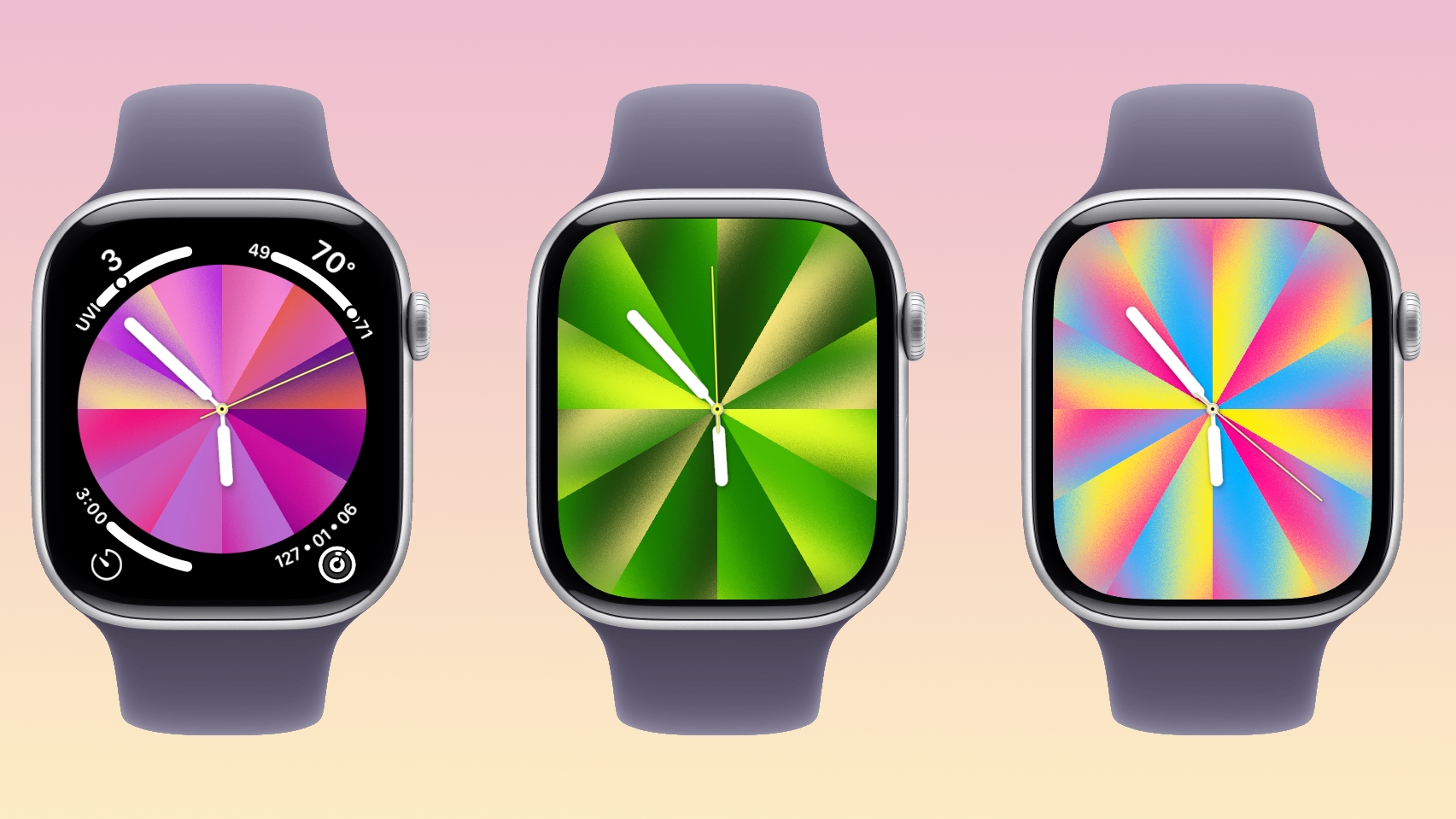
With watchOS 26.5, Apple is introducing a Pride Luminance face, and it's one of the most versatile and customizable watch faces. There are pre-configured color options, but the face also supports custom colors.
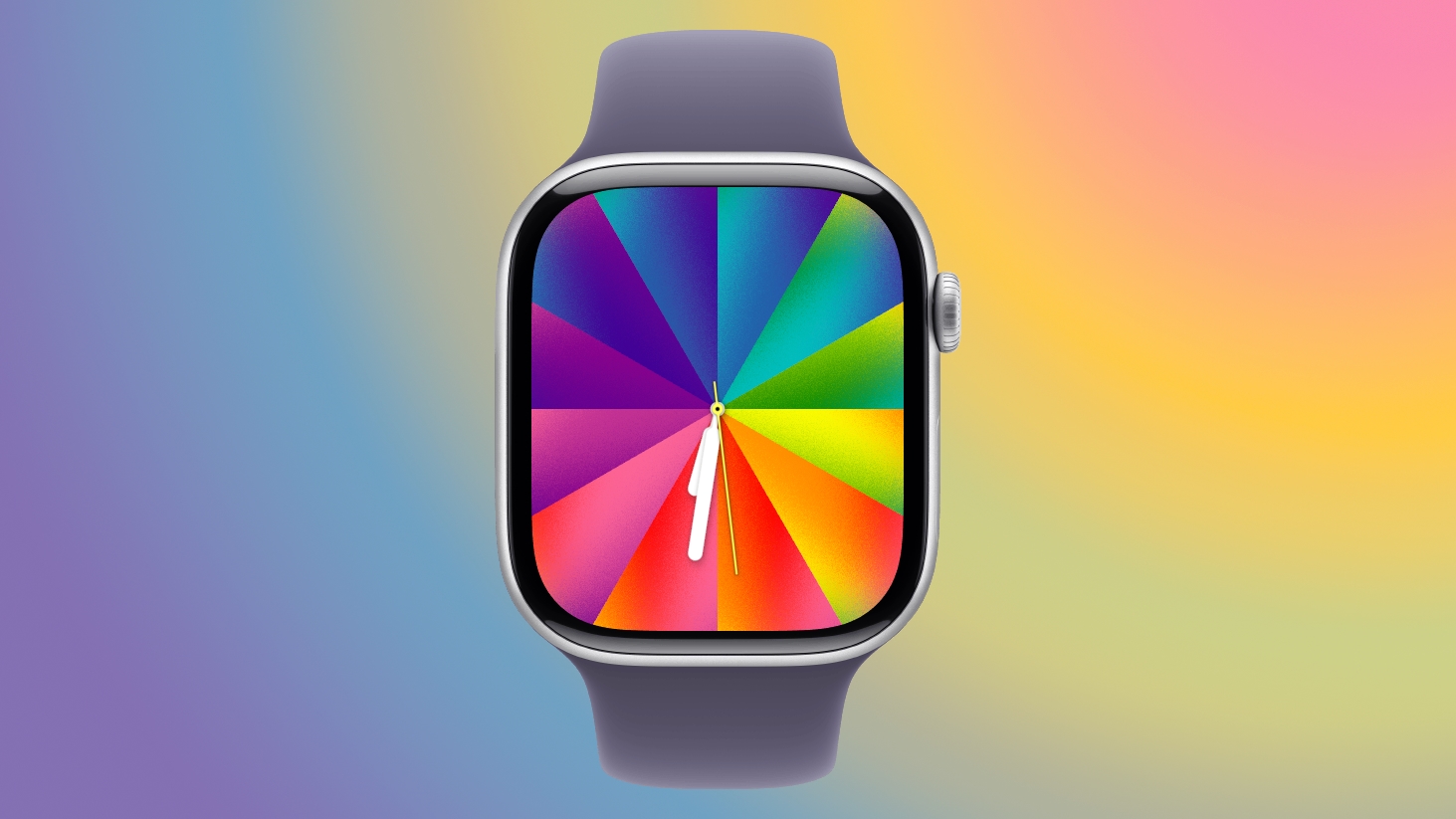

You can select 1 to 12 colors from a palette that has every color of the rainbow, some in-between shades, and black, white, brown, and gray.
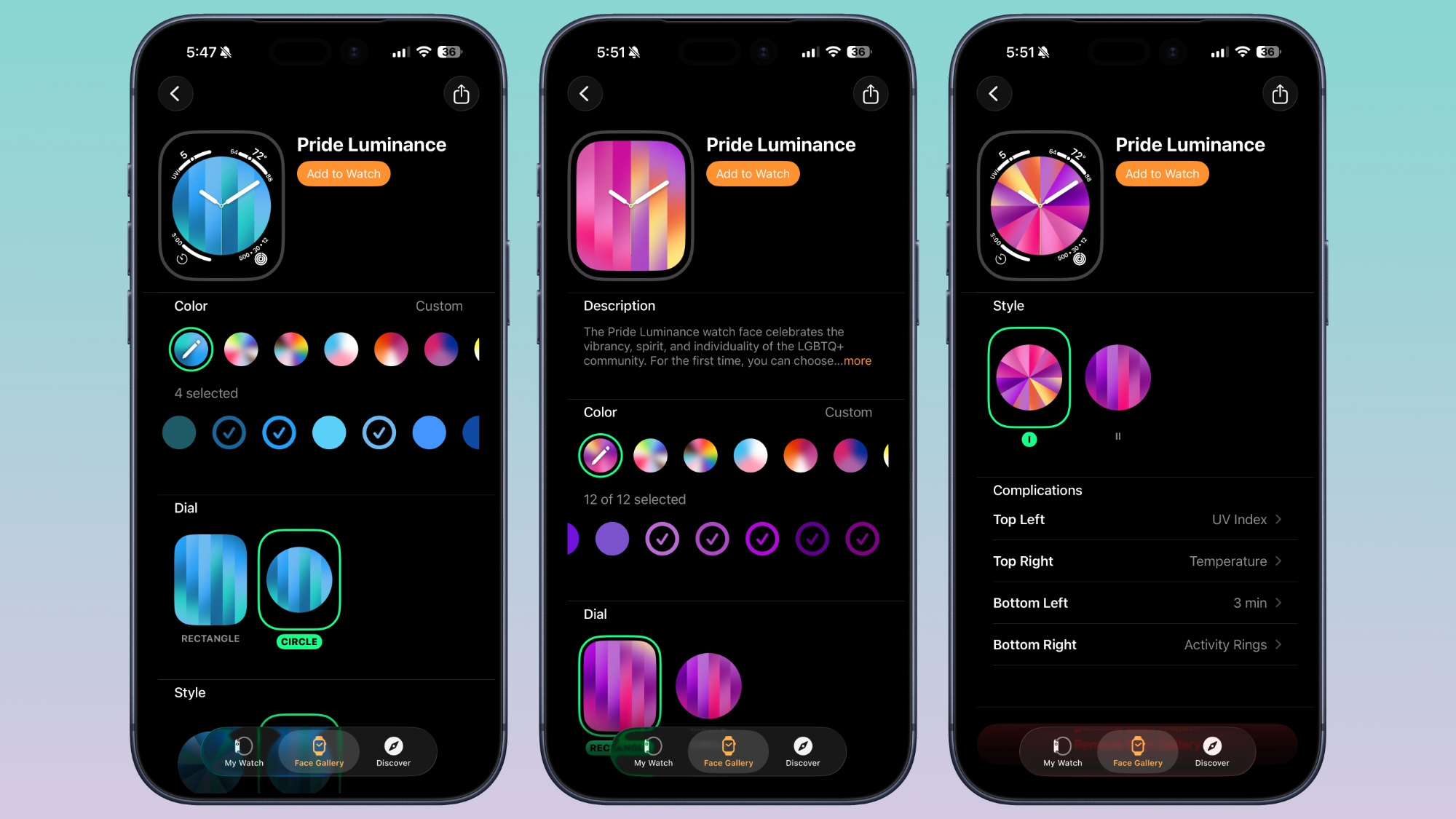

The colors you pick are distributed across the watch face in a gradient, available in either radial or linear styles. The first style looks like a starburst, while the second style is a series of rectangular lines.
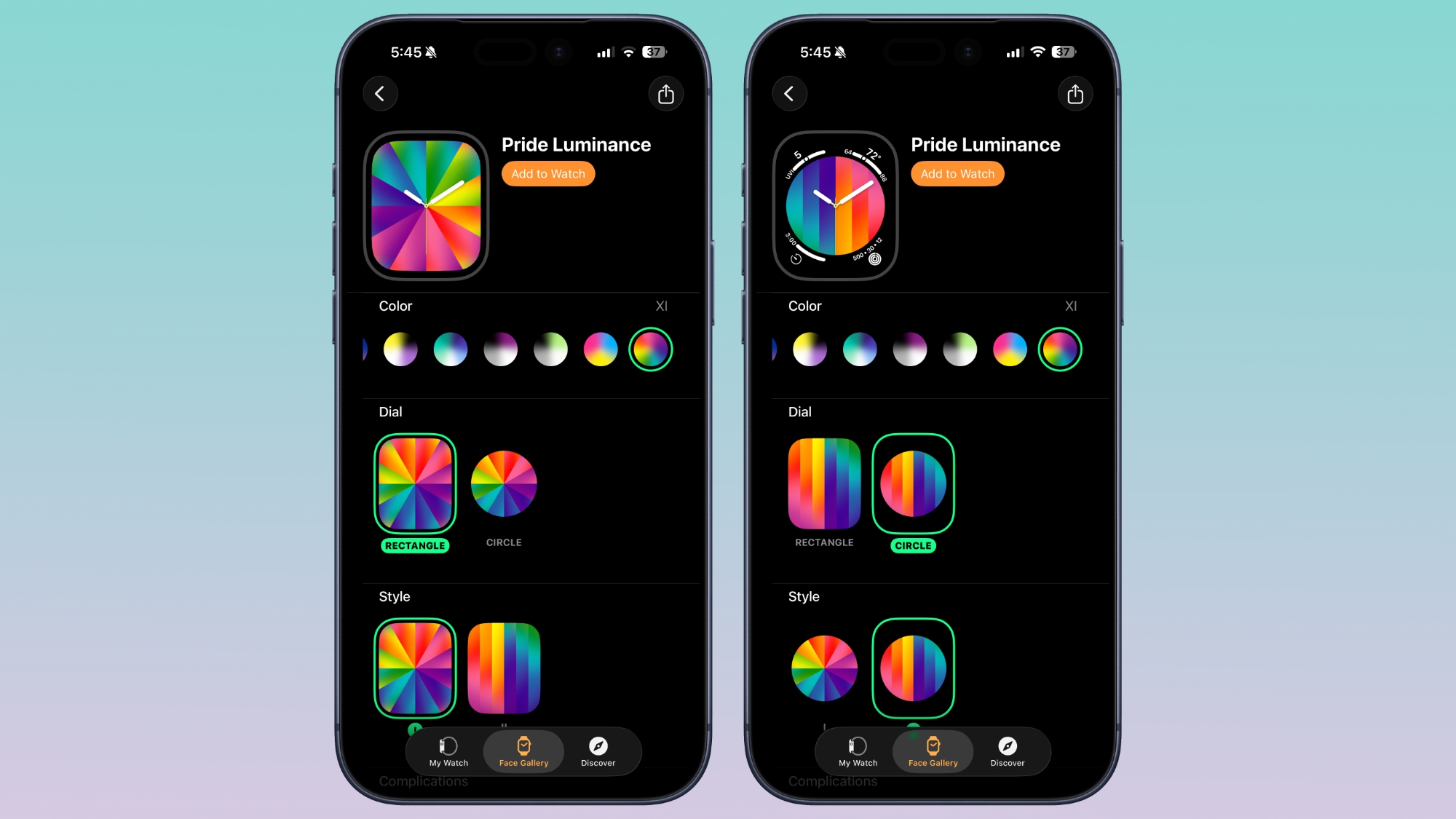

The dial can be set to Rectangle for edge-to-edge color, or Circle for a smaller dial that supports four complications.

As with most of Apple's faces, the Luminance face is animated. When the wrist is down, it shrinks into slim lines of color on a black background, but when the wrist is raised, the full color palette is displayed. Colors will also shift slowly.
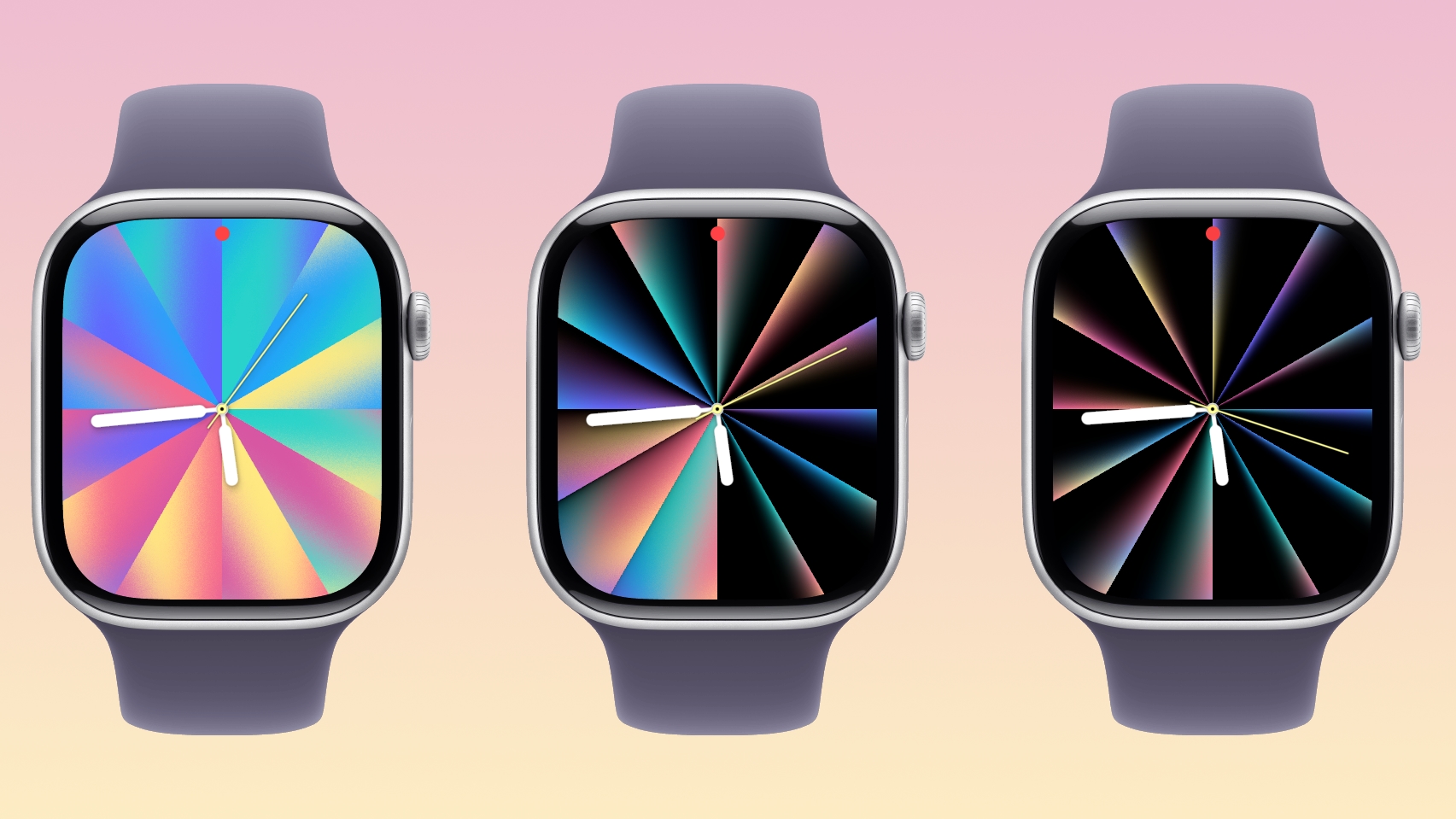

Apple's pre-selected colors represent different Pride flag colors, but with the deep customization options, the Pride Luminance face can match clothing, show off support for sports teams, or just display your favorite colors.

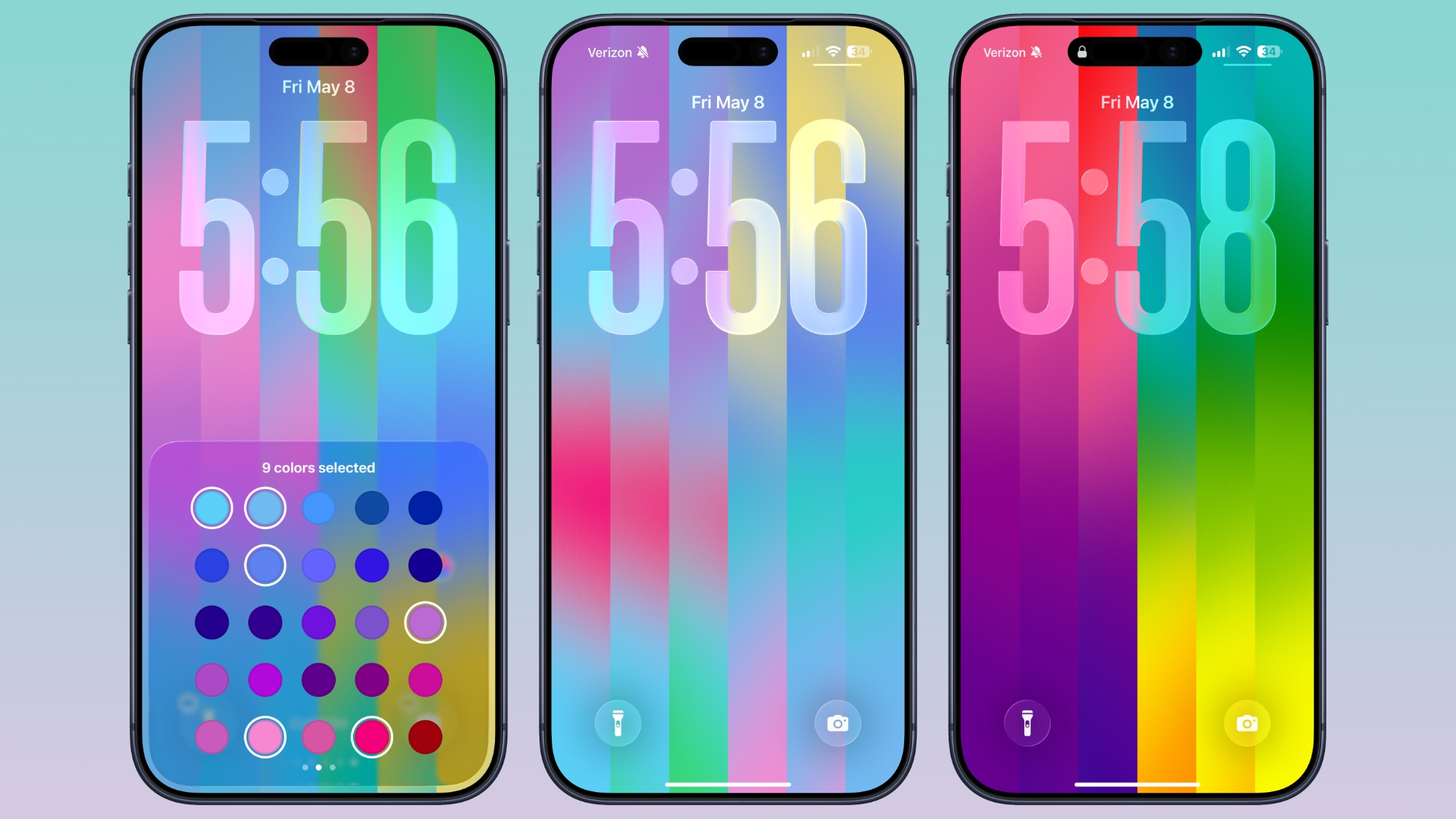
iOS 26.5 also has a matching Pride Luminance Wallpaper option that can be customized in the same way. You can choose up to 12 colors for the Lock Screen and Home Screen. On the Lock Screen, the colors collapse onto a black background when the device is locked.

To get the new watch face, you need iOS 26.5 and watchOS 26.5. Apple has released RCs, and the public versions of the updates are expected as soon as next week.
Related Roundup: watchOS 26
Related Forum: Apple Watch

This article, "A Closer Look at watchOS 26.5's New Luminance Watch Face" first appeared on MacRumors.com

Discuss this article in our forums
  •  

Apple Watch Series 12 and watchOS 27: What to Expect Later This Year

While not too much has been reported about the next Apple Watch models, there are a few rumors about potential design changes and watchOS 27 features.


Apple Watch Series 12 and Apple Watch Ultra 4 models are expected to be released in September, and we have outlined some of the key rumored hardware and software changes below. A new Apple Watch SE is not expected this year, as that model was just updated last year and it typically goes two to three years between refreshes.

Apple will unveil watchOS 27 during its WWDC 2026 keynote on Monday, June 8, and a developer beta will likely be available immediately afterwards. A public beta typically follows in July, and the update should be widely released in September.

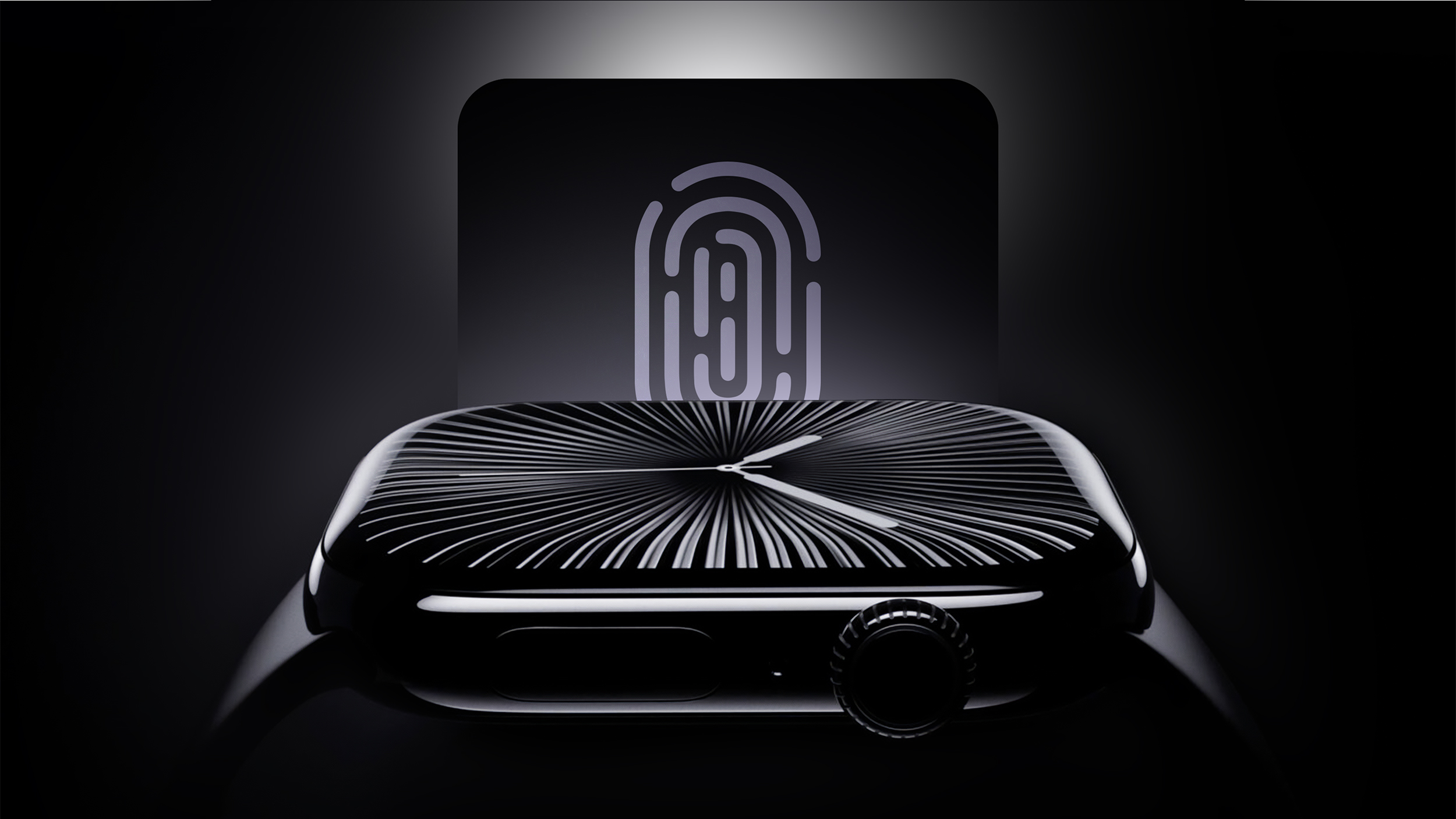
Touch ID


Touch ID may be coming to the Apple Watch Series 12 and Apple Watch Ultra 4, according to internal Apple software code that leaked online last year.

Touch ID would likely be built into the Apple Watch's side button, enabling users to unlock the device with their fingerprint instead of a passcode.

Even though new Touch ID references were discovered within the code, there is no guarantee that Apple will move forward with this plan either this year or ever. In addition, credible sources such as Bloomberg's Mark Gurman and Apple supply chain analyst Ming-Chi Kuo have yet to mention Touch ID coming to the Apple Watch this year.

New Chips After One-Year Hiatus


While the Apple Watch Series 11, Apple Watch Ultra 3, and Apple Watch SE 3 all contain the same S10 chip as the previous year's models, the leaked Apple code indicated that the Series 12 and Ultra 4 will get a new chip. It is unclear if the chip will have S11 or S12 branding, but performance improvements are expected either way.

New Modular Watch Face


watchOS 27 will reportedly include new watch faces, including a variant of the "Modular Ultra" watch face that is currently exclusive to the Apple Watch Ultra.

New Apple Intelligence Features


On watchOS 26, the following Apple Intelligence features are available on an Apple Watch when it is paired with an iPhone 15 Pro or newer:

  • Workout Buddy

  • Live Translation in Messages

  • Notification Summaries
When it announced the dates for WWDC 2026, Apple promised to unveil "AI advancements" across its platforms, and it can be reasonably assumed that watchOS 27 will include some additional Apple Intelligence features powered by the iPhone.

New Satellite Features


Apple Watch Ultra 3 has built-in satellite connectivity, enabling Emergency SOS, Find My, and Messages via satellite without any reliance on an iPhone.

iOS 27 will reportedly include up to five new satellite features, and the following two would likely extend to watchOS 27:
  • Apple Maps via satellite

  • Photos support for Messages via satellite
Amazon last month announced plans to acquire Globalstar, the satellite company that powers Apple's satellite features on the iPhone 14 and newer and the Apple Watch Ultra 3. In turn, Amazon announced that it has signed an agreement with Apple to provide satellite connectivity for current and future iPhone and Apple Watch features.
Related Forum: Apple Watch

This article, "Apple Watch Series 12 and watchOS 27: What to Expect Later This Year" first appeared on MacRumors.com

Discuss this article in our forums
  •  

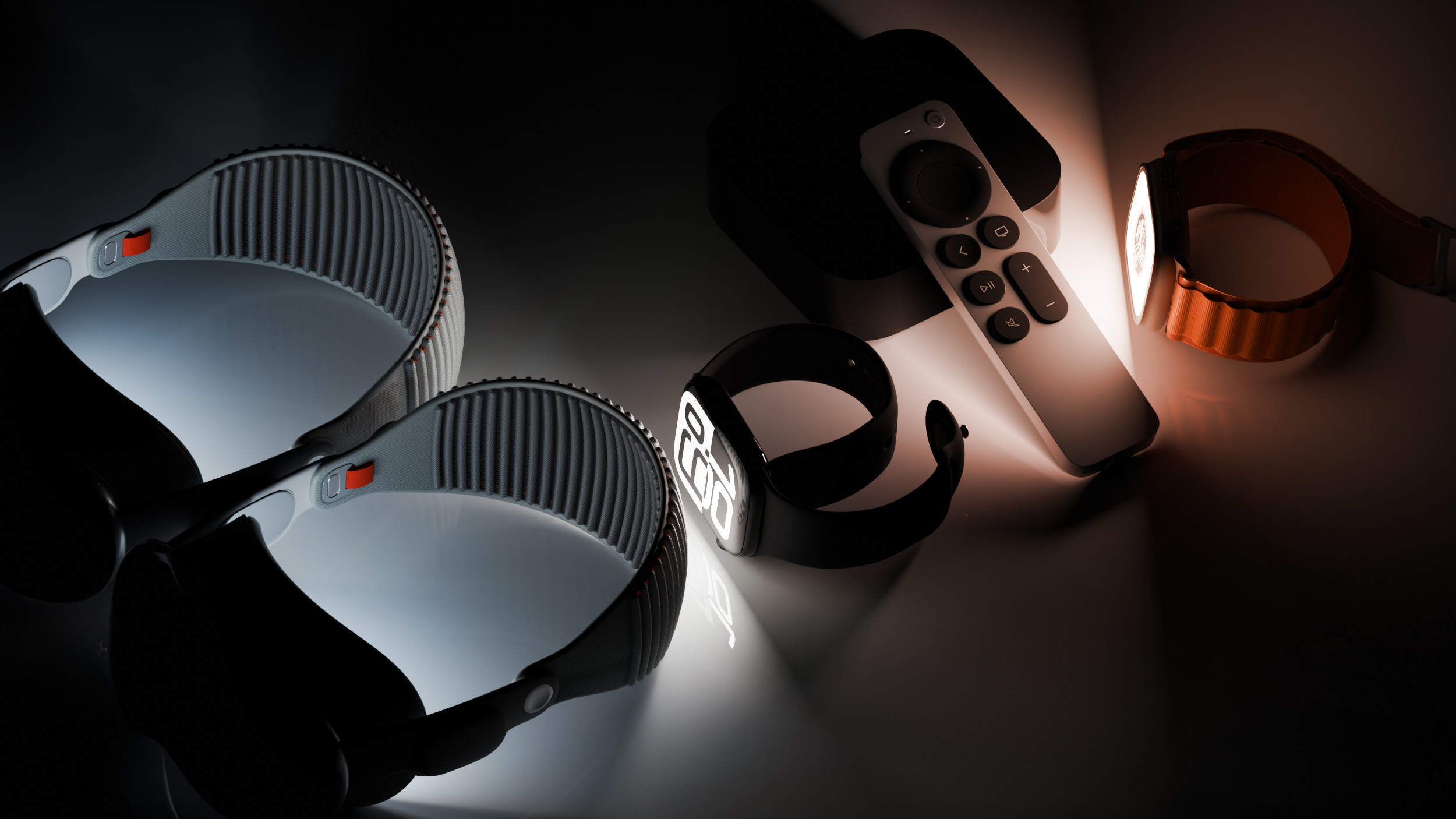
Apple Releases Fourth watchOS 26.5, tvOS 26.5 and visionOS 26.5 Betas

Apple today provided developers with the fourth betas of upcoming watchOS 26.5, tvOS 26.5, and visionOS 26.5 betas for testing purposes. The software comes a week after Apple released the third betas for each platform.


The software updates are available through the Settings app on each device, and because these are developer betas, a free developer account is required.

There's no word on what's in the software as of yet. watchOS, tvOS, and visionOS often get few features in each new beta, with updates primarily focusing on bug fixes and performance improvements. Nothing new was found in the first three betas.
This article, "Apple Releases Fourth watchOS 26.5, tvOS 26.5 and visionOS 26.5 Betas" first appeared on MacRumors.com

Discuss this article in our forums
  •  

Apple Releases Third watchOS 26.5, tvOS 26.5 and visionOS 26.5 Betas

Apple today provided developers with the third betas of upcoming watchOS 26.5, tvOS 26.5, and visionOS 26.5 betas for testing purposes. The software comes a week after Apple released the second betas for each platform.


The software updates are available through the Settings app on each device, and because these are developer betas, a free developer account is required.

There's no word on what's in the software as of yet. watchOS, tvOS, and visionOS often get few features in each new beta, with updates primarily focusing on bug fixes and performance improvements. Nothing new was found in the first two betas.
This article, "Apple Releases Third watchOS 26.5, tvOS 26.5 and visionOS 26.5 Betas" first appeared on MacRumors.com

Discuss this article in our forums
  •  

Apple Releases Second watchOS 26.5, tvOS 26.5 and visionOS 26.5 Betas

Apple today provided developers with the second betas of upcoming watchOS 26.5, tvOS 26.5, and visionOS 26.5 betas for testing purposes. The software comes two weeks after Apple released the first betas for each platform.


The software updates are available through the Settings app on each device, and because these are developer betas, a free developer account is required.

There's no word on what's in the software as of yet. watchOS, tvOS, and visionOS often get few features in each new beta, with updates primarily focusing on bug fixes and performance improvements. Nothing new was found in the first betas.

This article, "Apple Releases Second watchOS 26.5, tvOS 26.5 and visionOS 26.5 Betas" first appeared on MacRumors.com

Discuss this article in our forums

  •  

Older Apple Watch, iPhone, iPad Models Get Updates: iOS 18.7.7, watchOS 8.8.2, watchOS 5.3.10

Apple has released software updates for various older Apple devices, some of which are simple security patches that include important fixes to potential exploits, while others allow continued usage of core features like iCloud, iMessages, and FaceTime. These updates arrive as iOS 18.7.7, iPadOS 18.7.7, iOS 18.7.7, watchOS 8.8.2, and watchOS 5.3.10. Specifically, older Apple ... Read More
  •  

Important Software Updates for MacOS Big Sur & Catalina, Older iPhones, iPads, & Apple Watch, Released

Apple has released important software updates to a variety of older devices, including older model Macs, iPhones, iPads, and Apple Watch’s. These new updates are released as macOS Big Sur 11.7.11 and macOS Catalina Security Update 2026-001 Catalina, iOS 16.7.14, iPadOS 16.7.14, watchOS 10.6.2, watchOS 9.6.4, and watchOS 6.3.1. According to release notes from Apple, ... Read More
  •  

How to Turn Off Journal “Time to Write” Reminders on iPhone & Apple Watch

Once you use the Journal app, it will send a daily notification to your iPhone and Apple Watch (yuck) with a reminder that says “Time to Write”, nudging you to create a new journal entry for the day. If you’re annoyed by the Journal “Time to Write” alerts on your iPhone or Apple Watch, you ... Read More
  •  

26 New Features to Try in watchOS 26

Apple released watchOS 26 yesterday, and if you have a Series 9 or later or an Ultra 2 or later, there are a surprising number of useful new features. Apple could have limited new additions like Sleep Score and Hypertension notifications to the newest Apple Watch models, but now you don't need to buy a new watch to get helpful features.


Design


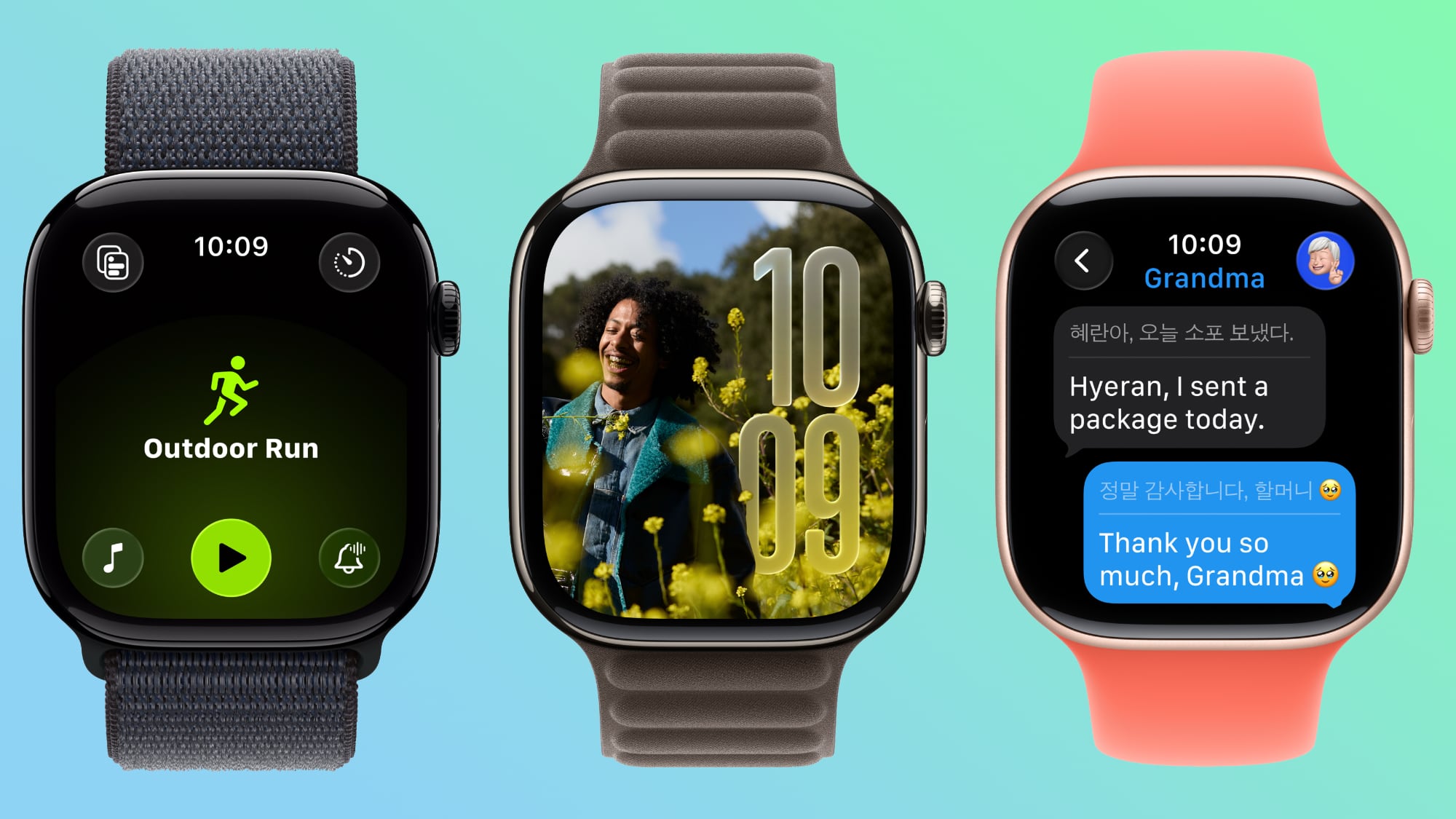
  • Liquid Glass - ‌watchOS 26‌ adopts Liquid Glass, with translucent, glass-like buttons and interface elements. It's most visible with select watch faces, the Smart Stack, and Control Center.

  • Control Center - Control Center is customizable, and you can rearrange it and add third-party app controls. If you don't like your changes, you can revert to the original design.

  • Smart Stack - The Smart Stack uses a new prediction algorithm and it will prompt you if there is a suggestion that's immediately useful.

  • Widgets - Widgets in the Smart Stack are customizable, so you can rearrange them to show what's most important to you first. Third-party apps are supported.


Gestures


  • Wrist Flick - There's a wrist flick gesture for things like silencing incoming calls and dismissing notifications one-handed.


Health


  • Hypertension Notifications - ‌watchOS 26‌ adds hypertension notifications based on heart rate, letting you know if high blood pressure is detected over time. It's available on the Series 9 and later and Apple Watch Ultra 2 and later.

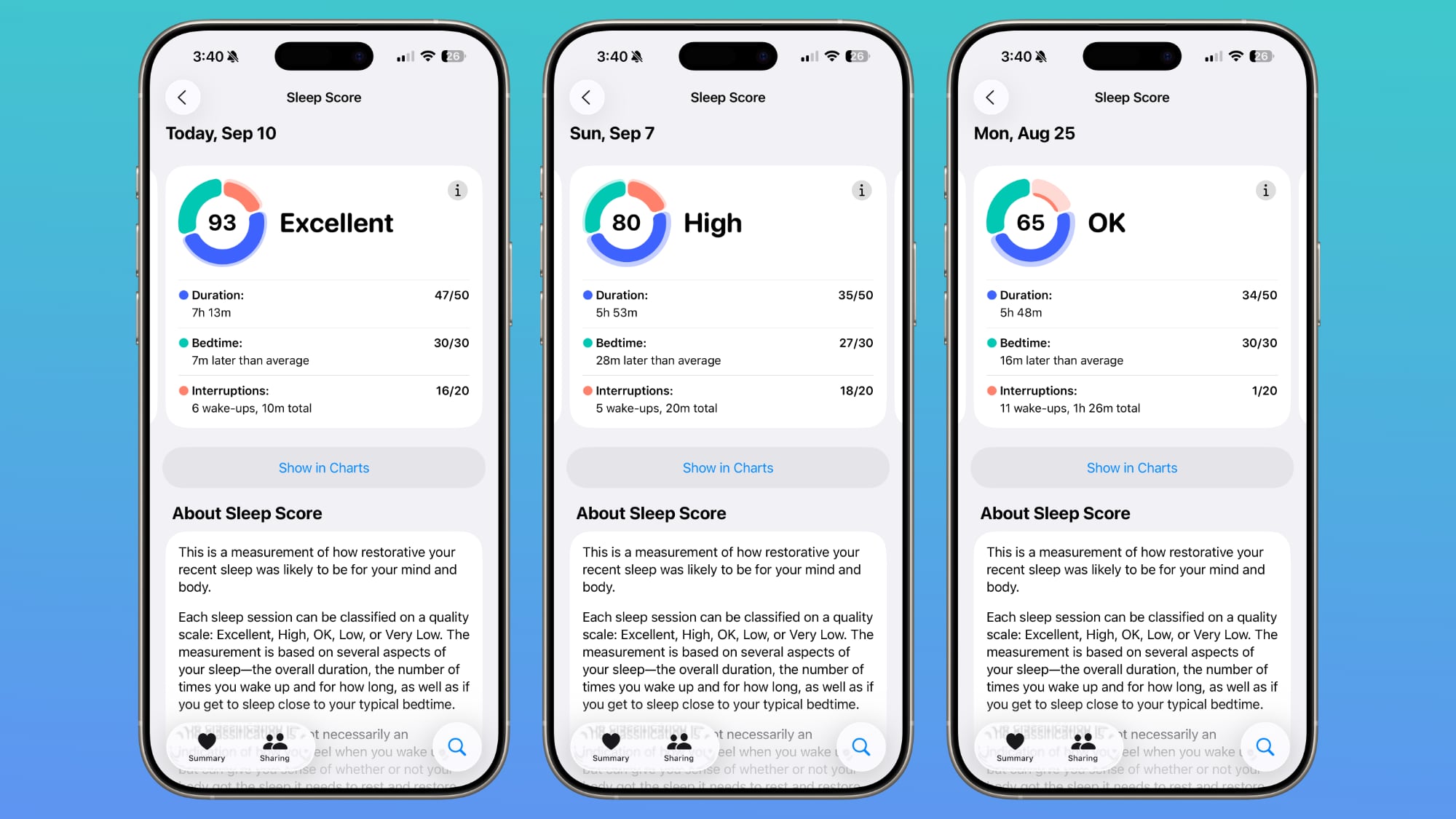
  • Sleep Score - Sleep Score gives you a number-based evaluation of your sleep quality. It takes into account sleep duration, the number of times you woke up in the night, and when you went to bed.


Fitness


  • Workout Buddy - There's an AI-powered Workout Buddy that motivates you during workouts and provides helpful insights.

  • Workout app - Apple redesigned the Workout app with an updated layout that makes options like custom workout, Workout Buddy, and Pacer easier to get to.

  • Media - There's an Autoplay Media option that will automatically play music that matches your workout. You can also select your own media to have autoplay when a workout is started.


Messages


  • Smart Actions - The Messages app can suggest smart actions like location sharing, providing an address, and more based on the context of a text.

  • Smart Replies - Smart replies have been improved so you should get more relevant one-tap responses for incoming messages.

  • Live Translation - The Messages app supports Live Translation, so incoming texts in another language can be translated to your language.

  • Backgrounds - Personalized backgrounds that you create for conversations on iPhone sync to the watch.


Phone


  • Call Screening - Call Screening asks callers for more information before your phone or Apple Watch rings.

  • Hold Assist - You can use the Hold Assist feature on the Apple Watch. It waits on the line for you so you can do other things.


Watch Faces


  • Photos - The Photos watch face uses Liquid Glass for the time, and the size and location of the time adjust based on the image that's being displayed. The shuffle option also uses Featured content from ‌Photos‌.

  • Flow - Flow is a watch face designed for Liquid Glass. It features an orb of color with Liquid Glass numbers.

  • Exactograph - Exactograph has hour, minute, and second dials for precise time keeping. If you tap on the face, it zooms in on the minutes and seconds dials so you can measure in even smaller increments of time.

  • Waypoint - Waypoint is only for the Apple Watch Ultra, but it shows points of interest in relation to where you are.

  • Hermes - There's a Hermes Faubourg Party watch face for Hermes watches. It displays different animations based on the time of day.

  • Ticking Seconds - More watch faces support the 1Hz refresh rate on the Apple Watch Series 10 and later, showing a ticking second hand even when your wrist is down.

  • Gallery - The watch face gallery has a new design that groups faces into collections.


Other Features


  • Volume Adjustment - The volume of incoming calls and notifications adjusts based on the ambient sound around you. So if you're in a quiet room, your watch won't have a super loud ring.

  • Live Listen - When using Live Listen on a connected ‌iPhone‌, a transcript of what's being said is displayed on the watch.

  • Notes - The Notes app is available on the Apple Watch, so you can view existing notes and create new ones.


Read More


For more on the features available in ‌watchOS 26‌, we have a dedicated watchOS 26 roundup.
Related Roundups: watchOS 11, watchOS 26
Related Forum: Apple Watch

This article, "26 New Features to Try in watchOS 26" first appeared on MacRumors.com

Discuss this article in our forums

  •  

You Don't Need the Apple Watch Series 11 to Get Your Sleep Score

With the Apple Watch Series 11, Ultra 3, and SE 3, Apple announced support for a new Sleep Score feature that's designed to provide you with an actionable overview of your sleep quality.


It turns out that Sleep Score is a watchOS 26 feature, so it is also available on older Apple Watch models. If you have the ‌watchOS 26‌ release candidate installed, you can see your Sleep Score in the Health app already.

Open up the Health app, choose the Sleep category from the Search interface, and tap on Sleep Score to see your personalized readout.

Apple will rate your sleep as Excellent, High, OK, Low, or Very Low. Scores are calculated based on sleep duration, the time you went to bed, and how many times your sleep was interrupted during the night. Duration is worth 50 points, bedtime is worth 30 points, and interruptions is worth 20 points. Points are deducted for low sleep times, a late bedtime, or multiple sleep interruptions.

According to Apple, an "Excellent" score means that your body and mind have received the rest and restorative sleep needed for the day. High means you got the sleep you need, even though you might not have slept perfectly. OK means you probably didn't get all the sleep you need, while Low means that you didn't get enough time to rest and restore. Very Low means you didn't get enough sleep and your rest level was low enough that it can have a mental and physical impact over time.

Sleep Score is calculated from sleep data collected by the Apple Watch during sleep, or from a third-party device that reports results to the Health app. You technically don't need an Apple Watch to get a Sleep Score, but you do need some kind of device that records sleep and logs the results in the Health app.

‌watchOS 26‌ with the Sleep Score, Liquid Glass, and other features will launch to the public on Monday, September 15.
Related Roundups: watchOS 11, watchOS 26
Related Forum: Apple Watch

This article, "You Don't Need the Apple Watch Series 11 to Get Your Sleep Score" first appeared on MacRumors.com

Discuss this article in our forums

  •  
❌