Reading view

OpenProject 16.6: Project evaluation and scoring

OpenProject 16.6 has been released and this version introduces new features and improvements again. Please take a few minutes to learn what changes for you. We will summarize the most important changes in this blog article and, as always, please see our release notes that contain all changes, features and bug fixes.

Project evaluation and scoring (Enterprise add-on)

With OpenProject 16.6, project portfolio managers gain new ways to make their work more measurable and transparent. The release introduces three new project attribute types: Hierarchy, Weighted item lists, and Calculated value. They can be combined to evaluate and compare projects based on consistent criteria.
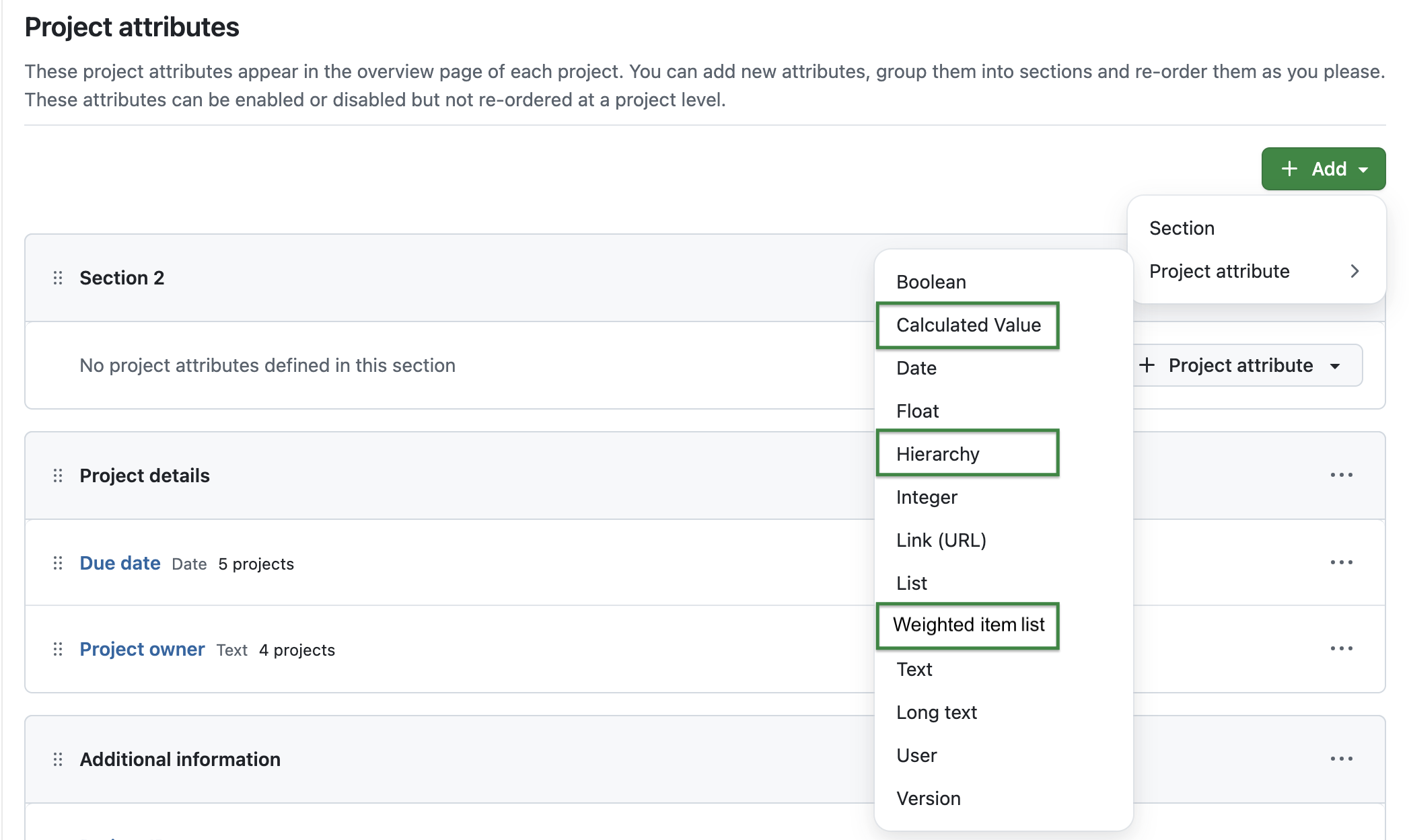
OpenProject administration with new types of project attributes: Calculated value, Hierarchy and Weighted item lists are highlighted.

These attributes allow organizations to build their own evaluation models. Hierarchy project attributes let you organize information in a structured, nested way — for example, grouping initiatives by region, department, or program.
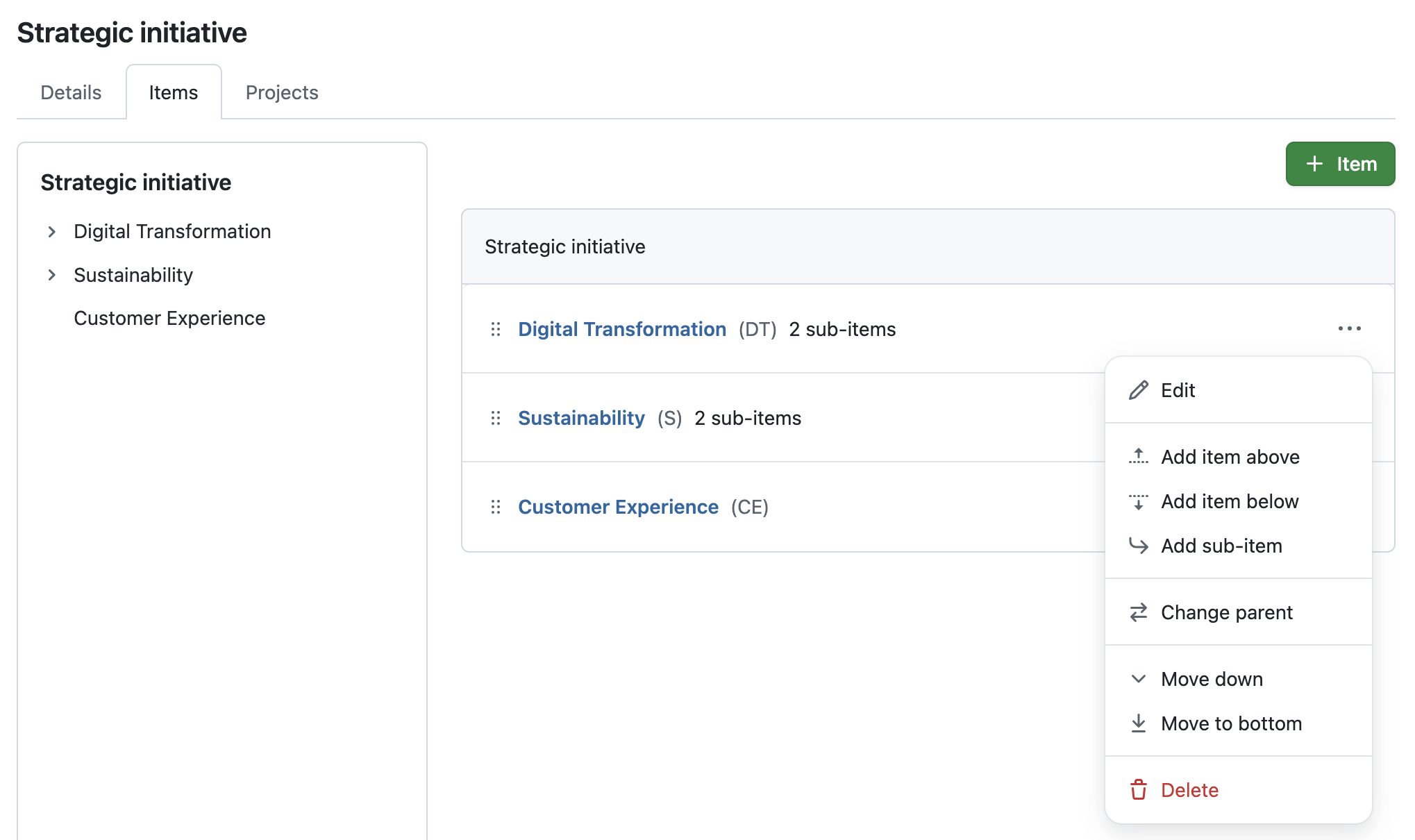
OpenProject administration shows a project attribute type hierarchy: The name is ‘Strategic initiative’ and it shows 3 items with sub-items, e.g. ‘Digital transformation’, and the options to edit, add sub-items, change parent and more.

Weighted item lists extend this concept by assigning numeric scores to list options, such as effort levels or risk ratings. These values can then be used as input for automated calculations.

Calculated values enable automatic computations based on formulas using numeric project attributes, including scores from Weighted item lists or even other calculated values. The computed result is displayed directly on the project overview and in the project list. It automatically updates whenever one of its source attributes (e.g., Benefit or Effort in the example below) changes.

Here’s an example of a calculated value called ‘Overall score (calculated)’ with the following formula: (Strategic impact * 0.6) + ( Benefit * 0.3) - (Effort * 0.1)
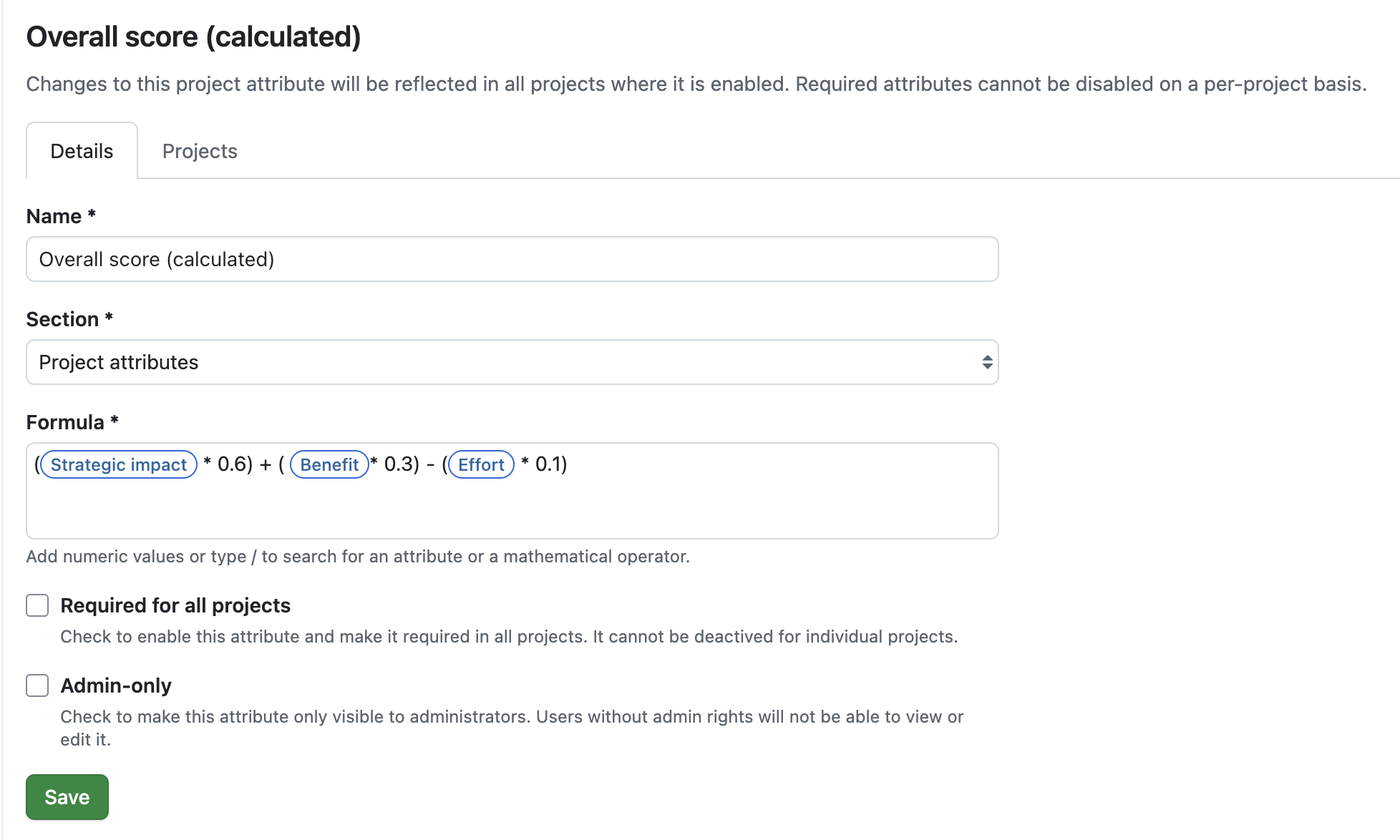
Formula example for a project attribute called ‘Calculated Project Score’: (Strategic impact * 0.6) + ( Benefit * 0.3) - (Effort * 0.1)

These new attribute types open up flexible ways to work with project data. Scoring is just one typical example — the same structure can be used to represent strategic priorities, aggregate indicators, or define your own evaluation framework that fits your organization’s needs.

Note

Please note that these new project attributes are part of our Enterprise add-ons in the Enterprise Premium plan.
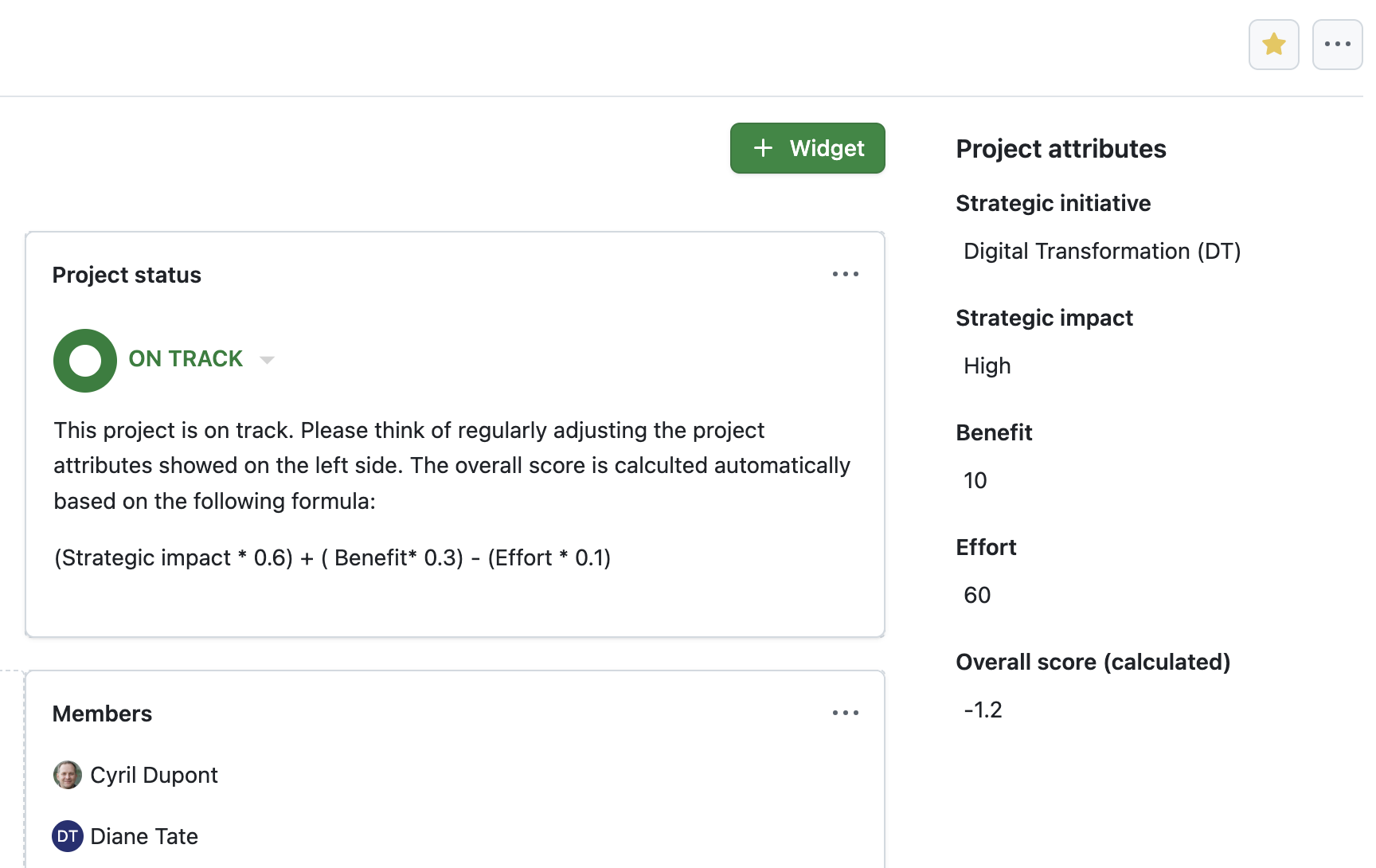
OpenProject 16.6: Project overview page showing three project attributes: Benefit = 10, Effort = 60, Overall Score (calculated) = automatically set to -1,2

Significant performance improvements

Working with large projects and complex portfolios can be challenging when pages take too long to load or filters lag behind. That’s why OpenProject 16.6 focuses on improving performance, ensuring that even large-scale installations with thousands of projects and millions of work packages remain fast and reliable.

To achieve this, several backend processes have been improved. Database queries and API responses have been refined to avoid unnecessary counting operations, and the autocompleter for adding work package relations now only retrieves the data it actually needs. These changes reduce query load and make the application more efficient overall.

As a result, users will notice faster response times, smoother navigation, and more responsive filtering — even in the largest environments.

New index page for Documents module

Managing project documents efficiently is key to keeping everyone aligned. But as projects grow, finding the right file can become a challenge. To make this easier, OpenProject 16.6 introduces the first step toward a more powerful and collaborative Documents module.

The new index page provides a structured overview of all project documents, showing each file’s Name, Type (the category), and Last edited date. The most recently updated items are always on top. A quick filter helps you search by title, and the navigation menu on the left lets you narrow the list by Type (previously called Category). Both terms are used synonymously in this first step, as Type will gradually replace Category in future updates.

A new + Document button makes adding content straightforward, and on mobile devices, the view adapts to show only the most relevant details.

While this is a smaller change on its own, it marks the beginning of a broader improvement to how teams will work with documents in OpenProject. We are excited about the upcoming changes that will make document management and live collaboration easier and more intuitive.

See our roadmap for more information.
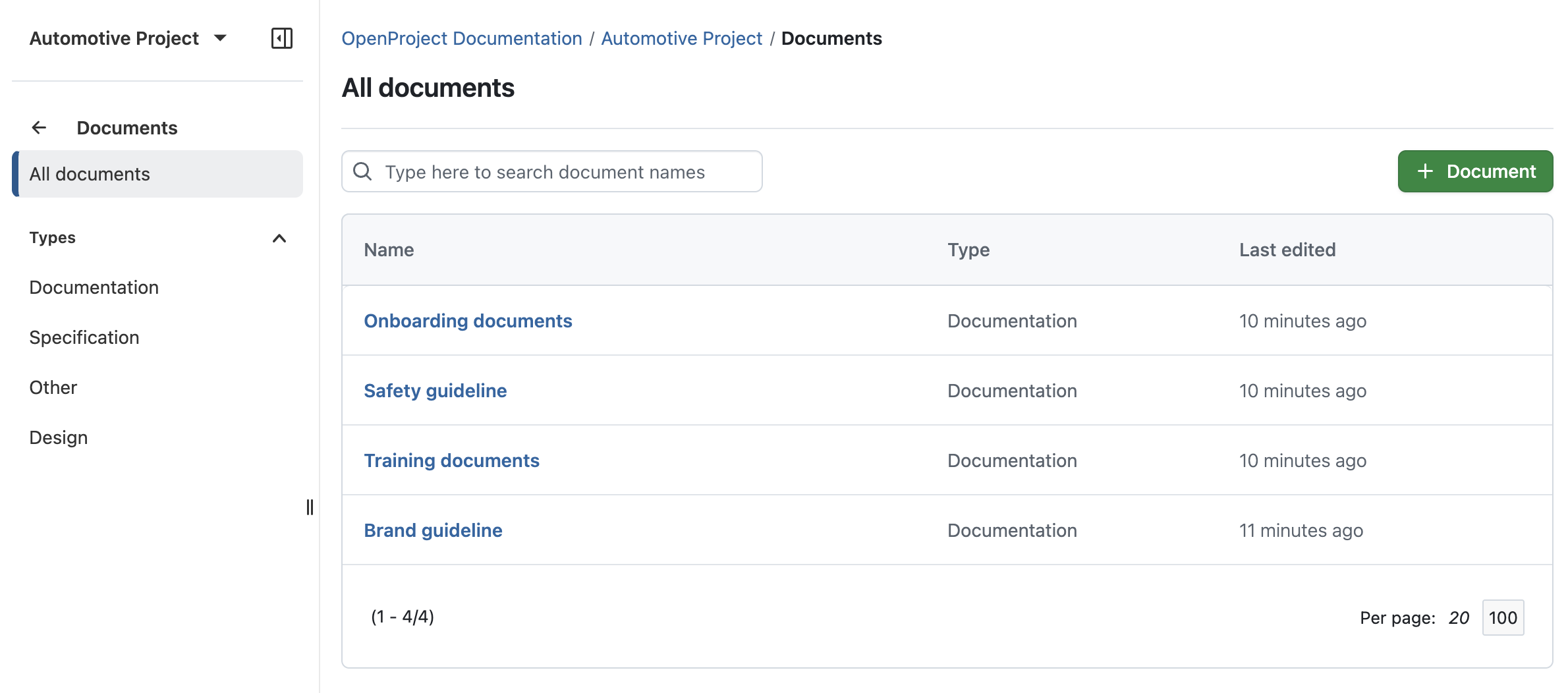
OpenProject 16.6: Redesigned index page for the Documents module, showing a table with clickable name, type and last edited.

Further usability updates

Small usability enhancements can make a big difference in everyday work. OpenProject 16.6 brings several refinements that make managing information smoother, meetings more efficient, and administration tasks easier to navigate.

Change parent of a custom field item or project attribute (Enterprise add-on)

Administrators can now rearrange items within hierarchical custom fields (Enterprise add-on) or project attributes without having to recreate them. A new Change parent option opens a dialog showing the hierarchy tree, allowing quick reorganization through search and selection.
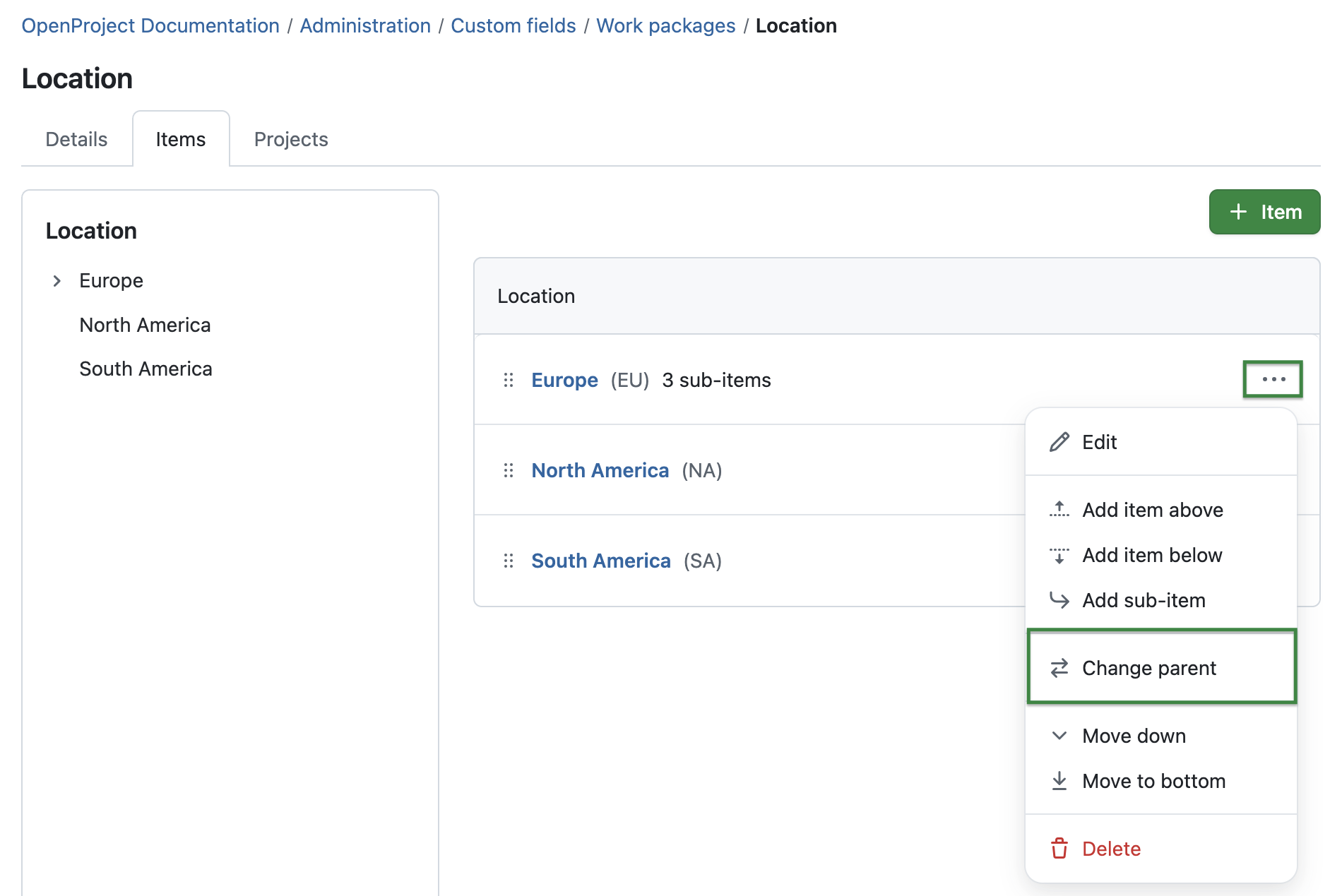
OpenProject 16.6: Custom field type hierarchy in the administration, tab ‘Items’, one item is selected with the ‘More’ menu and the option to change parent is highlighted

Updated “More” menu in meetings

In the Meetings module, moderators can now move agenda items directly between sections using the new Move to section action. This saves time in meetings with multiple sections or longer agendas and helps keep discussions better structured.

Learn more about meeting management with OpenProject.

OpenProject 16.6: Meetings module showing the options when clicking on the More menu on an agenda item

Editing individual attributes even if other fields are invalid

Users can now edit visible fields even if other required fields are missing or invalid. This prevents unnecessary validation errors — for example, when a required field was added later — and lets users continue their work without interruption.

Sticky header and first column in workflows

In Administration → Work packages → Workflow, the table now has a sticky header and sticky first column. This makes it easier for administrators to keep an overview of transitions when scrolling through large workflow tables.

Read more about managing work package workflows in OpenProject.
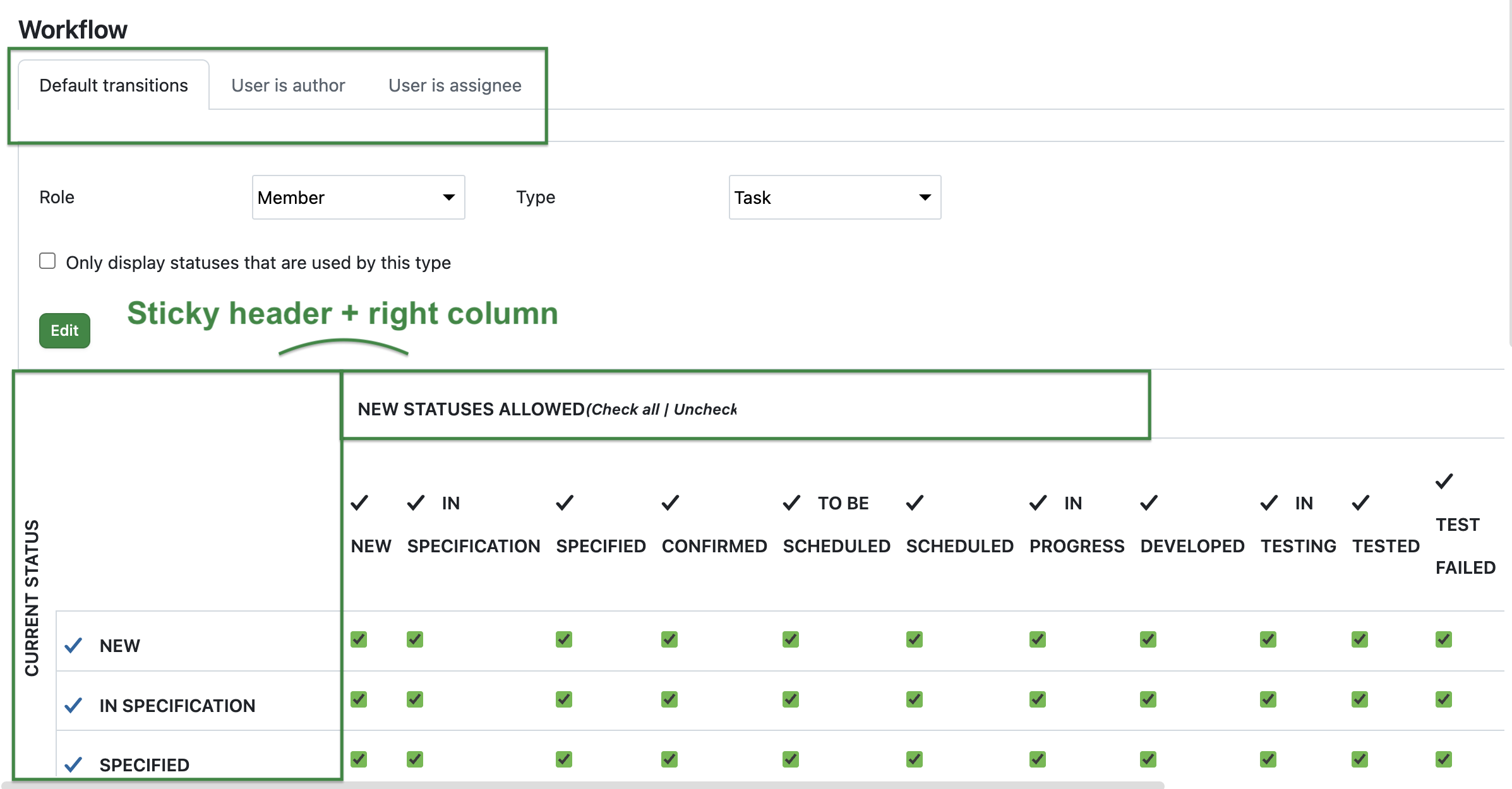
OpenProject 16.6: Administration for work package workflows highlighting the new tabs and that the header and right column are sticky when scrolling

Mini calendar re-added on mobile

On mobile devices, the date picker once again includes a mini calendar view for selecting start and finish dates. This makes it easier to see weekdays and working days at a glance, improving usability when managing tasks on the go.

OpenProject 16.6: Migration, installation, updates and support

Follow the upgrade guide for the packaged installation or Docker installation to update your OpenProject installation to OpenProject 16.6. We update your hosted OpenProject environments (Enterprise cloud) today, November 5, 2025.

You will find more information about all new features and changes in our Release notes or in the OpenProject Documentation.

If you need support, you can post your questions in the Community Forum, or if you are eligible for Enterprise support, please contact us and we are happy to support you personally.

Credits

A very special thank you goes to Helmholtz-Zentrum Berlin, City of Cologne, Deutsche Bahn and ZenDiS for sponsoring released or upcoming features. Your support, alongside the efforts of our amazing Community, helps drive these innovations. Also a big thanks to our Community members for reporting bugs and helping us identify and provide fixes. Special thanks for reporting and finding bugs go to Sven Kunze, Stefan Weiberg, Gábor Alexovics, Alexander Aleschenko, and Tobias Nowakow.

This release, we specifically want to thank Emon for reporting a security vulnerability on our website. Reports and feedback like this are one of the reasons we love OSS and appreciate being part of such an amazing community.

Last but not least, we are very grateful for our very engaged translation contributors on Crowdin, who translated quite a few OpenProject strings! This release we would like to particularly thank the following users:

  • William, for a great number of translations into Chinese Traditional.
  • Pickart, for a great number of translations into Catalan.
  • Maxime77, for a great number of translations into French. Would you like to help out with translations yourself? Then take a look at our translation guide and find out exactly how you can contribute. It is very much appreciated!

As always, we welcome any feedback on this release. 💙

  •  

2026 iPhone Air Could Feature Two Rear Cameras, Says Leaker

Apple's second iPhone Air model is in development and could feature two rear cameras instead of one, according to a Chinese leaker with sources within Apple's supply chain.


The Weibo-based account "Digital Chat Station" claims that Apple is evaluating a dual-lens setup for the next version of its ultra-thin iPhone, with a 48MP Fusion Ultra Wide camera joining the existing 48MP Fusion Main camera, similar to the base iPhone 17.

However, the leaker says that the second-generation device will keep the distinctive horizontal camera plateau, suggesting the second lens will sit alongside the existing one, unlike the dual-lens vertical arrangement on the iPhone 17.

Multiple technologies are housed in the plateau of the iPhone Air to maximize space for the battery, so Apple would presumably need to redesign the internals considerably to fit in another camera. Apple will reportedly continue to focus on making the device ultra-thin and lightweight.


Apple will release a second-generation iPhone Air alongside the iPhone 18 Pro, iPhone 18 Pro Max, and its first foldable iPhone in the second half of 2026, according to industry analyst Ming-Chi Kuo. Apple also plans to launch a third iPhone Air model with a larger display in the second half of 2027. That said, the first-generation device has apparently not been selling well outside of China, so Apple's plans could change.

Digital Chat Station has a decent track record for Apple rumors. They accurately revealed that the ‌iPhone‌ 15 and ‌iPhone‌ 15 Plus would feature a slightly smaller 48-megapixel sensor than the ‌iPhone‌ 15 Pro and ‌iPhone‌ 15 Pro Max, as well as the display panel design of the ‌iPhone‌ 12 back in 2020.
Related Roundup: iPhone Air
Buyer's Guide: iPhone Air (Buy Now)

This article, "2026 iPhone Air Could Feature Two Rear Cameras, Says Leaker" first appeared on MacRumors.com

Discuss this article in our forums

  •  

New Apple TV and HomePod Mini Likely Launching Soon

A new Apple TV and HomePod mini could launch as soon as this month, Bloomberg's Mark Gurman today suggested.


In today's "Power On" newsletter, Gurman said that Apple retail stores are planning an overnight refresh on the evening of November 11, where changes will be made after closing, such as refreshing displays and placing new products for the following day.

The timing of the overnight refresh could simply be related to the holiday season, but there is a possibility that it relates to the launch of new ‌Apple TV‌ and ‌HomePod mini‌ models. Gurman notes that inventory of current models has become tight, likely signaling that new versions are on the way. He added that even if they do not launch by the end of 2025, they "shouldn't be far off."

The new ‌Apple TV‌ and ‌HomePod mini‌ will apparently "help showcase the new Siri and Apple Intelligence features planned for next year." During its earnings call earlier this week, Apple seemingly suggested that any more new Macs are off the table for the rest of 2026, making the new ‌Apple TV‌ and ‌HomePod mini‌ the most likely candidates for any remaining Apple product releases this year.

Related Roundups: Apple TV, HomePod mini

This article, "New Apple TV and HomePod Mini Likely Launching Soon" first appeared on MacRumors.com

Discuss this article in our forums

  •  

Waiting for New Macs? Apple Just Shared Bad News

Apple has just given a strong indication that it will not be releasing any additional new Macs for the remainder of the year.


Apple's CFO Kevan Parekh dropped the hint during the company's earnings call on Thursday:
On Mac, keep in mind, we expect to face a very difficult compare against the M4 MacBook Pro, Mac mini, and iMac launches in the year-ago quarter.
Parekh essentially gave a heads up that Apple's Mac revenue in the fourth quarter of 2025 might not grow significantly compared to the fourth quarter of 2024, likely because there will be fewer new Macs released this quarter than in the year-ago quarter.

In other words, he implicitly suggested that Apple has no further Mac releases planned for 2025.

Earlier this month, Apple updated the lowest-end 14-inch MacBook Pro with the M5 chip, but it did not release any MacBook Pro models with M5 Pro or M5 Max chips, and the Mac mini and iMac did not receive any hardware updates.

AppleInsider previously reported that MacBook Pro models with M5 Pro and M5 Max chips would launch in 2026, and Parekh's comment seems to support that. Mac mini and iMac models with M5 chips also appear to be slated for 2026, while the MacBook Air, Mac Studio, and Mac Pro were always rumored to be updated next year.

A lower-cost MacBook with an A18 Pro or A19 Pro chip is also rumored to launch in late 2025 or early 2026, but given Parekh's comment, early 2026 sounds more likely. This model is expected to be the spiritual successor to the MacBook Air with an M1 chip, which is still sold exclusively by Walmart for $599 in the United States.
Related Roundups: iMac, MacBook Pro, Mac mini
Related Forums: iMac, MacBook Pro, Mac mini

This article, "Waiting for New Macs? Apple Just Shared Bad News" first appeared on MacRumors.com

Discuss this article in our forums

  •  

Video: Testing the New M5 Apple Vision Pro

Apple recently refreshed the Apple Vision Pro, adding a new M5 chip for improved performance. There aren't design changes, but Apple did introduce a new Dual Knit Band that's supposed to be more comfortable. MacRumors videographer Dan Barbera picked up one of the new Vision Pro headsets to see how it compares to the prior-generation M2 versions.


Software and hardware are the same if you've been using visionOS 26, but with the M5 chip, performance is noticeably improved. Creating a Persona, generating spatial photos, and using multiple apps at once are all tasks that are quicker.

Apple didn't update the micro-OLED displays in the Vision Pro, but the M5 is able to render 10 percent more pixels and it supports a 120Hz refresh rate, so things look smoother than before. Mac Virtual Display, where the Vision Pro works as a screen for your Mac, looks like two sharp 5K displays side-by-side. Personalized Spatial Audio support adds more accurate directionality for more immersive audio.

To improve the wearing experience, the Vision Pro ships with a Dual Knit Band that replaces the prior Solo Knit Band and Dual Loop that came with the ‌M2‌ model. The Dual Knit Band has a strap that goes over the top of the head and one at the back of the head, which allows for better weight distribution. The back band has weights inside for counterbalance, and it does make a difference in how it feels.

The top and bottom straps can be adjusted using an updated Fit Dial, so each Vision Pro wearer can get an ideal fit. The Dual Knit Band isn't a miracle fix, so while it does make the Vision Pro a little more comfortable to wear, it's still a heavy headset. The M5 Vision Pro continues to be priced at $3,499, and it can be purchased from Apple. ‌M2‌ Vision Pro owners can buy the Dual Knit Band standalone for $99.
Related Roundup: Apple Vision Pro
Buyer's Guide: Vision Pro (Buy Now)
Related Forum: Apple Vision Pro

This article, "Video: Testing the New M5 Apple Vision Pro" first appeared on MacRumors.com

Discuss this article in our forums

  •  

Software alternatives to Atlassian – free and open source

With the end of Jira Data Center announced and prices rising year after year, vendor lock-in is no longer just an abstract risk, it has already become reality. Many organizations now face a costly migration to the cloud, whether they want it or not.

But there’s another way. Open source software gives you back control: over your data, your infrastructure, and your budget. It’s built on transparency, community, and long-term reliability, without locking you into a single company’s roadmap or pricing. And while Atlassian has been steadily raising prices, open source has grown into a powerful, future-ready alternative.

OpenProject is your secure, self-managed alternative to Jira, and it’s only one piece of the puzzle. Whether you also rely on Confluence, Bitbucket, or other parts of the Atlassian stack, there are strong open source options ready to support your team. You’re not stuck. You’ve got choices. And we’re here to help.

Migrating away from Atlassian: We know it’s not easy

If you’re looking for an alternative to Atlassian, you’re not alone. Many organizations are now preparing to move away from Jira Data Center and Confluence. Not because they want to, but because they have to. With Atlassian ending support for self-managed hosting and pushing users toward the cloud, the pressure is mounting.

Still, switching tools isn’t a decision you make lightly. You’ve built entire workflows around Jira and Confluence. You’ve got hundreds of users, complex integrations, and a mountain of project data to manage. The idea of replacing your Atlassian stack can feel overwhelming, and we understand that.

But here’s the good news: there is a way forward. With powerful, professional open source software, you can migrate from Atlassian on your own terms, without compromising on functionality, security, or support. Whether you’re seeking a Jira replacement, a Confluence alternative, or a complete open source stack, we’re here to support you during this journey.

Tip

Why open source? Open source software means no vendor lock-in, giving you full control over your infrastructure, updates, and data, with affordable pricing. It offers transparency, letting you inspect the source code and know exactly how your tools work. And with Community-driven development, features evolve based on real need, not shareholder interests. And these are just some of at least 8 reasons to choose an open source software.

The open source ecosystem is ready for you

You don’t have to give up powerful workflows just because you’re moving away from Atlassian. Today’s open source tools are mature, well-integrated, and ready to replace the full Atlassian stack, from project management and documentation to team chat and file sharing.

Niels Lindenthal, CEO of OpenProject, in front of a building with “The future is Europe” written on it, together with a symbol for open source

OpenProject as alternative to Jira

OpenProject provides issue tracking, agile boards, Gantt charts for project timelines, cost and time tracking, and much more — fully self-managed or hosted, with a strong focus on data sovereignty. You decide if you want to host your data in the cloud or on your own servers. So if you’re looking for a Jira Data Center alternative, OpenProject is built for you.

Learn more about migrating to OpenProject as a Jira alternative.

XWiki as alternative to Confluence

XWiki is a powerful and extensible open source wiki platform. It enables collaborative documentation, structured content management, and fine-grained access control, making it a flexible alternative to Atlassian Confluence. And: Since July 2025, XWiki and OpenProject are officially partners to offer a strong alternative to Confluence and Jira.

Learn more about XWiki as Confluence alternative.

Element as alternative to Atlassian Team Chat

Element, based on the Matrix protocol, offers secure, end-to-end encrypted messaging and collaboration. It’s perfect for teams looking for a self-hosted alternative to Atlassian’s chat tools or Slack.

Learn more about Element as Atlassian team chat alternative.

Nextcloud as alternative to Atlassian’s file management tools

Nextcloud is the most popular self-hosted open source platform for file sharing and collaboration. With advanced access control, integration options, and European data protection standards, it’s a strong alternative to proprietary cloud file systems. And: Nextcloud integrates with OpenProject and vice versa.

Learn more about Nextcloud as Atlassian’s file management alternative.

Collabora as alternative to Microsoft 365

Collabora Online is a powerful open source office suite for editing documents, spreadsheets, and presentations in real time. It’s a great choice for teams looking to replace Confluence and Microsoft 365 with a self-hosted solution.

Learn more about Collabora as Atlassian Office alternative.

Frequently asked questions about Atlassian alternatives

Switching away from Atlassian isn’t just a technical decision, it’s a strategic one. If you’re considering alternatives to Jira, Confluence, or other Atlassian tools, you likely have questions about features, pricing, migration, and the open source ecosystem. Here are some answers to help you navigate the transition with confidence.

Why is open source software free and still costs money?

Open source doesn’t mean zero cost. It means freedom: to use, inspect, modify, and host the software yourself. Many open source vendors like OpenProject offer a free Community edition, alongside paid support and enterprise features. This ensures long-term sustainability and helps teams get professional assistance where needed. Still, open source software like OpenProject is often more affordable than proprietary tools like Atlassian. And if your budget ever becomes tight, your data stays safe, because OpenProject will always provide a cost-free Community edition.

Read more about why free open source software costs money.

I want one suite for all tools. Does that exist for open source?

Yes. In Europe, there is openDesk, your secure all in one office and collaboration suite. It brings together leading open source solutions — including OpenProject, XWiki, Nextcloud, and more — to create a fully sovereign digital workplace. The tools are interoperable, user-friendly, and developed with long-term public and enterprise use in mind.

Does OpenProject include the features I currently use in Jira, or do I need plugins?

OpenProject comes feature-rich out of the box. Unlike Jira, which often requires multiple plugins for core functionality, OpenProject includes agile boards, Gantt charts, cost tracking, time logging, custom workflows, and more — all in one system. This makes it especially attractive for teams moving away from Jira Data Center or self-managed Jira installations.

Of course, OpenProject is not exactly the same product as Jira, and users will need to adapt to some differences in workflows. However, OpenProject customers value its personalized and responsive support, as well as documentation available in English, German, French, Spanish and Portuguese.

How can I migrate my data from Atlassian / Jira or Confluence?

You have several options for migrating your data, whether you’re switching from Jira, Confluence, or both. Here’s what we recommend:

For a fully supported migration, we recommend contacting ALM Toolbox, an experienced migration partner that specializes in Atlassian to OpenProject transitions.

Need help deciding? Contact us, we’ll help you find the right path. More information on: https://migration.openproject.org/

  •  
❌