Reading view

iOS 27: All the Rumored App Features

Siri is getting a major overhaul in iOS 27, but Apple also has some big updates planned for apps like Camera, Photos, and Wallet. There are multiple new AI features in the works, plus some non-AI upgrades.


Much of the information about what's coming in iOS 27 is sourced from Bloomberg's Mark Gurman, who has shared extensive information on Apple's Siri changes and new app features.

Camera


Apple is moving Visual Intelligence from the Camera Control button to the Camera app in iOS 27. There will be a Siri mode that will be available alongside the existing Photo, Video, Portrait, and Panorama modes. When in Siri mode, the existing Camera app shutter button will feature the Apple Intelligence logo, letting users know the Siri features are available.
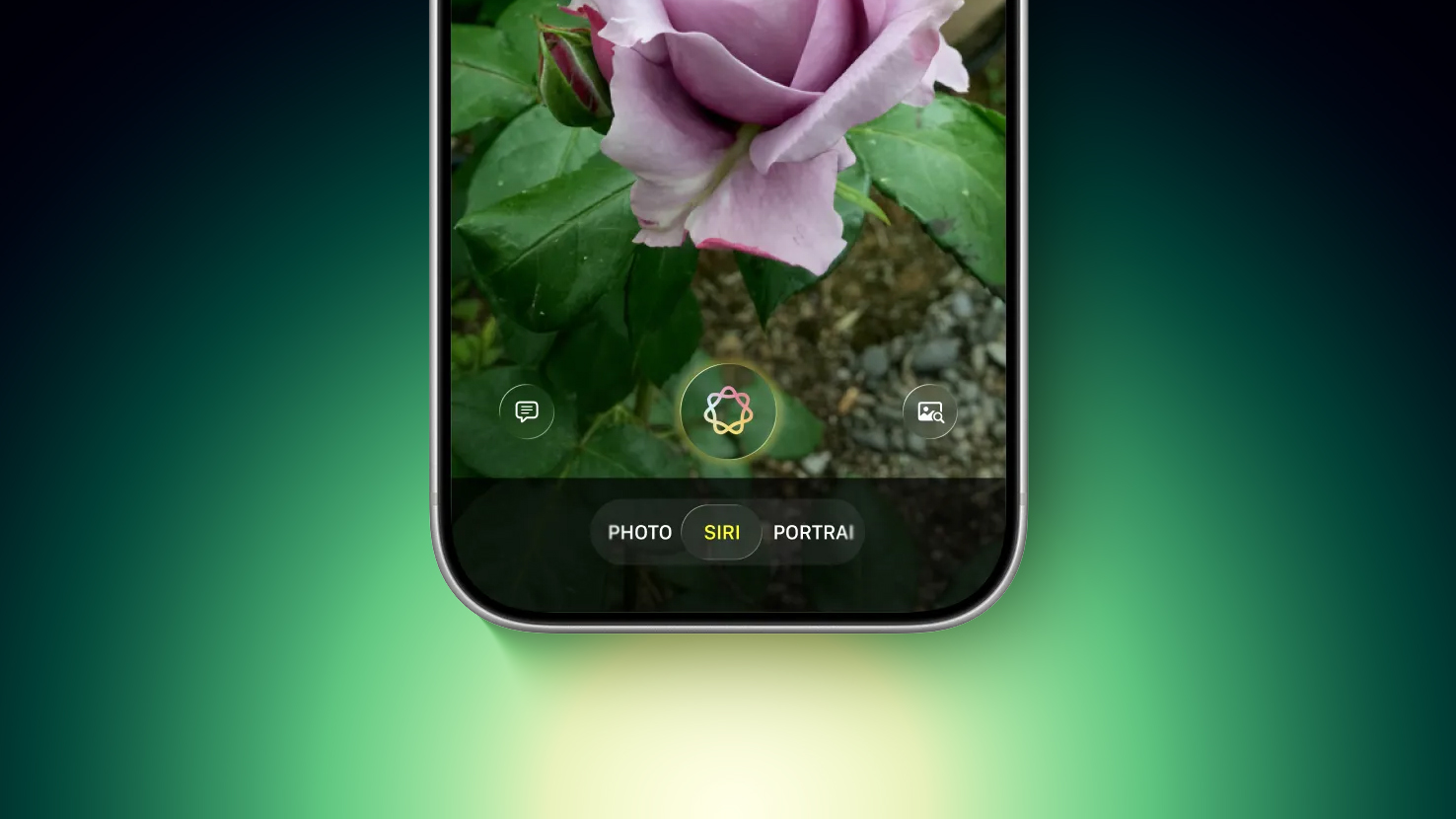
Image via Bloomberg

Siri mode is a renaming of Visual Intelligence, and it will make the feature more visible. Accessing Visual Intelligence in iOS 26 requires users to hold down the Camera Control button or assign the feature to the Action button, and many people may not even know it exists.

Visual Intelligence can identify objects, plants, animals, art, books, and more, searching for whatever the user snaps on Google Image Search. In iOS 27, Siri will be able to answer questions about what a user is looking at, providing information from the web.

Apple is adding new Visual Intelligence capabilities in iOS 27, and they will be available through the Camera app Siri mode.

  • Nutrition - Users can scan nutrition labels on food packaging for calorie and macronutrient tracking using the Health app.

  • Contacts - Visual Intelligence will let users scan phone numbers and addresses on business cards and other print media, adding the information to the Contacts app.


Apple plans to make the Camera app more customizable in iOS 27. iPhone users will be able to replace the top row of camera shortcuts with options of their choosing, selecting features like flash, exposure, timer, depth of field, photo styles, and resolution.

Camera controls, now labeled as widgets, can be placed at the top of the Camera interface in any order. Users can select widgets from a transparent widget tray that comes up from the bottom of the app and organizes widgets into categories like basic, manual, and settings.

The Camera app will have the same default layout that's available now with quick tap buttons for flash, Live Photos, and Night Mode, but the customizable widget interface will be added as an advanced layout that will appeal to professional users.
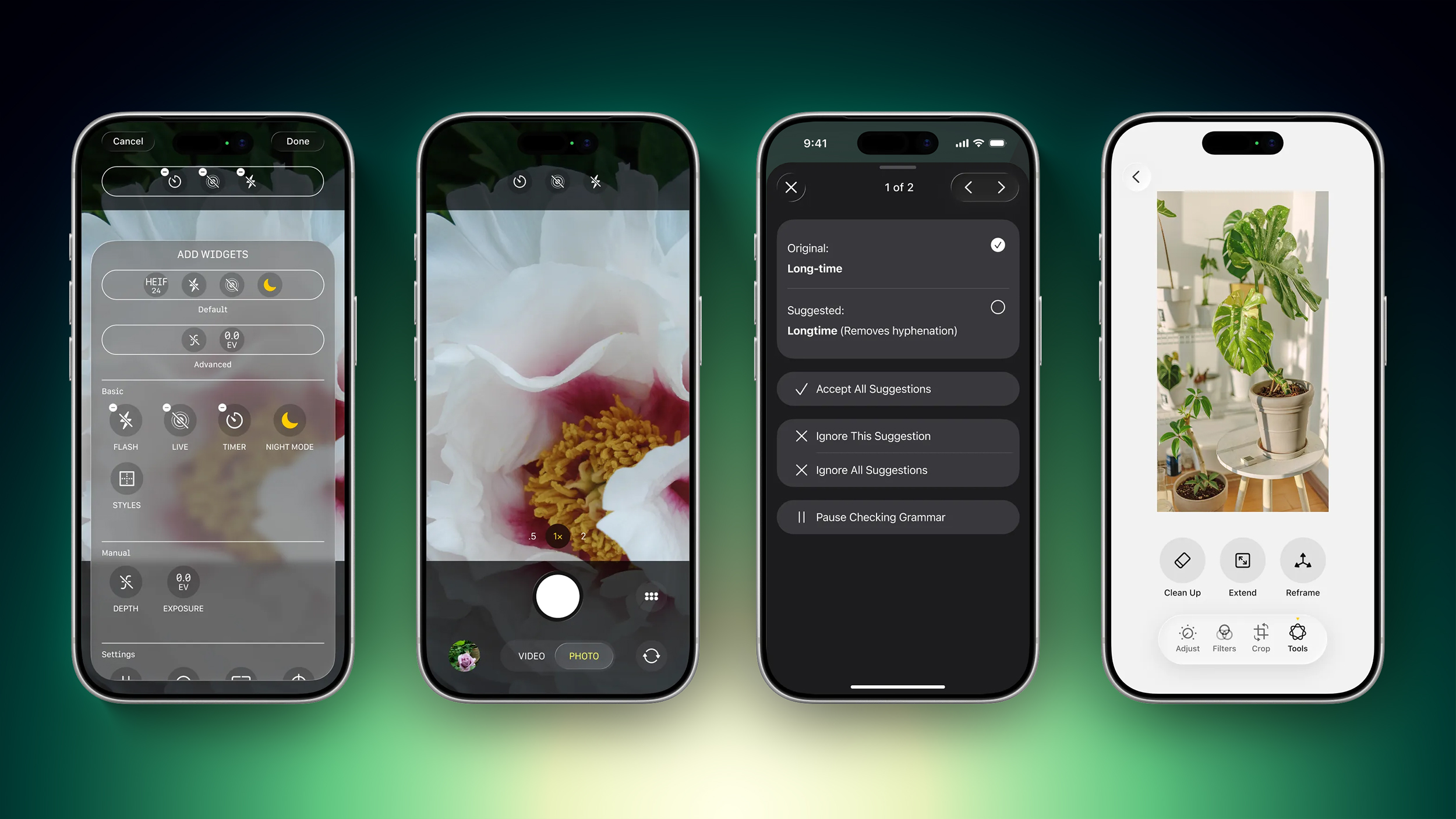
Image via Bloomberg

iPhone users can currently tap on an icon at the top right of the Camera app to access all of the Camera controls, but Apple is moving that view to the right of the shutter button in iOS 27.

The Camera app is also going to get new grid and level options that will join the existing features.

Photos


The Photos app will have an Apple Intelligence Tools section when editing an image with new Extend and Reframe options.

  • Extend - Extend generates additional image content beyond the original frame of the photo, filling in scenery when changing the crop of an image. This tool will support expanding the edges of an image with zoom gestures.

  • Reframe - When used with spatial photos, Reframe will let users change the perspective of an image after it's captured.


Apple is also testing an AI photo editing feature that lets users request edits using natural language. Users would be able to tweak color, lighting, cropping, and other image parameters without having to use manual tools. The voice-based photo editing feature may not arrive in the first version of iOS 27.

Shortcuts


The iOS 27 Shortcuts app will support using natural language to create a shortcut with AI. Users will be able to tell Siri what they want to accomplish with a multi-step shortcut, and Siri will generate it.

The Shortcuts app will open with a prompt that says "What do you want your shortcut to do?" with a text field to enter a description. Shortcuts that are created using AI are then automatically installed and immediately available for use.

Wallet


The Wallet app is getting a "Create a Pass" option so users can generate digital passes from scans of physical items like movie tickets, concert passes, and gym membership cards.

Users can tap on the "+" button in the Wallet app and then scan a QR code on a pass or ticket if one is available. If there is no QR code available, there will be an option to create a custom pass.

There are three pass types in Create a Pass, each with a different color. Apple is using purple for events, blue for memberships, and orange for other types of passes. Users can customize images, colors, style, and text on the digital passes.

Apple is also adding an AI bill-splitting feature that will work with Apple Cash. iPhone users will be able to take a photo of a receipt and generate Apple Cash payment requests for different people.

Image Playground and Genmoji


Apple is updating the Image Playground app. The interface for generating a new image has fewer controls and a "describe a change" option for editing images that are created. Previously created images are displayed in a grid with more rounded edges, and instead of a New Image button, there's a "+" button.

Apple has also been testing new models that produce more lifelike images, so we could see new image generation capabilities in iOS 27 with better image quality.

Genmoji is also getting an update so it will use fewer resources, causing less battery drain and fewer heat problems. Genmoji will be better quality with a new Genmoji model, and a Suggested Genmoji feature will bring up custom emoji ideas based on your media and text history.

Writing Tools


Apple is testing an expanded version of Writing Tools that will do more rewriting and text generation than the current version. There is a "Write with Siri" toggle at the top of the keyboard, along with a "Help Me Write" option that comes up when Siri is activated while a text field is open.

Apple is going to add a dedicated AI grammar checker that will work alongside the current spell check. When writing in Messages, Mail, and other apps there will be a translucent menu that slides up from the bottom of the iPhone's screen, and it will show suggested revisions next to the original written text.

Users can go through the suggestions and accept or reject them one by one, approve all of the changes at once, or ignore the changes.

Other Features


  • Wallpaper - There will be an option to generate custom wallpapers with the Image Playground app, with the feature built into the interface for selecting a new wallpaper.

  • Safari - Safari will get an updated start page with four tabs for switching between favorites, bookmarks, Reading List, and history.

  • Calendar - Rumors suggest the Calendar app will incorporate new AI features. Siri will also be able to draw on information in the app.

  • Health - With a new calorie scanning feature coming to the Camera app, calorie tracking will be more prominent in the Health app. Apple was also planning a Health+ subscription service, and while that's been scaled back, there could be other AI health app changes.

  • Weather - The Weather app will have a new Conditions panel for switching between temperature, rain, and wind from the main interface, without the need to tap into a weather module.

  • AirPods settings - The AirPods interface in the Settings app will be simplified, with options featuring better organization. Major features like hearing health will be easier to find.

  • AirPlay Alternatives - Apple is adding a feature that will let users beam content to AirPlay alternatives like Google Cast. It could be limited to iPhone users in the EU because it is being implemented as a Digital Markets Act requirement.


System-Wide Design Changes


There are system-wide design changes coming in iOS 27. The separate tab bar in apps like Apple Music, Podcasts, News, and Apple TV will be adjusted to combine search with the other navigation options. Apple separated search in many apps when introducing Liquid Glass, but it's reverting to the original look.

When using the on-screen keyboard, there's a new animation that shows the keys sliding up from the bottom of the iPhone interface, and Apple is adding redo and undo controls for easier customization of the Home Screen's icon and widget layouts.
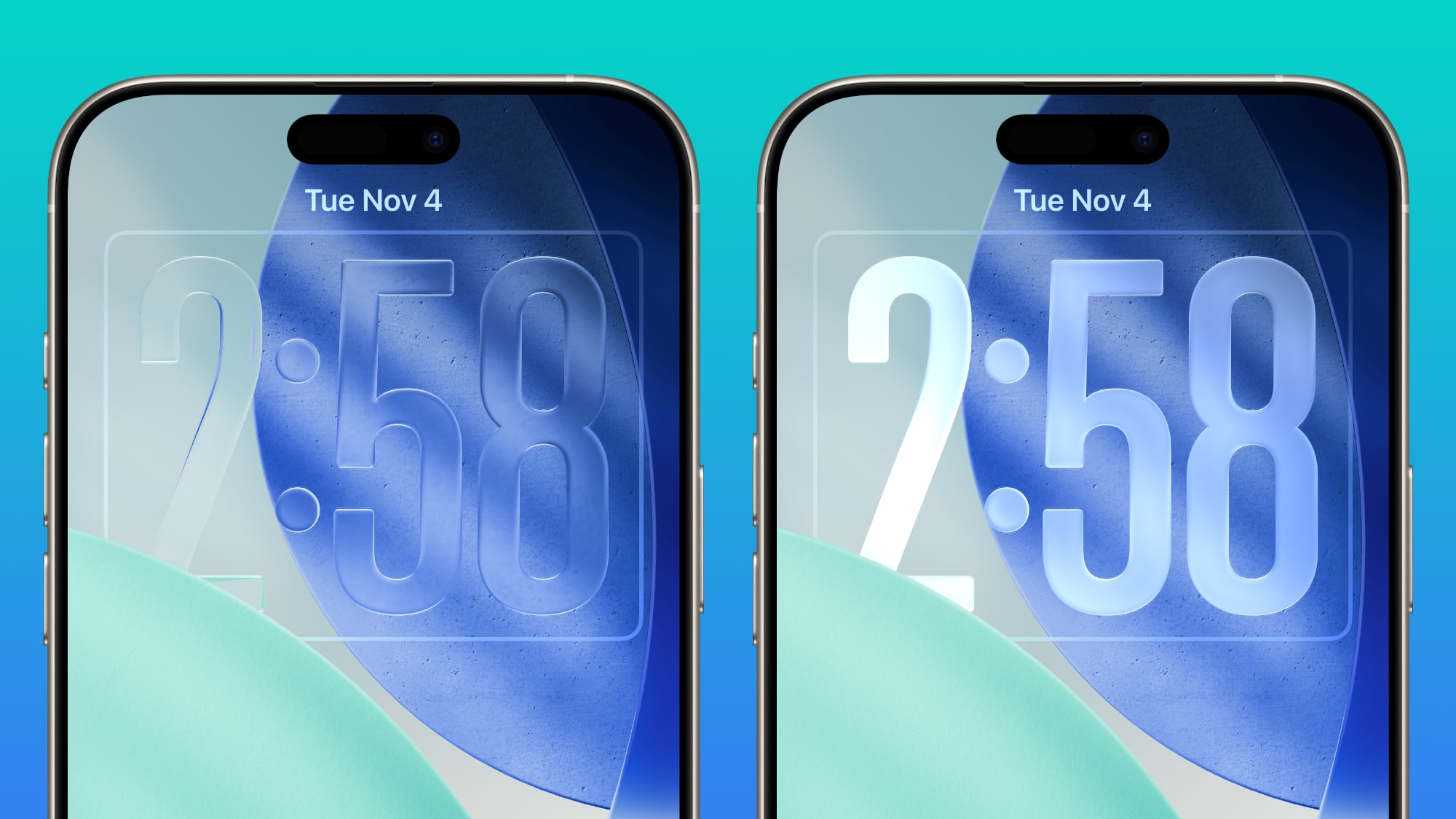


Apple doesn't plan to make major changes to the Liquid Glass aesthetic in iOS 27, but the company is mulling a system-wide setting that would precisely adjust the look of the interface. In iOS 26.2, Apple added a slider that lets users adjust the opacity of Liquid Glass for the Lock Screen's clock, and that setting could be expanded to the entire operating system.

Foldable iPhone Interface


The first foldable iPhone will be introduced in September. Rumors suggest that it will feature a 5.5-inch display when folded, and a 7.8-inch display when it's opened up like a book.
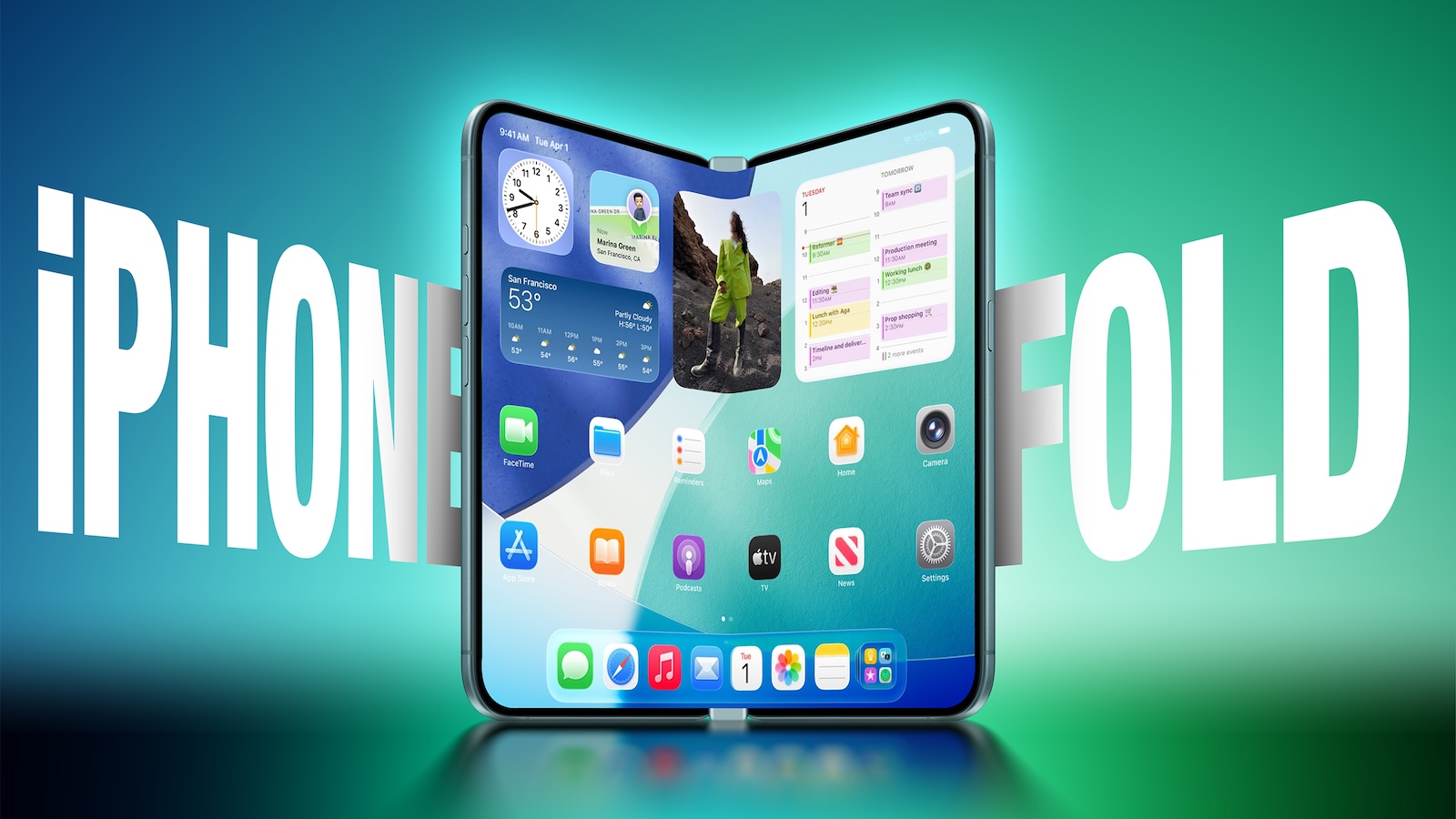


An iPhone with a larger display will require major updates to iOS, and iOS 27 will focus on building new interfaces and experiences made for a larger smartphone display.

The iPhone Fold will operate like a cross between an iPhone and an iPad, but it will run iOS, not iPadOS, and it won't support iPad apps. When unfolded, the iPhone will have an iPad-like layout that supports multitasking with two apps side-by-side. Many of Apple's iPhone apps will have sidebars on the left of the display, with Apple providing developers with tools to easily adapt their apps to the new layout.

Apple is using a wider design for the iPhone Fold than most foldable smartphone makers have used, and it is rumored to have an iPad-like 4:3 aspect ratio. When the iPhone is closed, it will have a standard iPhone layout that looks like the version of iOS we have now.

Satellite Features


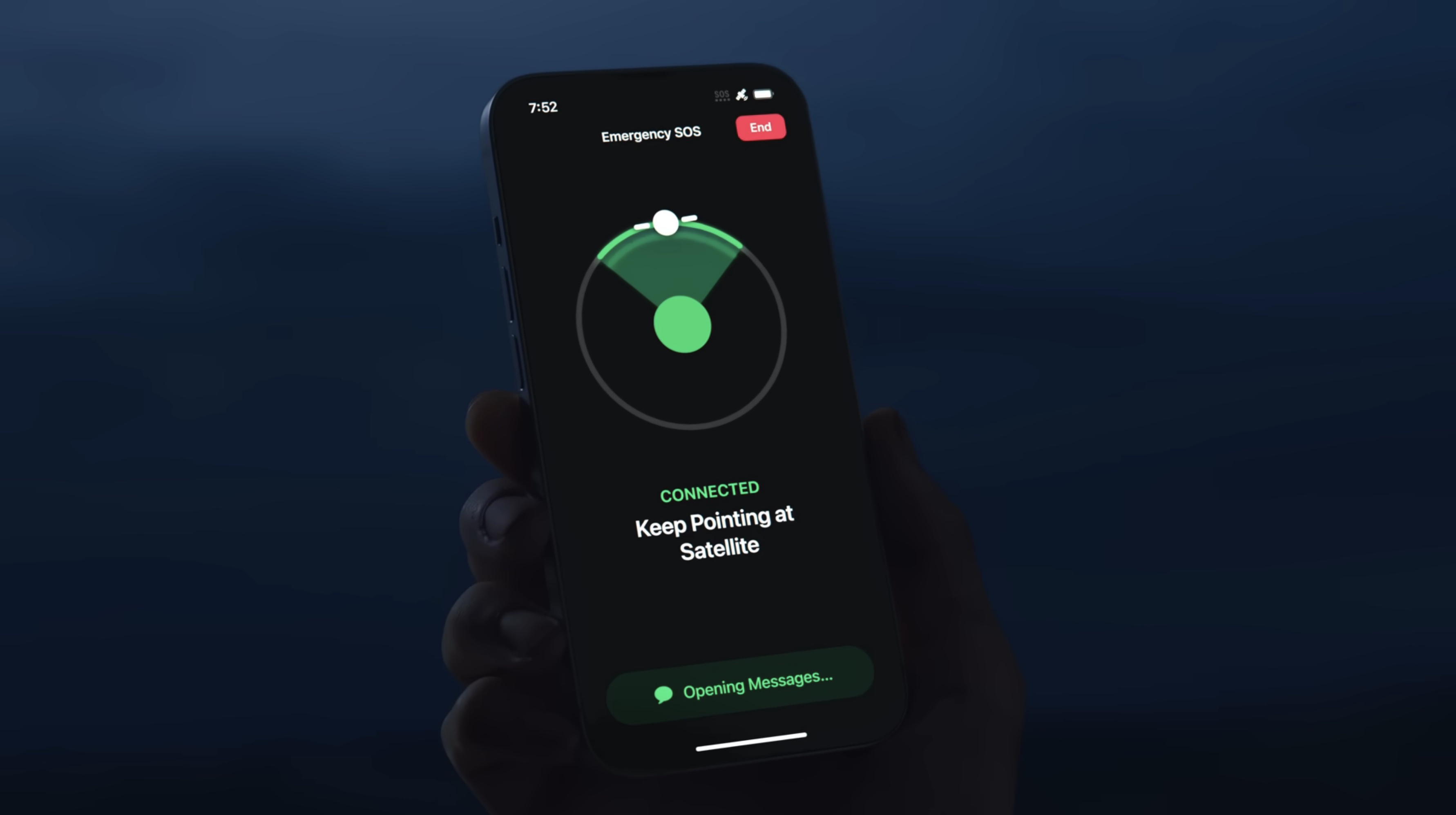
Apple is working on several new satellite features for the iPhone, and it's possible some features could be introduced as soon as 2027.

  • Apple Maps via satellite

  • Photos in Messages via satellite

  • Satellite API framework for third-party apps

  • Satellite over 5G

  • Satellite connectivity without the need for a view of the sky


Performance and Stability


Bloomberg's Mark Gurman has described iOS 27 as a "Snow Leopard" update, suggesting that Apple will focus on improving underlying performance and quality.

Apple is prioritizing cleaning up the iOS code and removing anything that's outdated, which could mean upgrading apps to improve performance and rewriting some existing features to be more efficient. The code updates could provide a more responsive, faster version of iOS.

Apple is also aiming for efficiency improvements that could translate into tangible battery life gains.

Launch Date


Apple will preview the new iOS features at its WWDC 2026 keynote event on June 8. Developers will get access the same day, and a public beta will likely be available in July. iOS 27 will launch in September alongside new iPhones.
Related Roundup: iOS 27

This article, "iOS 27: All the Rumored App Features" first appeared on MacRumors.com

Discuss this article in our forums
  •  

What's on Your iOS 27 Wishlist Ahead of WWDC 2026?

We're just a handful of days away from Apple's 2026 Worldwide Developers Conference, which will see the introduction of iOS 27, iPadOS 27, macOS 27, and more.


We've heard plenty of rumors about ‌iOS 27‌ and it sounds like most of the new features will focus on Siri and AI, but we want to hear from readers. Are you looking forward to any of the new capabilities? Read our iOS 27 roundup to see what's in store.

What's at the top of your wishlist? Do you want updates to the Liquid Glass design? Multitasking options? More emoji?

MacRumors readers have been discussing some of their ‌iOS 27‌ wants in a dedicated iOS 27 wishlist forum thread that's worth checking out. Some top picks:

  • Support for using any third-party AI assistant (which is rumored)

  • A dock with more than four icons

  • An option for using two apps at once

  • Dynamic wallpapers

  • Imports from the Files app to the Music and TV apps

  • Themes from prior versions of iOS

  • Multiple user accounts and/or guest mode (for iPadOS 27)

  • Clipboard history

  • An RSS app

  • A tool for PC file transfers


Let us know what you're hoping to see from Apple.

The WWDC 2026 keynote event will take place on Monday, June 8 at 10:00 a.m. Pacific Time or 1:00 p.m. Eastern Time.
Related Roundups: iOS 27, WWDC 2026

This article, "What's on Your iOS 27 Wishlist Ahead of WWDC 2026?" first appeared on MacRumors.com

Discuss this article in our forums
  •  

Siri in iOS 27: Every New Feature and Change to Expect

Apple first introduced the idea of a smarter version of Siri at the 2024 Worldwide Developers Conference. ‌Siri‌ with Apple Intelligence was supposed to launch as part of iOS 18, but the underlying architecture wasn't good enough, and Apple was forced to delay the feature. We're now expecting a new version of ‌Siri‌ in iOS 27 with some long-awaited smarts.


Siri's New Capabilities


Based on Apple's promises and rumors about what's coming in the new version of iOS, ‌Siri‌ in ‌iOS 27‌ will be nothing like ‌Siri‌ in iOS 26. In 2024, Apple showed us three ways that ‌Siri‌ will improve, but two years have passed and extra work has been done, so we're expecting even more than what Apple demonstrated back then.

‌Siri‌ is going to be able to draw on user data and information from Apple devices, with access to personal data for completing tasks. The assistant is also going to be able to do more with apps, and it will be able to tell what's on the screen to answer questions.

Personal Context


‌Siri‌ will be able to access emails, messages, files, photos, and more, learning all about you to help you complete tasks and keep track of what you've been sent. Apple offered some examples of how personal context will work:

  • Show me the files Eric sent me last week.

  • Find the email where Eric mentioned ice skating.

  • Find the books that Eric recommended to me.

  • Where's the recipe that Eric sent me?

  • What's my passport number?


Onscreen Awareness


Onscreen awareness will let ‌Siri‌ see what's on your screen and complete actions involving whatever you're looking at. If someone texts you an address, you can tell ‌Siri‌ to add it to their contact card. Or if you're looking at a photo and want to send it to someone, you can ask ‌Siri‌ to do it for you.

App Integration


‌Siri‌ will be able to do more in and across apps, performing actions and completing tasks that are just not possible with the personal assistant right now. We don't have a full picture of what ‌Siri‌ will be capable of, but Apple gave a few examples of what to expect.

  • Moving files from one app to another.

  • Editing a photo and then sharing it with someone.

  • Getting directions home and sending the ETA in the Messages app.

  • Drafting and then sending an email.


‌Siri‌ will be able to complete tasks in Apple apps and in third-party apps, with developers able to expose app capabilities to ‌Siri‌.

Siri as a Chatbot


Apple is turning Siri into a full chatbot that users can interact with similarly to Claude or ChatGPT. The ‌Siri‌ chatbot will be integrated into Apple's operating systems at the system level, plus there will be a ‌Siri‌ app for back-and-forth conversations.

‌Siri‌ will be able to do the same things that other chatbots can do. It will be able to search the web for answers to questions and provide summaries, evaluate and summarize uploaded documents, and even generate images and content so you can do things like get help with writing or creating an infographic.

Unlike ChatGPT and Claude, ‌Siri‌ will have deeper Apple device integration and more access to user data. Current chatbots can't access your mail app, what you've written in notes, your Photos Library, or your messages, but ‌Siri‌ will have that information. Personal data access will set ‌Siri‌ apart and give iPhone users some of the features that Android users have been able to enjoy thanks to Gemini's integration with Google services.

‌Siri‌ will be able to answer multi-part questions, remember what it was asked before, maintain context across requests, and remember details about the user.

Siri's Design


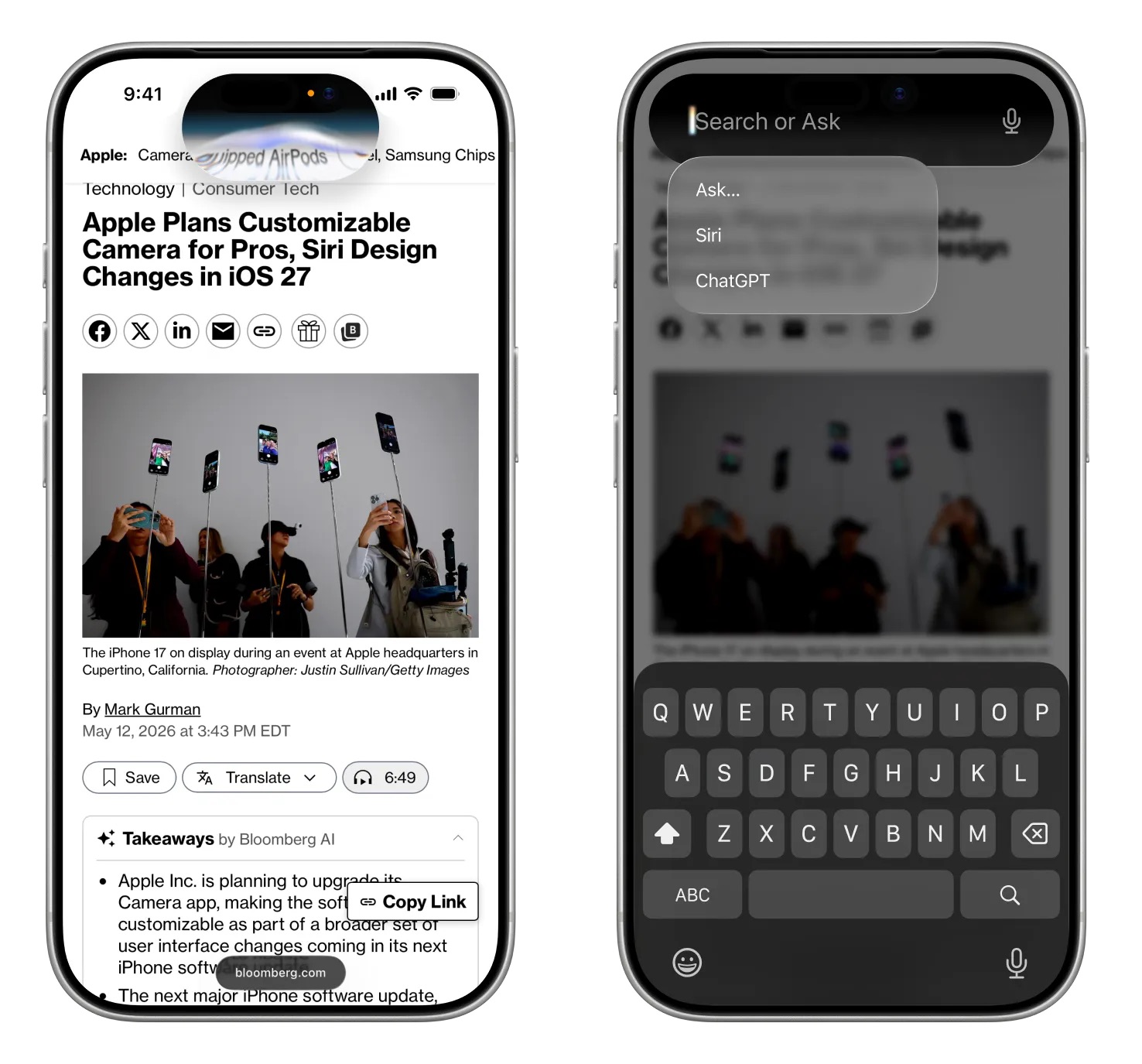
With ‌Siri‌'s chatbot transition, Apple will be making multiple Siri-related design changes. ‌Siri‌ will largely live in the Dynamic Island, and there will be new ways to access ‌Siri‌.

Swiping down from the center of the iPhone's display from the Home Screen or any app will bring up a new "Search or Ask" feature in the ‌Dynamic Island‌. A glowing, pill-shaped animation will be displayed in the ‌Dynamic Island‌ to indicate that ‌Siri‌ is processing a request.

Image via Bloomberg

When ‌Siri‌ has an answer, the ‌Dynamic Island‌ will expand into a transparent card with the result, incorporating images, info from the web, notes and other information relevant to the query or request. Swiping on the results card will bring up a conversation mode that looks similar to an iMessage chat, and there will be an option to transition to the full ‌Siri‌ app.

Search or Ask replaces ‌Siri‌ Suggestions and will let users launch apps, start text messages, ask about the weather, add calendar appointments, trigger shortcuts in apps, and search the web using Apple's new AI web search feature. Search or Ask queries will also be able to be sent to third-party chatbot services like ChatGPT instead of ‌Siri‌.

While ‌Siri‌ can be accessed through a swipe in ‌iOS 27‌, Apple is keeping the "Hey ‌Siri‌" wake word and ‌Siri‌ activation through the Side button. With the new center swipe, accessing the Notification Center will be done with a swipe down on the left side of the display. Swiping down on the right side will continue to bring up Control Center.

Apple will also integrate an "Ask ‌Siri‌" button into the menus of its apps, giving users a way to send content directly to ‌Siri‌ alongside a request.

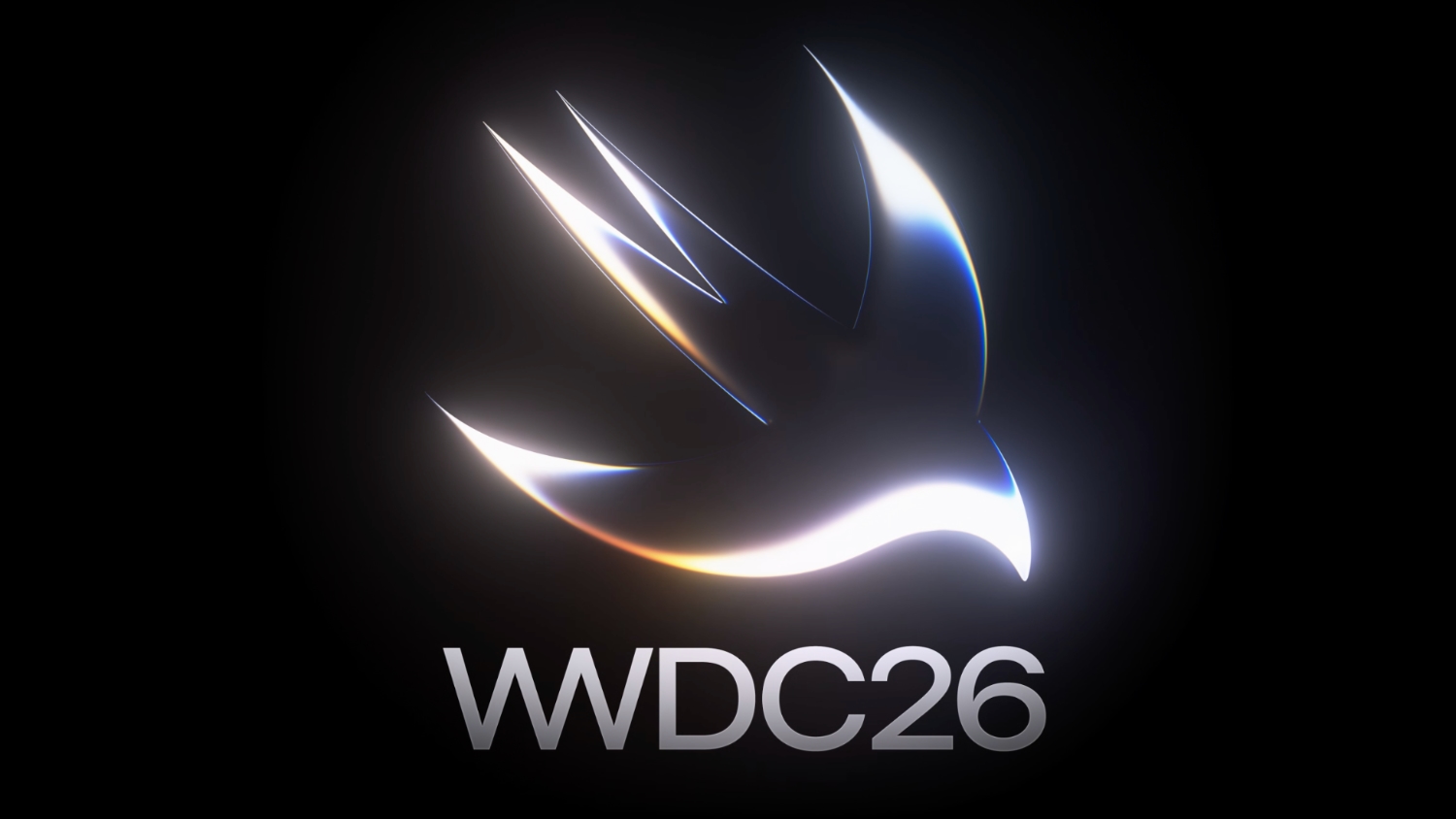
The new ‌Siri‌ interface uses dark colors with no light mode available. ‌Siri‌ UI elements have a dark background with color accents that mirror the options Apple is using in WWDC imagery. Apple's WWDC website features a white Swift bird with subtle highlights in pink, dark blue, purple, and orange.

A Siri App


There will be a dedicated ‌Siri‌ app for interacting with ‌Siri‌, and it will look similar to apps for third-party chatbots but with an Apple design aesthetic. We have a separate guide on the ‌Siri‌ app.

Privacy


Apple plans to lean into privacy as a central principle of its approach to AI, giving it a way to distinguish ‌Siri‌ from other chatbot options. Apple will likely aim to keep as much processing on-device as possible to limit the amount of data that leaves a user's device.

Apple said that ‌Apple Intelligence‌ features will continue to run on Apple devices and Private Cloud Compute.

Apple will have limits around memory, including restrictions on the information that can persist and how long it is kept. Users will be able to auto-delete ‌Siri‌ chats and requests after a set period of time, like 30 days or one year. There will also be an option to keep chats permanently.

‌Siri‌ can be turned off right now, as can ‌Apple Intelligence‌, and there's no sign that's going to change in ‌iOS 27‌. Users who don't want to enable ‌Siri‌ or use the new features will not have to.

Siri Extensions


Apple is letting rival chatbots integrate with ‌Siri‌ in ‌iOS 27‌, expanding on the OpenAI partnership that currently allows ‌Siri‌ to hand off requests to ChatGPT. Apple plans to allow other chatbots like Claude and Gemini to work with ‌Siri‌, so users will be able to send questions to their favorite chatbot instead of ‌Siri‌.

iPhone users will be able to select which services they want to use inside ‌Siri‌ through "Extensions" options coming to ‌iOS 27‌, iPadOS 27, and macOS 27. The options will be available in the ‌Apple Intelligence‌ and ‌Siri‌ section of the Settings app, with Apple providing download links for chatbot apps. There will be a dedicated Extensions section in the App Store that will serve as a way to choose a third-party AI app.

‌Siri‌ will be the default for the Search or Ask interface, but rumors suggest users will be able to select other chatbots to speak with. Users will also be able to choose third-party AI services as the default for ‌Apple Intelligence‌ features like Writing Tools and Image Playground, expanding ‌Apple Intelligence‌ integration beyond ChatGPT.

Apple also plans to let users choose voices from third-party AI to use instead of ‌Siri‌, so there will be a distinct audio difference between a response from ‌Siri‌ and a response from the user's chatbot of choice. ‌Siri‌ would use one voice, while responses from third-party AI options would use another voice.

Gemini Help


To get ‌Siri‌ up and running, Apple partnered with Google to use Gemini AI models instead of using its own AI models. Apple signed a multi-year deal to use Google's Gemini models and cloud technology for its Apple Foundation Models.

Google and Apple said that the next generation of Apple Foundation Models will be based on Google Gemini models, with Gemini used to power future ‌Apple Intelligence‌ features and the more personalized version of ‌Siri‌.

Apple said Google's AI technology offered the most capable foundation for its models.

Device Compatibility


‌Apple Intelligence‌ features require an iPhone 15 Pro or later, and it's possible some of the new ‌Siri‌ options could be limited to those same models.

Launch Date


Apple will preview the new ‌Siri‌ at its WWDC 2026 keynote event on June 8, with betas of ‌iOS 27‌, iPadOS 27, and ‌macOS 27‌ provided to developers the same day. Public betas will come in July, and the software updates will launch in September.

It is not yet clear if all of the new ‌Siri‌ features will be available in the beta, or even right when ‌iOS 27‌ launches.
Related Roundup: iOS 27
Tag: Siri

This article, "Siri in iOS 27: Every New Feature and Change to Expect" first appeared on MacRumors.com

Discuss this article in our forums
  •  

iOS 27 Rumored to Include Split-Screen App Adaptation Feature

Apple is working on a split-screen app landscape adaptation feature for iOS 27, according to a known leaker.


In a new post on Weibo, the leaker known as "Fixed Focus Digital" said Apple is developing a "Parallel View" capability for iOS, aimed at solving the platform's longstanding weakness with large-screen and landscape layouts. Parallel View is a feature in Huawei's HarmonyOS that automatically adapts smartphone apps for wide displays at the system level, without requiring developers to redesign their apps.

Fixed Focus Digital appears to be using the term as a reference point for the type of solution Apple is pursuing, rather than suggesting Apple is directly replicating Huawei's implementation. The leaker pointed to iPadOS as Apple's own existing example of the approach, noting that Apple already handles landscape adaptation at the system level on the iPad. iOS has never had an equivalent mechanism.

The feature appears to be aimed squarely at the foldable iPhone, whose 7.8-inch inner display will expose a fundamental limitation of iOS: virtually every iPhone app is designed for a tall, narrow screen. Without a system-level solution, those apps would appear letterboxed on the larger display. Fixed Focus Digital acknowledged that iOS is "indeed excellent" while noting its large-screen adaptation has consistently fallen short.

The claim corroborates earlier reporting from Bloomberg's Mark Gurman, who reported in March that ‌iOS 27‌ would support two apps side-by-side on the foldable iPhone's inner display, with an iPad-like layout and left-side navigation bars in supported apps.

Apple is expected to unveil ‌iOS 27‌ at WWDC 2026 later this month, ahead of a fall release alongside the iPhone 18 Pro models and the foldable iPhone.
Related Roundup: iOS 27

This article, "iOS 27 Rumored to Include Split-Screen App Adaptation Feature" first appeared on MacRumors.com

Discuss this article in our forums

  •  

iOS 27: What We Know About the New Siri App

iOS 27, iPadOS 27, and macOS 27 will include a standalone Siri app for the first time, providing a dedicated space for interfacing with ‌Siri‌.


Siri Chatbot


Apple needs a ‌Siri‌ app because ‌Siri‌ is turning into a chatbot. ‌Siri‌ will work like ChatGPT or Claude, able to pull information from the web to provide answers to questions.

‌Siri‌ will be integrated into iOS, iPadOS, and macOS at the system level, and can draw on device information. It will know more personal context than before, and will be able to access emails, texts, photos, calendar information, contacts, notes, and other personal data. Some of what ‌Siri‌ will be able to do:

  • Search the web for information

  • Generate images

  • Generate content

  • Summarize information

  • Analyze uploaded files

  • Use personal data to complete tasks

  • Write emails, notes, and texts

  • Control device features and settings

  • Search for on-device content, pulling information from emails, messages, files, and more


‌Siri‌ will be integrated into Apple apps like Mail, Messages, Photos, and Apple TV.

Siri App Design


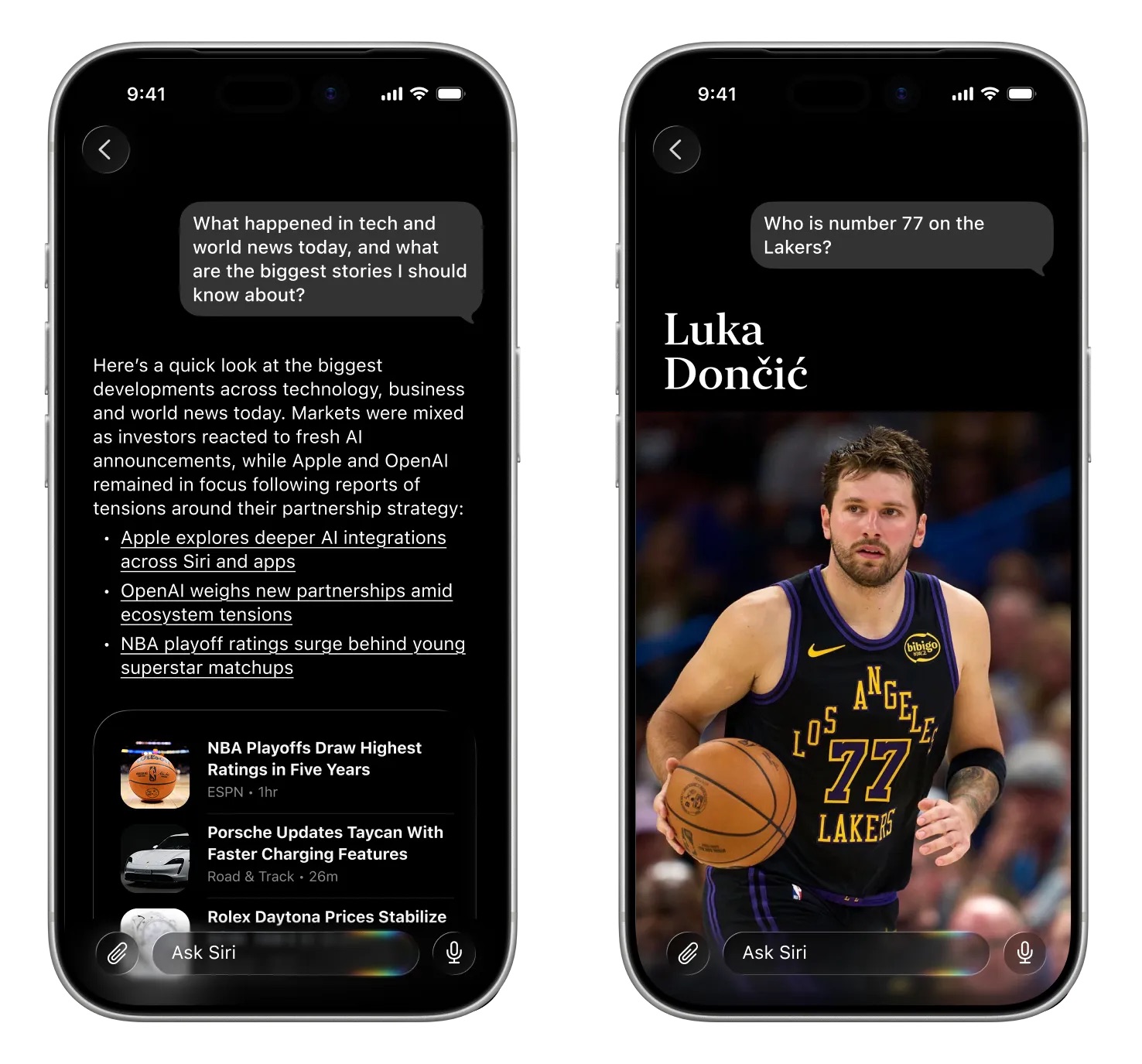
The standalone ‌Siri‌ app will look similar to the ChatGPT, Claude, or Gemini apps. Bloomberg's Mark Gurman shared a mockup of what the ‌Siri‌ app will look like.

Image via Bloomberg


‌Siri‌ will support text or voice-based conversations. The app will open with an "Ask ‌Siri‌" bar where users can type in a question. A paperclip icon will be available for attaching images, PDFs, and other documents. Apple will provide prompts with suggestions on what users can ask.

Questions will resemble iMessage chat bubbles, with Apple adopting a design that is familiar to users. Responses will include links, images, and other information.

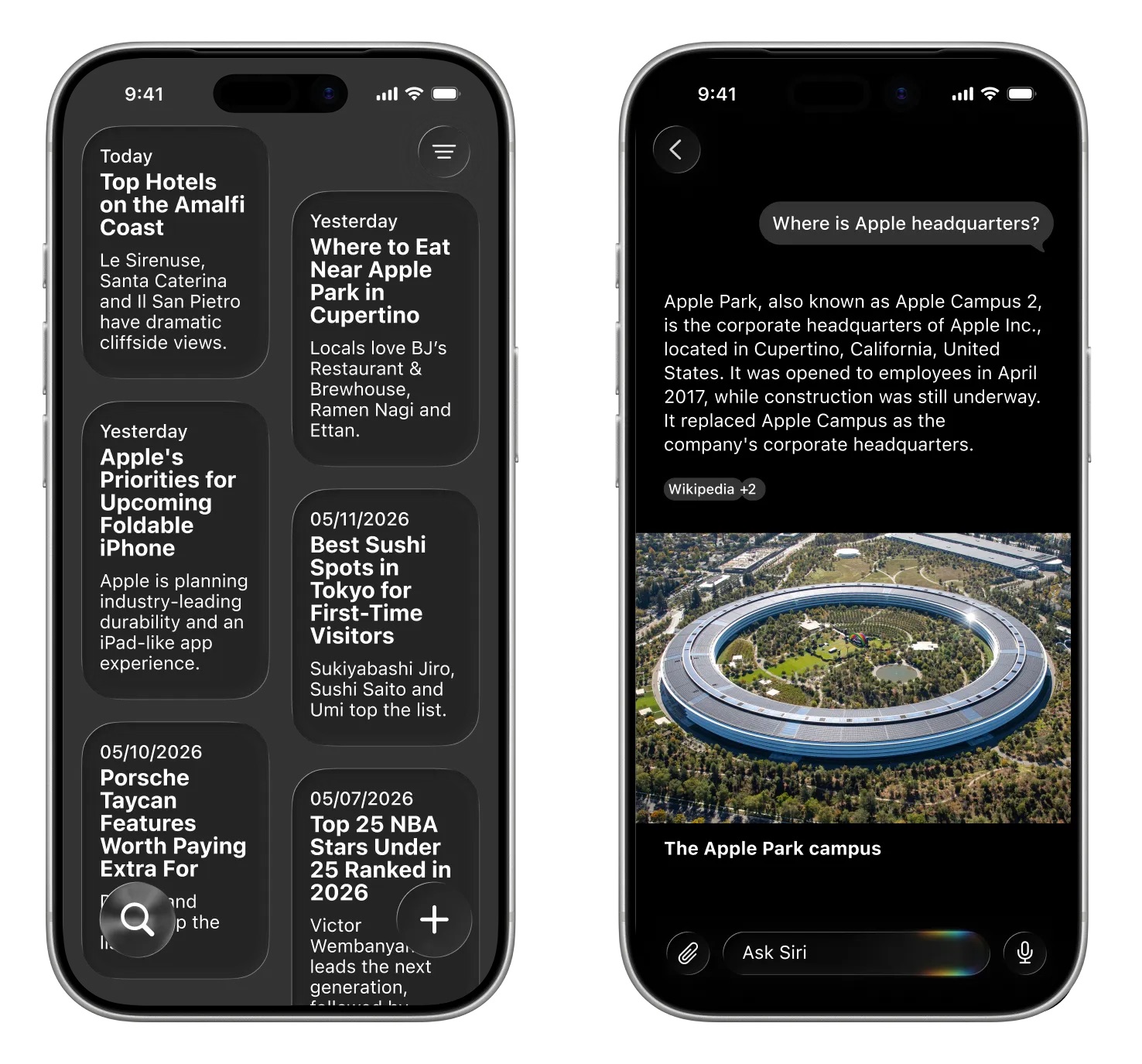
Image via Bloomberg.


A section of the app will be dedicated to past conversations that can be shown in a card-style interface with conversation summaries, or a list view. Users will be able to tap into a conversation to continue it.

Dark Interface


Apple's ‌Siri‌ interface both inside and outside of the dedicated ‌Siri‌ app will adopt dark colors. Apple's WWDC website hints at the colors it plans to use for ‌Siri‌.


The website features the Swift bird logo in white on a black background, with subtle highlights in pink, dark blue, purple, and orange. The colors are reminiscent of the current ‌Siri‌ animation that surrounds the iPhone's display when ‌Siri‌ is activated, but the shades are softer and not as saturated.

WWDC 2026


The updated version of ‌Siri‌ will be unveiled at WWDC 2026, which is set to begin on Monday, June 8 at 10:00 a.m. Pacific Time.
Related Roundup: iOS 27
Tag: Siri

This article, "iOS 27: What We Know About the New Siri App" first appeared on MacRumors.com

Discuss this article in our forums

  •  

Apple Cash in iOS 27 Will Help You Split Bills With Just a Photo

iOS 27 will include a nice quality-of-life improvement for those who frequently split bills with friends and family, allowing them to easily take a photo of a receipt and generate payment requests for different people, according to Bloomberg's Mark Gurman.


The feature will be tied to the peer-to-peer Apple Cash feature in the Wallet app, which lets users easily send money to other people and even make purchases.

in our forumsDiscuss this article

MacRumors.com" first appeared on Apple Cash in iOS 27 Will Help You Split Bills With Just a PhotoThis article, "
Related Roundup: iOS 27
by scanning items like movie tickets, concert passes, and gym membership cards.let users create their own digital passes This functionality isn't the only Apple Wallet improvement coming ‌iOS 27‌, as the update will also bring the ability to

The bill-splitting feature will be available through the Wallet and Messages apps, and users will be able to approve payments from an Apple Watch.

Gurman says that Apple is intending to announce the new feature "as early as next week" at WWDC, and it should be included in the upcoming ‌iOS 27‌ release. Notably, Apple Cash is currently only available in the United States.
  •  

iOS 28 Will Reportedly Be 'Far More Significant' Than iOS 27

While we are still a week away from Apple unveiling iOS 27, Bloomberg's Mark Gurman has just shared the first rumor regarding iOS 28.


In his Power On newsletter today, he said that iOS 28 will be "far more significant" than iOS 27, but he did not provide any specific details.

"Next year's '28' releases are already shaping up to be far more significant than the '27' updates," wrote Gurman, without elaborating.

iOS 28 is codenamed "Bell," while macOS 28 is "Poppy," he said.

iOS 28 would be the first version available on Apple's redesigned 20th-anniversary iPhone, which is expected to be released in September next year.

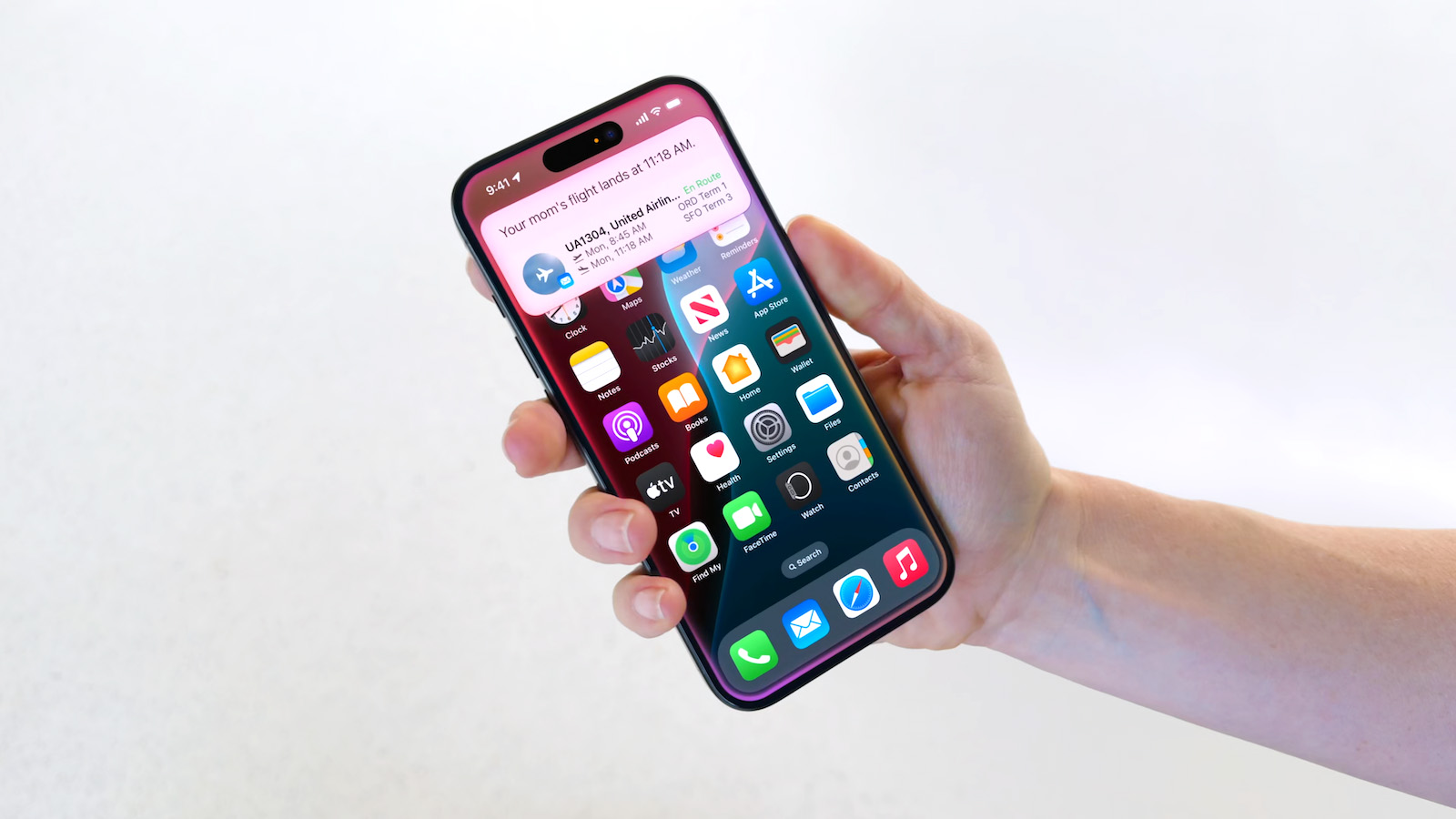
iOS 27 will seemingly be focused on a revamped Siri and additional Apple Intelligence features. The update will include the long-awaited personalized version of Siri, complete with on-screen awareness and better understanding of your personal context. For example, at WWDC 2024, Apple showed a user asking Siri about their mother's flight and lunch reservation based on info retrieved from the Mail and Messages apps.

A dedicated Siri app will allow you to have back-and-forth conversations with Siri in text or voice modes, similar to other chatbot apps like ChatGPT. In addition, iOS 27 is expected to add a "Search or Ask" feature to the Dynamic Island.

It remains to be seen exactly how iOS 28 will be more significant. The update will be unveiled at WWDC 2027 next June, so there is a long time to go.
Related Roundup: iOS 27

This article, "iOS 28 Will Reportedly Be 'Far More Significant' Than iOS 27" first appeared on MacRumors.com

Discuss this article in our forums

  •  

iOS 27 Siri Redesign Will Use Dark Color Scheme, Matching Apple's WWDC Art

Apple is redesigning Siri for iOS 27 to accommodate new artificial intelligence features and chatbot capabilities. ‌Siri‌ is getting a dedicated app, integration with the iPhone's Dynamic Island, and a new design scheme.


The graphics that Apple is using to promote WWDC hint at its design plans for ‌Siri‌, according to Bloomberg's Mark Gurman. In this week's Power On newsletter, Gurman said the logo Apple uses for its WWDC website features the same colors it will use for ‌Siri‌ animations and input fields in ‌iOS 27‌.

Apple's WWDC site features the Swift bird logo in white on a black background, with subtle highlights in pink, dark blue, purple, and orange. The colors are reminiscent of the current ‌Siri‌ animation that surrounds the iPhone's display when ‌Siri‌ is activated, but the shades are softer and not as saturated.

The ‌Siri‌ interface that Apple is testing uses all dark colors with no light mode available for now. Several of the new ‌Siri‌ UI elements will have a dark background with a cursor that blinks in those same colors.

Apple is creating a dedicated app for ‌Siri‌ for ongoing chatbot-style conversations, and it'll look similar to existing chatbot apps but with a Messages-style aesthetic. When ‌Siri‌ is activated, there will be a pill-shaped animation in the ‌Dynamic Island‌ and a glowing "searching" label while ‌Siri‌ is answering a query. Results are displayed in a translucent panel, and pulling down on the panel will initiate a conversation interface.

Swiping down from the top center of the display will activate a system-wide search interface with a Search or Ask bar for typing or speaking questions to ‌Siri‌.

Apple plans to entirely overhaul ‌Siri‌, and the personal assistant will be able to do far more than before. Apple has licensed Google's Gemini models to power ‌Siri‌ after its own AI models proved inadequate. With Gemini as ‌Siri‌'s backbone, Apple should be able to match many of the AI features that Google offers.

‌iOS 27‌ will be introduced at the WWDC 2026 keynote on June 8.
Related Roundups: iOS 27, WWDC 2026
Tag: Siri

This article, "iOS 27 Siri Redesign Will Use Dark Color Scheme, Matching Apple's WWDC Art" first appeared on MacRumors.com

Discuss this article in our forums

  •  

Don't Want to Wait for iOS 27? Shortcuts Playground From MacStories Generates Shortcuts Using AI

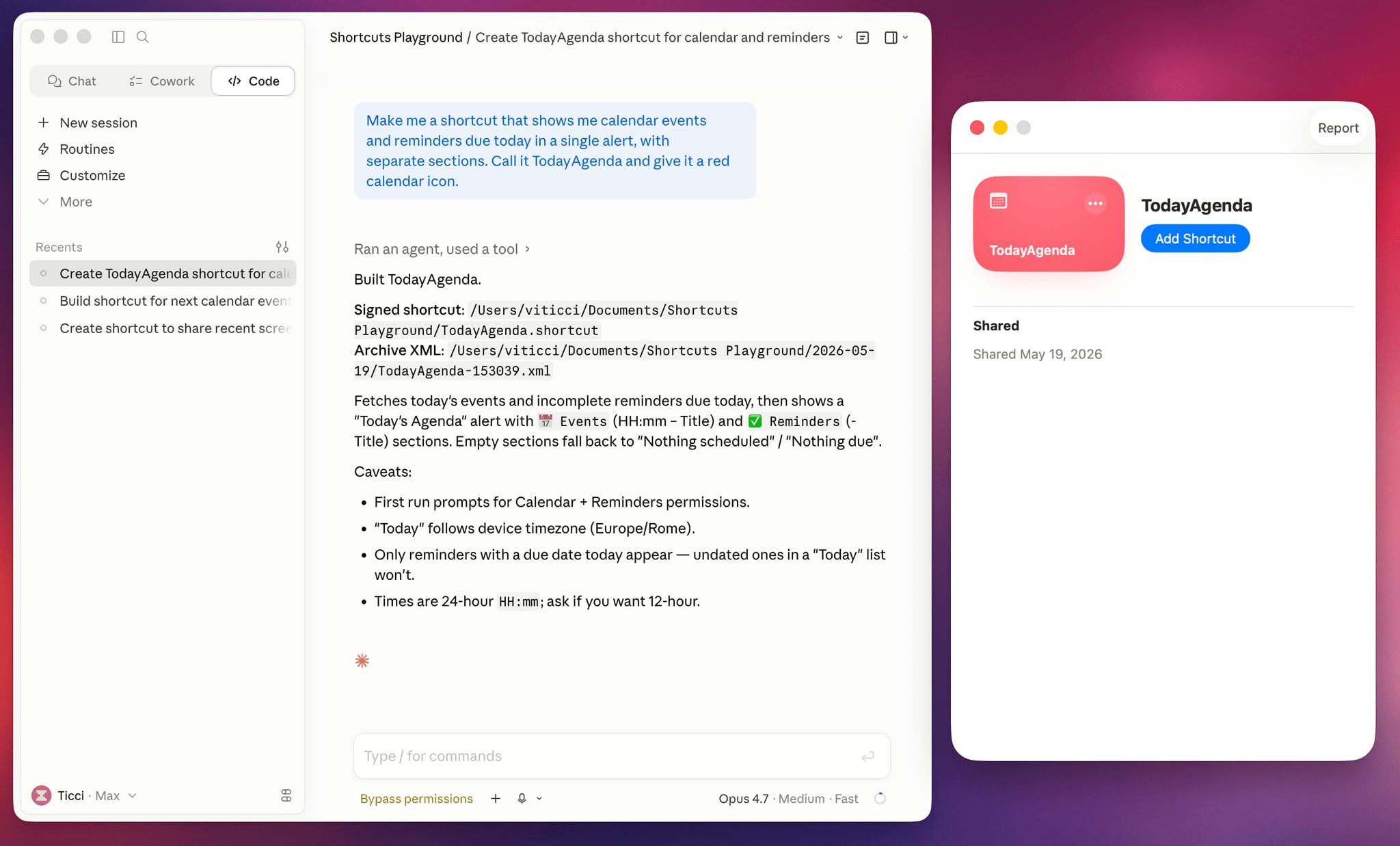
Apple is rumored to be adding an AI feature for creating shortcuts with natural language to the Shortcuts app in iOS 27, but MacStories' Federico Viticci has a clever AI tool for making shortcuts that you can use today.


Shortcuts Playground is a plugin for Claude Code and OpenAI Codex that can create shortcuts for the Apple Shortcuts app using natural language input. It's set up to let users type in a short sentence requesting a shortcut, with the final version output to Finder and ready to upload to Apple's Shortcuts app in a few minutes.

Viticci made Shortcuts Playground free and open source, and the plugin is available from GitHub. Viticci provided detailed documentation on how it works, plus anyone can inspect the code. While Claude Code or Codex can correct errors during the shortcut creation process, Viticci warns that shortcuts generated are not guaranteed to be 100 percent accurate, and users should always check the AI's work.

To get Shortcuts Playground, give Claude Code or OpenAI Codex a link to the GitHub repo, and the agent will find the plugin marketplace and install it. Viticci has several example shortcuts, including one that remembers the location of a parked car and guides the driver back to it, and another that adjusts several display settings at night while also turning on a Focus mode.

Club MacStories+ and Premier members can get Shortcuts Playground as a generative shortcut. Once the main plugin is installed on a Mac, there's an option to make more shortcuts using a shortcut and install them directly on an iPhone, iPad, or Mac.

Viticci is also debuting a redesigned MacStories Shortcuts Archive that features over 400 pre-built shortcut options. More information on Shortcuts Playground can be found on MacStories.
Related Roundup: iOS 27

This article, "Don't Want to Wait for iOS 27? Shortcuts Playground From MacStories Generates Shortcuts Using AI" first appeared on MacRumors.com

Discuss this article in our forums

  •  

Apple Previews New Accessibility Features Powered by Apple Intelligence

Apple today announced a suite of accessibility updates that use Apple Intelligence to expand capabilities across VoiceOver, Magnifier, Voice Control, and Accessibility Reader, with additional new features for generated subtitles and wheelchair control via Apple Vision Pro.


‌Apple Intelligence‌ powers several of the new features coming later this year:


  • VoiceOver Image Explorer uses ‌Apple Intelligence‌ to produce more detailed descriptions of images throughout the system, including photographs, scanned bills, and personal records. Users can also press the Action button on the iPhone to ask questions about what the camera viewfinder sees, with follow-up questions supported in natural language.

  • Magnifier brings Apple Intelligence-powered visual descriptions to its high-contrast interface for users with low vision, also accessible via the Action button, with support for spoken commands like "zoom in" or "turn on flashlight."

  • Voice Control gains natural language input so users can describe onscreen elements conversationally, such as "tap the guide about best restaurants" or "tap the purple folder," rather than memorizing exact label names or numbers. Apple says the feature can also help where on-screen elements lack proper accessibility labels.

  • Accessibility Reader gains support for more complex document layouts including scientific articles with multiple columns, images, and tables, plus on-demand summaries and built-in translation that retains a user's custom font, color, and formatting preferences.

  • Generated Subtitles use on-device speech recognition to automatically transcribe spoken audio in uncaptioned video content, including clips recorded on iPhone, received from friends and family, or streamed online, across the iPhone, iPad, Mac, Apple TV, and ‌Apple Vision Pro‌. Initially available in English in the U.S. and Canada.

  • Power Wheelchair Control for Apple Vision Pro uses the headset's precision eye-tracking system as an alternative input method for users who cannot operate a joystick, launching with support for the Tolt and LUCI alternative drive systems in the U.S. via Bluetooth and wired connections.


Apple shared a video about the new Voiceover feature:


Apple also announced a number of smaller additions coming later this year:

  • Vehicle Motion Cues are coming to visionOS to help reduce motion sickness when using Vision Pro as a passenger in a moving vehicle.

  • Apple Vision Pro will support face gestures for performing taps and system actions, plus a new way to select elements with one's eyes while using Dwell Control.

  • Made for iPhone hearing aids will gain more reliable pairing and handoff between Apple devices, with an improved setup experience across iOS, iPadOS, macOS, and visionOS.

  • Name Recognition, which notifies users who are deaf or hard of hearing if someone says their name, expands to more than 50 languages globally.

  • Larger Text support is coming to tvOS, allowing viewers with low vision to increase onscreen text size.

  • Sony Access controller is gaining support as a game controller on iOS, iPadOS, and macOS, with full button and thumbstick customization and support for combining two controllers.

  • FaceTime gains a new API allowing sign language interpretation app developers to add a human interpreter to an ongoing video call.

  • Touch Accommodations gain a new way to personalize setup in iOS and iPadOS.


Starting today, the Hikawa Grip & Stand for iPhone, an adaptive MagSafe accessory designed by Los Angeles-based designer Bailey Hikawa, is available globally in three new colors via the Apple Store online. The accessory was developed in collaboration with individuals with disabilities affecting grip, strength, and mobility, and is now available internationally via a partnership with PopSockets.

All of the announced features are expected to arrive later this year. Voice Control's natural language capabilities will be available in English in the U.S., Canada, the UK, and Australia.

Today's announcement is part of Apple's annual tradition of previewing upcoming accessibility features ahead of Global Accessibility Awareness Day, which falls on the third Thursday of May each year. While no firm release date is given for the features, they typically arrive with Apple's new operating system updates in the fall. This year that means iOS 27, iPadOS 27, macOS 27, tvOS 27, and visionOS 27, all of which are expected to be unveiled at WWDC in June before shipping in September.
Related Roundup: iOS 27

This article, "Apple Previews New Accessibility Features Powered by Apple Intelligence" first appeared on MacRumors.com

Discuss this article in our forums

  •  

iOS 27 to Let Users Generate Wallpapers and Build Shortcuts With AI

iOS 27 will include a custom wallpaper generator and an option to automatically create shortcuts using AI, reports Bloomberg.


When choosing a new wallpaper, users will have the option to generate something custom using the Image Playground app. ‌Image Playground‌ is used for generating custom emoji and images that can be used throughout iOS, and it is set to get an upgrade in ‌iOS 27‌.

Apple is testing models that produce more lifelike images, so the version of ‌Image Playground‌ that's used for generating custom wallpapers could be different from the current version.

Shortcuts is also getting a major update, with users able to use natural language to ask Siri to make a shortcut. There is an option for users to tell ‌Siri‌ what they want to accomplish with a shortcut to have the workflow created using AI.

Bloomberg says the Shortcuts app has a prompt that says "What do you want your shortcut to do?" with a text field to enter a description. Shortcuts that are created using AI are then automatically installed and immediately available for use.

Shortcut creation is largely done manually now, and it is a tool that has remained out of reach of many casual iPhone users. A Shortcuts app that's able to work with natural language capabilities will see the app getting more widespread use.

The new Shortcuts app and the wallpaper generation tool will be previewed at the WWDC keynote that's set to take place on June 8.
Related Roundup: iOS 27

This article, "iOS 27 to Let Users Generate Wallpapers and Build Shortcuts With AI" first appeared on MacRumors.com

Discuss this article in our forums

  •  

Apple Expanding AI Writing Tools With Grammar Checker in iOS 27

iOS 27 and iPadOS 27 will include a revamped AI chatbot version of Siri with new capabilities, but Apple is also planning to introduce new Apple Intelligence features across the operating system, reports Bloomberg.


Apple is testing an expanded version of Writing Tools that will do more rewriting and text generation than the current version. There is a "Write With ‌Siri‌" toggle at the top of the keyboard, along with a "Help Me Write" option that comes up when ‌Siri‌ is activated while a text field is open.

Apple is planning to introduce a dedicated AI grammar checker for Writing Tools that will work like Grammarly. When writing in Messages, Mail, and other apps there will be a translucent menu that slides up from the bottom of the iPhone's screen, and it will show suggested revisions next to the original written text.

Users can go through the suggestions and accept or reject them one by one, approve all of the changes at once, or ignore all of the changes. Apple has an option for pausing grammar checking and for moving between different flagged sections of text. Apple already has a spellchecking feature, but the new feature will add grammar suggestions.

The updates to Writing Tools will be unveiled at Apple's June 8 WWDC keynote. Apple is also planning AI updates for the Photos app, Camera app, and more, with details available in our iOS 27 roundup.
Related Roundup: iOS 27

This article, "Apple Expanding AI Writing Tools With Grammar Checker in iOS 27" first appeared on MacRumors.com

Discuss this article in our forums

  •  

Apple Working on Plan to Allow AI Agent Apps on the App Store

Apple is looking into ways to better support apps that include AI agents and AI coding capabilities in the App Store, reports The Information. Apple is designing a system that would maintain its security and privacy standards while allowing for AI app features, but details on how the system will work are unavailable.


Apple started blocking updates for some popular vibe coding apps in March because those apps violated ‌App Store‌ rules that prohibit apps from executing code that alters their own functionality or that of other apps. Vibe coding apps let users build apps and websites with little to no coding experience, using AI agents and natural language prompts. Vibe coding has become popular, and Apple's rules have not been able to keep up.

Apps that include AI agents present similar problems for Apple. AI agents can autonomously complete complex actions and make mini apps using tools and capabilities that would not traditionally be supported under Apple's ‌App Store‌ rules. Apple will need to make changes to keep up with the software trends that developers and users want.

Apple wants to incorporate AI agents into the ‌App Store‌ while preventing some of the issues that people have run into with rogue AI agents deleting content and causing other problems.

As it works to prepare for future AI apps, Apple is also developing its own AI capabilities. Siri is set to get a major overhaul in iOS 27, making it smarter and better able to compete with Claude and ChatGPT. Apple has partnered with Google to use custom Gemini models to power ‌Siri‌.

The Information says Apple has started contacting app developers to integrate app capabilities like booking flights and sending calendar invites into the new version of ‌Siri‌ and Apple Intelligence. Some developers are hesitant to work with Apple to integrate their apps into ‌Siri‌ because they are worried about providing new ways for Apple to collect commissions. Apple is telling some developers that it does not plan to charge commissions during the early stages of the partnership, but that fees are a possibility in the future. Apple has held talks with Baidu, Alibaba, and Tencent about ‌Siri‌ integration in ‌iOS 27‌, but the companies do not want to end up paying fees to Apple.

Apple also plans to allow users to select from multiple chatbots to use with ‌Siri‌, instead of limiting people to OpenAI's ChatGPT. AI models from companies like Anthropic or Google could be used for Image Playground and Writing Tools the way ChatGPT can be used today.

It is not clear if Apple plans to open up more of iOS to third-party chatbots, but OpenAI has reportedly been disappointed with Apple's limitations. ChatGPT can be used to generate images and text through the iOS integration, but it cannot access user emails or other personal information. Customers are also rarely using the functionality, according to The Information.

Apple's new version of ‌Siri‌ is expected to be unveiled at the WWDC keynote on June 8, and the plans that Apple has for agentic AI apps in the ‌App Store‌ could also be discussed at the same time.
Related Roundup: iOS 27

This article, "Apple Working on Plan to Allow AI Agent Apps on the App Store" first appeared on MacRumors.com

Discuss this article in our forums

  •  

iOS 27 Getting Major Siri Redesign With Chat Interface and Dedicated App

Apple is introducing an overhauled version of Siri in iOS 27, evolving the personal assistant into a more capable chatbot and AI agent able to compete with ChatGPT, Claude, and Gemini. With ‌Siri‌'s transition, Apple will be making multiple Siri-related design changes in ‌iOS 27‌, according to a new report from Bloomberg. ‌Siri‌ will largely live in the Dynamic Island in ‌iOS 27‌, but there will also be a dedicated ‌Siri‌ app for the first time.


When ‌Siri‌ is activated with the ‌Siri‌ wake word or through the iPhone's side button, a pill-shaped animation will be displayed in the ‌Dynamic Island‌. When ‌Siri‌ is asked a question or given a task, there will be a transparent results card. Swiping on it will bring up a conversation mode that looks similar to an iMessage chat, and it will incorporate small cards for the weather, notes, upcoming appointments, and other information that's relevant to queries.

Apple is also designing a full ‌Siri‌ app for ‌Siri‌ conversations. It will allow users to look back at prior chats, and begin new ‌Siri‌ chats. There is a grid of rectangles with summaries of past conversations that users can tap into, a search bar, and a "+" button for starting a new conversation. The app will support uploading images and documents, and users will be able to type to ‌Siri‌ or use voice input.

Swiping down from the top center of the display in any app will activate a system-wide search interface, with a "Search or Ask" bar in the ‌Dynamic Island‌ for typing or speaking questions. Search or Ask is similar to Spotlight Search, but Bloomberg suggests it will display "more advanced results and additional data from within apps."

‌Siri‌ will be able to draw information from the web to provide detailed answers to the typical questions users ask chatbots. ‌Siri‌'s responses will include bullet points with information and large images.

While ‌Siri‌ is the default for the search bar, pressing on it will let users select other chatbots to speak with, such as ChatGPT or Gemini. Apple plans to let users choose third-party AI services as the default for Apple Intelligence features like Writing Tools and Image Playground, expanding ‌Apple Intelligence‌ integration beyond ChatGPT.

Apple plans to overhaul the ‌Image Playground‌ app. The interface for generating a new image has fewer controls and a "describe a change" option for editing images that are created. Previously created images are displayed in a grid with more rounded edges, and instead of a New Image button, there's a "+" button. Apple has also been testing new models that produce more lifelike images, so we could see new image generation capabilities in ‌iOS 27‌.

Apple is also planning changes to the Camera app, Photos app, Wallet, and Shortcuts, plus there could be tweaks to Liquid Glass. More on what to expect from ‌iOS 27‌ can be found in our iOS 27 roundup.
Related Roundup: iOS 27

This article, "iOS 27 Getting Major Siri Redesign With Chat Interface and Dedicated App" first appeared on MacRumors.com

Discuss this article in our forums

  •  

Apple Seeds Second iOS 26.5 and iPadOS 26.5 Release Candidates to Developers

Apple today seeded new release candidate versions of upcoming iOS 26.5 and iPadOS 26.5 updates to developers for testing purposes, with the software coming five days after the first RC. It's not clear what's changed in the second RC, but Apple typically sends out another candidate if there are bugs that need to be addressed.


Registered developers can download the betas from the Settings app on the iPhone or iPad by going to the General section and selecting Software Update.

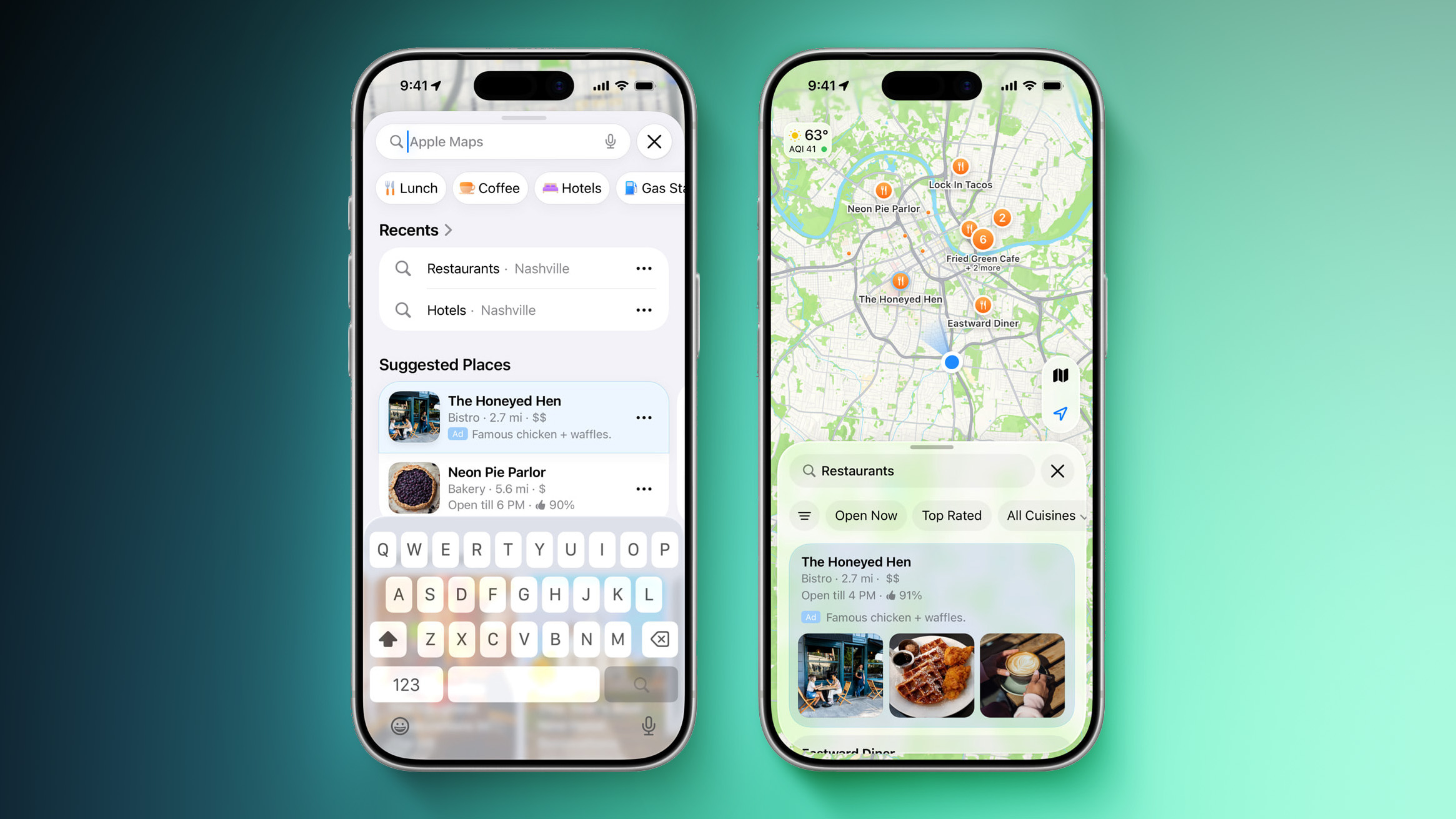
iOS 26.5 and iPadOS 26.5 do not include new Siri capabilities, suggesting any ‌Siri‌ updates are being held until iOS 27. The Maps app has a Suggested Places feature for recommending locations to visit nearby based on trends and recent searches, plus Apple is laying the groundwork for ads in the Apple Maps app.

Apple is continuing to test end-to-end encryption (E2EE) for RCS messages between iPhone and Android users. Apple included the feature in the iOS 26.4 beta, but removed it before the update launched to the public.

There is a new Pride wallpaper to go along with the Pride Apple Watch band for this year.

More detail on what's new in iOS 26.5 can be found in our iOS 26.5 beta features guide. iOS 26.5 is likely to see a launch next week.
Related Roundups: iOS 26, iPadOS 26, iOS 27
Related Forum: iOS 26

This article, "Apple Seeds Second iOS 26.5 and iPadOS 26.5 Release Candidates to Developers" first appeared on MacRumors.com

Discuss this article in our forums

  •  

iOS 27 Will Add These New Features to Your iPhone

Apple is expected to unveil iOS 27 during its WWDC 2026 keynote on June 8, and there are already many rumored features and changes for iPhones.


The first developer beta of iOS 27 will likely be available immediately following the keynote, and a public beta typically follows in July. Following beta testing, the software update should be released to all users with a compatible iPhone in September.

Below, we outline some of the new features that are rumored to be coming with iOS 27, as reported by sources such as Bloomberg and The Information.

Siri App


Apple reportedly plans to debut an all-new, dedicated Siri app with a so-called "Extensions" feature across iOS 27, iPadOS 27, and macOS 27.

With the Siri app, iPhone, iPad, and Mac users will reportedly be able to interact with Apple's assistant in both text and voice modes. The app will also provide users with access to their past conversations with Siri. Overall, the Siri app would function similarly to chatbots like ChatGPT, Gemini, and Claude.

It has been rumored that iOS 27 will include a new Siri interface in the Dynamic Island. When you trigger Siri, the Dynamic Island will reportedly show a "Search or Ask" prompt, and this will apparently be accompanied by a "glowing cursor" that looks similar to how the "26" is highlighted in the WWDC 2026 graphic.

iOS 27 should also include Apple's delayed personalized Siri features from 2024. For example, Apple showed a user asking Siri about their mother's flight and lunch reservation based on info retrieved from the Mail and Messages apps.

"We look forward to bringing a more personalized Siri to users coming this year," said Apple's CEO Tim Cook, on an earnings call this week.

New Satellite Features


iOS 27 will reportedly support 5G satellite internet connectivity, although this functionality might be limited to the upcoming iPhone 18 Pro, iPhone 18 Pro Max, and iPhone Ultra models with Apple's next-generation C2 modem.

Four additional satellite features have been rumored:
  • Apple Maps via satellite

  • Photos support for Messages via satellite

  • Third-party apps in the App Store will be able to integrate Apple's satellite features

  • The ability to connect an iPhone to a satellite without pointing the device toward the sky
Amazon last month announced plans to acquire Globalstar, the satellite company that powers Apple's satellite features on the iPhone 14 and newer and the Apple Watch Ultra 3. In turn, Amazon announced that it has signed an agreement with Apple to provide satellite connectivity for current and future iPhone and Apple Watch features.

Apple's current satellite features:
  • Emergency SOS via satellite

  • Find My via satellite

  • Roadside Assistance via satellite

  • Messages via satellite
All of the features are currently free to use in supported areas without Wi-Fi or cellular connectivity. Availability varies by country.

"Mac OS X Snow Leopard" Approach to Bug Fixes


iOS 27 may be similar to Mac OS X Snow Leopard, in the sense that Apple is apparently focused on improving "quality and underlying performance." Apple is expected to focus on bug fixes, improved stability, and Liquid Glass design enhancements.

More Rumored Features


Apple has reportedly tested an updated iPhone keyboard with enhanced autocorrect. The features should debut on iOS 27 if Apple moves forward with it. Similar to Grammarly, the keyboard "expands autocorrect by offering alternative words."

iOS 27 is not expected to include any major Liquid Glass design changes, but the update may add a system-wide Liquid Glass slider for precisely adjusting the opacity of the interface. A similar slider already exists for the Lock Screen's clock.

The update may include four new Apple Intelligence features for the iPhone 15 Pro and newer, based on code on Apple's servers discovered by Nicolás Alvarez:
  • Visual Intelligence will let you scan nutrition labels on food packaging, for tracking calories and macronutrients in the Health app.

  • Visual Intelligence will let you scan phone numbers and addresses printed on paper or a business card and add them to the Contacts app.

  • In the Wallet app, you will likely be able to scan physical event tickets, gym membership cards, and so forth and generate digital versions.

  • In the Safari app, you will be able to automatically name Tab Groups for users based on the contents of the tabs within the group.
A subsequent report provided more details about the new Visual Intelligence features.

iOS 27 may also have three new Apple Intelligence photo editing tools in the Photos app.

Apple reportedly plans to add "Undo" and "Redo" options to the iPhone's Home Screen customization menu on iOS 27.

Compatible iPhone Models


iOS 27 will be compatible with the iPhone 12 series and newer, according to Instant Digital, a known Apple leaker on the Chinese social media platform Weibo.

If this rumor is accurate, iOS 27 will drop support for the following iPhone models:
  • iPhone 11

  • iPhone 11 Pro

  • iPhone 11 Pro Max

  • iPhone SE (2nd generation)
However, these devices will continue to receive iOS 26 security updates for at least a few years.

iOS 27 will be compatible with the following iPhone models, according to the leaker:
  • iPhone 17e

  • iPhone 17

  • iPhone 17 Pro

  • iPhone 17 Pro Max

  • iPhone Air

  • iPhone 16e

  • iPhone 16

  • iPhone 16 Plus

  • iPhone 16 Pro

  • iPhone 16 Pro Max

  • iPhone 15

  • iPhone 15 Plus

  • iPhone 15 Pro

  • iPhone 15 Pro Max

  • iPhone 14

  • iPhone 14 Plus

  • iPhone 14 Pro

  • iPhone 14 Pro Max

  • iPhone 13

  • iPhone 13 mini

  • iPhone 13 Pro

  • iPhone 13 Pro Max

  • iPhone 12

  • iPhone 12 mini

  • iPhone 12 Pro

  • iPhone 12 Pro Max

  • iPhone SE (3rd generation)
Any new Apple Intelligence features introduced in iOS 27 will require an iPhone 15 Pro or newer.

Instant Digital has accurately leaked Apple information before, such as the yellow color for the iPhone 14 and iPhone 14 Plus, and the Apple Watch Ultra 2's Titanium Milanese Loop. However, the account does not have a perfect track record.
Related Roundup: iOS 27

This article, "iOS 27 Will Add These New Features to Your iPhone" first appeared on MacRumors.com

Discuss this article in our forums

  •  

iOS 27 Rumored to Drop Support for These iPhone Models

iOS 27 will be compatible with the iPhone 12 series and newer, according to Instant Digital, a known Apple leaker on the Chinese social media platform Weibo.


If this rumor is accurate, iOS 27 will drop support for the following iPhone models:
  • iPhone 11

  • iPhone 11 Pro

  • iPhone 11 Pro Max

  • iPhone SE (2nd generation)
However, these devices will continue to receive iOS 26 security updates for at least a few years.

iOS 27 will be compatible with the following iPhone models, according to the leaker:
  • iPhone 17e

  • iPhone 17

  • iPhone 17 Pro

  • iPhone 17 Pro Max

  • iPhone Air

  • iPhone 16e

  • iPhone 16

  • iPhone 16 Plus

  • iPhone 16 Pro

  • iPhone 16 Pro Max

  • iPhone 15

  • iPhone 15 Plus

  • iPhone 15 Pro

  • iPhone 15 Pro Max

  • iPhone 14

  • iPhone 14 Plus

  • iPhone 14 Pro

  • iPhone 14 Pro Max

  • iPhone 13

  • iPhone 13 mini

  • iPhone 13 Pro

  • iPhone 13 Pro Max

  • iPhone 12

  • iPhone 12 mini

  • iPhone 12 Pro

  • iPhone 12 Pro Max

  • iPhone SE (3rd generation)
Any new Apple Intelligence features introduced in iOS 27 will require an iPhone 15 Pro or newer.

Apple will unveil iOS 27 during its WWDC 2026 keynote on Monday, June 8, and the first developer beta should be released later that day. A public beta typically follows in July, ahead of a final release to all users in September.

iOS 27 been likened to Mac OS X Snow Leopard, in the sense that Apple is reportedly focused on bug fixes and stability improvements. A handful of new features are still expected, including a dedicated Siri app, a system-wide slider for finely adjusting the opacity of Liquid Glass, improved keyboard autocorrection, and more.

Instant Digital has accurately leaked Apple information before, such as the yellow color for the iPhone 14 and iPhone 14 Plus, and the Apple Watch Ultra 2's Titanium Milanese Loop. However, the account does not have a perfect track record.
Related Roundup: iOS 27

This article, "iOS 27 Rumored to Drop Support for These iPhone Models" first appeared on MacRumors.com

Discuss this article in our forums

  •  

iOS 26.5 and iOS 27 Will Add These New Features to Your iPhone

Earlier this week, Apple seeded the first beta of iOS 26.5 to developers. The software update is relatively minor so far, which is not too surprising given that Apple is likely shifting its focus towards iOS 27. Apple is expected to unveil iOS 27 during its WWDC 2026 keynote on June 8, and the update should be released in September.


Below, we outline what is new in iOS 26.5 so far, along with rumored iOS 27 features.

iOS 26.5


iOS 26.5 lays the groundwork for two changes, including end-to-end encryption for RCS in the Messages app and ads in the Apple Maps app.

End-to-end encryption for ‌RCS‌ is a security feature that ensures that messages sent between supported iOS 26.5 and Android devices are encrypted and cannot be intercepted and read by a third party while they are being delivered.

Apple already tested end-to-end encryption for RCS in the iOS 26.4 beta, but the feature did not make it into the final release of iOS 26.4 last week. It remains to be seen if the feature launches with iOS 26.5, or if it will be removed again before beta testing ends and return at some point during the iOS 27 software cycle.

Last month, Apple announced that ads are coming to the Apple Maps app on the iPhone and iPad in the U.S. and Canada starting "this summer," and there is evidence of Apple preparing for that within iOS 26.5's code.


Apple says businesses in the U.S. and Canada will be able to place ads in search results and at the top of a new "Suggested Places" section in the app.

The new "Suggested Places" section is visible in the iOS 26.5 beta.

"Ads on Maps will appear when users search in Maps, and can appear at the top of a user's search results based on relevance, as well as at the top of a new Suggested Places experience in Maps, which will display recommendations based on what's trending nearby, the user's recent searches, and more," says Apple.

Similar to the ads that are already shown in App Store search results on the iPhone and iPad, ads in Apple Maps will have an "Ad" label, and Apple promises strong privacy protections. For example, Apple says a user's location and the ads they see and interact with in Apple Maps are not associated with a user's Apple Account.

Read our coverage of Apple's announcement for more details about the ads.

In the iOS 26.5 beta, Apple is working to extend iPhone features like notifications, Live Activities, and AirPods-like pairing to third-party smartwatches and headphones in the EU, as required under the Digital Markets Act.

Beyond that, iOS 26.5 has only a few other minor changes.

iOS 27


Apple's long-awaited Siri revamp is finally expected to arrive with iOS 27.

The more personalized version of Siri will have understanding of a user's personal context, on-screen awareness, and deeper per-app controls. For example, during its WWDC 2024 keynote, Apple showed an iPhone user asking Siri about their mother's flight and lunch reservation plans based on info from the Mail and Messages apps.


That is not all, though, as iOS 27 will reportedly feature a dedicated Siri app with its own chatbot functionality and conversation history, or users will be able to tap into third-party chatbots such as OpenAI's ChatGPT, Google's Gemini, and Anthropic's Claude through a so-called "Extensions" feature in the app.

Earlier this year, Apple and Google announced that Gemini will help to power Apple Intelligence's underlying models and features, including the more personalized version of Siri. iOS 27 will likely expand Apple Intelligence to additional Apple apps, and it was rumored that this will include the Apple Calendar app.

iOS 27 will reportedly support 5G satellite internet connectivity, although this functionality might be limited to the upcoming iPhone 18 Pro models with Apple's next-generation C2 modem. Additional satellite features have been rumored, including Apple Maps via satellite and the ability to send and receive photos when using Messages via satellite.

iOS 27 may be similar to Mac OS X Snow Leopard, in the sense that Apple is apparently focused on improving "quality and underlying performance." Apple is expected to focus on bug fixes, improved stability, and Liquid Glass design enhancements.

Apple has reportedly tested an updated iPhone keyboard with enhanced autocorrect. The features should debut on iOS 27 if Apple moves forward with it.

Similar to Grammarly, the keyboard "expands autocorrect by offering alternative words."

iOS 27 is not expected to include any major Liquid Glass design changes, but the update may add a system-wide Liquid Glass slider for precisely adjusting the opacity of the interface. A similar slider already exists for the Lock Screen's clock.

Of course, these are only the known or rumored features so far.
Related Roundups: iOS 26, iPadOS 26, iOS 27
Related Forum: iOS 26

This article, "iOS 26.5 and iOS 27 Will Add These New Features to Your iPhone" first appeared on MacRumors.com

Discuss this article in our forums

  •  

iOS 27 Rumored to Feature All-New Siri App With 'Extensions' Feature

In his Power On newsletter today, Bloomberg's Mark Gurman discussed Apple's upcoming AI plans in more detail. As he reported last week, this will apparently include a Siri app with a so-called "Extensions" feature across iOS 27, iPadOS 27, and macOS 27.


With the Siri app, the report said that iPhone, iPad, and Mac users would be able to interact with Apple's assistant in both text and voice modes. The app would also provide users with access to their past conversations with Siri. Overall, the Siri app would function similarly to the ChatGPT, Gemini, and Claude apps.

Siri has been able to tap into ChatGPT since iOS 18.2, and the "Extensions" feature would allow for additional third-party chatbots to be connected.

"Extensions allow agents from installed apps to work with Siri, the Siri app and other features on your devices," reads fine print in the Settings app on an internal, pre-release version of iOS 27, according to Gurman. The first developer beta of iOS 27 should be available in June, ahead of a wide release to all users in September.

In his newsletter, Gurman said the App Store will have a dedicated "Extensions" section.

"It will be a marketplace of sorts for third-party AI integrations," he wrote.

That fine print also seemingly confirms that Apple is indeed testing a Siri app.

It is unclear if the Siri app will be available on all iPhone models compatible with iOS 27, or if it will require an iPhone 15 Pro or newer with Apple Intelligence support.

Beyond supporting more third-party chatbots, Siri will receive a major overhaul on iOS 27, according to Gurman. He expects Siri to have a redesigned interface, which may involve the Dynamic Island, and there will apparently be a systemwide "Ask Siri" button in Apple's apps and a "Write with Siri" button above the keyboard.

Related Roundup: iOS 27

This article, "iOS 27 Rumored to Feature All-New Siri App With 'Extensions' Feature" first appeared on MacRumors.com

Discuss this article in our forums

  •  

5+ Things to Know About the Siri Chatbot Coming in iOS 27

We're less than three months away from our first look at Apple's smarter, redesigned version of Siri. iOS 27, iPadOS 27, and macOS 27 will focus on ‌Siri‌ updates, and rumors about what we can expect are picking up.


There's a full chatbot version of ‌Siri‌ in the works, which will change the way that we use Apple's personal assistant. ‌Siri‌ will be more like Claude or ChatGPT, marking a major improvement in how ‌Siri‌ works and what it can do.

SiriBot


With ‌iOS 27‌, Apple will change the way that ‌Siri‌ works. Right now, ‌Siri‌ can answer common questions and complete simple tasks, but you can't engage it in a back and forth conversation, get help with multi-step tasks, or ask complicated questions.

Based on the current ‌Siri‌ chatbot rumors, ‌Siri‌ will be able to do all of that and more with the upcoming upgrade, and it will work like competing chatbots.

Apple wasn't initially planning to introduce a full chatbot like ChatGPT, but chatbots have become too popular for Apple to ignore. Simply adding AI capabilities to apps and features isn't enough for Apple to stay competitive with the way people have embraced chatbots for everything from web searches to coding help.

Google has already integrated Gemini into its Android device lineup, and chatbots like ChatGPT have hundreds of millions of weekly active users.

Standalone Siri App


When ‌Siri‌ evolves into a dedicated Apple-designed chatbot, it will launch alongside a standalone ‌Siri‌ app. The ‌Siri‌ app will look similar to apps from other companies like OpenAI, displaying a grid or list of past conversations.

‌Siri‌ will support text and voice-based conversations, and there will be options to favorite chats, search for content within chats, initiate new chats, and save chats. Conversations with ‌Siri‌ will apparently resemble iMessage conversations, with Apple adopting chat bubbles.

New conversations will start with suggested prompts on what users can ask ‌Siri‌.

Deep Integration


While there will be a standalone ‌Siri‌ app for back-and-forth conversations, ‌Siri‌ will be deeply integrated into Apple devices at the system level. ‌Siri‌ will be activated the same way as today, by speaking the ‌Siri‌ wake word or pressing on the side button of a Siri-enabled device. ‌Siri‌ will be able to respond to both voice and text-based requests.

Siri Capabilities


‌Siri‌ will be able to do much of what current chatbots can do, such as searching the web with visually rich results, providing summaries, and evaluating uploaded documents. The personal assistant will still be integrated into Apple devices. ‌Siri‌ integration will replace the current Spotlight search functionality, but Apple plans to keep and expand on ‌Siri‌ Suggestions. ‌Siri‌ Suggestions will have more access to user data to provide more relevant prompts.

  • Search the web for information

  • Generate images

  • Generate content

  • Summarize information

  • Analyze uploaded files

  • Use personal data to complete tasks

  • Ingest information from emails, messages, files and more

  • Analyze open windows and on-screen content to take action

  • Control device features and settings

  • Search for on-device content, replacing Spotlight


‌Siri‌ will also be integrated into Apple's core apps, including Mail, Messages, Apple TV, Xcode, and Photos. ‌Siri‌ will be able to search for specific images, edit photos, help with coding, make suggestions for TV shows and movies, and send emails.

New Look


Chatbot ‌Siri‌ will have an updated look to go along with the dedicated app. Activating ‌Siri‌ will have a new animation that prompts the user to search or ask a question, and Bloomberg's Mark Gurman says Apple is testing a version of ‌Siri‌ integrated into the Dynamic Island. Apple's test interface includes a glowing ‌Siri‌ icon and a "searching" label in the ‌Dynamic Island‌ while ‌Siri‌ is processing a request, and once done, ‌Siri‌ expands into a larger translucent panel with the results. Pulling down on the menu initiates an interface for a conversation.

Apple may also integrate an "Ask ‌Siri‌" button into the menus of other apps, giving users a way to send content directly to ‌Siri‌ alongside a request. The iOS keyboard could get a Write with ‌Siri‌ option that surfaces Writing Tools.

Memory


Claude, ChatGPT, and Gemini can remember past conversations and interactions, retaining a memory of the user. Apple is said to be discussing how much the ‌Siri‌ chatbot will be able to remember.

Apple may limit conversational memory to protect user privacy.

Third-Party Chatbot Integrations


Apple will allow third-party AI chatbots to integrate with Siri in ‌iOS 27‌. Apple already has a partnership with OpenAI that lets ‌Siri‌ hand questions off to ChatGPT, but that integration will expand to chatbots from other companies like Google and Anthropic.

An iPhone user with the Claude or Gemini app installed will be able to send questions from ‌Siri‌ to those chatbots, similar to how the OpenAI integration works today.

iPhone users will be able to choose which services they want to use inside ‌Siri‌ through a new "Extensions" option coming to the ‌Siri‌ and Apple Intelligence section in the Settings app.

Promised iOS 18 Features


‌Apple Intelligence‌ ‌Siri‌ features that were originally planned for iOS 18 will be introduced in ‌iOS 27‌, with ‌Siri‌ able to use personal data and context to answer queries. ‌Siri‌ will also be able to do more in and between apps, and will be able to see what's on the user's screen. Apple promised that those features would appear before the end of 2026.

Underlying Architecture and Servers


Apple has inked a deal with Google that will see Gemini powering upcoming versions of ‌Siri‌. Apple plans to use Gemini for the ‌Siri‌ chatbot and the other ‌Siri‌ features coming in ‌iOS 27‌.

"Apple and Google have entered into a multi-year collaboration under which the next generation of Apple Foundation Models will be based on Google's Gemini models and cloud technology," the two companies said in a statement in January.

The ‌Siri‌ chatbot specifically will rely on a custom AI model developed by the Google Gemini team. Gurman claims that the custom model is comparable to Gemini 3, and that it is more powerful than models Apple has developed in-house.

Apple and Google are also discussing running the ‌Siri‌ chatbot on Google's servers powered by Tensor Processing Units, probably because Apple doesn't yet have the infrastructure to handle chatbot queries from billions of active devices per day.

Launch Date


Apple is planning to introduce ‌Siri‌'s chatbot capabilities when it announces ‌iOS 27‌, iPadOS 27, and ‌macOS 27‌ at the June Worldwide Developers Conference, which starts on Monday, June 8. It is still unclear which ‌Siri‌ features Apple will be ready to unveil, and some could be held for future updates.
Related Roundup: iOS 27

This article, "5+ Things to Know About the Siri Chatbot Coming in iOS 27" first appeared on MacRumors.com

Discuss this article in our forums

  •  
❌